
1. Introduction
This instruction manual provides essential information for the proper installation, operation, and maintenance of your Yavor replacement optical pickup unit. This unit is designed to restore CD and DVD playback functionality to compatible devices, specifically the AIWA CSD-SR515 CD/DVD player. Please read this manual thoroughly before attempting any installation or repair.
2. Safety Information
- Disconnect Power: Always ensure the host device (AIWA CSD-SR515) is completely disconnected from its power source before beginning any installation or repair work.
- Static Electricity: Electronic components are sensitive to electrostatic discharge (ESD). Use an anti-static wrist strap or take other appropriate ESD precautions when handling the optical pickup unit.
- Laser Radiation: This product contains a laser diode. Do not look directly into the laser lens when the unit is powered, as it can cause eye damage. The laser is typically only active during disc playback.
- Professional Installation Recommended: Installation of this component requires technical knowledge and experience with electronic repairs. If you are unsure, seek assistance from a qualified technician.
- Handle with Care: The optical lens is a delicate component. Avoid touching it with bare fingers or any tools.
3. Product Overview
The Yavor replacement optical pickup unit is a precision component responsible for reading data from CDs and DVDs. It consists of a laser diode, a lens assembly, and associated circuitry, all housed within a compact frame designed for integration into the AIWA CSD-SR515 player.
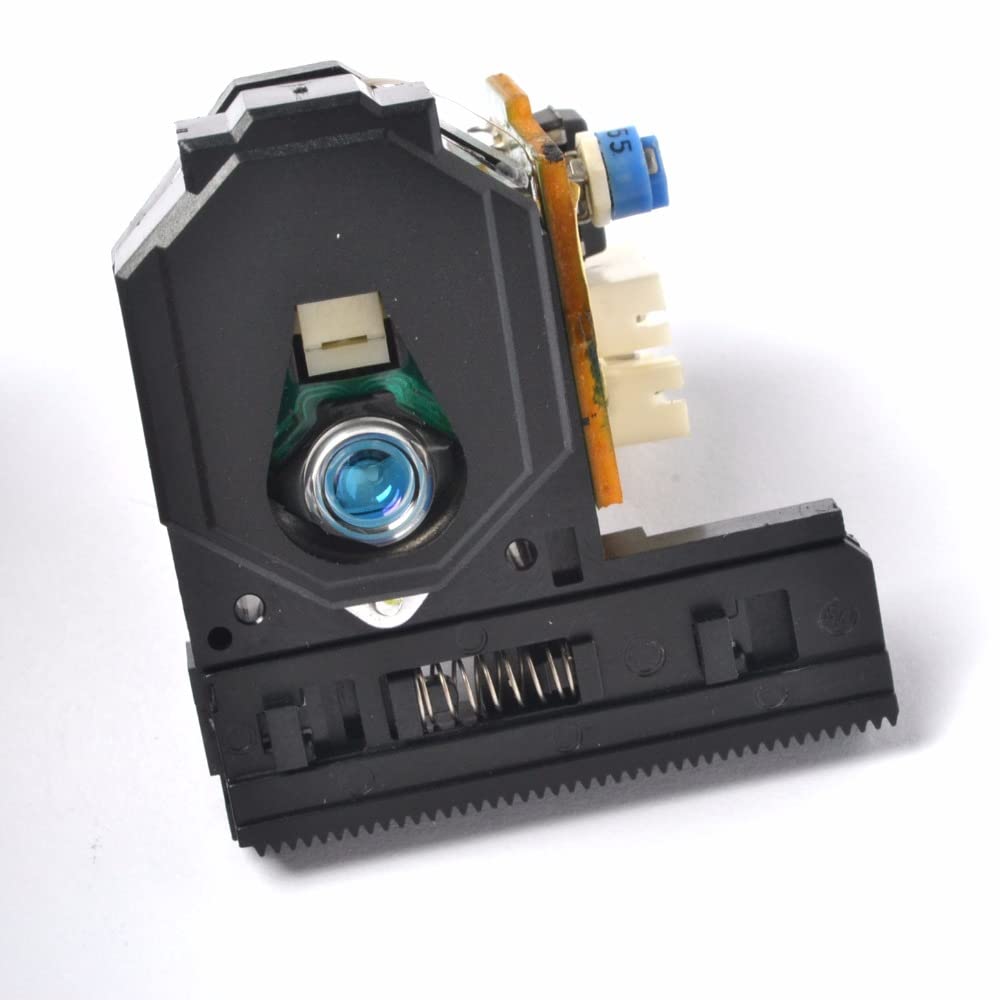
An image showing the Yavor replacement optical pickup unit. The unit features a black plastic housing, a blue laser lens visible at the front, and a green circuit board with various electronic components and flexible ribbon cables attached at the rear. A small potentiometer labeled '55' is visible on the circuit board.
4. Setup and Installation
Follow these steps carefully for proper installation. Refer to the original service manual of your AIWA CSD-SR515 for specific disassembly and reassembly instructions.
- Prepare the Device: Disconnect the AIWA CSD-SR515 from all power sources. Remove the outer casing and any internal components necessary to access the existing optical pickup unit.
- Remove Old Unit: Carefully disconnect the ribbon cables and any other connectors attached to the old optical pickup unit. Unscrew or unclip the old unit from its mounting points and remove it.
- Install New Unit: Position the new Yavor optical pickup unit in the same location as the old one. Secure it with the original screws or clips.
- Connect Cables: Reconnect all ribbon cables and other connectors to the new optical pickup unit. Ensure all connections are firm and correctly oriented. Avoid bending or creasing the ribbon cables sharply.
- Remove Anti-Static Solder Point: CRITICAL STEP: Most new optical pickup units come with an anti-static solder shorting bar (or solder point) on the flexible circuit board to protect the laser diode during shipping. This solder point MUST be carefully removed (desoldered) before powering on the device. Failure to remove this protection will prevent the unit from functioning and may cause damage. Locate a small solder blob connecting two pads on the flexible circuit board, typically near the ribbon cable connector, and carefully desolder it.
- Reassemble and Test: Before fully reassembling the device, perform a preliminary test. Connect the device to power and insert a known good CD or DVD. Observe if the disc spins and if the unit attempts to read the disc. If successful, proceed to fully reassemble the AIWA CSD-SR515.
5. Operating Instructions
Once the Yavor replacement optical pickup unit is correctly installed, the operation of your AIWA CSD-SR515 CD/DVD player will revert to its original functionality. Refer to the original AIWA CSD-SR515 user manual for detailed instructions on playing CDs and DVDs, navigating tracks, and using other player features.
- Insert a disc into the player's tray.
- Close the tray.
- Select the appropriate function (CD or DVD) on your player.
- Press the Play button to begin playback.
6. Maintenance
The optical pickup unit is largely maintenance-free. However, adhering to the following guidelines can help prolong its lifespan:
- Keep Clean: Ensure the environment where the AIWA CSD-SR515 is used is as dust-free as possible. Dust can accumulate on the lens and affect performance.
- Avoid Touching the Lens: Never touch the optical lens with your fingers or any abrasive materials. If cleaning is necessary, use a specialized lens cleaning disc or a soft, lint-free cloth with a small amount of isopropyl alcohol, applied very gently.
- Proper Disc Handling: Always handle discs by their edges to prevent fingerprints and scratches, which can cause read errors and strain the optical unit.
7. Troubleshooting
If you encounter issues after installing the replacement unit, consider the following:
- No Disc Detected / Disc Error:
- Verify that the anti-static solder point has been completely removed (see Section 4, Step 5). This is the most common cause of non-functionality.
- Check all ribbon cable connections to ensure they are secure and correctly seated.
- Ensure the disc is clean and free of scratches.
- Confirm the disc is inserted correctly.
- Skipping or Intermittent Playback:
- Clean the optical lens gently as described in Section 6.
- Ensure the disc is clean and undamaged.
- Check for any physical obstructions in the disc tray or around the optical unit's movement path.
- No Power to Unit:
- Double-check all power connections within the AIWA CSD-SR515.
- Ensure the device's main power supply is functioning correctly.
If problems persist after following these steps, it is recommended to consult a professional repair technician.
8. Specifications
- Product Type: Replacement Optical Pickup Unit
- Compatibility: AIWA CSD-SR515 CD/DVD Player
- Weight: Approximately 200 Grams
- ASIN: B09YXT6XMG
9. Warranty and Support
For information regarding warranty coverage or technical support for your Yavor replacement optical pickup unit, please refer to the purchase documentation or contact the seller directly. Keep your proof of purchase for any warranty claims.