
sprtoybat Q35
sprtoybat Q35 Wireless Sport Earbuds User Manual
Model: Q35
1. Introduction
The sprtoybat Q35 Wireless Sport Earbuds are designed for active lifestyles, offering a secure fit, high-fidelity audio, and robust features. These earbuds utilize Bluetooth 5.3 for stable connectivity, feature an LED digital display for battery status, and are IPX7 waterproof, making them suitable for various sports and outdoor activities.

Image: sprtoybat Q35 Wireless Sport Earbuds in their charging case, showcasing the sleek design and LED display.
2. What's in the Box
Ensure all components are present upon unboxing:
- 2 x Earbuds (Left and Right)
- 1 x Charging Case
- 1 x Mini USB Type-C Cable
- 1 x User Manual
- 3 x Pairs of Ear Caps (S/M/L)
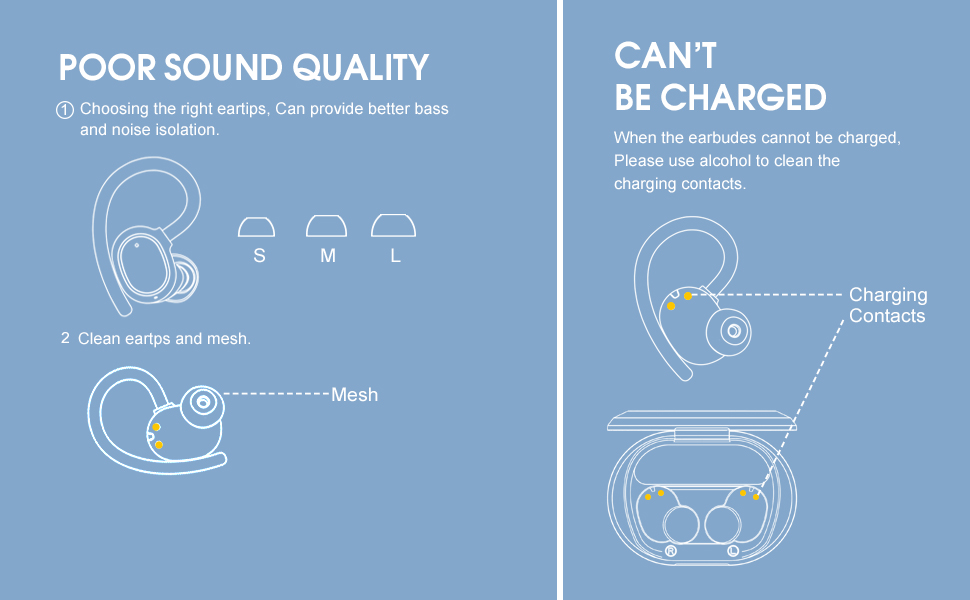
Image: All items included in the sprtoybat Q35 Earbuds package, neatly arranged.
3. Product Overview
The Q35 earbuds are engineered for comfort and performance:
- Flexible Earhooks: Designed for a secure and comfortable fit during intense activities.
- Ultralight Design: Each earphone weighs only 6 grams, and the entire product with the charging case weighs 50 grams.
- LED Digital Display: Shows the remaining charge level of the charging case and individual earbuds.
- Bluetooth 5.3: Provides a stable and efficient wireless connection.
- IPX7 Waterproof: Resistant to splashes and rain, ideal for workouts.
- High-fidelity Audio: Features 10mm speakers and a volume-optimized active equalizer for clear HD stereo sound and powerful bass.
- Clear Calls: Built-in noise-canceling microphone enhances call clarity.

Image: The charging case with its LED digital display, indicating the battery percentage of the case and the charge status of each earbud.

Image: Illustration of the earbud's lightweight design (6g earphone, 50g charging case) and the three included eartip sizes (S, M, L), with a person demonstrating the secure fit during exercise.
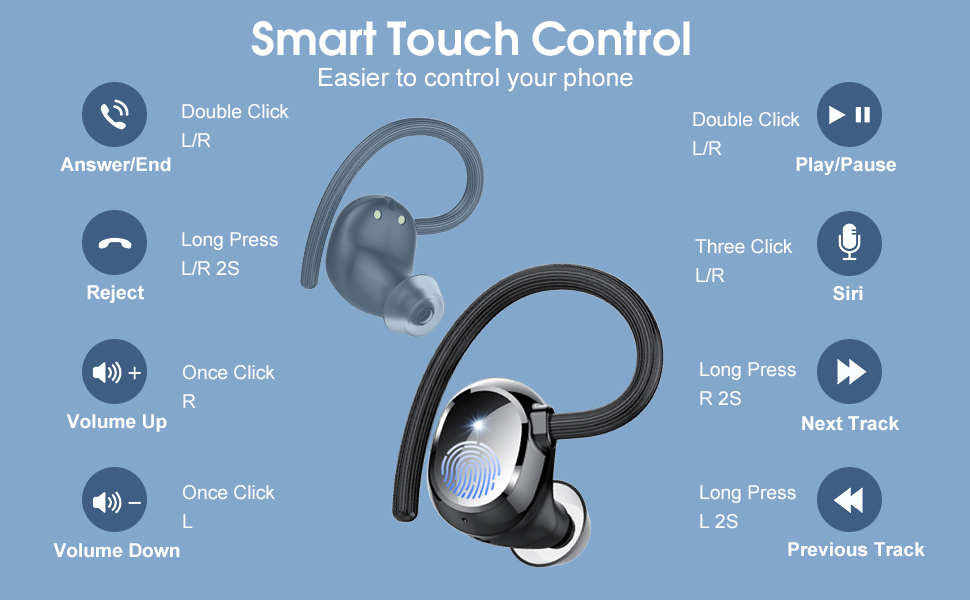
Image: Diagram illustrating the 10mm dynamic drivers and Bluetooth 5.3 technology responsible for the immersive sound quality.
4. Setup
4.1. Charging the Earbuds and Case
Before first use, fully charge the earbuds and charging case. Connect the provided Type-C cable to the charging port on the case and a compatible USB power source. The LED display on the case will show the charging progress. The earbuds will charge automatically when placed inside the case.
- Earbuds provide up to 5 hours of music playback per charge.
- The charging case provides an additional 25 hours of playback, allowing for 5 full recharges of the earbuds.
- The charging case supports Type-C fast charging.

Image: The earbuds and charging case connected to a Type-C cable, illustrating the battery life: 5 hours per earbud charge, 25 hours from the charging case, and 1.5 hours to fully charge the case.
4.2. Power On/Off
- Power On: Open the charging case. The earbuds will automatically power on and connect to the last paired device.
- Power Off: Place the earbuds back into the charging case and close the lid. They will automatically disconnect and power off.
4.3. Bluetooth Pairing
Follow these steps to pair your earbuds with a new device:
- Open the charging case. The earbuds will enter pairing mode.
- Enable Bluetooth on your device (smartphone, tablet, etc.).
- Search for "Q35" in the list of available Bluetooth devices.
- Select "Q35" to connect. Once connected, the earbuds will automatically connect to this device in the future when removed from the case.
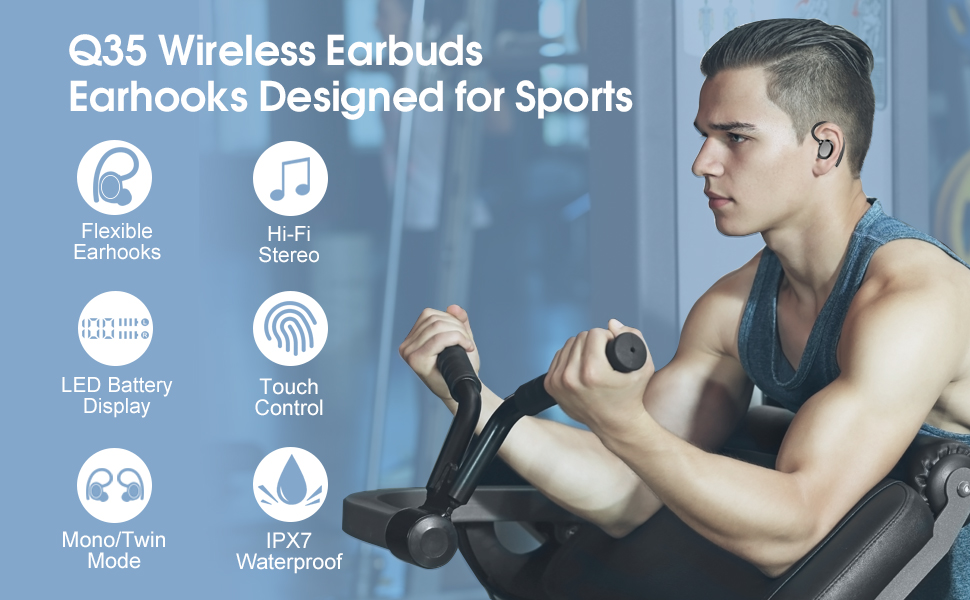
Image: Visual guide demonstrating the one-step pairing process: open the case to auto power on and connect, close to auto disconnect and power off.
Video: A demonstration of how to connect the sprtoybat Q35 Earbuds to a phone via Bluetooth, showing the pairing process from opening the case to successful connection.
5. Wearing Instructions
For optimal sound quality and a secure fit, follow these steps:
- Put the earhook over the back of your ear.
- Insert the ear cap into your ear canal.
- Adjust the earbud by twisting it for comfort and a secure seal.
Image: Step-by-step visual guide on how to properly wear the earbuds with earhooks for stability and comfort, including selecting the correct eartip size.
6. Operating Instructions
6.1. Touch Controls
The earbuds feature intuitive touch controls for managing audio and calls:
- Play/Pause: Double-click on either the Left (L) or Right (R) earbud.
- Volume Up: Single-click on the Right (R) earbud.
- Volume Down: Single-click on the Left (L) earbud.
- Next Track: Long press the Right (R) earbud for 2 seconds.
- Previous Track: Long press the Left (L) earbud for 2 seconds.
- Answer/End Call: Double-click on either the Left (L) or Right (R) earbud.
- Reject Call: Long press either the Left (L) or Right (R) earbud for 2 seconds.
- Voice Assistant (Siri/Google Assistant): Triple-click on either the Left (L) or Right (R) earbud.
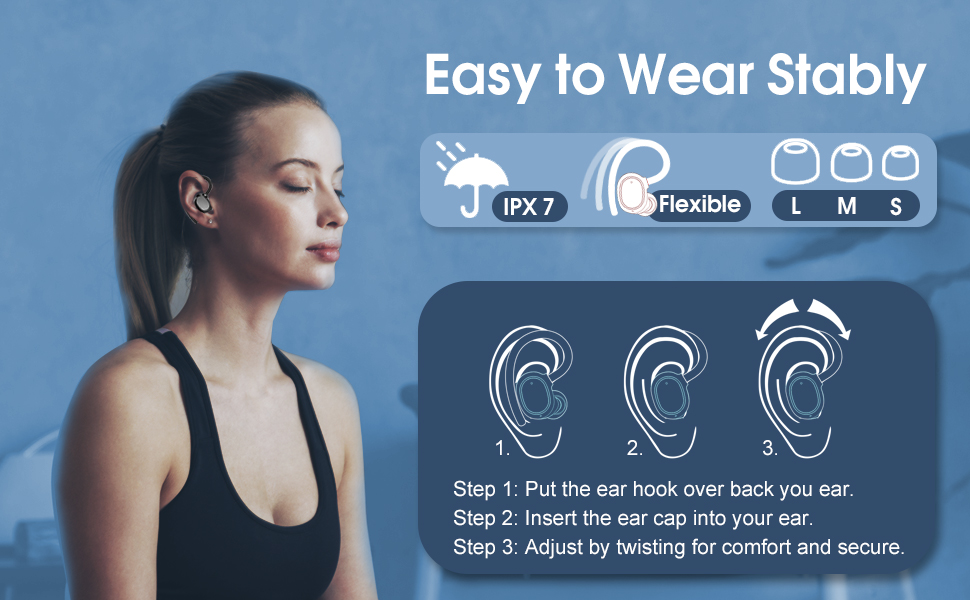
Image: A detailed diagram showing the various smart touch controls on the earbuds for managing calls, music playback, and activating voice assistants.
7. Maintenance
7.1. Cleaning
Regular cleaning helps maintain sound quality and charging efficiency:
- Clean the silicone eartips regularly with a soft, dry cloth.
- Gently clean the mesh area of the earbuds to prevent wax buildup, which can affect sound quality.
- If charging issues occur, use a cotton swab with a small amount of alcohol to clean the charging contacts on both the earbuds and inside the charging case.

Image: A person splashing water on their face while wearing the earbuds, illustrating the IPX7 waterproof feature, making them suitable for use during rain or sweat.
8. Troubleshooting
8.1. Poor Sound Quality
If you experience poor sound quality:
- Ensure you are using the correct size eartips for a proper seal in your ear canal. A good seal is crucial for optimal bass and noise isolation.
- Clean the eartips and the earbud mesh to remove any debris or earwax buildup.
8.2. Earbuds Cannot Be Charged
If your earbuds are not charging:
- Clean the charging contacts on both the earbuds and inside the charging case using a soft cloth or cotton swab with a small amount of alcohol.
- Ensure the charging cable is securely connected to both the case and the power source.

Image: Visual troubleshooting tips for common issues such as poor sound quality (suggesting eartip adjustment and cleaning) and earbuds not charging (suggesting cleaning charging contacts).
9. Specifications
| Feature | Specification |
|---|---|
| Model Name | Q35 |
| Connectivity Technology | Wireless (Bluetooth 5.3) |
| Ear Placement | Over Ear |
| Water Resistance Level | IPX7 Waterproof |
| Audio Driver Size | 10 Millimeters |
| Battery Life (Earbuds) | Up to 5 Hours |
| Battery Life (with Charging Case) | Up to 30 Hours |
| Charging Port | Type-C |
| Control Method | Touch |
| Item Weight (Earbuds) | 6 Grams (each) |
| Item Weight (Total with Case) | 50 Grams |
| Bluetooth Range | 15 Meters |
10. Warranty and Support
Your satisfaction is important to us. The sprtoybat Q35 Wireless Sport Earbuds come with a comprehensive warranty and dedicated support.
10.1. 2-Year Guarantee
If the product does not work within 2 years due to its own quality problems, it will be replaced for free or refunded in full.

Image: A graphic indicating a 2-year guarantee for the product, promising replacement or full refund for quality issues within this period.
10.2. Customer Support
- Our support team is available 24/7 to assist with any product issues. Please contact us through the official sprtoybat seller page.
- For questions, leave a query on the product page in the customer questions & answers section, and our team will respond within one day.
- All products are eligible for a full, hassle-free return within 30 days of purchase if you are dissatisfied or if an issue cannot be resolved through support.
Ask a question about this manual
Ask about setup, troubleshooting, compatibility, parts, safety, or missing instructions. Manuals+ will review the question and use this page’s manual context to help answer it.