
1. Introduction
This manual provides detailed instructions for the installation, operation, and maintenance of your ANNKE C800 4K PoE Security Camera. Please read this manual thoroughly before using the product to ensure proper setup and functionality. Keep this manual for future reference.

Figure 1: ANNKE C800 4K PoE Security Camera (3-pack shown)
2. Product Overview
2.1 Key Features
- 4K Ultra HD Resolution: Captures video at 3840 x 2160 pixels with a Sony sensor for clear images.
- PoE (Power over Ethernet): Simplifies installation by providing power and data transmission through a single Ethernet cable.
- AI Human/Vehicle Detection: Advanced artificial intelligence for accurate detection and reduced false alarms.
- H.265+ Video Compression: Efficiently compresses video to save storage space and bandwidth while maintaining quality.
- Audio Recording: Built-in microphone with environmental noise filtering for clear audio capture.
- EXIR 2.0 Night Vision: Provides up to 100 ft (30m) of clear night vision in low-light conditions.
- 120 dB True WDR & 3D DNR: Ensures balanced images in challenging lighting and reduces digital noise.
- Local Storage: Supports up to a 512GB TF card (not included) for local video recording.
- IP67 Weatherproof: Durable metal housing designed to withstand extreme outdoor conditions (-22°F to 140°F).
- Remote Access: Easy access to live view and playback via mobile applications (Android/iOS).
2.2 Camera Components

Figure 2: Detailed view of ANNKE C800 camera components.
- Bracket: For mounting the camera.
- Built-in Mic: Captures audio.
- 4.0mm Lens: Primary optical component for image capture.
- Spotlight: Provides illumination for color night vision.
- Waterproof Lid: Protects internal components.
- Waterproof Network Cable: Connects to PoE for power and data.
- Power Port: Optional power input (if not using PoE).
- Reset Button: Used to restore factory settings.
- SD Card Slot: For inserting a TF (microSD) card for local storage.
3. Setup
3.1 Unpacking
Carefully unpack all components and verify against the "What's in the Box" section. Retain packaging for future transport or returns.
3.2 TF Card Installation (Optional)
If you plan to use local storage, install a TF (microSD) card (up to 512GB, not included) into the designated slot. Ensure the camera is powered off before inserting or removing the card.
3.3 Physical Installation and Mounting
The camera is designed for wall mounting. Choose a location that provides the desired field of view and is within reach of your PoE network cable. Use the included mounting screws kit for secure installation.
- Mark the drilling positions using the mounting template (if provided).
- Drill holes and insert wall anchors if mounting on drywall or masonry.
- Secure the camera bracket to the mounting surface with screws.
- Adjust the camera angle as needed.

Figure 3: Example of a monitored area setup, highlighting the camera's ability to define specific surveillance zones.
3.4 Power and Network Connection (PoE)
Connect the camera to a PoE-enabled switch or NVR using a single Ethernet cable. This cable will provide both power and data connectivity to the camera. Ensure the connection is secure and waterproof.
Note: This camera does not work with analog signals via BNC cable.
4. Operating Instructions
4.1 Initial Setup via Mobile App
Download the ANNKE Vision app from the Google Play Store or Apple App Store to your smartphone. Follow the in-app instructions to add your camera and configure initial settings.
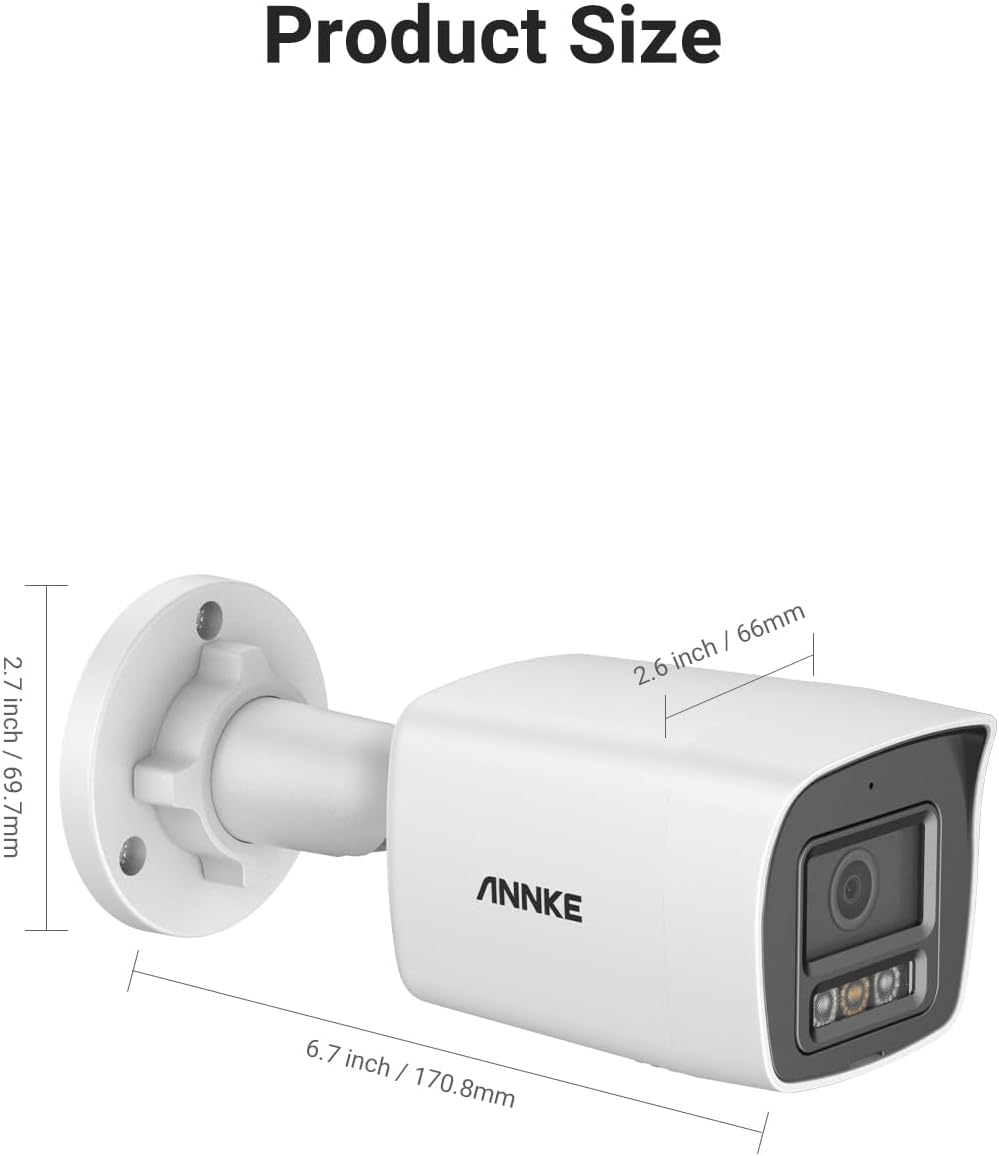
Figure 4: Remote access to the camera feed via the ANNKE Vision mobile application.
4.2 AI Human/Vehicle Detection
The camera features advanced AI detection to distinguish between humans and vehicles, reducing false alarms from other movements. Configure detection zones and sensitivity settings within the mobile app or NVR interface.

Figure 5: Intelligent motion detection identifying humans and vehicles.
4.3 Night Vision Modes
The ANNKE C800 camera offers three night vision modes to suit various lighting conditions:
- Black & White Vision: Standard infrared night vision for clear monochrome images in complete darkness.
- Color Night Vision: Utilizes the camera's spotlight to provide full-color images in low-light environments.
- Smart Dual Light: Automatically switches between black & white and color vision based on detected motion, conserving power and providing detailed footage when needed.

Figure 6: Explanation of the three available night vision modes.
4.4 Video Recording and Playback
Videos can be recorded to an installed TF card or to a connected Network Video Recorder (NVR). Access recorded footage and perform playback through the ANNKE Vision app or NVR interface.
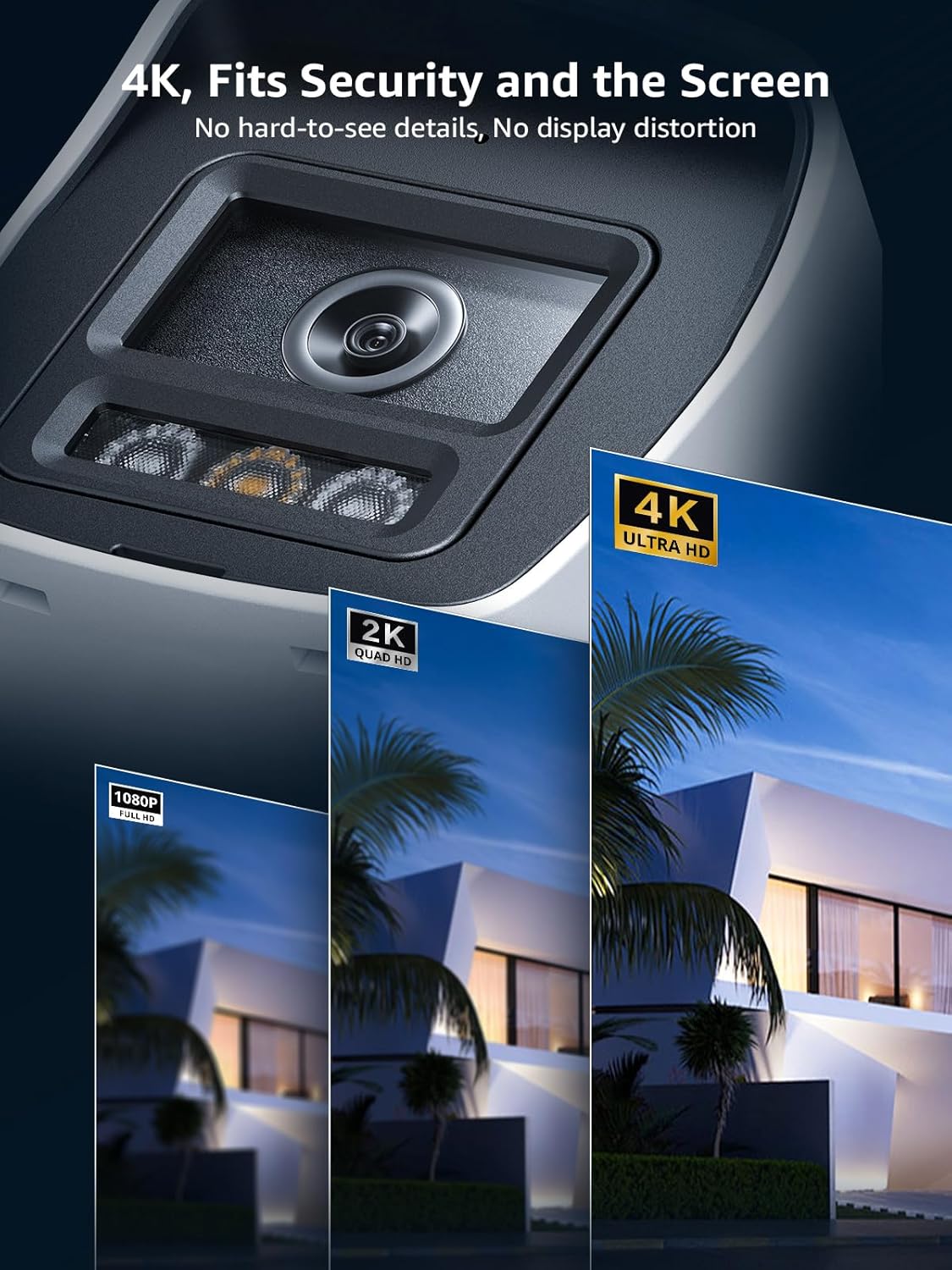
Figure 7: Visual comparison of 4K Ultra HD resolution versus lower resolutions.
5. Maintenance
5.1 Cleaning
Periodically clean the camera lens and housing with a soft, damp cloth. Avoid abrasive cleaners or solvents that could damage the finish or lens coating.
5.2 Weather Resistance
The ANNKE C800 camera has an IP67 weatherproof rating, making it suitable for outdoor use in various weather conditions. Its metal housing is designed to withstand temperatures from -22°F to 140°F (-30°C to 60°C).
6. Troubleshooting
If you encounter issues with your ANNKE C800 camera, consider the following common solutions:
- No Power/No Image:
- Ensure the Ethernet cable is securely connected to a PoE source.
- Verify the PoE switch or NVR is powered on and functioning correctly.
- Check if the power adapter (if used) is properly connected and supplying power.
- Poor Image Quality:
- Clean the camera lens.
- Check for obstructions in the camera's field of view.
- Ensure sufficient lighting for optimal night vision performance.
- Verify network bandwidth if streaming issues occur.
- No Remote Access:
- Confirm your camera is connected to the internet.
- Check your router's internet connection.
- Ensure the ANNKE Vision app is updated to the latest version.
- Verify camera settings within the app.
- False Alarms:
- Adjust the sensitivity of the AI Human/Vehicle Detection.
- Refine detection zones to exclude areas with frequent non-relevant motion (e.g., trees swaying).
For more detailed troubleshooting or technical support, please visit the official ANNKE support website or contact their customer service.
7. Specifications
| Feature | Specification |
|---|---|
| Image Sensor | 1/2.5" Progressive Scan CMOS |
| Video Resolution | 8MP (3840*2160@15fps) |
| Video Compression | H.265+ |
| Lens | 4mm |
| Infra-Red LEDs | 2 pcs |
| Day and Night Function | Support IR-CUT |
| Night Vision Distance | Up to 100ft/30m |
| Wide Dynamic Range (WDR) | True 120dB WDR |
| Weatherproof Rating | IP67 |
| Operating Conditions | -30 °C – 60 °C (-22°F – 140 °F) |
| Local Storage | Supports up to 512 GB TF Card (not included) |
| Connectivity Protocol | Ethernet (PoE) |
| Material | Metal |
| Product Dimensions | 8.5 x 4.72 x 4.65 inches (21.6 x 12 x 11.8 cm) |
8. What's in the Box
- 3 x 4K IP PoE Camera
- 1 x User Manual (this document)
- 1 x Mounting Screws Kit
9. Warranty and Support
ANNKE products come with a manufacturer's warranty. For specific warranty terms, registration, and technical support, please refer to the official ANNKE website or contact their customer service department. Keep your purchase receipt for warranty claims.
ANNKE Support: www.annke.com/support