
1. Introduction
This manual provides comprehensive instructions for the installation, operation, and maintenance of the Real HD DS-2CD2143G2-IU Acusense 4MP PoE Dome IP Camera. This camera is designed for surveillance applications, offering high-resolution video, advanced detection capabilities, and robust outdoor performance.

Image Description: A front-facing view of the Real HD DS-2CD2143G2-IU Acusense 4MP PoE Dome IP Camera. The camera features a white dome casing with a dark, transparent cover over the lens, indicating its dome form factor.
2. Product Features
- 4 Megapixel High Resolution: Captures video at 2688 × 1520 pixels.
- 2.8mm Fixed Lens: Provides a wide horizontal field of view of 102°.
- Power over Ethernet (PoE): Simplifies installation by delivering power and data over a single Ethernet cable.
- Built-in Microphone: Enables audio recording alongside video.
- Acusense Technology: Features human and vehicle detection for accurate alerts.
- 120dB Wide Dynamic Range (WDR): Ensures clear images in scenes with strong backlighting.
- 3D Digital Noise Reduction (DNR): Reduces image noise for clearer video, especially in low light.
- H.265+ Video Compression: Efficiently compresses video to save storage space and bandwidth.
- IP67 Weather-proof: Suitable for outdoor installation, protected against dust and water immersion.
- IR Range: Up to 30 meters (98 feet) for night vision.
- On-board Storage: Supports Micro SD/SDHC/SDXC cards up to 128 GB.
3. Setup and Installation
3.1 Power and Network Connection
The camera supports Power over Ethernet (PoE) for simplified installation, allowing both power and data transmission through a single RJ45 Ethernet cable. Alternatively, it can be powered via a DC12V power supply (not included).

Image Description: A close-up view of the camera's connectivity cables, showing the RJ45 Ethernet port and the DC power input port. These are essential for connecting the camera to power and network infrastructure.
3.2 MicroSD Card Installation and Reset Button
To install a MicroSD card for local storage, locate the MicroSD slot inside the camera housing. The reset button is also located near the MicroSD slot. Refer to the diagram below for precise location.
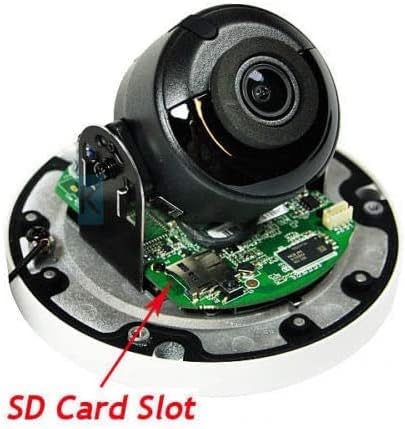
Image Description: An internal view of the camera's circuit board, highlighting the MicroSD card slot and a small reset button with a red arrow pointing to it. This shows where to insert the memory card and access the reset function.
3.3 Mounting
The camera is designed for surface mounting. Ensure the mounting surface is stable and capable of supporting the camera's weight. The 3-axis adjustment feature allows for flexible positioning after installation.

Image Description: An outdoor shot showing a white dome camera mounted under an eave, with a bright blue sky in the background. This illustrates a typical installation scenario for the outdoor-rated camera.
4. Operating Instructions
4.1 Video and Image Settings
The camera's image settings, including rotate mode, saturation, brightness, contrast, and sharpness, can be adjusted via client software (e.g., iVMS-4200) or a web browser interface. The camera supports dual video streams and triple streams for versatile monitoring and recording.
4.2 Smart Features
The DS-2CD2143G2-IU incorporates Acusense technology for intelligent event detection:
- Line Crossing Detection: Triggers an alert when a pre-defined virtual line is crossed.
- Intrusion Detection: Triggers an alert when an object enters and loiters in a pre-defined virtual region.
- Face Detection: Identifies human faces within the camera's field of view.
4.3 Day/Night Operation
The camera features an IR cut filter with auto switch for seamless transition between day and night modes. The Day/Night switch can be set to automatic or scheduled based on user preference. Enhanced IR Technology provides improved illumination and static protection for night vision.

Image Description: A composite image demonstrating the benefits of 3D Digital Noise Reduction (DNR), 120dB Wide Dynamic Range (WDR), and Enhanced IR Technology (EXIR). It shows comparisons of video quality with and without these features, highlighting improved clarity in various lighting conditions.
5. Maintenance
5.1 Firmware Upgrades
The camera supports firmware upgrades to ensure optimal performance and access to new features. Consult the manufacturer's website or contact support for the latest firmware and upgrade procedures.
5.2 Cleaning
Periodically clean the camera lens and housing with a soft, dry cloth to remove dust and debris. Avoid using harsh chemicals that may damage the camera's finish or lens coating.
5.3 Environmental Protection
The IP67 rating ensures protection against environmental elements. However, ensure proper installation to prevent water accumulation around the camera or its connections.
6. Troubleshooting
6.1 Common Issues and Solutions
- No Video Output: Verify power connection (PoE or DC12V) and network cable integrity. Ensure the camera is properly connected to your NVR or network.
- Poor Image Quality: Check for obstructions on the lens. Adjust image settings (brightness, contrast, sharpness) via the client software or web interface. Ensure sufficient lighting for optimal performance.
- Network Connectivity Issues: Confirm the RJ45 Ethernet cable is securely connected. Check network settings and IP address configuration. The camera supports IP address filtering.
- Camera Unresponsive: Use the one-key reset function (refer to Section 3.2) to restore factory default settings. Note that this will erase custom configurations.
- Smart Detection Not Working: Ensure detection zones (line crossing, intrusion) are correctly configured in the camera's settings. Verify that human/vehicle detection is enabled.
6.2 Technical Support
For further assistance or issues not covered in this manual, please contact the seller for technical support. The seller provides a one-year warranty for this product.
7. Specifications
| Feature | Specification |
|---|---|
| Image Sensor | 1/2.5" Progressive Scan CMOS |
| Video Capture Resolution | 4MP (2688 × 1520) |
| Frame Rate | 20fps (2688 × 1520), 30fps (2688 × 1520, 2560 × 1440, etc.) |
| Lens | 2.8 mm fixed lens |
| Viewing Angle | 102° (horizontal) / 103° (diagonal) |
| IR Range (Night Vision) | Up to 30m (98 feet) |
| Wide Dynamic Range (WDR) | 120 dB |
| Digital Noise Reduction | 3D DNR |
| Video Compression | H.265+/H.265/H.264+/H.264/MJPEG |
| Audio | Built-in Microphone |
| Storage | Micro SD/SDHC/SDXC slot, up to 128 GB |
| Communication Interface | 1 RJ45 10M / 100M Ethernet interface |
| Power Supply | DC12V & PoE (802.3af) |
| Ingress Protection | IP67 |
| Material | Metal |
| Item Weight | 0.71 Kilograms (1.57 pounds) |
| Compatible Devices | NVR |
| Special Features | Acusense (Human/Vehicle Detection), Firmware Upgrade Support, One-key reset |
8. Warranty and Support
This Real HD DS-2CD2143G2-IU camera comes with a one-year warranty provided by the seller. For any technical assistance, troubleshooting, or warranty claims, please contact the seller directly. They are equipped to provide support and guidance for your product.