
1. Introduction
This manual provides detailed instructions for the safe and efficient operation of your LWLONGWEI LW-3010-2KD 4-Channel DC Power Supply. This adjustable switching regulated DC bench power supply features four channels, with two main channels providing 0-30V and 0-10A, and additional fixed 5V/2A USB and DC outputs. It is equipped with a 4-digit LED display for precise readings and multiple protection functions to ensure safety during use. Please read this manual thoroughly before operating the device.
2. Product Features
- High Precision Output: Resolution of 10mV/1mA with a 4-digit LCM display.
- Multiple Channels: Two main adjustable channels (0-30V, 0-10A) and two fixed 5V/2A USB/DC outputs.
- Accuracy: Voltage accuracy of 0.03%+10mV, current accuracy of 0.1%+5mA.
- Flexible Operation Modes: Supports independent, series, and parallel operation for main channels.
- Comprehensive Protection: Includes overcurrent protection, constant voltage (CV) and constant current (CC) modes, overheat protection, overvoltage protection, and short circuit protection.
- Efficient Cooling: Built-in smart cooling fan for noise reduction and extended product life.
- Durable Construction: Features pure copper terminals for good conductivity and high-quality internal cabling for safe operation.
3. Package Contents
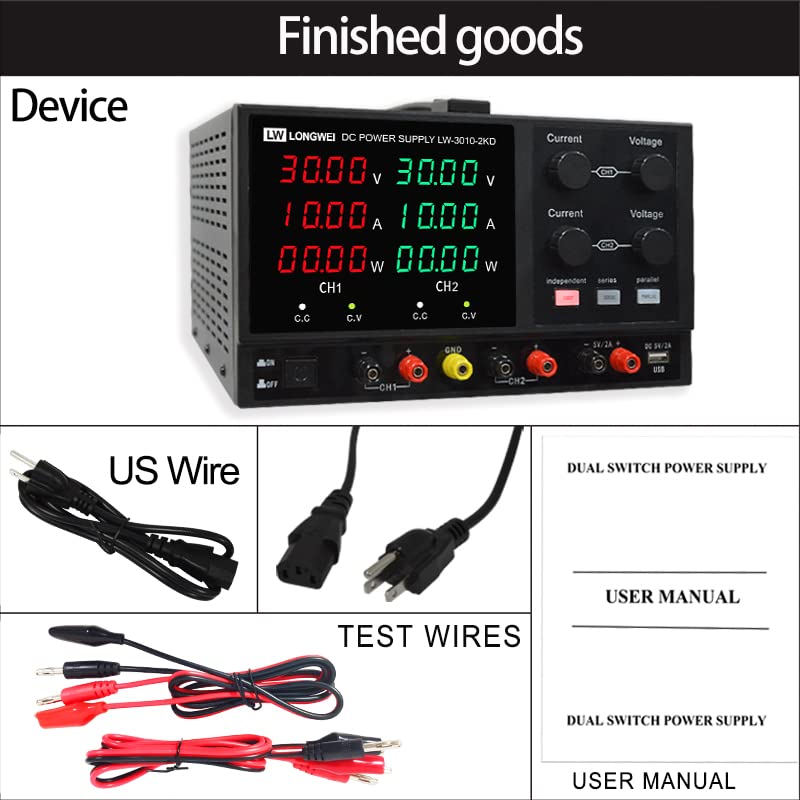
Verify that all items are present and in good condition upon unpacking:
- 1 x LWLONGWEI LW-3010-2KD DC Power Supply
- 1 set of Crocodile clip to banana connector test cable
- 3 sets of exchange test cables
- 1 x Input Power wire (US plug or EU Plug, depending on region)
- 1 x User Manual
4. Setup
- Placement: Place the power supply on a stable, level surface with adequate ventilation. Ensure no obstructions block the cooling fan vents.
- Power Connection: Connect the provided input power cord to the AC inlet on the rear of the unit, then plug it into a suitable AC power outlet (110V/220V ±10% 50Hz/60Hz).
- Initial Power On: Turn on the power switch located on the front panel. The LED displays for voltage, current, and power for CH1 and CH2 will illuminate.
- Output Terminal Identification:
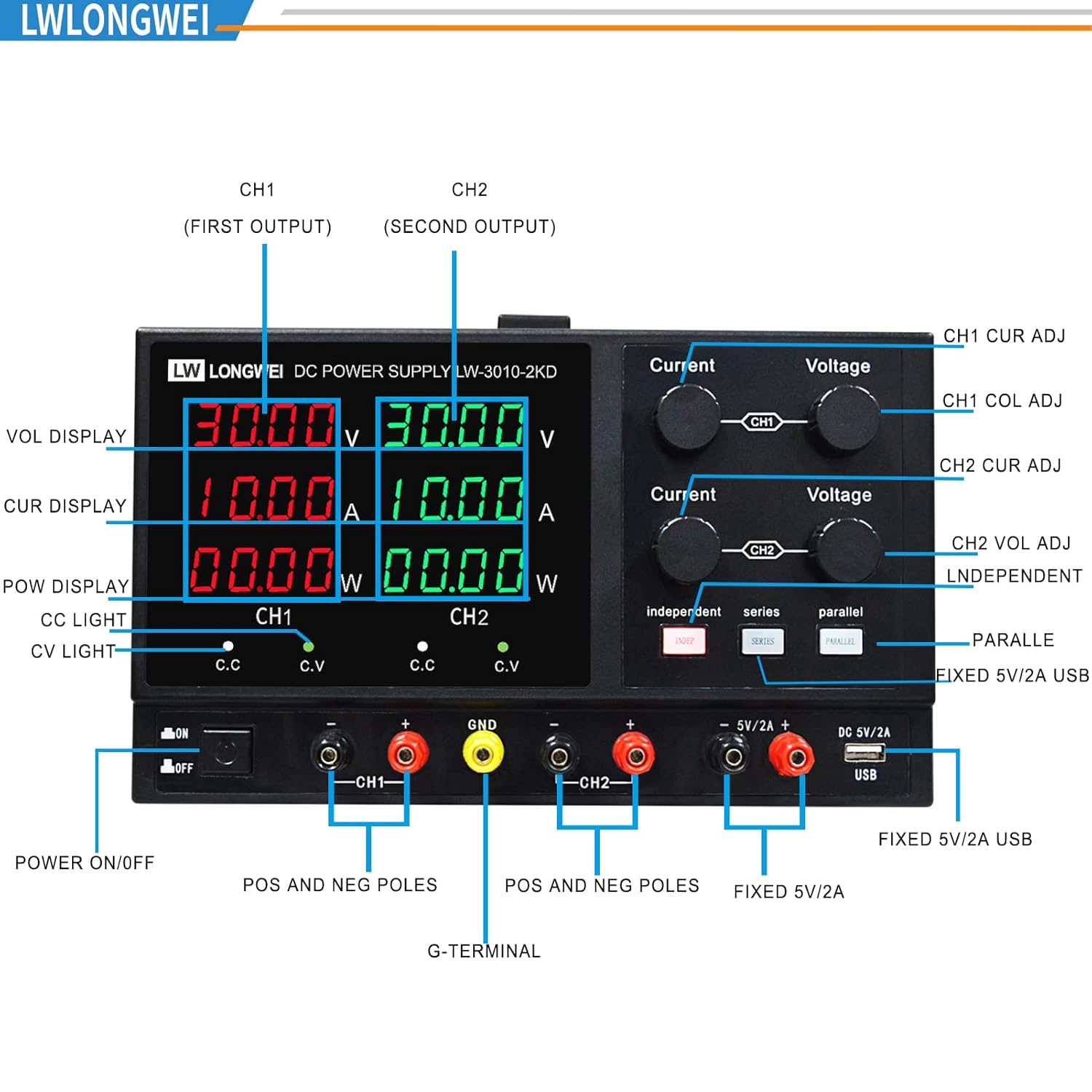
Image: Detailed view of the front panel, highlighting CH1 and CH2 output terminals, ground terminal, and fixed 5V/2A USB/DC outputs. - CH1 Output: Red and black terminals labeled "CH1".
- CH2 Output: Red and black terminals labeled "CH2".
- Ground Terminal: Yellow terminal labeled "GND".
- Fixed 5V/2A Outputs: Dedicated USB and DC 5V/2A ports.
5. Operating Instructions
5.1. Independent Mode
In independent mode, CH1 and CH2 operate as two separate power supplies, each with its own adjustable voltage and current. This is the default mode when the "Independent" button is illuminated.
- Adjusting CH1: Use the "Current" and "Voltage" knobs in the top section (labeled CH1) to set the desired output for Channel 1. The red display shows CH1 values.
- Adjusting CH2: Use the "Current" and "Voltage" knobs in the bottom section (labeled CH2) to set the desired output for Channel 2. The green display shows CH2 values.
- Connecting Load: Connect your load to the respective CH1 or CH2 output terminals. Ensure correct polarity (red for positive, black for negative).

5.2. Series Mode (Higher Voltage)
To combine CH1 and CH2 for a higher voltage output, use the series mode. The total voltage will be the sum of CH1 and CH2 voltages, while the current limit will be that of the lower-set channel.
- Activate Series Mode: Press the "Series" button on the front panel. The corresponding indicator light will illuminate.
- Connect Terminals: Connect the negative terminal of CH1 to the positive terminal of CH2. The output will be taken from the positive terminal of CH1 and the negative terminal of CH2.
- Adjust Output: Adjust the voltage and current using the CH1 and CH2 knobs. The display will show the combined voltage on the CH1 screen.
5.3. Parallel Mode (Higher Current)
To combine CH1 and CH2 for a higher current output, use the parallel mode. The total current will be the sum of CH1 and CH2 currents, while the voltage will be that of the lower-set channel.
- Activate Parallel Mode: Press the "Parallel" button on the front panel. The corresponding indicator light will illuminate.
- Connect Terminals: Connect the positive terminal of CH1 to the positive terminal of CH2, and the negative terminal of CH1 to the negative terminal of CH2. The output can be taken from either set of terminals.
- Adjust Output: Adjust the voltage and current using the CH1 and CH2 knobs. The display will show the combined current on the CH1 screen.
5.4. Fixed 5V/2A USB/DC Output
The power supply includes dedicated fixed 5V/2A USB and DC outputs for convenience. These outputs are independent of the main adjustable channels.
- Simply plug your USB-powered device into the USB port or use the DC 5V/2A output terminals.

5.5. Important Operation Notes
- Always set the current and voltage to zero before connecting or disconnecting a load to prevent damage to the power supply or the connected device.
- Ensure proper ventilation during operation to prevent overheating.
- Do not exceed the maximum voltage or current ratings of the power supply or the connected load.
5.6. Operational Video Guide
For a visual demonstration of the power supply's operation, including independent, series, and parallel modes, please refer to the official video below:
6. Maintenance
- Cleaning: Regularly clean the exterior of the unit with a soft, dry cloth. Do not use abrasive cleaners or solvents. Ensure the unit is powered off and unplugged before cleaning.
- Ventilation: Keep the ventilation openings clear of dust and debris to ensure proper airflow and prevent overheating.
- Storage: When not in use for extended periods, store the power supply in a cool, dry place, away from direct sunlight and extreme temperatures.
- Fuse Replacement: The unit is equipped with replaceable fuses for short-circuit protection. If a fuse blows, replace it with one of the same type and rating. Refer to the specifications for fuse details.
7. Troubleshooting
| Problem | Possible Cause | Solution |
|---|---|---|
| No power/Unit does not turn on | Power cord not connected, power outlet faulty, internal fuse blown. | Check power cord connection. Test power outlet. Replace fuse if necessary (refer to maintenance section). |
| No output voltage/current | Output is off, voltage/current set to zero, overload protection activated, faulty connection. | Ensure output is enabled. Adjust voltage/current knobs. Check for short circuits or overloads. Verify test lead connections. |
| Inaccurate readings | Faulty test leads, external meter calibration issue. | Test with different leads. Compare readings with a known calibrated meter. |
| Overheating | Blocked ventilation, prolonged high-load operation. | Ensure vents are clear. Reduce load or allow unit to cool down. |
8. Specifications
| Parameter | Value |
|---|---|
| Model | LW-3010-2KD |
| Input Voltage | AC110V/220V ±10% 50Hz/60Hz |
| Output Voltage (CH1, CH2) | 0-30V (Continuously Adjustable) |
| Output Current (CH1, CH2) | 0-10A (Continuously Adjustable) |
| Fixed Output | DC 5V/2A (USB & DC) |
| Voltage Accuracy | 0.03%+10mV |
| Current Accuracy | 0.1%+5mA |
| Resolution | 10mV/1mA |
| Display | 4-Digits LED (LCM) |
| Operating Temperature | -10°C to +35°C, relative humidity <80% |
| Storage Temperature | -20°C to +70°C, relative humidity <70% |
| Ripple and Noise | CV≤0.5% FS, CC≤0.5% FS |
| Dimensions (L x W x H) | 12.4 x 10.24 x 5.91 inches (315 x 260 x 150 mm) |
| Weight | 5kg |

9. Warranty & Support
Your LWLONGWEI LW-3010-2KD DC Power Supply comes with technical support from LWLONGWEI. For any inquiries, troubleshooting assistance, or warranty claims, please contact LWLONGWEI customer service directly. Refer to the product packaging or the official LWLONGWEI website for the most current contact information.