
Atlanta 1866/5
Atlanta Radio-Controlled Analog Alarm Clock - Model 1866/5
Instruction Manual
Introduction
Thank you for purchasing the Atlanta Radio-Controlled Analog Alarm Clock, Model 1866/5. This manual provides detailed instructions for setting up, operating, and maintaining your new alarm clock. Please read this manual thoroughly before use to ensure optimal performance and longevity of the product.
Product Overview and Features
The Atlanta 1866/5 is a radio-controlled analog alarm clock designed for clear readability and reliable timekeeping. Key features include:
- Radio-Controlled Time: Automatically sets and adjusts time for accuracy.
- Large Analog Display: Easy-to-read dial with large numbers.
- Luminous Hands: Hands glow in the dark for visibility without illumination.
- Dial Illumination: Press a button for temporary backlight.
- Snooze Function: Temporarily pauses the alarm.
- Crescendo Alarm: Alarm volume gradually increases.
- Digital Display: Shows date and temperature.
- Silent Sweep Movement: No ticking sound.
- Battery Operated: Requires 1 AA battery (not included).
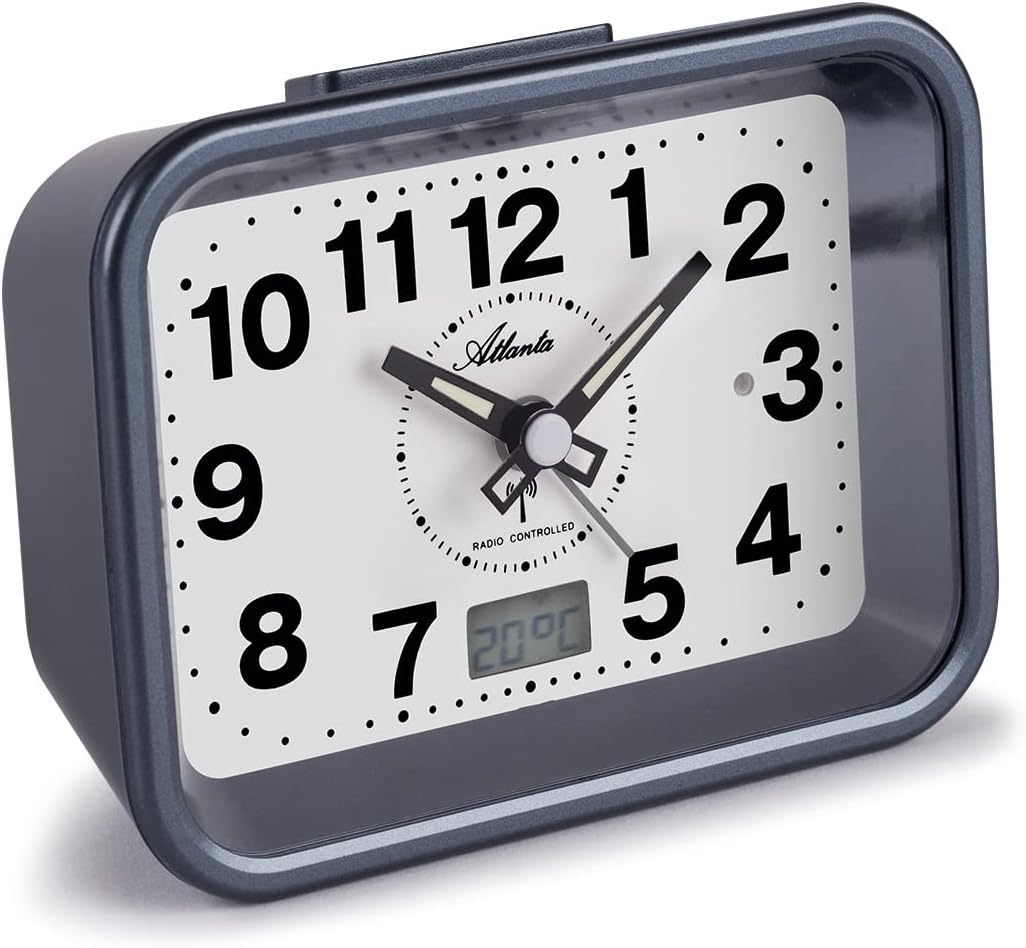
Image 1: Front view of the Atlanta 1866/5 radio-controlled analog alarm clock, showing the large analog dial, luminous hands, and the digital display for temperature and date at the bottom.
Setup
1. Battery Installation
- Locate the battery compartment on the back of the alarm clock.
- Open the battery compartment cover.
- Insert one (1) AA battery, ensuring correct polarity (+/-).
- Close the battery compartment cover securely.

Image 2: Side and back view of the alarm clock, highlighting the battery compartment cover and the ON/OFF switch for the alarm function.
2. Initial Time Synchronization (Radio Control)
Upon battery installation, the clock will automatically attempt to synchronize with the radio time signal. This process may take several minutes. Ensure the clock is placed in an area with good signal reception, away from electronic interference.
- The hands will move to the 12 o'clock position and then begin searching for the signal.
- Once synchronized, the clock will automatically set to the correct time.
- If synchronization fails, try repositioning the clock or manually setting the time (see Operating Instructions).
Operating Instructions
Manual Time Setting (if radio control fails)
In rare cases or areas with poor radio signal, you may need to set the time manually.
- Locate the "SET" button and the time adjustment knob on the back of the clock.
- Press and hold the "SET" button until the hands start moving.
- Rotate the time adjustment knob to set the correct time.
- Press "SET" again to confirm and exit manual setting mode.

Image 3: Rear view of the alarm clock, showing the "SET", "REC", and "RESET" buttons, along with the alarm setting knob.
Setting the Alarm
- Locate the alarm setting knob on the back of the clock.
- Rotate the alarm setting knob to move the alarm hand to your desired alarm time.
- Ensure the alarm ON/OFF switch (located on the side) is in the "ON" position.
Snooze Function
When the alarm sounds, press the large "SNOOZE/LIGHT" button on top of the clock. The alarm will pause for approximately 5 minutes and then sound again.

Image 4: Top view of the alarm clock, showing the prominent "SNOOZE/LIGHT" button for temporary alarm pause and dial illumination.
Dial Illumination
Press the "SNOOZE/LIGHT" button on top of the clock to temporarily illuminate the dial for easy viewing in low light conditions.

Image 5: The Atlanta 1866/5 alarm clock with its dial illuminated, showing clear visibility of the time and digital display in a dark environment.
Digital Display (Date and Temperature)
The small digital display at the bottom of the dial cycles between showing the current date and the ambient temperature.

Image 6: A close-up view of the digital display on the alarm clock, clearly showing the temperature reading.
Maintenance
- Cleaning: Wipe the clock with a soft, dry cloth. Do not use abrasive cleaners or solvents.
- Battery Replacement: Replace the AA battery annually or when the display dims or timekeeping becomes inaccurate.
- Storage: If storing the clock for an extended period, remove the battery to prevent leakage.
Troubleshooting
| Problem | Possible Cause | Solution |
|---|---|---|
| Clock does not display time or function. | No battery or incorrect battery polarity. | Insert a fresh AA battery with correct polarity. |
| Time is incorrect or not setting automatically. | Poor radio signal reception or interference. | Move the clock to a different location, away from electronic devices. Perform manual time setting if necessary. |
| Alarm does not sound. | Alarm switch is OFF or alarm time is not set correctly. | Ensure the alarm ON/OFF switch is in the "ON" position. Verify the alarm hand is set to the desired time. |
| Dial illumination is dim or not working. | Low battery. | Replace the AA battery with a fresh one. |
Specifications
- Model: Atlanta 1866/5
- Dimensions (L x W x H): 12 cm x 5 cm x 9 cm (approximately 4.7 x 2 x 3.5 inches)
- Weight: 200 grams (approximately 0.44 lbs)
- Material: Plastic
- Power Source: 1 x AA Battery (not included)
- Display Type: Analog with digital sub-display
- Special Features: Radio-controlled time, Date display, Temperature display, Crescendo alarm, Snooze, Dial illumination, Luminous hands, Silent sweep movement.
Warranty and Support
For warranty information and customer support, please refer to the documentation provided at the time of purchase or contact your retailer. Keep your proof of purchase for any warranty claims.
Related documents1866/5

Ask a question about this manual
Ask about setup, troubleshooting, compatibility, parts, safety, or missing instructions. Manuals+ will review the question and use this page’s manual context to help answer it.