
Introduction
Thank you for choosing the Glocusent Horizontal ET-Head Book Light. This manual provides essential information for the safe and efficient operation of your new reading light. Please read it thoroughly before use and keep it for future reference.
What's in the Box
- 1 x Glocusent ET Book Light
- 1 x User Manual
- 1 x Charging Cable
- 1 x Bookmark (No adapter included)
Key Features
- Horizontal ET-Head Design: Illuminates a wider page area with evenly spread light, covering both pages without hard edges.
- Eye-Caring Amber Light: Features an 1800K amber mode that blocks 99.99% of blue light, reducing eye strain and promoting better sleep.
- Versatile Lighting Options: Offers 3 color temperatures (1800K Amber, 3400K Soft White, 6000K Natural White) and 5 adjustable brightness levels.
- Long-Lasting Rechargeable Battery: Provides 8 to 80 hours of reading time on a single charge, depending on brightness settings. USB-C rechargeable.
- Lightweight & Portable: Weighs only 1.8 ounces (51 grams), making it easy to carry and use anywhere.
- Flexible Gooseneck & Sturdy Clamp: Allows for precise light positioning and secure attachment to books or other surfaces.
- High Color Rendering Index (CRI 95): Ensures vivid and accurate color representation.
- 30-Minute Timer Function: Automatically turns off the light after 30 minutes.

Image: The unique horizontal ET-head design provides wider and more even light distribution across both pages of a book.
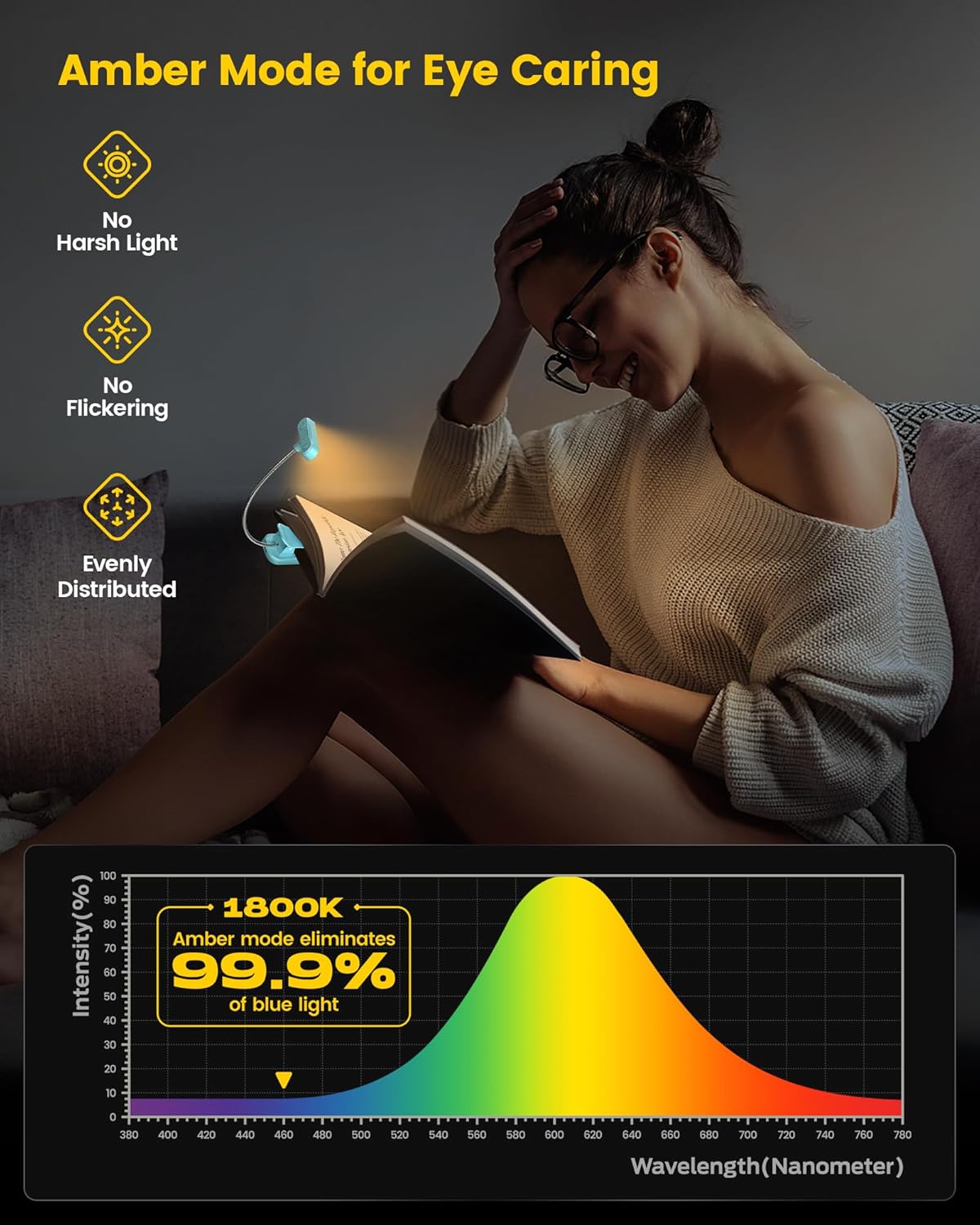
Image: The amber light mode (1800K) is designed for eye comfort, blocking blue light for relaxed reading.

Image: The book light is versatile for various activities such as leisure reading, studying, video conferencing, and reading in bed.
Setup
Charging the Book Light
- Locate the USB-C charging port on the side of the clip base.
- Connect the provided USB-C charging cable to the port.
- Plug the other end of the cable into a USB power source (e.g., computer, wall adapter, power bank).
- The charging indicator light will illuminate (typically red) while charging and turn off or change color when fully charged.

Image: The book light features a convenient USB-C charging port for easy power replenishment.
Attaching the Book Light
- Open the sturdy clip at the base of the light.
- Attach the clip to the cover or pages of your book, or to any suitable surface like a headboard or table edge.
- Adjust the flexible gooseneck to position the light head over your reading material for optimal illumination.
Operating Instructions
The Glocusent book light features three control buttons on the light head:
- Middle Button: Power On/Off and Timer function.
- Left Button: Adjusts color temperature.
- Right Button: Adjusts brightness levels.

Image: The control panel on the light head allows for easy adjustment of color and brightness.
Power On/Off
- To Turn On: Short press the middle power button.
- To Turn Off: Short press the middle power button again.
Adjusting Color Temperature
- With the light on, short press the left button to cycle through the 3 color temperatures: 1800K Amber, 3400K Soft White, and 6000K Natural White.
Adjusting Brightness Levels
- With the light on, short press the right button to cycle through the 5 brightness levels.
30-Minute Auto Off Timer
- To activate the timer, long press the middle power button for 2 seconds. The light will automatically turn off after 30 minutes.
- To deactivate the timer, long press the middle power button again for 2 seconds.

Image: The 30-minute timer function can be activated by long-pressing the power button.
Official Product Videos
Video: An overview of the Glocusent Amber Book Light, showcasing its features and benefits for reading.
Video: Demonstrating the eye-caring and lightweight aspects of the Glocusent ET-head Amber Book Light.
Maintenance
- Cleaning: Wipe the light with a soft, dry cloth. Do not use abrasive cleaners or solvents.
- Storage: Store the light in a cool, dry place when not in use for extended periods.
- Battery Care: To prolong battery life, charge the device regularly, even if not used frequently. Avoid fully discharging the battery.
Troubleshooting
| Problem | Possible Cause | Solution |
|---|---|---|
| Light does not turn on. | Low battery or no charge. | Charge the book light using the provided USB-C cable. |
| Light flickers. | Low battery. | Recharge the book light. |
| Light does not hold position. | Gooseneck not adjusted properly. | Gently bend and adjust the flexible gooseneck to the desired position. Ensure the clamp is securely fastened. |
Specifications
| Feature | Detail |
|---|---|
| Model Name | Book Light for Reading in Bed (A18) |
| Brand | Glocusent |
| Light Source Type | LED |
| Number of Light Sources | 9 |
| Color Temperatures | 1800K (Amber), 3400K (Soft White), 6000K (Natural White) |
| Brightness Levels | 5 |
| Color Rendering Index (CRI) | 95.00 |
| Luminous Flux | 25 Lumen (Maximum) |
| Power Source | Battery Powered (1 Lithium Metal battery included) |
| Battery Life | Up to 80 hours (on dimmest setting) |
| Charging Port | USB-C |
| Item Weight | 1.8 ounces (51 Grams) |
| Product Dimensions | 2.6"D x 1.3"W x 1.5"H (6.7 x 3.9 x 3.3 cm) |
| Material | Acrylonitrile Butadiene Styrene (ABS) |
| Control Method | Touch |
| Indoor/Outdoor Usage | Indoor |
| Water Resistance Level | Not Water Resistant |
Warranty & Support
Glocusent offers the following:
- 30-Day Return Service: If you are not satisfied with your purchase, you may return it within 30 days.
- 24-Month Warranty: The product is covered by a 24-month warranty against manufacturing defects.
- Customer Support: Our Customer Experience Team is available 24/7 to assist you with any questions or concerns. Please refer to the product packaging or Glocusent's official website for contact information.
- Certifications: This product is FCC, CE, RoHS, PSE & C-TICK certified, ensuring quality and safety standards.
