1. Introduction
This manual provides detailed instructions for the installation, setup, and operation of your TEKXDD Smart Door Lock. This 4-in-1 keyless entry door lock offers multiple unlocking methods including fingerprint, keypad code, mechanical key, and a mobile application (Tuya BLE). It is designed to enhance home and office security with convenient access control.
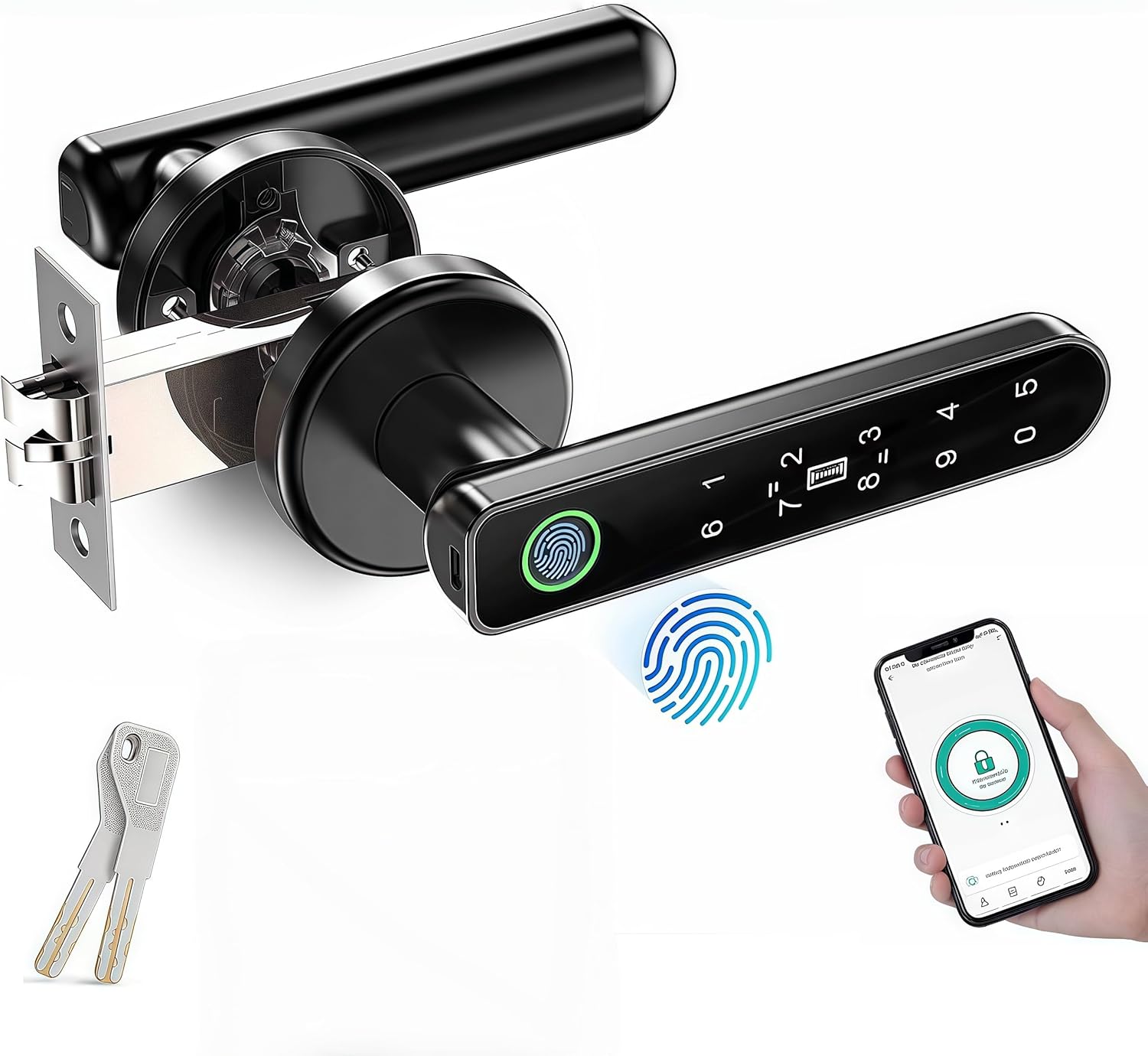
Image 1.1: Overview of the TEKXDD Smart Door Lock, showcasing its fingerprint sensor, keypad, and connectivity with a mobile application for smart control.
2. Product Components
Carefully unpack the box and ensure all components are present and in good condition. Refer to the list and image below.
- Front Handle Assembly (with fingerprint sensor and keypad)
- Rear Handle Assembly
- Latch Bolt
- Strike Plate
- Mechanical Keys (2)
- Mounting Screws Kit
- Small Screwdriver
- Instruction Manual

Image 2.1: Contents of the TEKXDD Smart Door Lock package, showing all parts required for installation.
3. Installation Guide
Before installation, verify your door dimensions. The lock is compatible with door thicknesses between 1-3/8" (35mm) to 2-3/16" (55mm). The adjustable latch supports backsets of 2-3/8" (60mm) or 2-3/4" (70mm).
3.1 Prepare the Door
- Ensure the door is properly prepped with standard boreholes.
- Adjust the latch bolt to the correct backset (60mm or 70mm) if necessary.
3.2 Install the Latch Bolt and Strike Plate
- Insert the latch bolt into the door edge and secure it with screws.
- Install the strike plate on the door frame, aligning it with the latch bolt.
3.3 Install the Handle Assemblies
- Connect the cable from the front handle assembly to the rear handle assembly.
- Insert the spindle through the latch bolt.
- Mount the front and rear handle assemblies, ensuring they are flush with the door surface.
- Secure the assemblies with the provided mounting screws.
3.4 Adjust Handle Direction
The handle direction can be adjusted to suit left or right-opening doors. Follow the instructions in the included manual for specific steps on how to rotate the handle for proper orientation.

Image 3.1: Visual guide for adjusting the smart door lock handle to open left or right, ensuring compatibility with various door configurations.
4. Initial Setup and Programming
After installation, the lock requires initial setup to register users and access methods.
4.1 Mobile App Setup (Tuya BLE)
- Download the Tuya (BLE) app from your smartphone's app store.
- Create an account or log in.
- Follow the in-app instructions to add your TEKXDD Smart Door Lock. Ensure Bluetooth is enabled on your device.
- The app allows for setting multiple fingerprints, keypad codes, and managing access records.
4.2 Fingerprint Registration
- Access the fingerprint management section within the Tuya app or directly on the lock's keypad (refer to the detailed manual for direct programming steps).
- Place your finger on the sensor multiple times from different angles as prompted to ensure accurate recognition.
- Repeat for all desired fingerprints.
4.3 Keypad Code Setup
- Through the Tuya app or directly on the lock, navigate to the passcode management.
- Enter a new desired passcode (typically 6-8 digits) and confirm it.
- The app also supports generating dynamic passwords for temporary guest access.

Image 4.1: The four primary methods for unlocking the TEKXDD Smart Door Lock, including app control, fingerprint recognition, PIN code entry, and traditional key access.
5. Operating Instructions
The TEKXDD Smart Door Lock offers several convenient ways to secure and access your property.
5.1 Unlocking with Fingerprint
Place your registered finger on the fingerprint sensor. The lock will unlock within 1 second if the fingerprint is recognized.
5.2 Unlocking with Keypad Code
Enter your registered keypad code on the illuminated keypad. Press '#' or the designated confirmation key to unlock.
5.3 Unlocking with Mobile App
Open the Tuya app on your smartphone. Ensure you are within Bluetooth range of the lock. Tap the unlock icon within the app to disengage the lock.
5.4 Unlocking with Mechanical Key
In case of emergency or battery depletion, insert the mechanical key into the keyhole and turn to unlock the door.

Image 5.1: Key features of the smart lock, including emergency key access, USB charging for power backup, biometric fingerprint recognition, and mobile app integration.
6. Maintenance
Proper maintenance ensures the longevity and optimal performance of your smart door lock.
6.1 Battery Replacement
The lock requires batteries for operation. When the battery level is low, the lock will provide an alert. Replace all batteries with new ones of the specified type (typically AAA batteries). Refer to the detailed manual for instructions on accessing the battery compartment.
6.2 Emergency Power
If the batteries are completely depleted, the lock can be temporarily powered via a USB charging cable connected to the emergency USB port, allowing you to unlock it using a registered method.
6.3 Cleaning
Clean the lock's surface and fingerprint sensor with a soft, dry cloth. Avoid using abrasive cleaners or solvents that could damage the finish or electronic components.

Image 6.1: The smart lock featuring a mechanical key override and a USB port for emergency power, ensuring access even if batteries are depleted.
7. Troubleshooting
This section addresses common issues you might encounter with your TEKXDD Smart Door Lock.
7.1 Lock Not Responding
- Check battery levels and replace if necessary.
- Ensure the lock is properly installed and all connections are secure.
- Use the mechanical key for emergency access.
7.2 Fingerprint Not Recognized
- Ensure your finger is clean and dry.
- Try placing your finger on the sensor from different angles.
- Re-register your fingerprint if recognition issues persist.
7.3 App Connectivity Issues
- Ensure Bluetooth is enabled on your smartphone.
- Make sure you are within close proximity to the lock.
- Restart the Tuya app and/or your smartphone.
7.4 Abnormal Alarm
The smart door lock can trigger an abnormal alarm in situations such as multiple incorrect entry attempts. Check the lock's status via the Tuya app for details on the alarm event.

Image 7.1: The smart lock's 'Trial and error alarm' feature, designed to alert users to unauthorized access attempts.
8. Specifications
| Feature | Specification |
|---|---|
| Model Number | TY190 |
| Manufacturer | TEKXDD |
| Product Dimensions | 10 x 2 x 3 cm |
| Item Weight | 454 g |
| Material | Aluminum |
| Color | Black One Piece |
| Style | Modern |
| Finish Type | Polished |
| Power Source | AC (Battery operated, USB emergency power) |
| Installation Method | Screw-In |
| Lock Type | Biometric |
| Special Feature | Office available |
| Recommended Uses | Indoor and outdoor use |
| Door Thickness Compatibility | 1-3/8" (35mm) to 2-3/16" (55mm) |
| Adjustable Latch | 2-3/8" (60mm) or 2-3/4" (70mm) |
9. Warranty and Support
9.1 Warranty Information
The TEKXDD Smart Door Lock comes with a 3-year warranty. For specific details regarding coverage and claims, please refer to the warranty documentation included with your product or contact customer service.
9.2 Customer Service
For any questions, technical assistance, or support, please contact TEKXDD customer service. We aim to provide a satisfactory answer within 24 hours.
Contact information can typically be found on the product packaging or the official TEKXDD website.

