
Introduction
This instruction manual provides essential information for the safe and correct installation, maintenance, and troubleshooting of your Yavor CDR030 replacement optical pickup unit. This unit is designed as a direct replacement for the laser lens assembly in Sherwood CD-3030R CD players. Please read this manual thoroughly before attempting any installation.
Safety Information
Warning: This product contains a laser diode. Exposure to the laser beam can cause eye damage. Do not look directly into the laser lens when the unit is powered. Always disconnect the CD player from the power source before beginning any installation or maintenance.
- Ensure the CD player is unplugged from the main power supply before handling any internal components.
- Static electricity can damage electronic components. Use appropriate anti-static precautions (e.g., anti-static wrist strap) when handling the optical pickup unit.
- If you are not confident in performing the installation, seek assistance from a qualified technician.
- Do not attempt to disassemble the optical pickup unit itself, as this may cause damage and void any potential warranty.
Installation
The Yavor CDR030 optical pickup unit is a delicate component. Handle with care. This section outlines the general steps for replacement. Specific disassembly and reassembly procedures for your Sherwood CD-3030R player may vary; refer to your player's service manual if available.
Required Tools:
- Small Phillips head screwdriver
- Small flathead screwdriver (for prying connectors)
- Anti-static wrist strap (recommended)
- Isopropyl alcohol and cotton swab (for cleaning)
Installation Steps:
- Power Disconnection: Ensure the Sherwood CD-3030R CD player is completely unplugged from the power outlet.
- Access Internal Components: Carefully remove the outer casing of the CD player. This usually involves unscrewing screws on the back and sides.
- Locate Old Unit: Identify the existing optical pickup unit within the CD mechanism. It typically slides along a rail.
- Disconnect Cables: Gently disconnect the ribbon cable and any other power/signal cables attached to the old optical pickup unit. Be careful not to damage the connectors.
- Remove Old Unit: Unscrew any mounting screws holding the old unit in place and carefully remove it from the CD mechanism.
- Prepare New Unit: The new Yavor CDR030 unit may have an anti-static solder bridge (a small solder blob connecting two pads) to protect the laser diode during shipping. This bridge must be removed before installation. Use a soldering iron to carefully desolder and remove this bridge. Failure to do so will prevent the unit from functioning.
- Install New Unit: Carefully place the new Yavor CDR030 optical pickup unit into the CD mechanism, ensuring it aligns correctly with the rails and mounting points. Secure it with the screws previously removed.
- Connect Cables: Reconnect the ribbon cable and any other power/signal cables to the new unit. Ensure the ribbon cable is inserted correctly and securely.
- Initial Test: Before reassembling the casing, temporarily plug in the CD player and perform a brief test to ensure the unit powers on and attempts to read a disc. If it functions, unplug the player again.
- Reassemble: Carefully reattach the outer casing of the CD player.
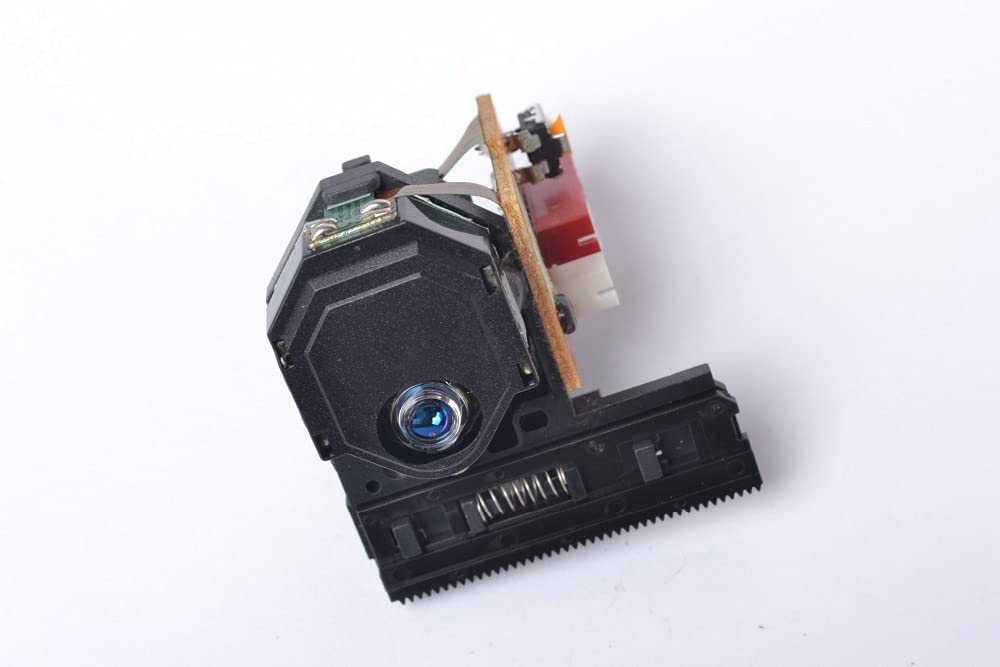
Image showing the Yavor CDR030 optical pickup unit, a replacement laser lens assembly for CD players. The unit features a laser lens, circuit board, and mounting mechanism.
Operation
Once correctly installed, the Yavor CDR030 optical pickup unit operates as an integral part of your Sherwood CD-3030R CD player. Its function is to read the data from compact discs. Normal operation will resume once the unit is installed and the CD player is powered on and a disc is inserted.
Maintenance
The optical pickup unit generally requires minimal maintenance. However, dust and debris can accumulate on the laser lens over time, potentially affecting disc reading performance.
- Lens Cleaning: If disc reading issues occur, you may carefully clean the laser lens. Disconnect power to the CD player. Use a clean, lint-free cotton swab lightly dampened with isopropyl alcohol (90% or higher purity). Gently wipe the lens in a straight motion, avoiding circular scrubbing. Allow the lens to dry completely before reconnecting power.
- Dust Removal: Periodically, use compressed air (held upright and at a distance) to gently blow away dust from the CD mechanism area.
Troubleshooting
If you encounter issues after installing the Yavor CDR030 unit, consider the following:
- Disc Not Reading / No Disc Error:
- Ensure the anti-static solder bridge was removed from the new unit. This is a common oversight.
- Check all cable connections, especially the ribbon cable, to ensure they are seated correctly and securely.
- Clean the laser lens as described in the Maintenance section.
- Verify that the disc itself is clean and free of scratches.
- Skipping / Intermittent Playback:
- Clean the laser lens.
- Ensure the CD player is on a stable, level surface to prevent vibrations.
- Check if the CD mechanism's rails are clean and lubricated (use a very small amount of silicone grease if necessary, avoid oil).
- Unit Not Moving:
- Confirm all power and signal cables are connected.
- Check for any obstructions preventing the unit from moving along its rails.
If problems persist after following these steps, professional repair may be required.
Specifications
| Model | CDR030 |
| Compatibility | Sherwood CD-3030R CD Player |
| Type | Optical Pickup Unit / Laser Lens Assembly |
| Weight | Approximately 200 Grams |
Warranty and Support
For warranty information and technical support, please refer to the documentation provided with your purchase or contact the retailer. Keep your proof of purchase for warranty claims.