
1. Introduction
Thank you for choosing the Midea HU 60F17 Built-in Hood. This manual provides essential information for the safe installation, operation, and maintenance of your new appliance. Please read it thoroughly before use and keep it for future reference.
1.1 What's in the Box
- Midea HU 60F17 Extractor Hood
- Power Plug
2. Safety Information
Always follow basic safety precautions when using electrical appliances to reduce the risk of fire, electric shock, and injury.
- Ensure the power supply voltage matches the rating on the appliance.
- Do not operate the hood with a damaged cord or plug.
- Installation must be performed by a qualified person in accordance with all local codes and standards.
- Do not flambé under the range hood.
- Regularly clean the grease filters to prevent fire hazards.
- This appliance is for domestic use only.
3. Setup and Installation
The Midea HU 60F17 is designed for built-in installation. Professional installation is recommended to ensure proper functionality and safety.

Figure 3.1: Angled view of the Midea HU 60F17 Built-in Hood.
3.1 Dimensions and Weight
- Product Dimensions: 60 x 44 x 8 cm
- Item Weight: 5.8 Kilograms
Ensure adequate space and proper ventilation ducting are available before installation.

Figure 3.2: Front view of the Midea HU 60F17 Built-in Hood.
4. Operating Instructions
The Midea HU 60F17 hood features intuitive controls for fan speed and lighting.
4.1 Controls
The control panel is located on the front right side of the hood. It typically includes buttons for:
- Light On/Off: Activates or deactivates the hood's illumination.
- Fan Speed Selection: Allows you to choose between different fan speeds (e.g., Low, Medium, High) to adjust the extraction power based on cooking needs.
For optimal performance, turn on the hood a few minutes before cooking and leave it on for a few minutes after cooking to clear residual odors and steam.
5. Maintenance
Regular maintenance ensures the longevity and efficiency of your Midea hood.
5.1 Cleaning the Aluminum Filter
The aluminum filter is removable and should be cleaned regularly (e.g., monthly, depending on usage) to maintain optimal airflow and prevent grease buildup.

Figure 5.1: Underside view showing the removable filter.
- Turn off and unplug the hood from the power supply.
- Locate the filter release latches (typically two on each filter) and push them to release the filter.
- Carefully remove the filter.
- Wash the filter by hand in warm soapy water or in a dishwasher (if compatible) to remove grease.
- Rinse thoroughly and allow to dry completely before re-installing.
- Re-insert the filter, ensuring it clicks securely into place.
5.2 Cleaning the Hood Surface
Clean the stainless steel surface with a soft cloth and a mild, non-abrasive cleaner specifically designed for stainless steel. Do not use harsh chemicals or abrasive pads.
5.3 Light Replacement
The hood is equipped with an integrated light. If replacement is needed, consult a qualified technician or refer to specific instructions for light module access.

Figure 5.2: Close-up of the hood's integrated light.
6. Troubleshooting
Before contacting customer service, try these basic troubleshooting steps for common issues:
- Hood not turning on: Check if the power plug is securely inserted and if there is power to the outlet. Check the circuit breaker.
- Poor extraction: Ensure the aluminum filters are clean and not clogged. Check if the ventilation ducting is clear and not obstructed.
- Unusual noise: Check if the filters are correctly installed. Ensure no foreign objects are in the fan area.
- Light not working: Check if the light button is pressed. If the light module is faulty, it may require professional replacement.
If the problem persists after performing these checks, please contact Midea customer support.
7. Specifications
Technical specifications for the Midea HU 60F17 Built-in Hood:
| Feature | Specification |
|---|---|
| Brand | Midea |
| Model Number | HU 60F17002 |
| Mounting Type | Built-in |
| Color | Stainless Steel |
| Material | Stainless Steel |
| Product Dimensions | 60 x 44 x 8 cm |
| Item Weight | 5.8 Kilograms |
| Voltage | 20 Volts |
| Noise Level | 66 dB |
| Airflow | 180 m³/h |
| Energy Efficiency Class | C |
| Included Components | Extractor Hood, Power Plug |
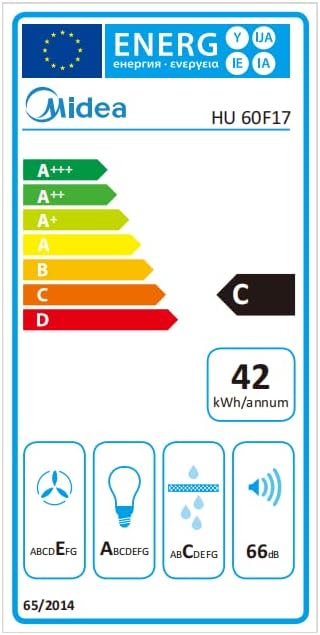
Figure 7.1: Energy Efficiency Label.
8. Warranty and Support
For information regarding warranty, returns, or specific product support, please refer to the purchase documentation or contact the retailer where the product was purchased. For general Midea product support, visit the official Midea website or contact their customer service department.
Please note that specific return policies may vary based on the marketplace or retailer. For purchases made on Amazon.it, you can consult their help pages regarding returns and defective/damaged products.


