1. Introduction
Thank you for choosing the CITHOT Electric Rotary Shaver RS8336-Q. This manual provides essential information for the safe and effective use, maintenance, and troubleshooting of your new shaver. Please read it thoroughly before first use and retain it for future reference.
2. Safety Information
WARNING: To reduce the risk of electric shock, injury, or damage to the appliance, always observe the following safety precautions:
- Always unplug the shaver and allow it to cool before cleaning.
- Do not use the shaver while it is charging, especially in the shower or near water.
- Exercise caution when using the shaver to avoid cuts, particularly around sensitive areas.
- Always follow the cleaning instructions to prevent bacterial growth and maintain hygiene.
- Keep the appliance dry. Do not immerse the charging adapter in water or other liquids.
- This appliance is not intended for use by persons (including children) with reduced physical, sensory or mental capabilities, or lack of experience and knowledge, unless they have been given supervision or instruction concerning use of the appliance by a person responsible for their safety.
3. Product Overview
3.1 Package Contents
- CITHOT Electric Rotary Shaver RS8336-Q
- Charging Cable
- Cleaning Brush
- Protective Cover
- User Manual (this document)
3.2 Shaver Components
Familiarize yourself with the main parts of your CITHOT Electric Rotary Shaver.

Figure 1: CITHOT Electric Rotary Shaver RS8336-Q. This image displays the shaver with its three rotary heads, power button, and LCD display, surrounded by water splashes indicating its waterproof nature.

Figure 2: LCD Intelligent Digital Display. This image highlights the shaver's LCD screen, showing indicators for remaining battery percentage, charging reminder, key lock, and washing reminder.

Figure 3: Shaver Dimensions. This image illustrates the physical dimensions of the shaver, including its height and width, along with the charging adapter and cable.
4. Setup
4.1 Initial Charging
Before using your shaver for the first time, it is recommended to fully charge it. The shaver requires approximately 1 hour for a full charge, providing up to 120 minutes of continuous use.
- Ensure the shaver is dry before connecting the charging cable.
- Plug the charging cable into the shaver's charging port.
- Connect the other end of the cable to a suitable power source (e.g., USB wall adapter, computer USB port).
- The LCD display will show the charging status and battery percentage.
- Once fully charged, disconnect the shaver from the power source.

Figure 4: Shaver Charging. This image shows the shaver connected to its charging cable, with the LCD displaying the battery percentage, indicating the fast charging capability.
5. Operating Instructions
5.1 Power On/Off
- To turn on the shaver, press the power button once.
- To turn off the shaver, press the power button again.
5.2 Shaving Techniques
The CITHOT Electric Rotary Shaver is designed for both wet and dry shaving, adapting to the contours of your face, neck, and chin with its 3D floating heads.

Figure 5: 3D Floating Shaver Head. This image illustrates the shaver's 3D rotary heads and sharp blades, designed for efficient and comfortable shaving by adapting to facial contours.
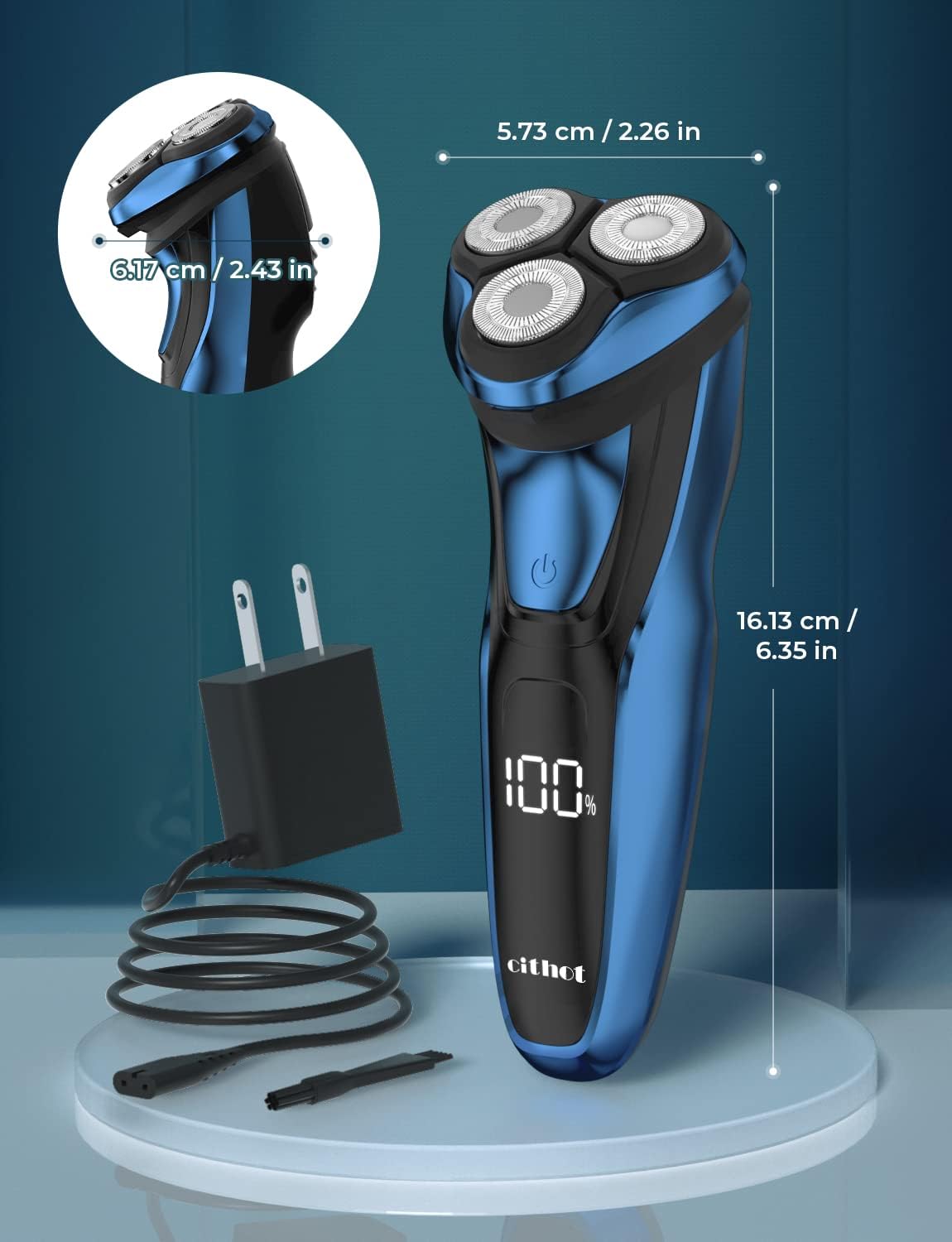
Figure 6: Man Shaving. This image shows a man using the electric shaver on his face, demonstrating typical usage.
Dry Shaving:
- Ensure your face is clean and dry.
- Move the shaver in small, circular motions over your skin, applying gentle pressure.
- Stretch your skin with your free hand to make the hairs stand upright for a closer shave.
Wet Shaving (with foam or gel):
- Apply shaving foam or gel to your face.
- Move the shaver in small, circular motions. The IPX7 waterproof design allows for safe use with water.
- Rinse the shaver head under running water during and after shaving to remove lather and hair residue.

Figure 7: Wet and Dry Shaving. This image illustrates the shaver being used for both dry shaving and wet shaving with foam, highlighting its versatility and waterproof capabilities, including a washing reminder icon.
5.3 Using the Pop-up Trimmer
The integrated pop-up trimmer is ideal for shaping sideburns, mustaches, and detailing your beard.
- Locate the pop-up trimmer switch on the back of the shaver.
- Slide the switch upwards to activate the trimmer.
- Hold the shaver at a right angle to your skin and gently trim the desired areas.
- When finished, slide the switch downwards to retract the trimmer.

Figure 8: Pop-up Trimmer. This image demonstrates the use of the shaver's pop-up trimmer for detailing beards and sideburns, showing its extended position.
5.4 Travel Lock Function
The travel lock prevents accidental activation of the shaver during transport.
- To activate the travel lock: Press and hold the power button for 3 seconds. A lock icon will appear on the LCD display.
- To deactivate the travel lock: Press and hold the power button for 3 seconds again. The lock icon will disappear.
6. Maintenance and Cleaning
Regular cleaning ensures optimal performance and hygiene of your shaver.
6.1 Daily Cleaning
After each use, especially after wet shaving:
- Turn off the shaver.
- Press the release button to open the shaver head unit.
- Rinse the shaver head thoroughly under running tap water until all hair and foam residue are removed.
- Shake off excess water and allow the shaver head to air dry before closing it.
6.2 Deep Cleaning
For a more thorough cleaning, or when the cleaning reminder icon appears on the LCD display:
- Turn off the shaver and open the shaver head unit.
- Carefully remove the individual rotary blades and their holders.
- Use the provided cleaning brush to remove any stubborn hair particles from the blades and the shaver body.
- Rinse all parts under running water.
- Allow all components to air dry completely before reassembling. Ensure blades are placed back into their original holders.
The LCD display includes a washing reminder icon to prompt you when cleaning is recommended.
7. Troubleshooting
If you encounter any issues with your shaver, refer to the following common problems and solutions:
| Problem | Possible Cause | Solution |
|---|---|---|
| Shaver does not turn on. | Battery is depleted. Travel lock is activated. | Charge the shaver. Deactivate the travel lock by pressing and holding the power button for 3 seconds. |
| Poor shaving performance / Does not cut hair effectively. | Shaver heads are dirty. Blades are worn. Battery is low. | Clean the shaver heads thoroughly. Consider replacing the shaver heads if they are old. Ensure the shaver is fully charged. |
| Shaver turns off accidentally during use. | Power button is pressed inadvertently during handling. | Adjust your grip to avoid pressing the power button. |
| LCD display not working. | Shaver is off or battery is completely drained. | Turn on the shaver. Charge the shaver. |
8. Specifications
| Feature | Specification |
|---|---|
| Model Name | RS8336-Q |
| Power Source | Battery Powered |
| Battery Type | 1 Lithium Ion battery (included) |
| Charging Time | Approx. 1 hour |
| Battery Life / Runtime | Approx. 120 minutes |
| Waterproof Rating | IPX7 (100% waterproof) |
| Blade Material | Stainless Steel |
| Special Features | Rechargeable, Fast Charging, LED Display, Cordless, Battery Indicator, Washing Reminder, Travel Lock |
| Product Dimensions | 19 x 14.5 x 7.8 cm |
| Item Weight | 0.31 Kilograms |
9. Warranty and Support
9.1 Warranty Information
CITHOT products are manufactured to high-quality standards. For specific warranty details, please refer to the warranty card included with your purchase or contact CITHOT customer support. The warranty typically covers defects in materials and workmanship under normal use.
9.2 Customer Support
If you have any questions, require assistance, or need to report an issue with your CITHOT Electric Rotary Shaver RS8336-Q, please contact our customer support team. Contact information can usually be found on the product packaging or the official CITHOT website.


