
1. Introduction and Overview
The K&F CONCEPT X-Pro+CPL 95mm Filter Holder is designed for photographers seeking a versatile and high-quality filter system. This system allows for the use of square filters and includes a circular polarizer (CPL) filter, enhancing photographic capabilities by managing light and reflections. The filter holder features a robust design, a 91mm large aperture to minimize vignetting, and a quick-release CPL system. It is compatible with various lens sizes via included adapter rings.

Image 1.1: Overview of the K&F CONCEPT X-Pro+CPL 95mm Filter Holder system, showing the holder, CPL filter, and adapter rings.
This filter holder system was recognized with two major design awards in 2021: the Red Dot Design Award and the iF Design Award, highlighting its innovative and user-friendly design.
2. Package Contents
Please verify that all items are present in your package:
- K&F CONCEPT X-Pro Filter Holder
- 95mm Circular Polarizer (CPL) Filter
- Adapter Rings: 67mm, 72mm, 77mm, 82mm
- Instruction Manual (this document)

Image 2.1: The filter holder, CPL filter, and adapter rings as included in the package.
3. Setup and Installation
Follow these steps to correctly install the filter holder system onto your camera lens.
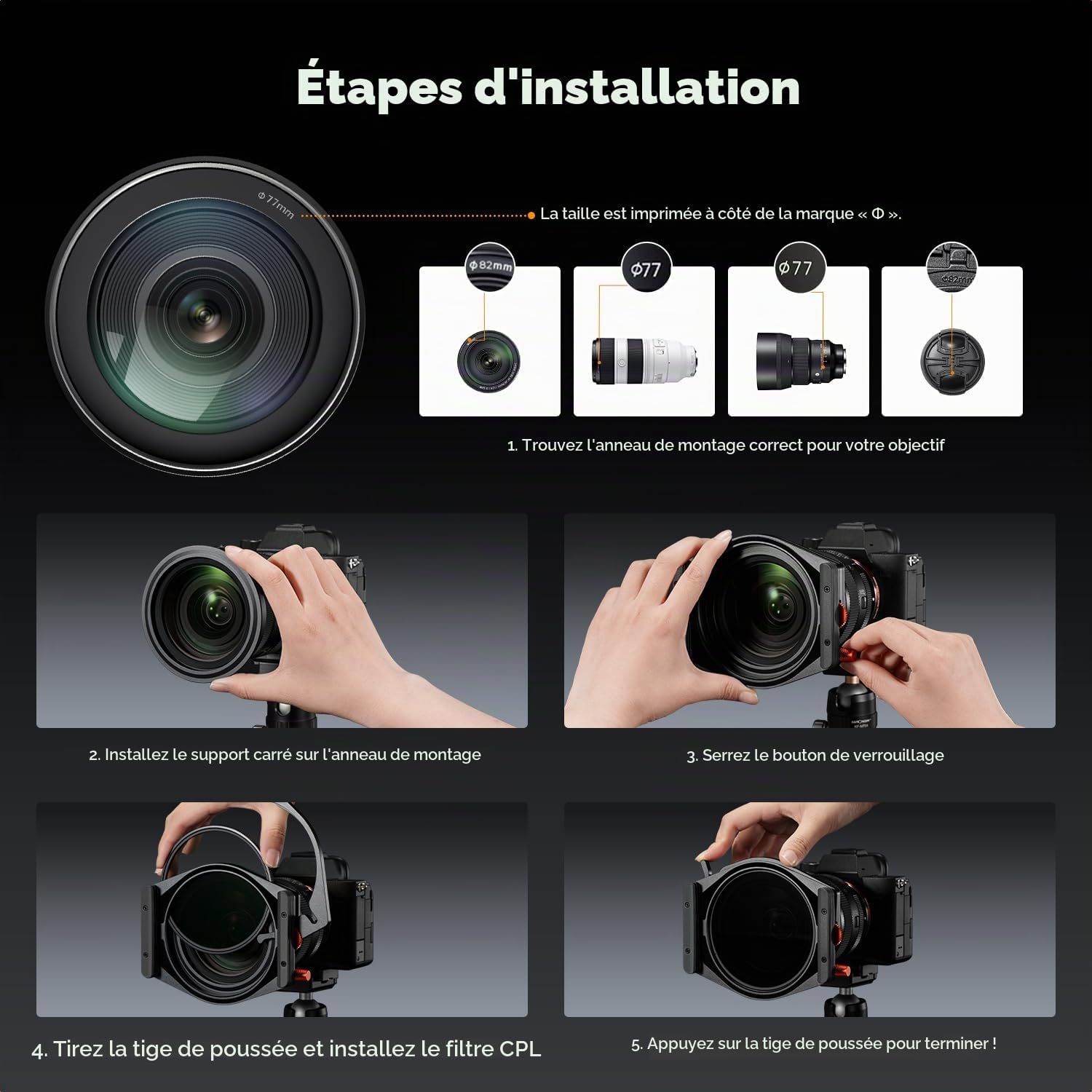
Image 3.1: Detailed steps for installing the filter holder and CPL filter on a camera lens, including identifying lens size, attaching adapter, mounting holder, and installing CPL.
- Identify Your Lens Thread Size: Locate the filter thread size on your camera lens. This is usually marked with a "Ø" symbol followed by a number (e.g., Ø77mm).
- Attach the Correct Adapter Ring: Select the adapter ring that matches your lens thread size (67mm, 72mm, 77mm, or 82mm). Screw the adapter ring onto the front of your lens until secure.
- Mount the Filter Holder: Align the filter holder with the adapter ring. Gently push the holder onto the ring until it clicks into place.
- Secure the Holder: Tighten the locking knob on the side of the filter holder to ensure it is firmly attached to the adapter ring.
- Install the CPL Filter: The CPL filter is designed for quick installation. Pull the release tab on the back of the filter holder, insert the CPL filter into its designated slot, and release the tab to secure it.
- Insert Square Filters (Optional): Slide up to two square filters into the front slots of the holder. Ensure they are fully seated. The holder's design prevents light leaks with its thick velvet band.
4. Operating Instructions
4.1 Using the CPL Filter
The 95mm CPL filter helps reduce reflections from non-metallic surfaces (like water or glass) and enhances color saturation and contrast without affecting the overall color balance.
- To adjust the polarization effect, rotate the CPL filter using the integrated adjustment wheel on the filter holder.
- The quick-release system allows for easy attachment and removal of the CPL filter, preventing light leaks when removed by closing the cover.

Image 4.1: Demonstrating the quick attachment and adjustment of the CPL filter.

Image 4.2: Visual comparison showing the effect of a CPL filter in reducing reflections and enhancing contrast.
4.2 Stacking Square Filters
The filter holder can accommodate up to two square filters simultaneously, in addition to the CPL filter. This allows for creative combinations of Neutral Density (ND), Graduated Neutral Density (GND), or other square filters.
- Carefully slide square filters into the available slots.
- Ensure filters are clean and free of fingerprints before insertion. The design allows for easy alignment and minimizes fingerprints.
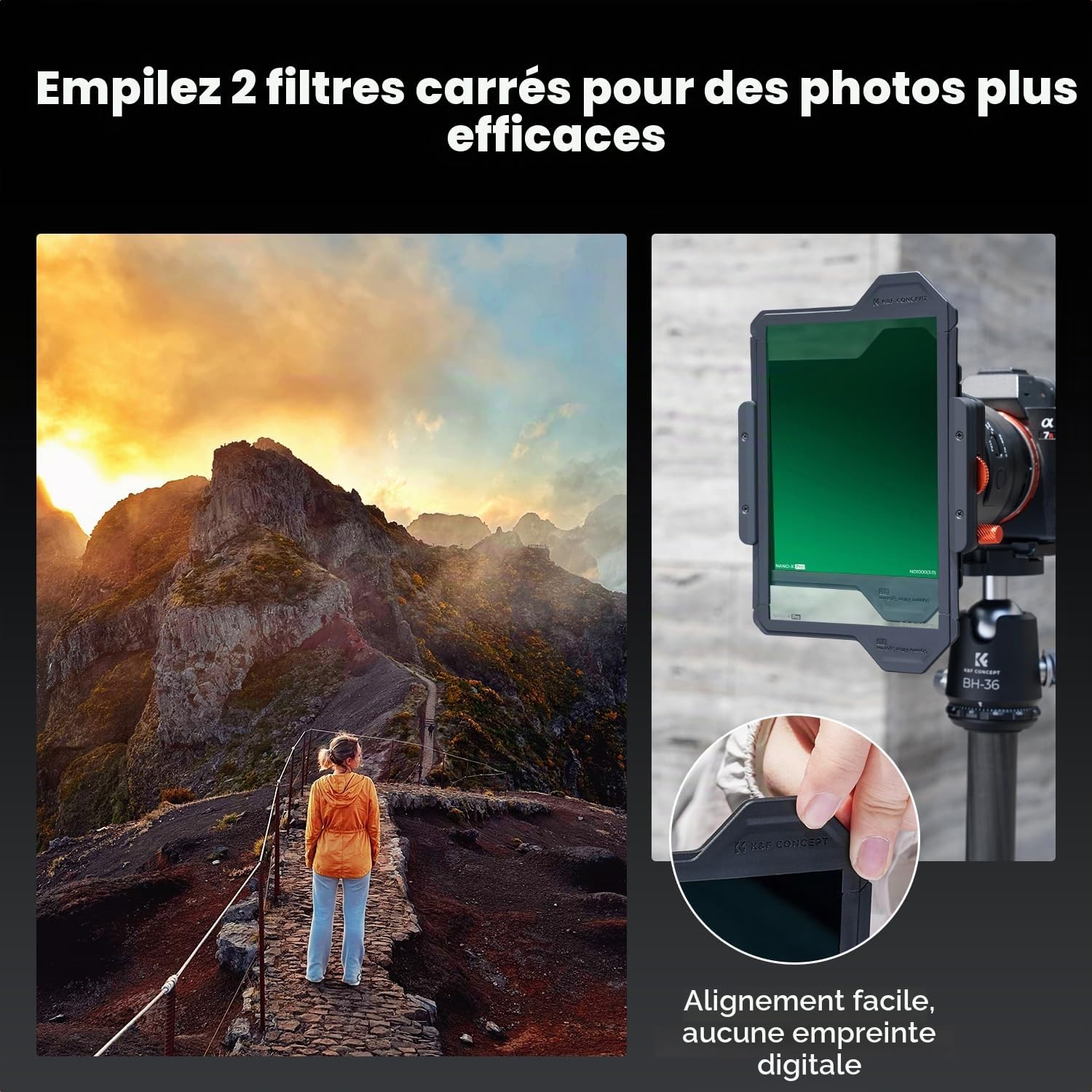
Image 4.3: Demonstrating the stacking of two square filters for combined effects.
The 12mm thickness of the filter holder and its 91mm large opening are designed to reduce vignetting, especially when using ultra-wide-angle lenses.

Image 4.4: Illustrating how the 91mm large diameter helps prevent vignetting with the K&F CONCEPT filter system compared to other systems.
5. Maintenance and Care
Proper maintenance ensures the longevity and optimal performance of your K&F CONCEPT filter system.
- Cleaning Filters: Use a soft, lint-free microfiber cloth and a specialized lens cleaning solution to clean the filters. Gently wipe in a circular motion. For dust, use a blower brush first. Avoid touching the filter surfaces with bare hands.
- Cleaning the Holder: Wipe the filter holder with a clean, dry cloth. Avoid harsh chemicals or abrasive materials.
- Storage: Store the filter holder and filters in their protective cases when not in use. Keep them in a dry, dust-free environment away from direct sunlight and extreme temperatures.
- Handling: Always handle filters by their edges to prevent fingerprints and smudges on the optical surfaces.
6. Troubleshooting
| Problem | Possible Cause | Solution |
|---|---|---|
| Vignetting (dark corners) | Using multiple thick filters, or an ultra-wide-angle lens with a standard filter system. | The K&F CONCEPT X-Pro system is designed with a 91mm large aperture to minimize vignetting, even with ultra-wide-angle lenses. Ensure filters are correctly seated and not excessively thick if using third-party filters. |
| Light leaks | Improperly seated filters, or gaps between the filter and holder. | Ensure all filters (CPL and square filters) are fully inserted and seated correctly. The filter holder features a thick velvet band to prevent light leaks. If the CPL filter is removed, ensure the cover is closed. |
| Difficulty attaching holder to lens | Incorrect adapter ring size, or adapter ring not fully screwed onto the lens. | Verify your lens thread size and use the corresponding adapter ring. Ensure the adapter ring is securely screwed onto the lens before attempting to attach the filter holder. |
| CPL filter not rotating smoothly | Dust or debris in the CPL mechanism, or improper installation. | Remove the CPL filter and gently clean its edges and the slot in the holder with a soft brush or air blower. Reinstall the CPL filter, ensuring it is correctly seated. |
7. Specifications
| Feature | Detail |
|---|---|
| Brand | K&F CONCEPT |
| Model | FH902 (Nano-X Pro Series) |
| Material | Aluminum, Optical Glass |
| Filter Holder Thickness | 12mm |
| Large Aperture Diameter | 91mm |
| CPL Filter Diameter | 95mm |
| Adapter Ring Sizes Included | 67mm, 72mm, 77mm, 82mm |
| Max Square Filters | 2 (plus 1 CPL filter) |
| Coating Description | Nano-coating |
| Water Resistance Level | Waterproof |
| Product Dimensions (L x W) | 9.5L x 9.5W centimeters |
| Compatible Devices | Cameras with 95mm, 67mm, 72mm, 77mm, or 82mm lenses |
8. Warranty and Support
K&F CONCEPT products are manufactured to high-quality standards. For specific warranty information regarding your X-Pro+CPL 95mm Filter Holder, please refer to the warranty card included in your product packaging or visit the official K&F CONCEPT website.
For technical support, troubleshooting assistance, or to inquire about replacement parts, please contact K&F CONCEPT customer service through their official website or the retailer where the product was purchased.
Online Resources:
- Official K&F CONCEPT Website: www.kentfaith.com (General website, specific support link may vary by region)
- Amazon Brand Store: K&F CONCEPT on Amazon


