1. Introduction
Thank you for choosing the GOLDCHAMP Digital Multimeter GC-4070L. This professional multimeter is designed for accurate measurement of capacitance, inductance, and resistance, along with hFE testing. It features a manual range selection, backlight, and auto-off function for enhanced usability. Please read this manual thoroughly before operation to ensure safe and correct usage.
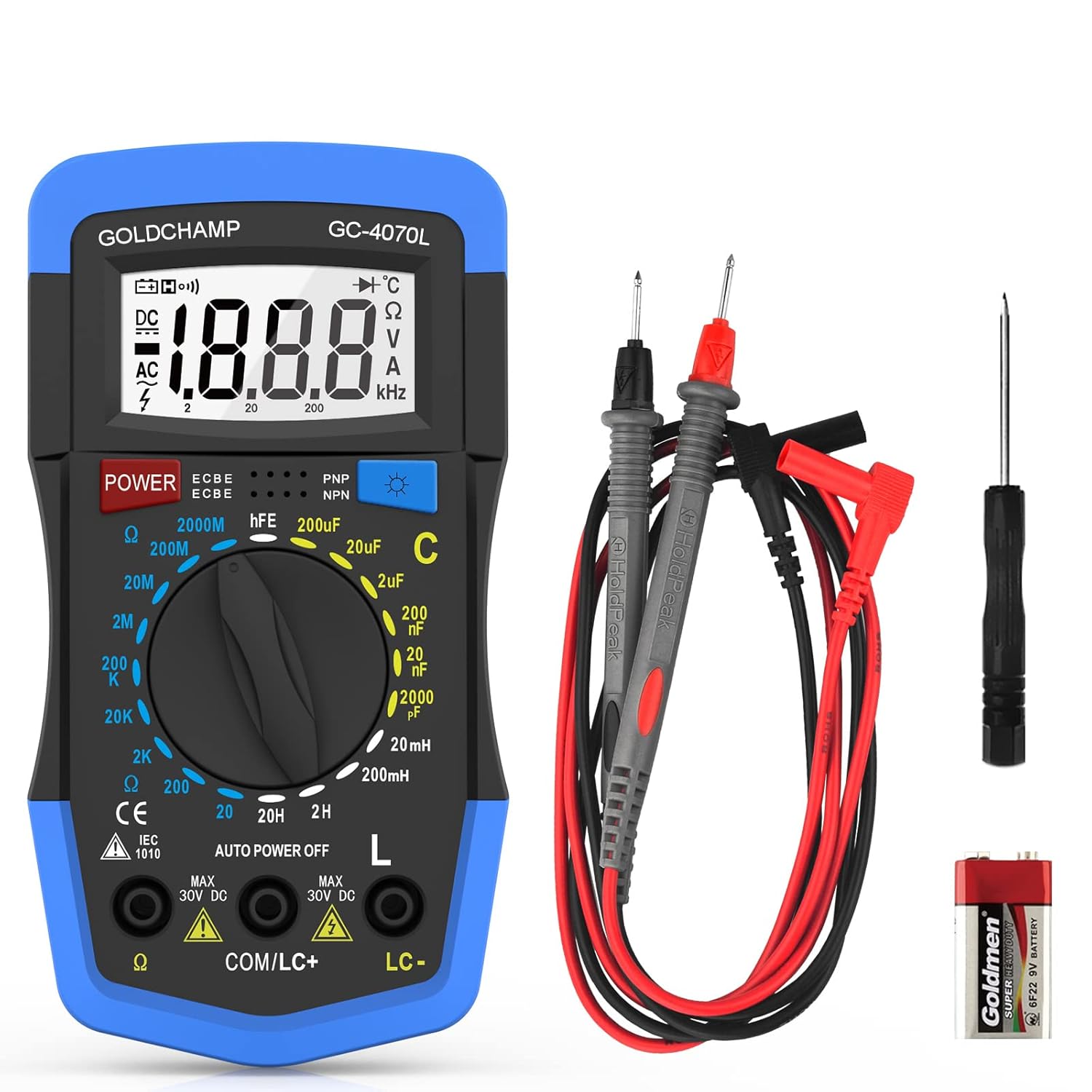
Figure 1: GOLDCHAMP Digital Multimeter GC-4070L and accessories.
2. Safety Information
Always observe basic safety precautions when using this multimeter to avoid electric shock, injury, or damage to the meter or equipment under test. Pay particular attention to all warnings and cautions.
- Do not apply voltage to the meter when the function switch is set to Resistance, Capacitance, or Inductance mode.
- Ensure the test leads are correctly inserted into the appropriate jacks for the desired measurement.
- Always disconnect power to the circuit and discharge all high-voltage capacitors before measuring resistance, capacitance, or inductance.
- Do not use the meter if it appears damaged or if the case is open.
- Replace the battery when the low battery indicator appears to ensure accurate readings.
3. Product Overview
The GOLDCHAMP GC-4070L features a clear LCD display and intuitive controls for various measurement functions.

Figure 2: Key components of the multimeter.
- LCD Display: Large screen for easy reading of measurement values.
- Power Button: Turns the device on and off.
- Backlight Button: Activates the display backlight for low-light conditions.
- Function Switch: Rotary dial to select desired measurement mode (Capacitance, Inductance, Resistance, hFE).
- Probe Jacks: Input terminals for connecting test leads.
4. Setup
4.1 Battery Installation
The multimeter requires a 9V battery (included). To install or replace the battery:
- Locate the battery compartment on the back of the meter.
- Use the included screwdriver to remove the screw securing the battery cover.
- Insert the 9V battery, observing correct polarity.
- Replace the battery cover and secure it with the screw.

Figure 3: Battery compartment and foldable stand.
4.2 Connecting Test Leads
Connect the red and black test leads to the appropriate input jacks on the multimeter. The black lead typically connects to the 'COM' (common) jack, and the red lead connects to the jack corresponding to the desired measurement function (e.g., VΩmA for voltage, resistance, or small current measurements).
5. Operating Instructions
5.1 Power On/Off
Press the POWER button to turn the multimeter on. To turn it off, press the POWER button again or wait for the auto-off function to activate.
5.2 Capacitance Measurement (C)
The GC-4070L can measure capacitance from 2000pF to 200µF.
- Rotate the function switch to the desired 'C' (Capacitance) range (e.g., 2000pF, 20nF, 200nF, 2µF, 20µF, 200µF).
- Important: Before measuring, ensure the capacitor is fully discharged to avoid damage to the meter.
- Connect the test leads to the capacitor terminals. The reading will appear on the LCD display.
Video 1: Demonstration of capacitance measurement using a similar GOLDCHAMP meter. This video illustrates the process of connecting leads and reading capacitance values.
5.3 Inductance Measurement (L)
The GC-4070L can measure inductance from 20mH to 20H.
- Rotate the function switch to the desired 'L' (Inductance) range (e.g., 20mH, 200mH, 2H, 20H).
- Connect the test leads to the inductor terminals. The reading will appear on the LCD display.
5.4 Resistance Measurement (Ω)
The GC-4070L can measure resistance from 20Ω to 2000MΩ.
- Rotate the function switch to the desired 'Ω' (Resistance) range (e.g., 20Ω, 200Ω, 2kΩ, 20kΩ, 200kΩ, 2MΩ, 20MΩ, 200MΩ, 2000MΩ).
- Connect the test leads to the resistor terminals. The reading will appear on the LCD display.
5.5 hFE Test
The hFE test function allows for testing of transistor gain.
- Rotate the function switch to the 'hFE' position.
- Insert the transistor leads into the appropriate sockets on the meter (E, B, C for Emitter, Base, Collector, and PNP/NPN type).
- The hFE value will be displayed on the LCD.
5.6 Backlight and Auto-Off
- Backlight: Press the Backlight button to illuminate the LCD display. Press it again to turn off the backlight.
- Auto-Off: The meter will automatically power off after approximately 10 minutes of inactivity to conserve battery life.

Figure 4: Multimeter display with backlight.
6. Maintenance
- Cleaning: Wipe the meter with a dry, soft cloth. Do not use abrasives or solvents.
- Battery Replacement: Replace the 9V battery as described in Section 4.1 when the low battery indicator appears on the display.
- Storage: If the meter is not used for a long period, remove the battery to prevent leakage and damage. Store in a cool, dry place.
7. Troubleshooting
- No Display: Check battery installation and ensure the battery has sufficient charge.
- Incorrect Readings: Verify that the function switch is set to the correct range and that test leads are properly connected. Ensure the component under test is correctly prepared (e.g., discharged capacitors).
- "OL" or "1" on Display: This indicates an overload or out-of-range measurement. Select a higher range or check the circuit.
8. Specifications
| Feature | Specification |
|---|---|
| Brand | GOLDCHAMP |
| Model Number | GC-4070L |
| Measurement Type | Multimeter (Capacitance, Inductance, Resistance, hFE) |
| Capacitance Range | 2000pF ~ 200µF |
| Inductance Range | 20mH ~ 20H |
| Resistance Range | 20Ω ~ 2000MΩ |
| Display | LCD, 1999 Counts, Backlight |
| Power Source | 9V Battery (included) |
| Auto-Off | Yes (approx. 10 minutes) |
| Dimensions | 15.29 x 11.3 x 4.6 cm |
| Weight | 272 g |
| Color | Blue |
9. Warranty and Support
For warranty information or technical support, please refer to the contact details provided with your purchase or visit the official GOLDCHAMP website. Keep your purchase receipt as proof of purchase.


