
1. Introduction
This manual provides detailed instructions for the safe and efficient use of your ACOPOWER 90W Portable Foldable Solar Panel. Please read this manual thoroughly before operation to ensure proper functionality and longevity of the product. This solar panel is designed to provide portable power for various devices, ideal for camping, RV use, and other outdoor activities.

Image 1.1: The ACOPOWER 90W Portable Foldable Solar Panel in its unfolded state, ready for use.
2. Safety Instructions
- Water Exposure: The solar panel is IP65 water-resistant, protecting against splashing water. Do not submerge the panel in water or expose it to heavy rain.
- Handling: Handle the solar panel with care. Avoid dropping or subjecting it to strong impacts.
- Temperature: Do not expose the solar panel to extreme temperatures or open flames.
- Modifications: Do not attempt to disassemble, modify, or repair the solar panel yourself. Contact customer support for assistance.
- Children: Keep the solar panel out of reach of children.
- Electrical Safety: Ensure all connections are secure before use. The panel includes built-in protection against overcharging, overheating, and short circuits.
3. Package Contents
Verify that all items are present in your package:
- 1 x ACOPOWER 90W Portable Foldable Solar Panel
- Integrated cables for DC, USB, and Type-C outputs
- Adjustable stands (integrated into the design)
4. Product Features
- Multiple Output Ports: Equipped with DC, USB, and Type-C output ports for broad compatibility with various devices.
- High Conversion Efficiency: Monocrystalline photovoltaic cells achieve up to 25% solar conversion efficiency.
- Durable Construction: Features advanced laminated technology and long-lasting ETFE material for scratch resistance and improved light transmittance.
- Integrated Safety: Built-in smart IC chip provides protection against overcharging, overheating, and short circuits.
- Portable Design: Lightweight (8.1 lb) and foldable, with compact dimensions (21.4 x 13.3 x 0.79 inches folded) for easy transport.
- Adjustable Stands: Two integrated adjustable stands allow for optimal angle positioning towards the sun.
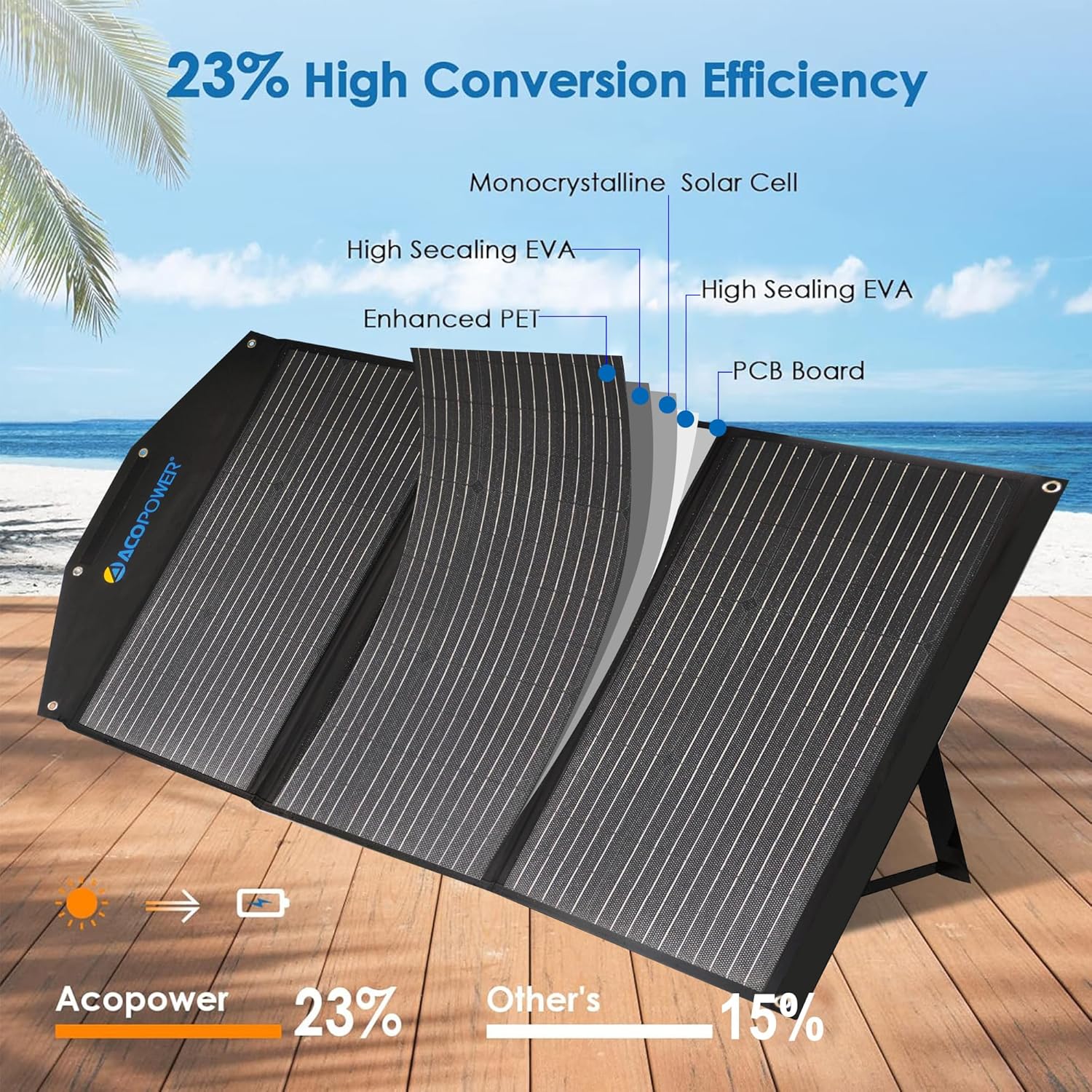
Image 4.1: Cross-section diagram illustrating the high-efficiency monocrystalline solar cell and durable ETFE material layers.

Image 4.2: The solar panel in both folded and unfolded states, highlighting its compact and portable design with dimensions.
5. Setup
- Unfold the Panel: Carefully unfold the ACOPOWER 90W solar panel from its compact, suitcase-like form.
- Position the Stands: Extend the two adjustable stands located on the back of the panel. Position them to support the panel at an angle that maximizes exposure to direct sunlight. An angle of approximately 45 degrees to the sun is often optimal.
- Placement: Place the unfolded solar panel in an area with unobstructed sunlight. Ensure no shadows fall on the panel, as this can significantly reduce efficiency.
- Secure the Panel: If necessary, use the integrated mounting holes to secure the panel against wind or accidental displacement.

Image 5.1: A person setting up the ACOPOWER solar panel, demonstrating the use of the adjustable kickstand for optimal positioning.
6. Operating Instructions
Once the solar panel is set up and exposed to sunlight, you can begin charging your devices.
- Connecting Devices:
- DC Output: Use the DC port to connect to compatible portable power stations or other devices requiring DC input.
- USB Output: Connect smartphones, tablets, power banks, and other USB-powered devices to the USB-A ports. The smart IC chip will automatically detect your device and optimize charging speed (up to 2.4A max 5V DC per port, 6A max overall).
- Type-C Output: Connect compatible devices, such as modern smartphones, tablets, or laptops, to the Type-C port.
- Charging Indicator: Some devices may have a charging indicator. Observe this to confirm power flow.
- Optimal Performance: For best charging results, ensure the solar panel is positioned directly facing the sun and free from any obstructions. Adjust the angle periodically as the sun moves.

Image 6.1: The ACOPOWER solar panel connected to various devices including a power station, laptop, camera, smartphone, and tablet, demonstrating its wide compatibility.

Image 6.2: The solar panel highlighting its built-in protection functions, including short circuit, surge, and overload protection, ensuring safe charging.
7. Maintenance
- Cleaning: Regularly clean the surface of the solar panel with a soft, damp cloth to remove dust, dirt, or debris. Avoid abrasive cleaners or harsh chemicals.
- Inspection: Periodically inspect the panel and cables for any signs of damage, wear, or loose connections.
- Storage: When not in use, fold the solar panel and store it in a dry, cool place away from direct sunlight and extreme temperatures.
8. Troubleshooting
| Problem | Possible Cause | Solution |
|---|---|---|
| No power output from ports. |
|
|
| Slow charging speed. |
|
|
| Panel feels hot during operation. |
|
|
9. Specifications
| Attribute | Detail |
|---|---|
| Brand | ACOPOWER |
| Model Number | 90W Portable Solar Panel |
| Material | ETFE |
| Product Dimensions (Unfolded) | 46.9 x 21.4 inches |
| Product Dimensions (Folded) | 21.4 x 13.3 x 0.79 inches |
| Item Weight | 8.1 lb (3.67 kg) |
| Efficiency | Up to 25% (Monocrystalline) |
| Output Ports | DC, USB-A (up to 2.4A max 5V DC per port, 6A max overall), Type-C |
| Water Resistance | IP65 (Splash-proof) |
| Safety Features | Overcharging, Overheating, Short Circuit Protection (Smart IC chip) |
| UPC | 810073750647 |
10. Warranty and Support
ACOPOWER products are designed for reliability and performance. For warranty information, technical support, or any questions regarding your 90W Portable Foldable Solar Panel, please contact ACOPOWER customer service directly.
You can find contact information on the official ACOPOWER website or through your purchase platform.


