
1. Introduction
This manual provides essential information for the installation, operation, and maintenance of your Timetec 32GB KIT (2x16GB) DDR5 4800MHz SODIMM Laptop Memory. This memory module is designed to enhance your laptop's performance by providing faster processing speeds and improved multitasking capabilities. Please read these instructions carefully before proceeding with installation.
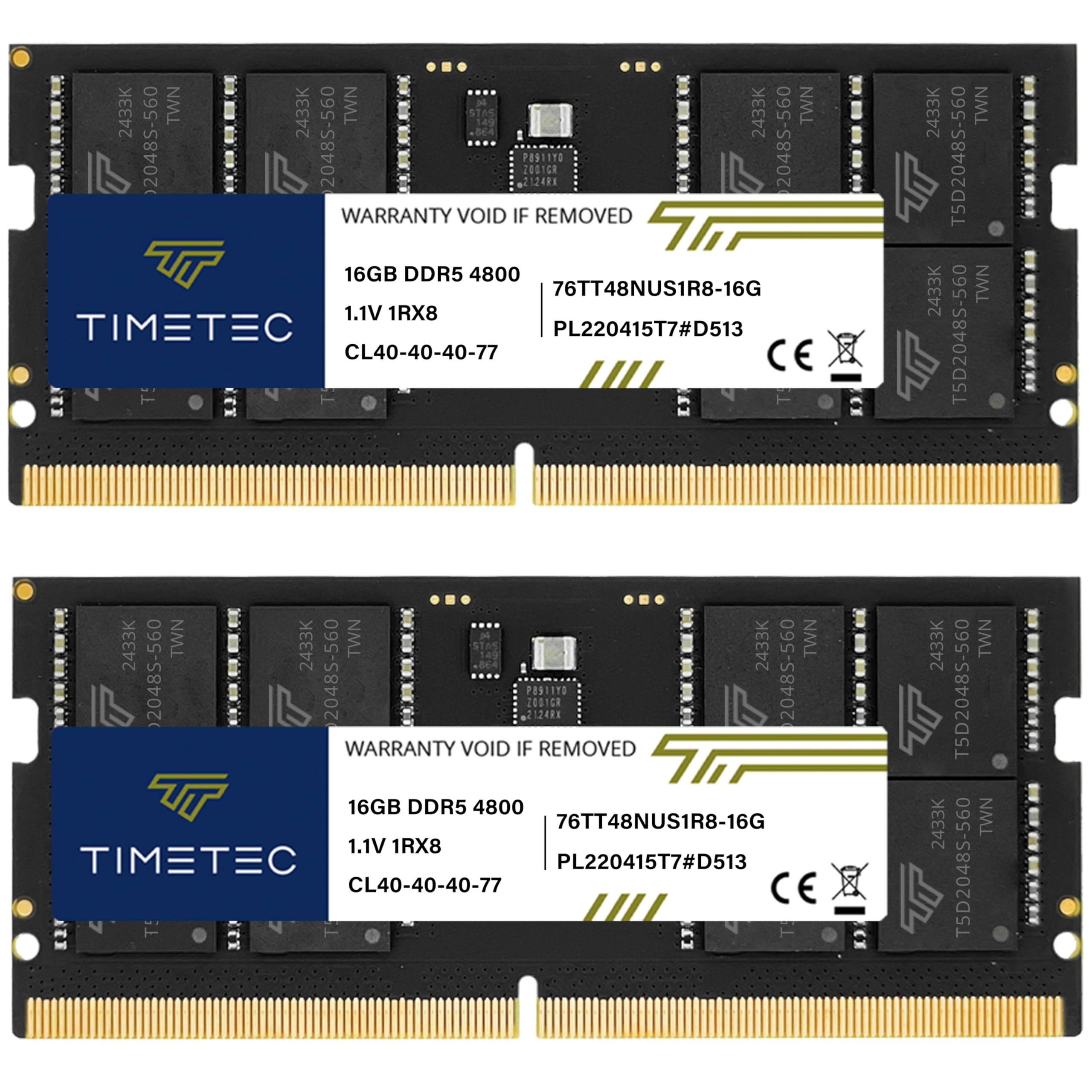
Image 1.1: Timetec 32GB DDR5 4800MHz SODIMM Laptop Memory Module. This image displays the memory module itself, highlighting its compact form factor suitable for laptops.
2. Safety Precautions
Before handling any computer components, observe the following safety guidelines:
- Electrostatic Discharge (ESD) Protection: Always ground yourself before touching memory modules or other internal computer components. Use an anti-static wrist strap or frequently touch a grounded metal object (e.g., the computer chassis).
- Power Off: Ensure your laptop is completely powered off and disconnected from the power adapter and battery before opening the chassis.
- Handle with Care: Hold memory modules by their edges, avoiding contact with the gold connectors or the integrated circuits (ICs).
- Consult Laptop Manual: Refer to your laptop's official service manual for specific instructions on accessing and replacing memory modules, as procedures vary by model.
3. Compatibility
This Timetec DDR5 4800MHz SODIMM memory kit is designed for laptops that support DDR5 memory. It is not compatible with DDR4 motherboards. Verify your laptop's memory type and maximum supported capacity before installation.

Image 3.1: Partial list of compatible DDR5 laptops. This image provides examples of laptop models that are compatible with Timetec DDR5 memory modules.
4. Installation Guide
Follow these general steps to install your Timetec DDR5 SODIMM memory modules. Specific steps may vary based on your laptop model.
- Prepare Your Laptop: Power off your laptop completely, disconnect the AC adapter, and remove the battery (if removable).
- Access Memory Slots: Carefully open your laptop's chassis to access the memory slots. This usually involves removing screws from the bottom panel. Refer to your laptop's service manual for precise instructions.
- Remove Existing Modules (if applicable): If you are replacing existing memory, gently push the small clips on both sides of the SODIMM module outwards. The module will pop up at an angle. You can then carefully pull it out of the slot.
- Install New Modules: Align the notch on the Timetec DDR5 SODIMM module with the key in the memory slot. Insert the module at a 45-degree angle, applying firm but gentle pressure until it is fully seated.
- Secure Modules: Push the module down until the side clips snap into place, securing the module horizontally.
- Repeat for Second Module: If installing both modules from the kit, repeat steps 4 and 5 for the second memory slot.
- Reassemble Laptop: Carefully close your laptop's chassis, reattach the battery (if removed), and reconnect the AC adapter.
- Power On and Verify: Power on your laptop. The system should automatically detect the new memory. You can verify the installed memory in your operating system's system information or BIOS/UEFI settings.

Image 4.1: Timetec DDR5 SODIMM modules positioned near a laptop keyboard, illustrating their size and placement for installation.

Image 4.2: Two Timetec DDR5 SODIMM modules shown installed within a laptop's memory slots, demonstrating proper seating.
5. Operation
Once correctly installed, your Timetec DDR5 SODIMM memory modules operate automatically. The system's BIOS/UEFI will detect the new memory, and the operating system will utilize it to improve overall performance, application responsiveness, and multitasking efficiency. No user configuration is typically required for standard operation.
6. Key Features and Benefits
The Timetec DDR5 4800MHz SODIMM memory offers several advanced features:
- High Speed: Operates at 4800MHz, providing significantly faster data transfer rates compared to previous DDR generations.
- Enhanced Multitasking: Increased bandwidth and capacity allow for smoother operation of multiple applications simultaneously.
- On-die ECC (ODEC): Improves error checking capability directly on the memory module, leading to more stable and accurate data processing.
- Power Management IC (PMIC): Integrated PMIC ensures stable power delivery and reduces power consumption to 1.1V, improving energy efficiency.

Image 6.1: Graphic illustrating DDR5 4800MHz performance, showing its speed advantage over DDR4.

Image 6.2: Close-up view of a DDR5 module, highlighting the Power Management Integrated Circuit (PMIC) for stable power transfer.

Image 6.3: Graphic demonstrating the enhanced multitasking capabilities provided by DDR5 memory, allowing seamless operation of multiple applications.
7. Maintenance and Care
Timetec memory modules are designed for reliability and require minimal maintenance. To ensure optimal performance and longevity:
- Keep Clean: Avoid dust accumulation inside your laptop, which can affect component cooling. Periodically clean your laptop's interior with compressed air.
- Proper Handling: When handling memory modules, always hold them by the edges to prevent damage to the components or gold contacts.
- Storage: If storing modules, keep them in an anti-static bag in a cool, dry place.
8. Troubleshooting
If you encounter issues after installing your memory, consider the following:
- No Display/Boot Issues:
- Ensure modules are fully seated in their slots. Re-insert them firmly.
- Verify compatibility with your laptop model.
- Try installing one module at a time to identify a potentially faulty module or slot.
- Incorrect Memory Reported:
- Check your laptop's BIOS/UEFI settings to confirm the memory is recognized.
- Ensure your operating system is 64-bit to fully utilize 32GB of RAM.
- System Instability/Crashes:
- Run a memory diagnostic tool (e.g., Windows Memory Diagnostic, MemTest86) to check for errors.
- Ensure your laptop's BIOS/UEFI is updated to the latest version.
If problems persist, contact Timetec customer support for further assistance.
9. Specifications
| Feature | Detail |
|---|---|
| Memory Type | DDR5 SODIMM |
| Capacity | 32GB KIT (2x16GB) |
| Speed | 4800MHz (PC5-38400) |
| Voltage | 1.1V |
| CAS Latency | CL40-40-40-77 |
| Rank | 1Rx8 Single Rank |
| Pin Count | 262 Pin |
| Error Correction | Unbuffered Non-ECC (with On-die ECC) |
| Compatible Devices | Laptops with DDR5 support |
10. Warranty Information
Timetec provides a Guaranteed Lifetime Warranty from the purchase date for this memory module. This warranty covers defects in materials and workmanship under normal use. For warranty claims or detailed terms and conditions, please refer to the official Timetec website or contact customer support.
11. Customer Support
For technical assistance, troubleshooting, or warranty inquiries, please contact Timetec customer support. Free technical support is available from our United States-based team.
- Online Support: Visit the official Timetec website for FAQs and support resources.
- Contact Information: Refer to the Timetec website for current contact methods (phone, email, chat).
Video 11.1: Official Timetec Premium DDR5 SODIMM product video. This video provides a visual overview of the Timetec Premium DDR5 SODIMM memory module and its features.