Product Overview
The BISHKJOK E27 Light Bulb Security Camera is a versatile surveillance device designed for smart home security. It features 1080P resolution, 360-degree pan/tilt panoramic view, color night vision, motion detection with alarms, and two-way audio communication. Its unique light bulb design allows for easy installation into standard E27 light sockets, making it a discreet and effective solution for monitoring indoor spaces.

Image: The BISHKJOK E27 Light Bulb Security Camera, showing its light bulb form factor and camera lens with integrated LEDs.
What's in the Box
Upon opening the product packaging, please verify that all the following components are included:
- Bulb Camera
- E27 Socket Adapter (if included, for standard US outlets)
- Manual
- Toolkit (screws, wall anchors)
- Poly bag
- Foam packaging
- Packing box
Video: An unboxing video demonstrating the contents of the Light Bulb Security Camera package, including the camera, E27 socket, and accessories.

Image: A detailed view of the product components, including the E27 light socket, enhanced WiFi module, microphone, 4 white LEDs, 4 array LEDs, HD lens, light sensor, Micro SD card slot, and reset button.
Setup
1. Physical Installation
The BISHKJOK E27 Light Bulb Security Camera is designed for easy installation into any standard E27 light bulb socket. Ensure the power to the socket is turned off before installation.
- Screw the camera into an existing E27 light socket.
- If using the included E27 socket adapter, first plug the adapter into a standard wall outlet, then screw the camera into the adapter.
- Turn on the power to the socket. The camera will power on and begin its initialization sequence.

Image: A visual guide demonstrating how to easily install the light bulb camera into an E27 power socket, similar to installing a regular light bulb.
Video: A demonstration of the physical installation process for the Light Bulb Security Camera, showing how to attach it to an E27 socket and power it on.
2. App Download and Connection
The camera operates via the "Tuya Smart" app. Ensure your mobile device is connected to a 2.4GHz Wi-Fi network (5GHz networks are NOT supported).
- Download the "Tuya Smart" app from the App Store (iOS) or Google Play (Android). You can use this link to download the app.
- Register an account and log in to the app.
- In the app, tap "Add Device" or the "+" icon.
- Select "Security Camera (Wi-Fi)" from the device list.
- Follow the on-screen prompts to connect the camera. You will be asked to confirm the indicator light is flashing rapidly.
- Enter your 2.4GHz Wi-Fi network password.
- The app will generate a QR code. Hold your phone with the QR code approximately 15-20 cm (6-8 inches) in front of the camera lens until you hear a prompt tone indicating successful scanning.
- Wait for the device to connect. Once connected, you can name your camera and assign it to a room.

Image: A four-step guide illustrating the quick connection process using the Tuya Smart app, including downloading the app, connecting to 2.4GHz WiFi, scanning the QR code, and successful device addition.

Image: A detailed eight-step guide for AP (Access Point) connection, showing how to add the device manually, select the camera type, confirm indicator status, connect to the camera's hotspot, and complete the setup.
Video: A comprehensive video demonstrating the app setup process for the Light Bulb Security Camera, including connecting to Wi-Fi and scanning the QR code for pairing.
Operating the Camera
Live View and Pan/Tilt Control
Once connected, open the camera's live view in the Tuya Smart app. You can control the camera's pan (horizontal) and tilt (vertical) movements directly from the app to view different areas of the room. The camera offers a 355° pan and 95° tilt range, ensuring no blind spots.
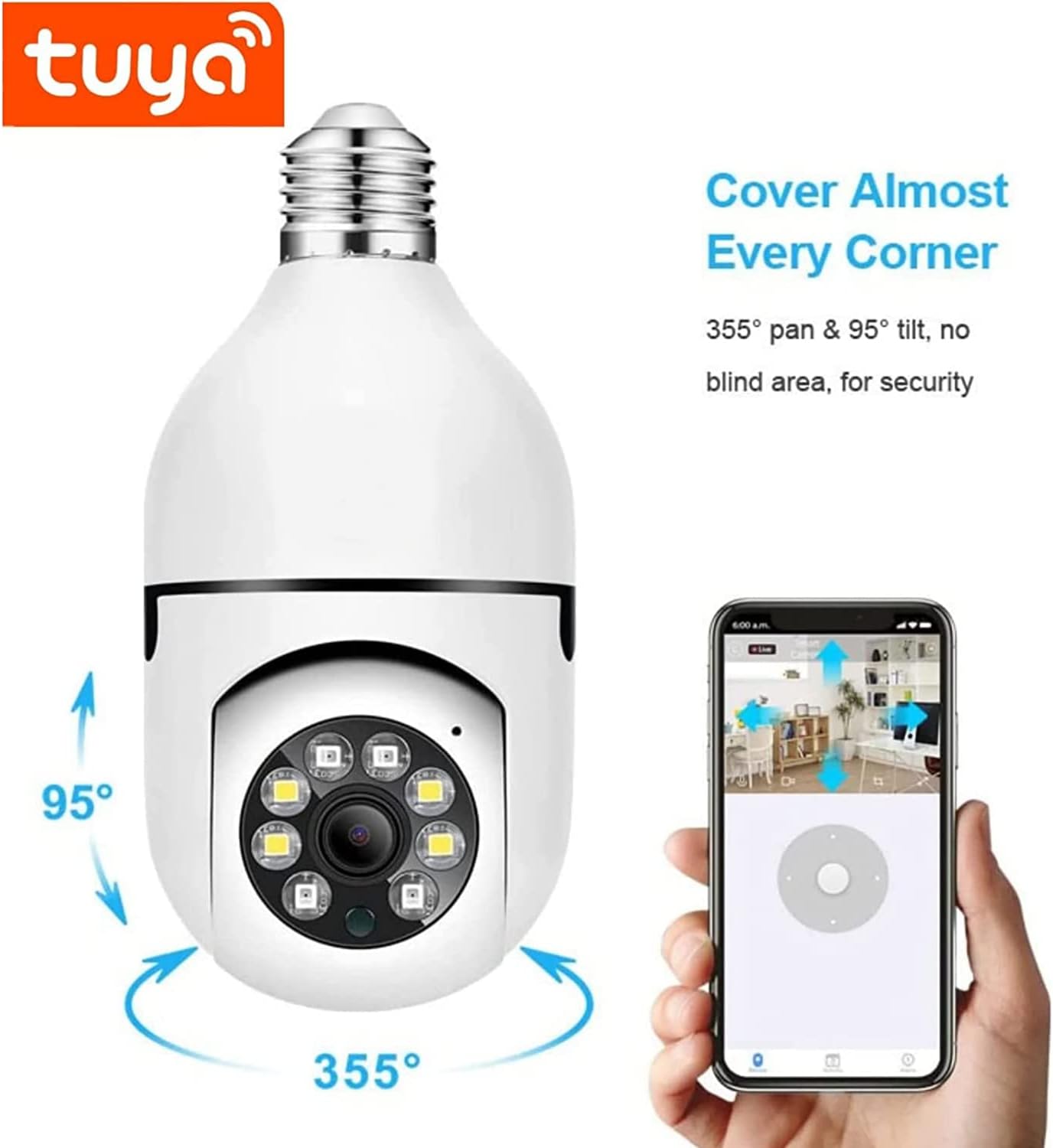
Image: Illustrates the 355° pan and 95° tilt capabilities of the camera, showing how it can cover almost every corner without blind spots, controlled via the mobile app.
Video: A demonstration of controlling the camera's pan and tilt functions using the mobile application, showcasing its 360-degree viewing capability.
Night Vision Modes
The camera supports both infrared night vision and full-color night vision. In low-light conditions, the camera can automatically switch to infrared mode for clear black and white images. When motion is detected, the strong white light LEDs can automatically activate to provide full-color night vision and deter intruders.

Image: A comparison showing the difference between infrared night vision (monochrome) and full-color night vision, highlighting the camera's ability to provide clear, colorful images even in low light.
Video: A short preview demonstrating the camera's night vision capabilities, showing the transition between different lighting conditions and the clarity of the night view.
Two-Way Talk
The built-in microphone and speaker allow for real-time two-way audio communication. You can speak through the camera to communicate with family members, pets, or deter unwanted visitors directly from your smartphone.

Image: Illustrates the two-way voice intercom feature, showing a user communicating with a child through the app, enabling multi-person sharing and interaction.
Video: A demonstration of the two-way talk feature, showing how users can communicate through the camera using their mobile device.
Motion Detection and Alerts
The camera features intelligent human motion tracking and alarm functions. When movement is detected, especially human figures, the camera can automatically track the subject and send real-time alerts to your mobile device. This helps you stay informed of any potential dangers or activity in your home.

Image: Depicts the motion detection feature, showing how the camera can warn uninvited guests instantly with a siren alarm and light up when someone passes by, sending notifications to your phone.
Video Recording and Storage
Video footage can be stored securely using either a Micro SD card (not included) or cloud storage services (subscription may be required). All video and account data are encrypted for privacy and security.

Image: Illustrates the available video storage options: cloud storage and local storage via a TF (Micro SD) card, with a timeline of recorded events.
Maintenance
To ensure optimal performance and longevity of your BISHKJOK E27 Light Bulb Security Camera, follow these maintenance guidelines:
- Cleaning: Gently wipe the camera lens and exterior with a soft, dry cloth. Avoid using liquid cleaners or abrasive materials that could scratch the lens or damage the device.
- Firmware Updates: Regularly check the Tuya Smart app for available firmware updates. Keeping the camera's firmware up-to-date ensures you have the latest features, security patches, and performance improvements.
- Network Stability: Ensure your 2.4GHz Wi-Fi network is stable and has a strong signal where the camera is installed. Poor network connectivity can affect video quality and real-time alerts.
- Storage Management: If using a Micro SD card, periodically review and manage stored footage to prevent the card from becoming full. Consider backing up important recordings to cloud storage or another device.
- Environmental Conditions: This camera is designed for indoor use. Avoid exposing it to extreme temperatures, direct water, or high humidity, as this can damage internal components.
Troubleshooting
If you encounter issues with your BISHKJOK E27 Light Bulb Security Camera, refer to the following common problems and solutions:
| Problem | Possible Cause & Solution |
|---|---|
| Camera fails to connect to Wi-Fi. |
|
| Poor video quality or frequent disconnections. |
|
| Motion detection alerts are not received. |
|
| Two-way audio is unclear or not working. |
|
Specifications
| Feature | Detail |
|---|---|
| Model Name | E27 |
| Indoor/Outdoor Usage | Indoor |
| Power Source | E27 |
| Connectivity Protocol | Wi-Fi (2.4GHz only) |
| Video Capture Resolution | 1080p |
| Mounting Type | Wall Mount, Placed on table |
| Viewing Angle | 360 Degrees (Pan/Tilt) |
| Special Features | Night Vision, Motion Sensor, Two-Way Talk |
| Dimensions (L x W x H) | 6.3 x 2.8 x 2.8 inches |
| Item Weight | 9.9 ounces |
| Material | Plastic |
| Voltage | 240 Volts |
| Wattage | 5 Watt-hours |
| International Protection Rating | IP65 |
Warranty and Support
For detailed warranty information and technical support, please refer to the official user guide or contact BISHKJOK customer service.
You can access the official User Guide (PDF) here.
For further assistance, please reach out to the seller or manufacturer directly through the platform where the product was purchased.


