
1. Introduction to the Autel MaxiCOM MK906S PRO2-TS
The Autel MaxiCOM MK906S PRO2-TS is an advanced automotive diagnostic and information system designed for comprehensive vehicle analysis and maintenance. This device offers a wide range of functionalities, including full system diagnostics, extensive service functions, and complete Tire Pressure Monitoring System (TPMS) capabilities. It is built with a robust hardware platform and runs on an optimized Android operating system to provide efficient and reliable performance.

Figure 1.1: Autel MaxiCOM MK906S PRO2-TS Diagnostic Scanner
2. Setup and First Use
2.1 Unboxing and Initial Inspection
Upon receiving your Autel MaxiCOM MK906S PRO2-TS, carefully unbox all components and inspect for any signs of damage. Ensure all items listed in the 'What's in the Box' section are present.
Video 2.1: MaxiSys MS906 Pro Unboxing. This video demonstrates the unboxing process and contents of a similar Autel device, providing a visual guide for initial setup.
2.2 Connecting the VCI (Vehicle Communication Interface)
The MaxiCOM MK906S PRO2-TS utilizes an enhanced Bluetooth VCI V200 for wireless communication with the vehicle. This allows for remote diagnosis and a more stable connection.
- Locate the vehicle's OBDII port, typically found beneath the steering column.
- Plug the VCI V200 into the OBDII port. The VCI's indicator lights will confirm power and connection status.
- On the MaxiCOM tablet, navigate to the VCI Manager application.
- Ensure Bluetooth is enabled on the tablet and select the VCI V200 from the list of available devices to establish a connection. A green checkmark next to the VCI icon on the tablet indicates a successful connection.

Figure 2.2: The MaxiCOM MK906S PRO2-TS tablet and VCI V200, illustrating the wireless connection capability.
2.3 Software Updates
It is crucial to keep your device's software updated to ensure compatibility with the latest vehicle models and access to new features. The MK906S PRO2-TS supports weekly/monthly updates.
- Connect the tablet to a stable Wi-Fi network.
- Tap the Update icon on the home screen.
- Follow the on-screen prompts to download and install available updates.
3. Operating the Diagnostic Scanner
3.1 Vehicle Identification
The device offers several methods for quick and accurate vehicle identification:
- Auto VIN: Automatically reads the Vehicle Identification Number (VIN) upon connection.
- Auto Scan 2.0: A new technology for rapid scanning, identifying vehicles in seconds (e.g., GM <8s, Ford/VAG/Chrysler <10s).
- Scan VIN/License: Uses the tablet's camera to scan the VIN or license plate.
- Manual Input: Allows manual entry of vehicle details.
3.2 OE-Level All System Diagnostics
The MK906S PRO2-TS provides comprehensive diagnostics for all available vehicle systems, including Engine, Airbag, BCM, BMS, ABS, and more.
- Read/Clear DTCs: Access and clear over 8000 diagnostic trouble codes.
- View Live Data: Monitor real-time sensor data in text or graph format.
- Freeze Frame: View a snapshot of sensor data at the moment a DTC was set.
- Retrieve ECU Information: Access detailed information about the Electronic Control Unit.

Figure 3.1: Overview of OE-Level All System Diagnostics capabilities.
Video 3.1: Autel MK808 Full System Diagnostic Scanner. This video demonstrates the full system diagnostic process on a similar Autel device, showcasing its capabilities.
3.3 Bidirectional Control / Active Tests
Perform various active tests to command vehicle ECUs and pinpoint faulty components quickly.
- Injector Tests, Fuel Injector Balance, EVAP Tests, Compression tests.
- Cooling Fan, ABS Motor Pump, Windows/Wipers/Sunroof/Doors operation.

Figure 3.2: Illustration of Bidirectional Control and Active Test functions.
4. TPMS Functions
The MaxiCOM MK906S PRO2-TS is a comprehensive TPMS tool, offering full functionality from diagnosis to programming and relearn procedures.
- BLE-A001 Compatibility: Works with Autel Bluetooth-TPMS sensors preprogrammed for Tesla models and programmable for BLE-equipped vehicles.
- MX-Sensor Programming: Supports 2 ways to program MX-Sensors (Copy by OBD, Auto Create 1-20 Sensors Simultaneously).
- Sensor Activation: Activates all known TPMS sensors (315MHz & 433MHz).
- TPMS Relearn: Features over 3000 built-in TPMS relearn procedures (OBD Relearn, Automatic Relearn, Stationary Relearn, Copy Relearn).
- TPMS Retrofit: Allows adding TPMS to vehicles not originally equipped with it.
- TPMS Toolkit: Includes RKE & RF signal strength check, Redi-sensor flashing, Sleep/Park Mode Switch.

Figure 4.1: TPMS programming and relearn options.
Video 4.1: 2022 Autel MaxiCOM MK906 Pro-TS, Full TPMS Services. This video provides a detailed overview of the full TPMS service capabilities.
5. Advanced Features and Service Functions
5.1 ECU Coding and Adaptations
The device supports advanced ECU coding functions for 95% of vehicles, including online and offline coding.
- Refresh Hidden Functions, Simulate Higher-Level Features.
- Component Match & Modification, Personalization for Land Rover/Jaguar.
- Offline Adaptation for BMW E/F/G Chassis, Porsche, Ford.

Figure 5.1: ECU Coding capabilities for various vehicle functions.
Video 5.1: Autel MK906 Pro TS: VW Online Coding - Demo. This video demonstrates online coding for Volkswagen vehicles.
5.2 40+ Hot Reset & Maintenance Services
The MK906S PRO2-TS provides over 40 reset and maintenance services for routine vehicle upkeep.
- Oil Reset, EPB (Electronic Parking Brake), SAS (Steering Angle Sensor) Adjustment.
- DPF (Diesel Particulate Filter) Regeneration, Injector Coding, ABS Auto Bleed, BMS (Battery Management System).
- Power Balance, Throttle Adaptation, Suspension Calibration, Headlamp Adjustment, and more.
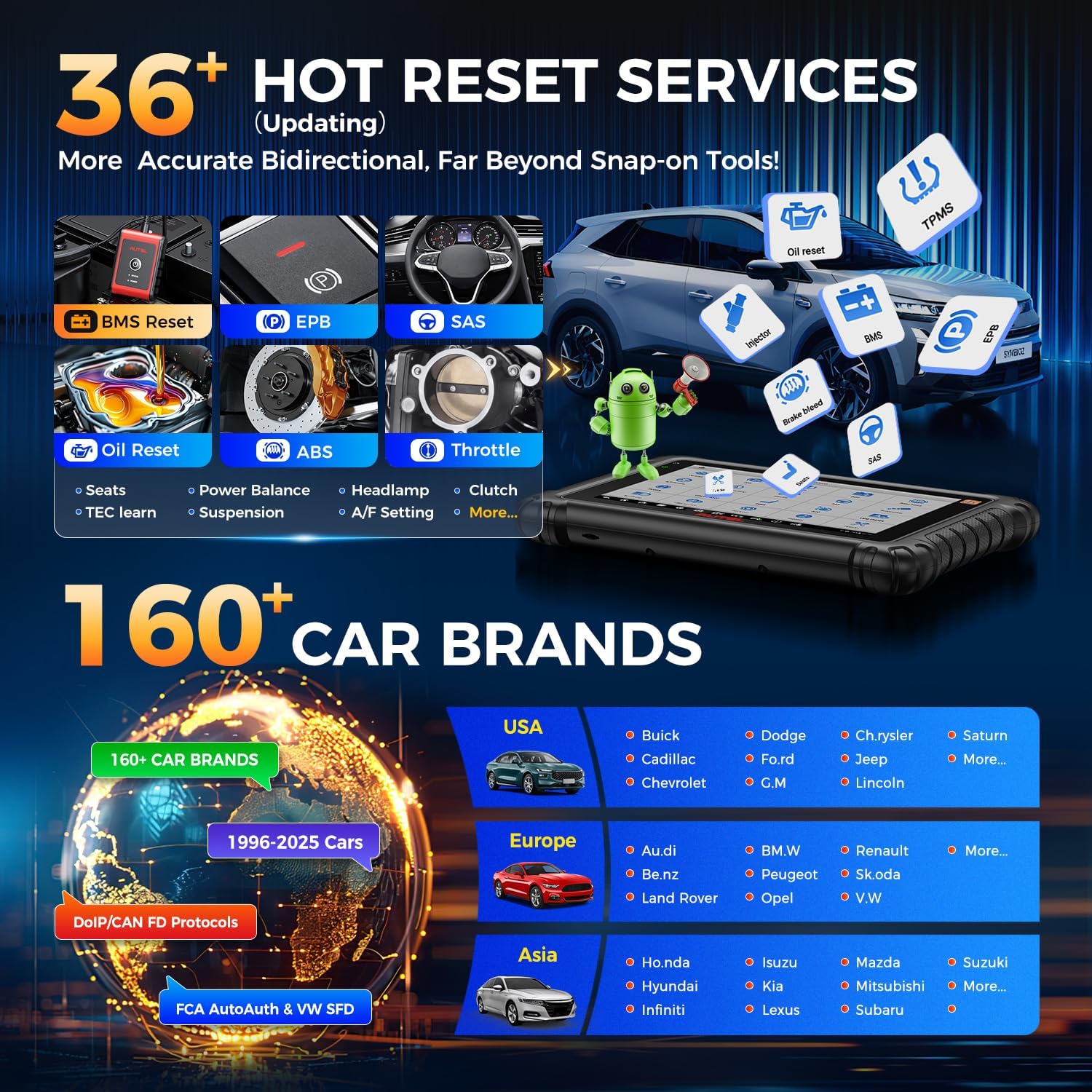
Figure 5.2: A selection of the 40+ hot reset and maintenance services available.
5.3 Latest Protocols and Vehicle Coverage
Supports modern vehicle communication protocols and offers extensive vehicle coverage.
- CAN FD: For GM vehicles 2019 and newer.
- DoIP: For BMW E/F/G Chassis, Volvo models 2018+, Land Rover & Jaguar 2017+.
- Vehicle Coverage: Supports over 160 brands worldwide, from 1996 to 2025 models, without IP restrictions.
- SGW Access: Direct diagnosis for 2018+ FCA vehicles (Chrysler, Dodge, Jeep, Fiat) and newer Renault cars with FCA AutoAuth, VW-SFD, and Renault SGW.

Figure 5.3: Supported CAN FD and DoIP protocols and compatible vehicle brands.
Video 5.2: Autel How To Use SGW Secure Gateway Access FCA Vehicles. This video demonstrates accessing Secure Gateway for FCA vehicles.
6. Maintenance and Additional Functions
6.1 Pre & Post Scan Reports and Cloud Management
Generate detailed diagnostic reports and manage them efficiently.
- Pre & Post Scan: Perform scans before and after repairs to document vehicle status.
- WiFi Printing: Print reports directly from the device without needing a PC.
- Autel Cloud Service: Upload and share diagnostic reports anytime, with no memory limit.

Figure 6.1: Workflow for Pre & Post Scan reports and WiFi printing.
6.2 Extended Functions
Expand the device's capabilities with optional accessories and integrated features.
- Battery Test: Works with Autel BT506 Battery Tester for comprehensive battery, cold cranking, and generator tests (BT506 not included).
- Endoscope: Compatible with MV108S/MV105S for visual inspection of hard-to-reach areas (Endoscope camera not included).
- VAG Guided Function: Provides guided functions for VW, Audi, Skoda, Seat, and Bentley vehicles.
- VIN/Odometer Check: Quickly retrieve VIN data and vehicle information, including mileage values from various ECUs.

Figure 6.2: Integration with Autel BT506 for battery testing.
7. Troubleshooting
If you encounter issues with your MaxiCOM MK906S PRO2-TS, consider the following common troubleshooting steps:
- Connection Issues: Ensure the VCI V200 is securely plugged into the OBDII port and its indicator lights are active. Verify the Bluetooth connection between the tablet and VCI in the VCI Manager.
- Software Functionality: Confirm that your software subscription is active and all updates have been installed. Outdated software can limit functionality for newer vehicles.
- Vehicle Compatibility: Not all functions are universal across all vehicle models. Always check compatibility for specific services or tests by providing your VIN to Autel support.
- Power Issues: Ensure the tablet is sufficiently charged. The device has an 11600mAh battery for extended operation.
8. Specifications
| Feature | Specification |
|---|---|
| Model | Autel MaxiCOM MK906S PRO2-TS |
| Operating System | Android 10.0 |
| Processor | Qualcomm 660 8-Core CPU |
| Memory | 4G RAM & 128G ROM |
| Display | 8.0" LED Screen with 1920*1200 resolution |
| Battery | 11600mAh Lithium Polymer |
| Cameras | Dual 16MP |
| Connectivity | Bluetooth, 5G & 2.4G WiFi |
| Protocols Supported | CAN FD, DoIP |
| Item Weight | 7.26 pounds |
| Product Dimensions | 2.36 x 1.97 x 1.57 inches |
9. What's in the Box
- Autel MaxiCOM MK906S PRO2-TS Tablet
- Power Adapter
- VCI V200
- Lifetime Tech-Support
- 1-Year Warranty
10. Warranty and Support
The Autel MaxiCOM MK906S PRO2-TS comes with a 12-month warranty and lifetime technical support. Additionally, it includes 1-year of free software updates, with weekly/monthly updates continually expanding vehicle coverage and services.
- 1-Year Free Updates: Access to the latest software versions and vehicle data.
- 12-Month Warranty: Covers manufacturing defects and hardware issues.
- Lifetime Support: Ongoing technical assistance for the lifespan of the product.
- 30-Day Return/Replace Policy: For customer satisfaction.

Figure 10.1: Autel's commitment to customer support and updates.
For any inquiries or to change the device language, please contact Autel support directly.


