
Veise RZ-A
Veise Keyless Entry Door Lock User Manual
Model: RZ-A
Product Overview
The Veise Keyless Entry Door Lock (Model RZ-A) is an electronic keypad deadbolt designed for enhanced home security and convenience. This lock features multiple access methods, including keypad codes and traditional keys, along with smart functionalities like auto-locking and anti-peeking password protection. It is built with durability in mind, featuring a sturdy lock cylinder and alloy construction, and is powered by 4 AA batteries for long-lasting performance. The lock also includes a backlit keypad for visibility in low light, low battery alerts, mute mode, and vacation mode, making it suitable for various residential applications.

Figure 1: Front view of the Veise Keyless Entry Door Lock, showcasing its satin nickel finish, numeric keypad, and traditional keyhole.
Setup and Installation
Installing your Veise Keyless Entry Door Lock is designed to be straightforward, requiring only a screwdriver. The lock is compatible with all American standard left and right-handed doors. Before installation, ensure your door meets the required dimensions for proper fitment.
Door Preparation and Compatibility
Verify your door's dimensions and latch hole type to ensure compatibility. The lock fits doors with a hole diameter of 2-1/8 inches (54mm), a minimalist distance of 1-3/4 inches (40mm), and a backset of 2-3/8 inches or 2-3/4 inches (60mm or 70mm). The bore diameter should be 1 inch (25mm).
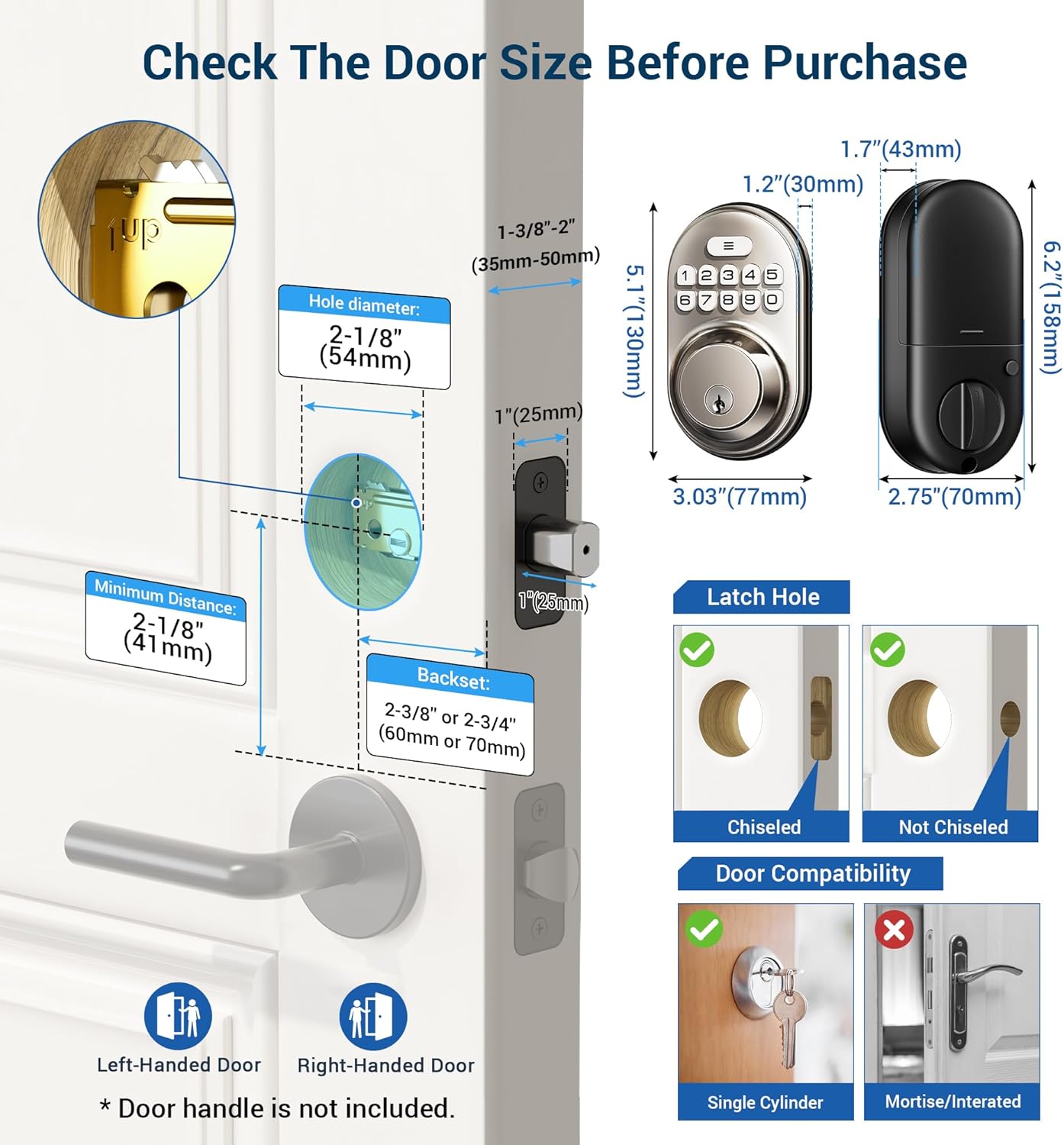
Figure 2: Detailed diagram illustrating required door dimensions and compatibility checks for installation, including hole diameter, backset, and latch hole types.

Figure 3: Visual guide for latch hole and door lock compatibility, indicating suitable and unsuitable lock types.
Installation Steps (General Overview)
- Prepare the Door: Ensure the door is properly drilled according to the dimensions provided in Figure 2.
- Install the Latch: Insert the latch into the door edge and secure it with screws.
- Install the Exterior Assembly: Place the exterior keypad assembly onto the door, ensuring the spindle passes through the latch.
- Install the Interior Mounting Plate: Attach the interior mounting plate to the door, aligning it with the exterior assembly.
- Install the Interior Assembly: Connect the cable from the exterior assembly to the interior assembly, then secure the interior assembly to the mounting plate.
- Insert Batteries: Install 4 AA alkaline batteries into the battery compartment.
- Test Operation: Test the lock's functionality using the keypad and physical key.
For detailed, step-by-step installation instructions, please refer to the "Installation Manual (PDF)" available for download from the product's Amazon page or Veise's official support resources.
Operating Instructions
The Veise Keyless Entry Door Lock offers multiple convenient ways to secure and access your property.
Keyless Entry with Passwords
The lock supports up to 20 permanent user codes and one-time passwords for temporary access. The keypad is backlit for easy visibility.

Figure 4: Illustration of convenient keyless access for various users, highlighting the capacity for multiple user codes and one-time codes.
Anti-Peeking Password Function
To enhance security, you can enter random digits before or after your actual password. This feature prevents others from easily discerning your code by observing your finger movements on the keypad.

Figure 5: Explanation of the anti-peeking password feature, where random numbers can be added before or after the correct code to obscure it.
Auto-Lock and One-Touch Lock
- Auto-Lock: The lock can be configured to automatically lock after a set period (10-99 seconds) once the door is closed. This ensures your door is always secured.
- One-Touch Lock: For immediate locking, simply press and hold any key on the keypad for 2 seconds.

Figure 6: Visual representation of the auto-lock feature, showing the lock engaging automatically after entry.

Figure 7: Demonstrating the one-touch lock function, allowing for quick manual locking by pressing a key for two seconds.
Special Modes
- Mute Mode: The lock can be set to mute mode to disable keypad beeps, providing quiet operation, especially useful during late hours.
- Vacation Mode: This mode disables all user codes, providing enhanced security when you are away for an extended period. Access is only possible with the physical key.

Figure 8: The mute mode feature, which silences keypad sounds for quiet operation, ideal for not disturbing others.

Figure 9: Vacation mode, designed to disable all user codes for increased security when the property is unoccupied for extended periods.
Maintenance
Battery Replacement
The Veise Keyless Entry Door Lock is powered by 4 AA alkaline batteries, providing approximately one year of battery life under normal usage. The lock features a low battery alert to notify you when the batteries need replacement.

Figure 10: Indicators for long battery life, including the low battery alert and backlit keypad for convenience.
To replace the batteries:
- Remove the battery cover on the interior assembly.
- Remove the old AA batteries.
- Insert 4 new AA alkaline batteries, ensuring correct polarity.
- Replace the battery cover.
It is recommended to replace all four batteries at the same time for optimal performance.
Cleaning
To clean the lock, use a soft, damp cloth. Avoid using abrasive cleaners or solvents, as these can damage the finish or electronic components.
Troubleshooting
This section addresses common issues you might encounter with your Veise Keyless Entry Door Lock. For more complex problems, please refer to the full user guide or contact customer support.
- Lock not responding to keypad:
- Check if the batteries are low. Replace them if the low battery indicator is active.
- Ensure the correct code is being entered.
- Verify that the lock is not in Vacation Mode.
- Auto-lock not engaging:
- Check the auto-lock settings to ensure it is enabled and the delay time is correctly set.
- Ensure the door is fully closed and the latch is properly aligned.
- Keypad not lighting up:
- Check battery level.
- Ensure the lock is not in a power-saving state.
- Difficulty turning the thumb-turn:
- Check for any obstructions in the door frame or strike plate.
- Ensure the lock is properly aligned and installed.
Specifications
| Feature | Detail |
|---|---|
| Brand | Veise |
| Model Name | RZ-A |
| Lock Type | Deadbolt |
| Color | Satin Nickel |
| Material | Metal |
| Dimensions (L x W x H) | 6.2 x 2.8 x 2 inches |
| Item Weight | 1.9 pounds |
| Special Features | Water Resistant, Backlit Keypad, Low Battery Alert, Mute Mode, Vacation Mode |
| Power Source | 4 AA Alkaline Batteries (not included) |
| Keyless Entry | Up to 20 password codes + one-time password |
| Auto Lock | Adjustable 10-99 seconds |
| ANSI Grade | 3 |
Warranty and Support
Veise is committed to providing excellent customer service and product support.
Warranty Information
Veise offers at least a 1-year product warranty from the date of purchase. This warranty covers defects in materials and workmanship under normal use.
Customer Support
For any questions, assistance with installation, programming, or troubleshooting, Veise provides 24/7 email support. Additionally, lifetime phone support is available Monday-Friday, 9 AM - 5 PM PST.

Figure 11: Veise's US-based customer support team, ready to assist with any product inquiries or issues.
You can find contact information on the official Veise website or through the product's Amazon page.
Related documentsRZ-A


Ask a question about this manual
Ask about setup, troubleshooting, compatibility, parts, safety, or missing instructions. Manuals+ will review the question and use this page’s manual context to help answer it.