1. Introduction
The Aiweiwa Universal Rear Speaker Shelves are designed to provide a secure and space-saving solution for mounting small satellite speakers. These shelves feature a durable construction and an adjustable design to accommodate various speaker sizes and cable management needs. The curved edge design enhances safety, making them suitable for homes with children and the elderly.
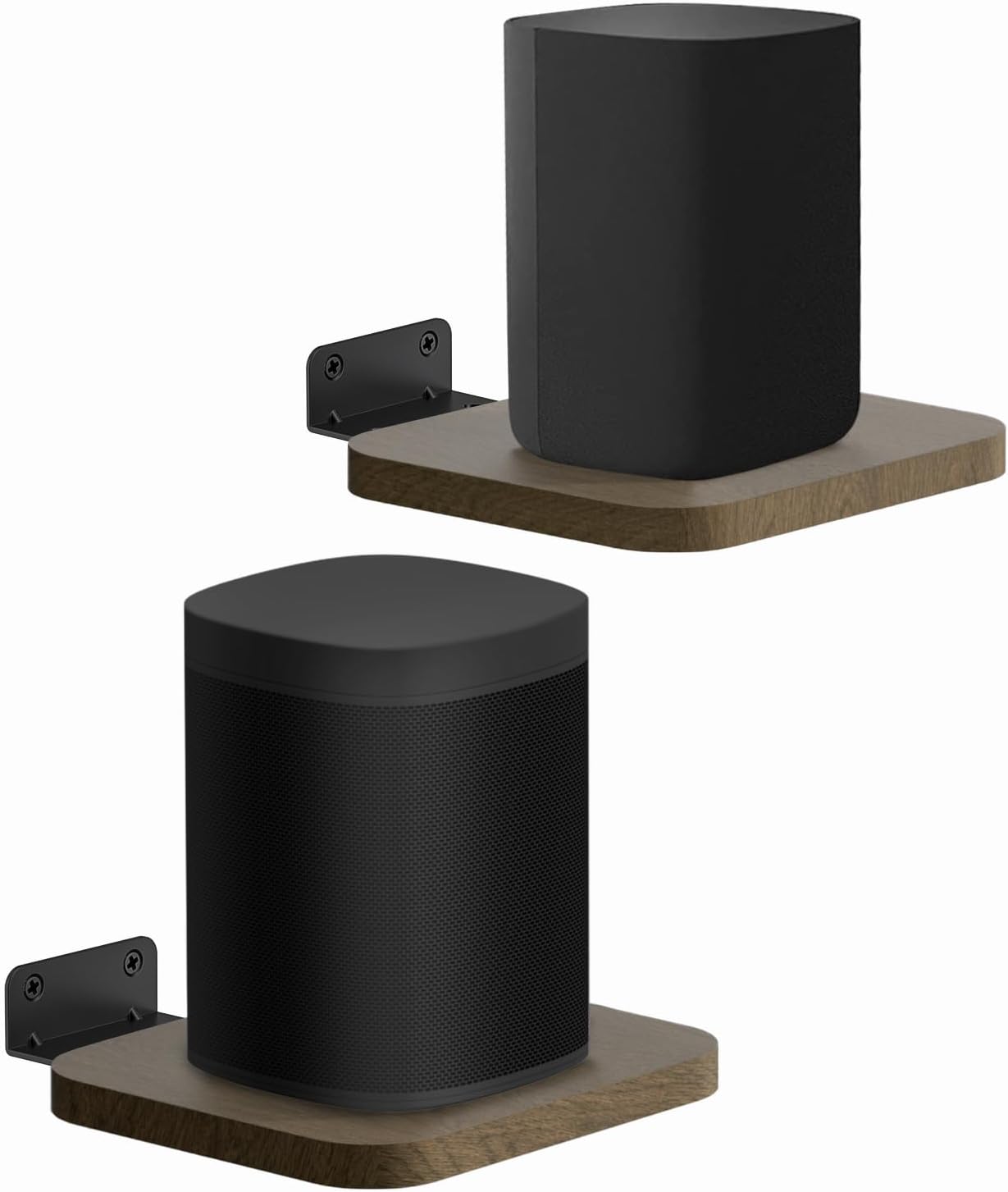
Figure 1.1: Aiweiwa Universal Rear Speaker Shelves with speakers.
Key features include universal compatibility with many small speaker brands, a robust wood and metal construction, and an adjustable depth for optimal speaker placement and cable organization.
2. Safety Information
Please read all safety instructions carefully before installation and use. Failure to follow these instructions may result in property damage or personal injury.
- Weight Limit: Do not exceed the maximum weight capacity of 10 lbs (4.5 kg) per shelf. These shelves are designed for small satellite speakers, not for heavy bookshelf speakers.
- Secure Installation: Ensure the shelves are securely mounted to a sturdy wall surface using appropriate anchors for your wall type (drywall, concrete, wood stud).
- Placement: Avoid mounting shelves in areas where they may be easily bumped or where falling objects could cause damage.
- Curved Edges: The shelves feature rounded, smooth curved corners to minimize the risk of injury. However, exercise caution during installation and use.

Figure 2.1: Rounded and smooth curved corner design for safety.
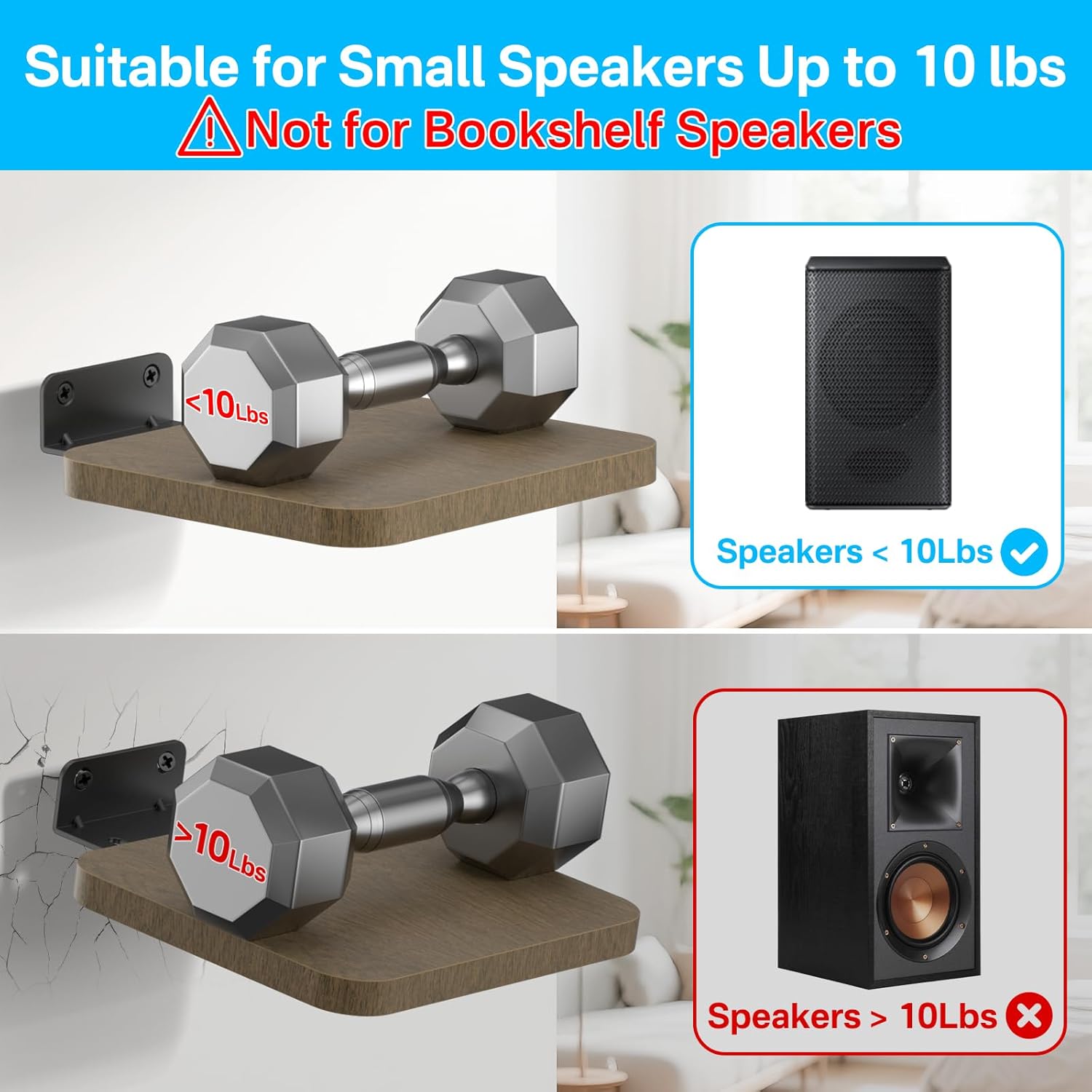
Figure 2.2: Weight capacity illustration. Maximum 10 lbs per shelf.
3. Package Contents
Verify that all components are present before beginning installation:
- Speaker Shelf (x2)
- Metal Mounting Bracket (x2)
- Mounting Screws (for brackets)
- Drywall Anchors (x4)
- Concrete Anchors (x4)
- User Manual (this document)

Figure 3.1: Included components.
4. Specifications
| Feature | Description |
|---|---|
| Model Number | 6422241703771 |
| Material | Wood (shelf), Metal (bracket) |
| Color | Black (bracket), Brown (shelf) |
| Maximum Weight Capacity | 10 lbs (4.5 kg) per shelf |
| Shelf Dimensions (L x W x H) | 5.9 inches x 5.3 inches x 0.45 inches (15 cm x 13.5 cm x 1.14 cm) |
| Adjustable Depth Range | 5.3 inches (13.5 cm) to 6.7 inches (17 cm) |
| Item Weight | 1.08 pounds (0.49 kg) per pair |
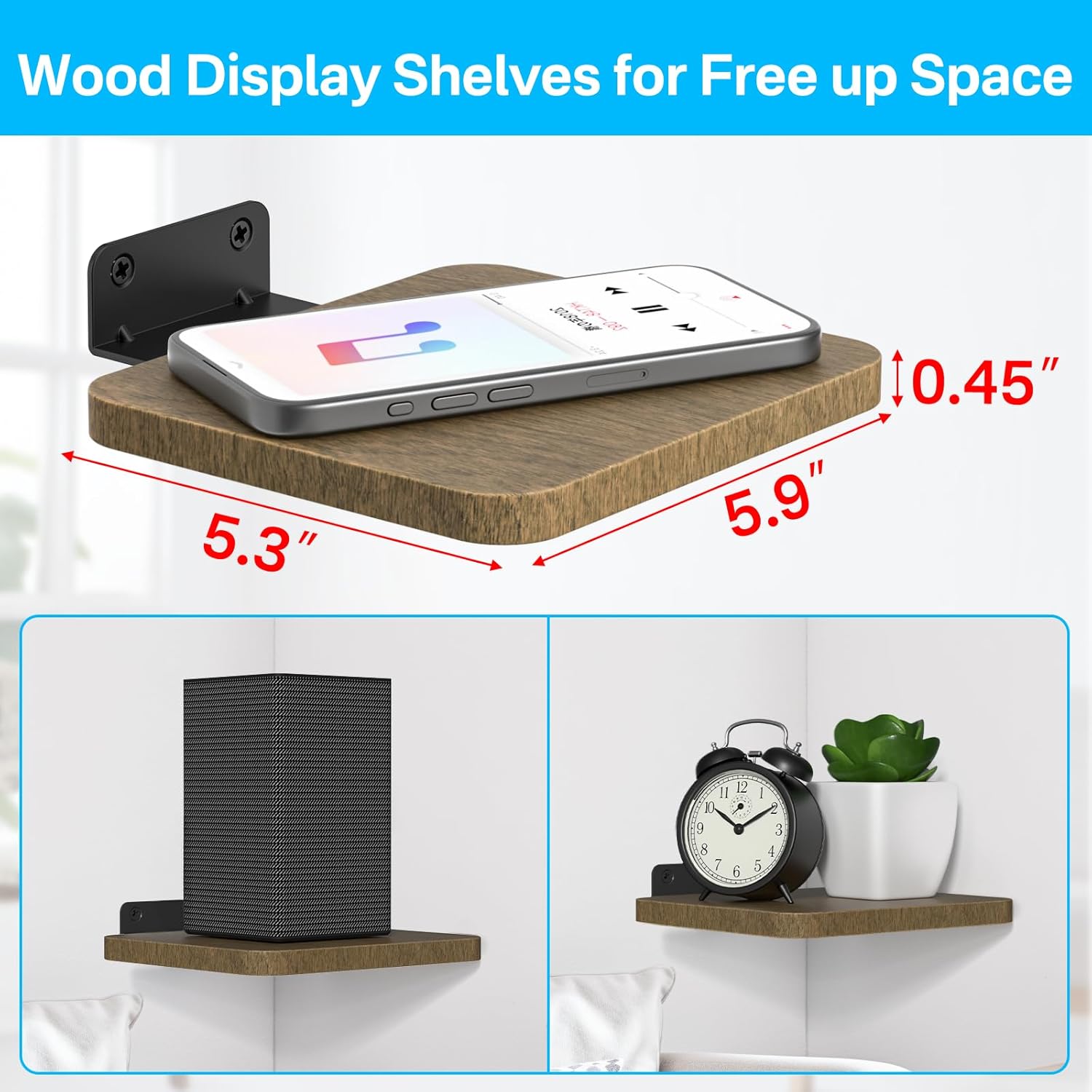
Figure 4.1: Shelf dimensions.

Figure 4.2: Adjustable depth for speaker placement and cable organization.
5. Setup and Installation
The installation process is designed to be straightforward. You will need a drill, a screwdriver, and a pencil for marking.
5.1 Choose Mounting Location
Select a sturdy wall location. Consider the desired height for your speakers and ensure there are no electrical wires or plumbing behind the drilling points.
5.2 Attach Bracket to Shelf
- Align the metal mounting bracket with the pre-drilled holes on the underside of the wooden shelf.
- Secure the bracket to the shelf using the provided screws. Ensure the screws are tightened firmly but do not overtighten to avoid damaging the wood.
5.3 Mark Drilling Points
- Hold the assembled shelf against the wall at the desired mounting location.
- Use a pencil to mark the positions of the two mounting holes on the bracket onto the wall.
5.4 Drill Holes and Insert Anchors
Based on your wall type, use the appropriate anchors:
- For Drywall: Drill pilot holes at the marked points. Insert the drywall anchors by gently tapping them with a hammer until flush with the wall surface.
- For Concrete/Brick: Drill pilot holes at the marked points. Insert the concrete anchors into the drilled holes.
- For Wood Studs: Drill pilot holes directly into the wood studs. Anchors are typically not required when mounting directly into studs.

Figure 5.1: Drywall anchor installation.

Figure 5.2: Concrete anchor installation.
5.5 Mount the Shelf
- Align the holes on the metal bracket with the installed anchors or pilot holes.
- Insert the long mounting screws through the bracket holes and into the anchors/studs.
- Tighten the screws until the shelf is firmly secured to the wall. Do not overtighten.

Figure 5.3: Example of mounted shelves in a living room setting.
6. Operation
Once installed, the Aiweiwa speaker shelves are ready for use. Their primary function is to securely hold your small satellite speakers.
6.1 Placing Speakers
Carefully place your speaker onto the center of the shelf. Ensure the speaker is stable and does not extend significantly beyond the shelf's edges, especially if it is a heavier speaker close to the 10 lbs limit.
6.2 Adjusting Shelf Depth
The shelf depth can be adjusted to optimize speaker placement or to manage power cords. To adjust, simply slide the wooden shelf along the metal bracket. The shelf can be set to a shortest depth of 5.3 inches (13.5 cm) or extended to a longest depth of 6.7 inches (17 cm).
Figure 6.1: Adjusting shelf depth for speaker positioning or cable management.
This adjustment allows you to position the speaker optimally for sound projection or to create space behind the speaker for neatly tucking away power cords.

Figure 6.2: Enjoying an excellent listening experience with properly positioned speakers.
7. Maintenance
The Aiweiwa speaker shelves require minimal maintenance to ensure their longevity and appearance.
- Cleaning: Wipe the wooden shelf and metal bracket with a soft, dry, or slightly damp cloth. Avoid using harsh chemicals or abrasive cleaners, as these can damage the finish.
- Inspection: Periodically check the mounting screws and anchors to ensure they remain tight and secure. If any looseness is detected, re-tighten them carefully.
- Environmental Conditions: Avoid exposing the shelves to extreme humidity or direct sunlight for prolonged periods, as this may affect the wood finish.

Figure 7.1: The wooden shelves are designed for durability and resistance to deformation.
8. Troubleshooting
If you encounter issues with your Aiweiwa speaker shelves, refer to the following common problems and solutions:
| Problem | Possible Cause | Solution |
|---|---|---|
| Shelf appears unstable or wobbly. | Mounting screws are loose; incorrect anchors used for wall type; wall surface is not sturdy. | Ensure all mounting screws are tightened. Verify that appropriate anchors were used for your wall material. If mounting into drywall, ensure anchors are fully engaged. If the wall itself is weak, consider mounting into a wall stud. |
| Shelf is not level after installation. | Drilling points were not level; bracket not aligned properly. | Use a spirit level to mark drilling points accurately before installation. If already installed, you may need to slightly adjust the mounting screws or re-drill if the misalignment is significant. |
| Wood splits when attaching bracket. | Screws are overtightened; pilot holes for bracket screws are too small. | Ensure screws are tightened only until snug. Avoid excessive force. If pilot holes are too small, they may need to be slightly widened, but this is generally not required for the provided screws. |
| Shelf sags or bends with speaker. | Speaker exceeds the 10 lbs weight limit. | Remove the speaker immediately. These shelves are designed for small satellite speakers up to 10 lbs. Do not place heavier speakers on them. |
9. Warranty and Support
Aiweiwa is committed to providing high-quality products. For specific warranty information, please refer to the product packaging or contact Aiweiwa customer support directly.
9.1 Customer Support
If you have any questions, require assistance with installation, or need to report a defect, please contact Aiweiwa customer support through the retailer's platform where the product was purchased or visit the official Aiweiwa store page:
Visit the Aiweiwa Store on Amazon
Please have your model number (6422241703771) and purchase details ready when contacting support.