
1. Introduction
Thank you for choosing the Eumspo i17 Wireless Headset. This manual provides essential information for the safe and efficient use of your new device. Please read it thoroughly before operation and retain it for future reference.
2. Safety Information
- Do not disassemble or modify the headset.
- Keep the device away from water, moisture, and extreme temperatures.
- Avoid prolonged exposure to high volume levels to prevent hearing damage.
- Use only the provided charging cable or a certified equivalent.
- Dispose of the device and its battery responsibly according to local regulations.
3. Package Contents
Ensure all items are present in your package:
- Eumspo i17 Wireless Earbuds (2)
- Charging Case (1)
- USB-C Charging Cable (1)
- User Manual (1)
- Additional Eartips (various sizes)
4. Product Overview
Familiarize yourself with the components of your Eumspo i17 Wireless Headset.

4.1. Key Features
- True Wireless Stereo: Enjoy high-quality audio without cables.
- Touch Control: Manage music and calls with simple taps.
- Bluetooth 5.1: Provides a stable and fast wireless connection.
- Dual-Mic: Ensures clear phone calls.
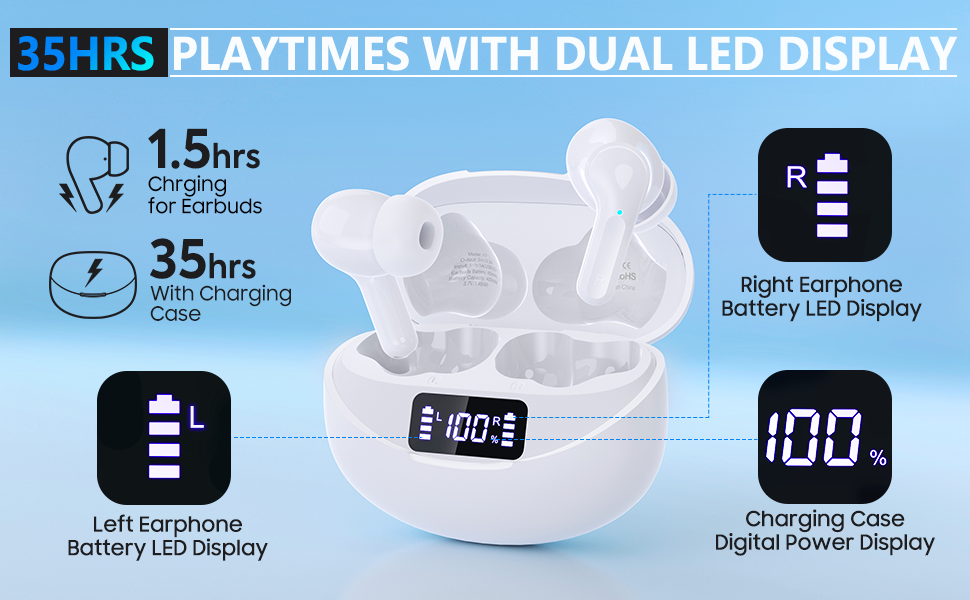
- Digital Power Display: Shows battery levels for earbuds and case.
- Long Playtime: Up to 35 hours with the charging case.
- Type-C Fast Charging: Quick and convenient charging.
5. Setup
5.1. Charging the Headset
Before first use, fully charge the charging case and earbuds.
- Connect the provided USB-C charging cable to the charging port on the case and a compatible USB power adapter (not included).
- The LED display on the charging case will show the battery percentage.
- Place the earbuds into the charging case. The display will indicate individual earbud charge levels.
- Charging time for earbuds is approximately 1.5 hours, and for the case, it provides up to 35 hours of additional playtime.
5.2. Bluetooth Pairing
The earbuds support both Dual Ear Mode and Single Ear Mode.
5.2.1. Dual Ear Mode
- Take both earbuds out of the charging case. They will automatically power on and pair with each other. The indicator light will flash quickly.
- Activate Bluetooth on your device (smartphone, tablet, etc.).
- Search for "i17" in the Bluetooth device list and select it to connect.
- Once successfully paired, a voice prompt "Connected" will be heard, and the indicator light will turn off.
5.2.2. Single Ear Mode
- Take one earbud out of the charging case. It will automatically power on.
- Activate Bluetooth on your device.
- Search for "i17" in the Bluetooth device list and select it to connect.
- A voice prompt "Connected" will confirm the connection.

6. Operating Instructions
6.1. Power On/Off
- Power On: Take the earbuds out of the charging case. They will automatically power on. Alternatively, press and hold the touch button on both earbuds for 3-5 seconds until the blue indicator light flashes.
- Power Off: Place the earbuds back into the charging case. They will automatically switch off. Alternatively, press and hold the touch button on either earbud for 3-5 seconds until the blue indicator flashes once with a voice prompt "power off".
6.2. Touch Controls
The Eumspo i17 earbuds feature smart touch controls for easy operation:
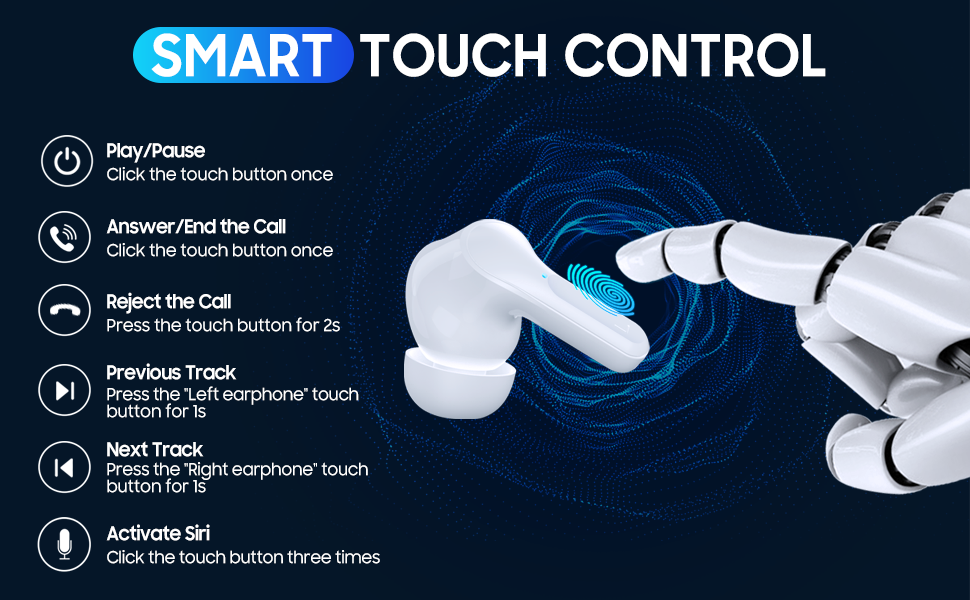
- Play/Pause: Click the touch button once on either earbud.
- Answer/End Call: Click the touch button once on either earbud.
- Reject Call: Press the touch button for 2 seconds on either earbud.
- Previous Track: Press the left earbud's touch button for 1 second.
- Next Track: Press the right earbud's touch button for 1 second.
- Volume -: Click the left earbud's touch button twice.
- Volume +: Click the right earbud's touch button twice.
- Activate Voice Assistant (Siri/Google Assistant): Click the touch button three times on either earbud.
7. Maintenance
- Cleaning: Use a soft, dry cloth to clean the earbuds and charging case. Do not use liquids or abrasive cleaners.
- Storage: When not in use, store the earbuds in their charging case to protect them and keep them charged. Store in a cool, dry place.
- Eartips: Regularly check and clean the eartips to ensure optimal sound quality and hygiene. Replace if damaged.
8. Troubleshooting
| Problem | Solution |
|---|---|
| Earbuds not powering on | Ensure earbuds are charged. Place them in the charging case for a few minutes, then try again. |
| Earbuds not pairing with device | Make sure Bluetooth is enabled on your device. Forget "i17" from your device's Bluetooth list and try pairing again. Ensure earbuds are close to the device. |
| Only one earbud working | Ensure both earbuds are charged. Place both earbuds back into the charging case, close the lid, then open it and take them out together to re-establish stereo pairing. |
| Poor sound quality | Check earbud fit and try different sized eartips. Ensure earbuds are clean. Move closer to your device to avoid interference. |
| Charging case not charging | Check the USB-C cable and power adapter. Try a different cable or adapter. |
9. Specifications
- Brand: Eumspo
- Model Number: i17
- Color: White
- Ear Placement: In Ear
- Form Factor: In Ear
- Noise Control: Active Noise Cancellation
- Connectivity Technology: Bluetooth 5.1, Wireless
- Headphone Jack: USB (for charging case)
- Water Resistance Level: Waterproof
- Additional Features: Android, Microphone Included, Noise Cancellation, USB connectivity, iOS, sports-and-exercise, water-resistant, wireless
- Specific Uses For Product: Sports and Exercise
10. Warranty and Support
For warranty information and customer support, please refer to the documentation included with your purchase or visit the official Eumspo website. Keep your proof of purchase for any warranty claims.
