1. Product Overview
The VIVOSUN G4 4" Inline Duct Fan with E42A+ Smart Controller is designed to provide efficient and quiet ventilation for various environments, including grow tents, greenhouses, and home ventilation systems. This system features an energy-efficient EC motor, precise temperature and humidity monitoring, and comprehensive control via the E42A+ controller and a dedicated mobile application. It enables automated environmental management to maintain optimal conditions.

Image: The VIVOSUN AeroZesh G4 Inline Fan with E42A+ Controller, illustrating the fan and its smart control unit.
2. Safety Information
- Electrical Safety: Ensure the power source matches the fan's voltage requirements. Do not operate with damaged cords or plugs. Avoid exposing electrical components to water or excessive moisture.
- Installation: Install the fan and controller in a stable, secure location. Ensure proper ducting connections to prevent air leaks and maintain efficiency.
- Operation: Keep fingers and foreign objects away from the fan blades during operation. Do not block air intake or exhaust vents.
- Maintenance: Disconnect power before performing any cleaning or maintenance. Refer to the maintenance section for proper cleaning procedures.
- Children and Pets: Keep the device out of reach of children and pets to prevent accidental injury or damage.
3. Package Contents
Verify that all components are present in the package:
- VIVOSUN G4 4" Inline Duct Fan
- GrowHub E42A WiFi Controller
- Sensor Probe (Temperature and Humidity)
- Fan to Controller Cord (10 ft / 3 m)
- Hanging Straps (2 pieces)
- Power Adapter
- User Manual

Image: A visual representation of the VIVOSUN G4 4-inch Inline Duct Fan, E42A+ Smart Controller, sensor probe, connecting cables, and hanging straps.
4. Setup Instructions
4.1 Fan Installation
The inline duct fan can be installed as either an exhaust fan or an intake fan, depending on your ventilation needs. It can be placed inside or outside the grow tent/area.
- Mounting the Fan: Use the provided hanging straps to secure the fan to a sturdy support structure. Loop the straps around the fan's flanges and then around the flange brackets.
- Ducting Connection: Connect appropriate ducting to both ends of the inline fan. Ensure connections are sealed tightly to prevent air leakage.

Image: Step-by-step visual guide showing how to loop hanging straps around the fan flanges and connect the controller.
4.2 Controller Connection
- Connect Fan to Controller: Plug the fan's power cable into the designated port on the E42A+ controller.
- Connect Sensor Probe: Insert the temperature and humidity sensor probe into its port on the controller. Position the probe in the area where you want to monitor environmental conditions.
- Power On: Connect the controller's power adapter to a suitable electrical outlet. The controller display will illuminate.

Image: The VIVOSUN E42A+ Smart Controller, highlighting its various ports for circulation fans, grow lights, duct fans, and temperature/humidity sensors.
4.3 App Installation & Pairing
Download the VIVOSUN app from the App Store (iOS) or Google Play Store (Android) to enable remote control and advanced features.
- Download App: Search for "VIVOSUN" in your device's app store and install the application.
- Create Account: Follow the in-app instructions to create a VIVOSUN account or log in if you already have one.
- Pair Controller: In the app, select to add a new device and follow the pairing instructions. Ensure your smartphone is connected to a 2.4GHz Wi-Fi network during the pairing process.

Image: A smartphone displaying the VIVOSUN app interface, which provides real-time environmental data and control over connected devices.
5. Operating Instructions
5.1 E42A+ Controller Interface
The E42A+ controller features an interactive color display for direct management of your devices.
- Navigation: Use the arrow buttons to navigate through menus and adjust settings.
- Monitoring: The display shows real-time temperature, humidity, and VPD (Vapor Pressure Deficit) readings from the connected sensor.
- Device Control: Directly adjust fan speed, light intensity, and other connected device settings.

Image: The E42A+ controller's color display showing various settings for circulation fan, grow light, and duct fan, alongside the mobile app interface for automated grow recipes.
5.2 Mobile App Control
The VIVOSUN app provides comprehensive remote management and automation capabilities.
- Real-time Data: Monitor environmental conditions from anywhere via Wi-Fi.
- Grow Recipes: Utilize preset or custom schedules for different growth stages (seedling, vegetative, flowering) to automate equipment operation.
- Auto-Triggers: Set up automated responses based on environmental thresholds (e.g., fan activates if temperature exceeds a set point).
- Device Settings: Adjust fan speed, light intensity, and other connected device parameters remotely.
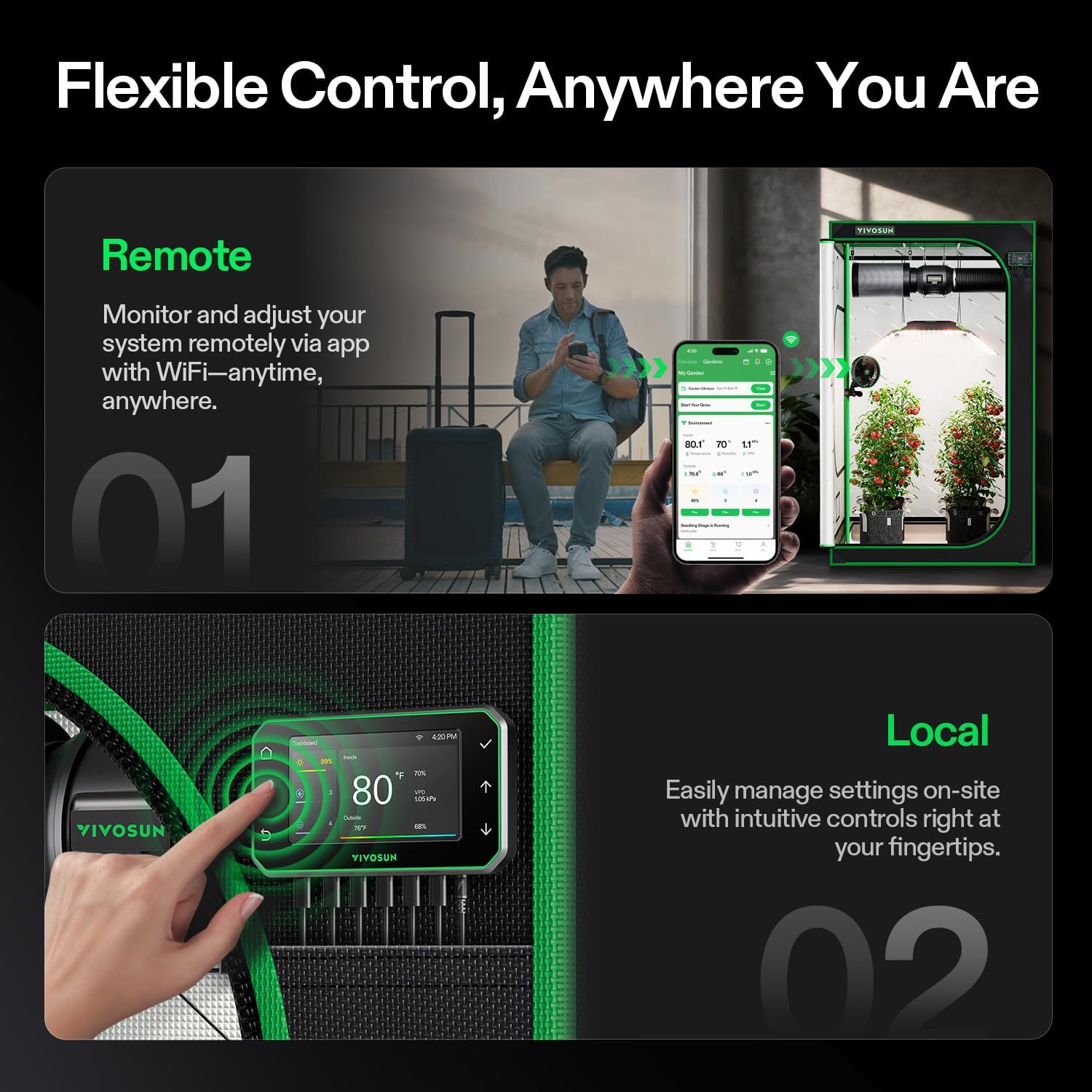
Image: Illustration showing both remote control via the VIVOSUN app on a smartphone and local control directly on the E42A+ controller.
5.3 VPD Management
The system accurately tracks temperature, humidity, and calculates VPD to optimize plant care.
- VPD Calculation: The controller and app display VPD values, which are crucial for plant transpiration and growth.
- Optimized Environment: Use VPD data to fine-tune temperature, humidity, and airflow settings for specific plant growth stages.

Image: Graphs illustrating real-time tracking of VPD, temperature, and humidity, managed by the VIVOSUN E42A+ controller for optimized plant care.
6. Maintenance
Regular maintenance ensures optimal performance and longevity of your VIVOSUN G4 Inline Duct Fan and E42A+ Smart Controller.
- Cleaning the Fan: Periodically inspect the fan blades and housing for dust and debris accumulation. Disconnect power before cleaning. Use a soft, dry cloth or a vacuum cleaner with a brush attachment to gently remove any buildup. Do not use liquid cleaners directly on electrical components.
- Cleaning the Sensor Probe: Keep the temperature and humidity sensor probe clean and free from obstructions. Dust or residue can affect accuracy. Wipe gently with a dry, soft cloth if needed.
- Ducting Inspection: Check ducting for any tears, blockages, or loose connections that could reduce airflow efficiency.
- Controller Care: Keep the controller display clean and dry. Avoid harsh chemicals.
7. Troubleshooting
| Problem | Possible Cause | Solution |
|---|---|---|
| Fan not turning on | No power, loose connection, fan malfunction | Check power outlet and connections. Ensure controller is powered. If problem persists, contact support. |
| Inaccurate temperature/humidity readings | Sensor dirty or improperly placed, faulty sensor | Clean the sensor probe. Relocate the sensor to a representative area. If readings remain inaccurate, contact support. |
| App connectivity issues | Incorrect Wi-Fi password, 5GHz Wi-Fi, network interference | Ensure your phone is on a 2.4GHz Wi-Fi network. Re-enter Wi-Fi password. Restart router and controller. |
| Fan is noisy | Debris in fan, loose mounting, high speed setting | Disconnect power and check for debris. Ensure fan is securely mounted. Lower fan speed if noise is excessive. |
8. Specifications
| Feature | Detail |
|---|---|
| Model Name | VSV-AZG4E42A |
| Size | 4-inch / 100 mm |
| Motor Type | EC Motor (Brushless) |
| Airflow Capacity | 195 CFM (330 m³/h) |
| Fan Speed | Up to 2700 RPM |
| Noise Level | As low as 28 dB (typical operation), 39 dB(A) (max) |
| Power Consumption | 20 Watts |
| Power Source | Corded Electric (120-240V) |
| Controller | GrowHub E42A WiFi Controller |
| Control Method | App Control, Manual Interface |
| Product Dimensions | Fan: 11.81"D x 3.94"W x 7.87"H (approx.) | Controller: 5.55"L x 3.19"W (approx.) |
| Item Weight | 4.5 Pounds |
| Bearing IP | IP44 |

Image: A comparison table detailing specifications for VIVOSUN T4, G4, and R4 inline fan models, including motor type, airflow, speed, and power.
9. Warranty & Support
VIVOSUN products are designed for reliability and performance. For warranty information, technical support, or service inquiries, please refer to the official VIVOSUN website or contact their customer service directly. Keep your purchase receipt as proof of purchase for warranty claims.
Online Support: Visit www.vivosun.com for FAQs, product registration, and contact information.