
Introduction
Thank you for purchasing the ASVEGEN 9.7 Inch Android 12.0 Car Stereo Radio. This manual provides essential information for the installation, operation, and maintenance of your new car multimedia player. Please read it thoroughly before use to ensure proper functionality and to maximize your driving experience.
This unit is designed specifically for Bentley Continental GT and Flying Spur models manufactured between 2012 and 2019. It features an Octa-Core CPU, 4GB RAM, 64GB ROM, and a 9.7-inch IPS touchscreen with 1024*768 resolution, offering advanced navigation, entertainment, and connectivity options.
What's in the Box
Please verify that all components are present in the package:
- 1x ASVEGEN 9.7 Inch Android Car Stereo
- 1x Cable Pack (various connection cables)
- 1x User Manual (this document)

Image: The ASVEGEN 9.7 Inch Android Car Stereo unit displayed alongside its comprehensive cable pack, including various connectors for power, audio, and data.
Product Specifications
| Feature | Specification |
|---|---|
| Brand | ASVEGEN |
| Model Name | 9.7 Inch Touch Screen |
| Operating System | Android 12.0 |
| CPU | Octa-Core |
| RAM | 4GB |
| ROM | 64GB |
| Screen Size | 9.7 Inch |
| Screen Resolution | 1024*768 |
| Bluetooth Version | 5.0 |
| Connectivity Technology | Auxiliary, USB, Wi-Fi, Bluetooth |
| Supported Navigation System | GPS (Online/Offline Maps) |
| Special Features | Touchscreen, Built-in DSP, EQ Balanced Audio, Apple CarPlay, Android Auto, Mirror Link, Intelligent Voice Control, Split Screen, FM/AM Receiver |
| Compatible Vehicle Type | Bentley Continental GT, Flying Spur (2012-2019) |
| Item Dimensions L x W x H | 16.9"L x 5.9"W x 15.4"H |
Installation Guide
The ASVEGEN Android Car Stereo is designed for plug-and-play installation, retaining original vehicle functions like the backup camera and steering wheel controls. Professional installation is recommended to ensure correct setup and avoid potential issues.
Pre-Installation Steps:
- Verify Compatibility: Ensure your vehicle is a Bentley Continental GT or Flying Spur model from 2012-2019. Refer to the second product image for visual confirmation of suitability.
- Gather Tools: Prepare necessary tools for removing existing dashboard components.
- Disconnect Battery: For safety, disconnect the vehicle's battery before starting installation.
Removal of Original Unit:
Carefully remove the original car stereo and associated trim. This typically involves prying off trim pieces and unscrewing mounting bolts. Pay attention to the location of all original wiring harnesses.
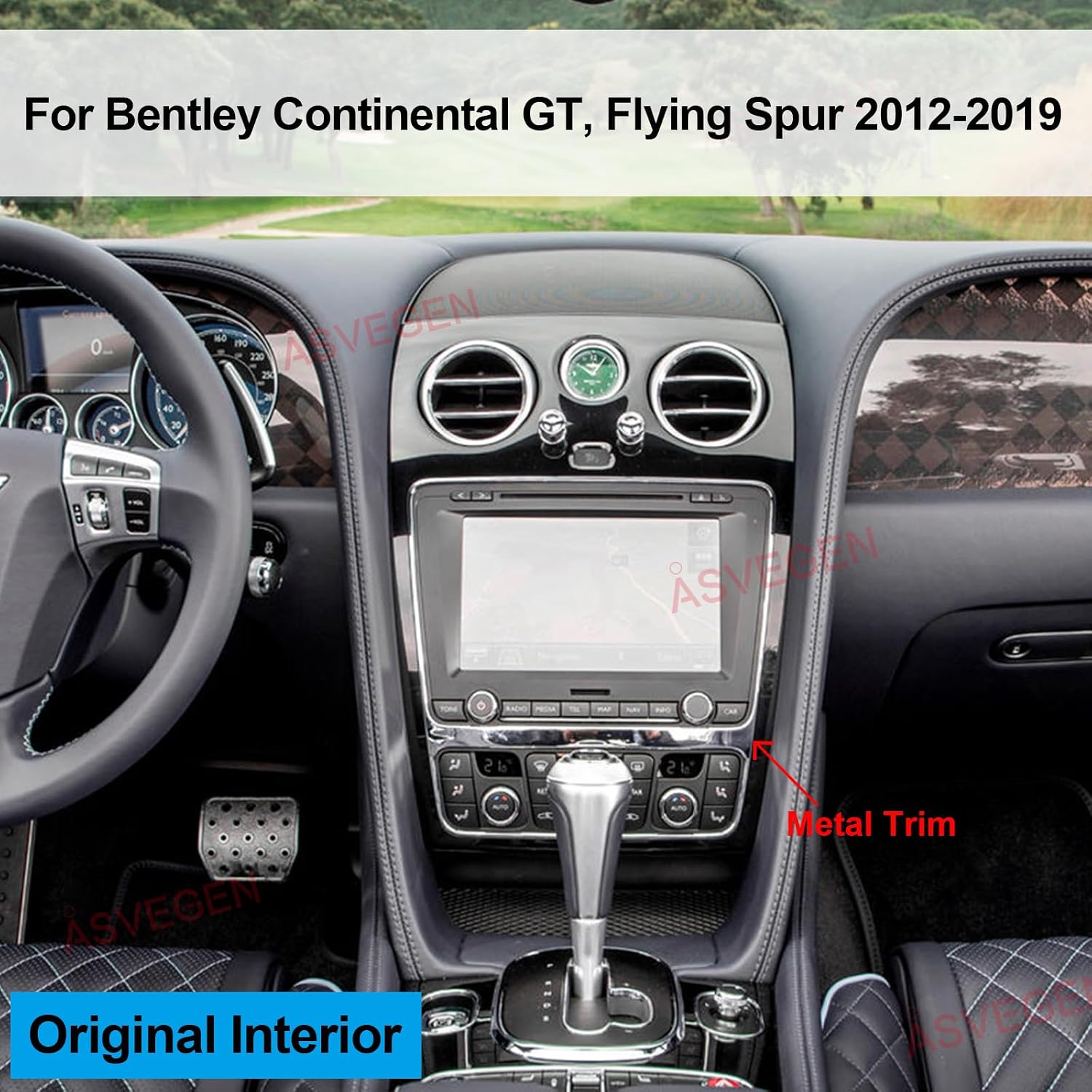
Image: The original interior dashboard of a Bentley Continental GT, showing the factory stereo unit before replacement.
Wiring and Connection:
Connect the provided cable pack to the new ASVEGEN unit and the vehicle's existing wiring harnesses. Ensure all connections are secure. The system is designed for plug-and-play, but careful attention to detail is crucial.
Video: A detailed guide demonstrating the removal of the original Bentley radio and the connection of the new Android unit's wiring harnesses. This video shows the process of disconnecting the old unit, connecting the new wiring, and securing the components.
Mounting the New Unit:
Once all connections are made, carefully mount the new ASVEGEN stereo into the dashboard opening. Secure it with the appropriate screws and reattach any removed trim pieces.

Image: The Bentley Continental GT dashboard after the successful installation of the ASVEGEN 9.7 Inch Android Car Stereo, showing the integrated display.
Important Note: If you encounter issues with AC or steering wheel controls after installation, please contact customer support for setup assistance.
Operating Instructions
The ASVEGEN Android Car Stereo offers a user-friendly interface with a wide range of features. Navigate through the system using the responsive 9.7-inch IPS touchscreen.
Basic Navigation:
- Home Screen: Access frequently used apps and widgets.
- App Drawer: Swipe up or tap the app icon to view all installed applications.
- Back Button: Located on the screen, or use steering wheel controls if configured, to return to the previous screen.

Image: The main user interface of the ASVEGEN Android Car Stereo, displaying a grid of application icons including Play Store, Radio, Touch-Assistant, Voice Search, YouTube, and Car Info.
Key Features:
- GPS Navigation: Supports online and offline maps with voice guidance and 2D/3D views. Access via the 'Navi' app.
- Wi-Fi Connectivity: Connect to Wi-Fi hotspots to download apps, stream content, and browse the internet.
- Bluetooth 5.0: For hands-free calls, automatic phonebook loading, and Bluetooth music playback.
- Apple CarPlay & Android Auto: Seamlessly sync your smartphone for navigation, music, and messaging.
- Mirror Link: Project your phone screen onto the stereo display.
- Intelligent Voice Control: Access apps and functions using voice commands.
- Split Screen Function: Run two applications simultaneously on the screen.
- FM/AM Receiver: Store up to 30 stations for easy access.
- Built-in DSP & EQ: Enjoy excellent sound quality with balanced audio processing technology.
Video: Demonstration of the Android Radio's user interface in a Bentley Continental GT, showcasing app navigation, music playback, radio functions, and vehicle settings. This video highlights the responsiveness of the touchscreen and the various features available.
Video: A demonstration of the car stereo's GPS navigation and reverse camera functionality in a Bentley. The video shows the map interface, voice commands, and the automatic display of the rear camera feed when shifting into reverse.
Vehicle Settings and Personalization
Access the 'Vehicle Settings' application to customize various car-specific parameters directly from the stereo's touchscreen. This includes suspension levels, tire information, and other personalization options.

Image: The ASVEGEN Android Car Stereo screen showing the 'Vehicle Personalization' menu, with options for Radar Volume, Parking Mode, Suspension Info, and Tire Information.
- Suspension Info: Adjust suspension level (e.g., comfort, sport) and car level (e.g., general).
- Tire Information: Monitor tire pressure, set tire type, and adjust tire speed selection (e.g., normal, max).
- Parking Assist Settings: Configure radar volume and parking mode (e.g., horizontal parking).
Troubleshooting
If you encounter any issues with your ASVEGEN Android Car Stereo, please refer to the following common troubleshooting tips:
- No Power: Check all power connections and ensure the vehicle's battery is properly connected and charged. Verify the fuse in the cable pack.
- No Sound: Ensure all audio cables are correctly connected. Check the volume settings on the stereo and your vehicle's original audio system. Verify DSP settings.
- Steering Wheel Controls Not Working: Confirm that the steering wheel control wires are correctly connected and configured in the stereo's settings. Contact support if issues persist.
- GPS Signal Issues: Ensure the GPS antenna is installed in a clear location with an unobstructed view of the sky.
- Touchscreen Unresponsive: Try restarting the unit. If the issue continues, perform a factory reset (refer to settings menu, note that this will erase user data).
- AC Controls Malfunctioning: Double-check all AC-related wiring connections. If the problem persists, contact customer support as specific setup might be required.
Warranty and Support
The ASVEGEN 9.7 Inch Android 12.0 Car Stereo comes with a 12-month warranty from the date of purchase. This warranty covers manufacturing defects and malfunctions under normal use.
For technical support, troubleshooting assistance, or warranty claims, please contact ASVEGEN customer service through the retailer where you purchased the product. Provide your model number (Asv-BESO02-us) and a detailed description of the issue for prompt assistance.
Always refer to official ASVEGEN support channels for the most accurate and up-to-date information.