
Introduction
Thank you for choosing the ASVEGEN 9.7 Inch Android Car Stereo GPS Navigation system. This manual provides essential information for the proper installation, operation, and maintenance of your new car stereo. Please read this manual thoroughly before installation and use to ensure optimal performance and safety.
Safety Information
- Ensure the vehicle is turned off and the battery is disconnected before beginning installation to prevent electrical short circuits.
- Professional installation is recommended. Improper installation may damage the device or vehicle's electrical system.
- Do not operate the device in a manner that distracts you from driving. Always prioritize road safety.
- Avoid exposing the device to extreme temperatures, direct sunlight for prolonged periods, or excessive moisture.
- Use only specified cables and accessories provided with the unit or recommended by the manufacturer.
Package Contents
Verify that all items are present in the package:
- 1x ASVEGEN 9.7 Inch Android Car Stereo Unit
- 1x Power Cable Harness
- 1x GPS Antenna
- 2x USB Cables
- 1x RCA Cable Pack (Audio/Video Input/Output)
- Other necessary installation accessories (as pictured)

Image: The ASVEGEN car stereo unit displayed with its accompanying power cable harness, GPS antenna, USB cables, and RCA cable pack.
Product Overview
The ASVEGEN 9.7 Inch Android Car Stereo is designed for Alfa Romeo Stelvio (2017-2019) and Giulia (2017-2018) SUV models, offering an enhanced in-car entertainment and navigation experience. It features a large IPS capacitive touch screen and runs on Android 10.0.
Key Features:
- Operating System: Android 10.0
- Processor: OCTA-Core CPU
- Memory: 4GB RAM, 64GB ROM
- Screen: 9.7-inch IPS Capacitive Touch Screen (1024*768 resolution)
- Connectivity: Built-in Wi-Fi, Bluetooth 5.0
- Navigation: GPS module for online and offline maps
- Smartphone Integration: Built-in Apple CarPlay and Android Auto
- Audio: Built-in DSP (Digital Sound Processor) with EQ balanced audio processing
- Radio: FM/AM Receiver with 30 station presets
- Additional Functions: Mirror Link, Intelligent Voice Control, Split Screen, Support for Driving Recorder/OBD2 (if car equipped)

Image: A visual comparison showing the original car interior screen and the ASVEGEN 9.7 inch Android stereo after installation in an Alfa Romeo SUV.
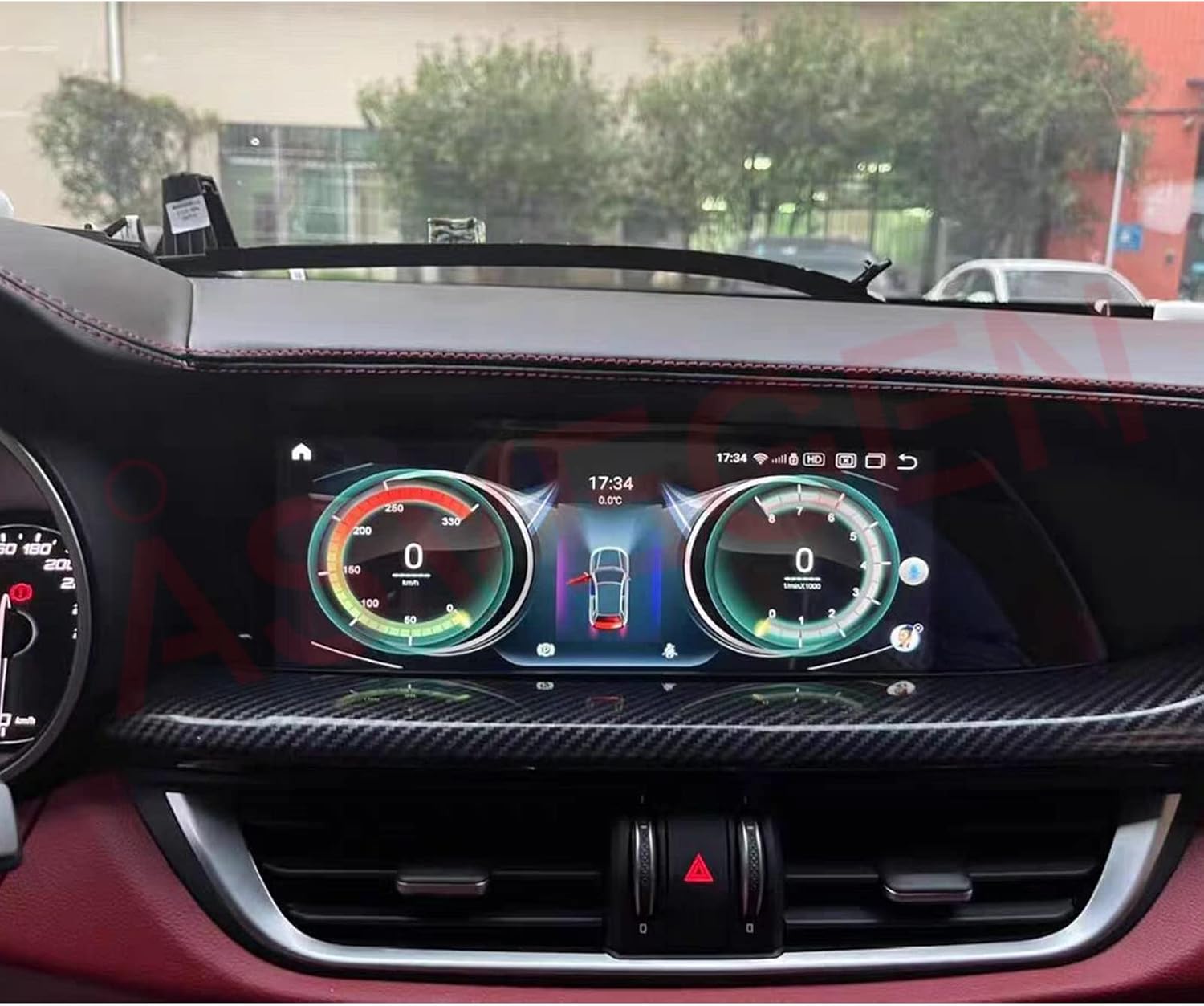
Image: The ASVEGEN 9.7 inch Android stereo integrated into a car dashboard, displaying a digital dashboard interface with speed and RPM gauges.
Installation
This unit is designed for specific Alfa Romeo models. Before installation, it is crucial to confirm your car's model and year (Alfa Romeo Stelvio 949 SUV 2017-2019 or Alfa Romeo Giulia 952 SUV 2017-2018). It is highly recommended to have this unit installed by a qualified professional to ensure proper integration with your vehicle's existing systems, including steering wheel controls, backup camera, and amplifier sound system.
General Installation Steps (Consult a professional):
- Preparation: Disconnect the vehicle's battery to prevent electrical damage.
- Remove Original Unit: Carefully remove the existing car stereo and dashboard trim.
- Connect Wiring: Connect the provided wiring harness to the vehicle's wiring. Ensure all connections (power, speakers, GPS antenna, USB, RCA, etc.) are secure.
- Mount New Unit: Securely mount the ASVEGEN Android Car Stereo into the dashboard opening.
- Test Functionality: Reconnect the battery and test all functions (power, audio, touch screen, GPS, Bluetooth, steering wheel controls, camera) before reassembling the dashboard.
- Reassemble: Carefully reassemble the dashboard trim.

Image: A side profile view of the ASVEGEN 9.7 inch Android car stereo unit, showing its sleek design.

Image: The rear view of the ASVEGEN 9.7 inch Android car stereo unit, displaying various ports and connectors for wiring.
Operation
The ASVEGEN Android Car Stereo operates similarly to an Android tablet, with a user-friendly touch interface. Below are instructions for common functions.
Video: This video demonstrates the user interface of the ASVEGEN Android car stereo, showcasing navigation through menus, playing music and videos, accessing phone functions, and using various applications like Google Maps, Chrome, and the equalizer.
1. Navigation (GPS)
- Tap the 'Navigation' icon on the home screen.
- The unit supports online GPS (requires Wi-Fi/hotspot connection) and offline GPS maps.
- Enter your destination and follow the voice-guided directions.
2. Music Playback
- Select the 'Music' icon to access your audio files.
- Supported formats include MP3, FLAC, etc.
- Use the equalizer settings (DSP) to customize sound output.

Image: The ASVEGEN 9.7 inch Android stereo screen showing the music player interface with track information and album art.

Image: The ASVEGEN 9.7 inch Android stereo screen showing the audio equalizer settings, allowing users to adjust sound frequencies.
3. Video Playback
- Tap the 'Video' icon to play video files.
- Ensure video files are in compatible formats.
4. Phone (Bluetooth)
- Go to 'Phone' or 'Bluetooth' settings to pair your smartphone.
- Enable Bluetooth on your phone and search for the car stereo.
- Once paired, you can make/receive hands-free calls and stream Bluetooth audio.
5. Apps and Settings
- Access the 'APPS' menu to view pre-installed applications or download new ones from the Play Store (requires Wi-Fi).
- The 'Settings' menu allows customization of system preferences, display, sound, and vehicle-specific options like reverse camera and parking lines.

Image: The ASVEGEN 9.7 inch Android stereo screen showing a grid of application icons, including Google, Play Store, Maps, Equalizer, Chrome, and DVR.
Troubleshooting
- No Power: Check all power connections and vehicle fuses. Ensure the battery is properly connected.
- No Sound: Verify speaker connections. Check volume levels and equalizer settings. Ensure the amplifier (if external) is powered on.
- GPS Not Working: Ensure the GPS antenna is correctly installed and has a clear view of the sky. Check GPS settings in the system.
- Bluetooth Connection Issues: Ensure Bluetooth is enabled on both the stereo and your phone. Try unpairing and re-pairing the devices.
- Touch Screen Unresponsive: Restart the unit. If the issue persists, a factory reset might be necessary (consult support).
- Steering Wheel Controls Not Working: Verify wiring connections for steering wheel control. Check settings within the unit to ensure proper configuration.
Specifications
| Brand | ASVEGEN |
| Operating System | Android 10.0 |
| CPU | OCTA-Core |
| RAM | 4GB |
| ROM | 64GB |
| Screen Size | 9.7 Inch (10.25 Inch mentioned in product description) |
| Screen Resolution | 1024*768 |
| Bluetooth Version | 5.0 |
| Connectivity Technology | Bluetooth, Wi-Fi |
| Special Feature | Touchscreen |
| Vehicle Service Type | Car, SUV (Alfa Romeo Stelvio, Giulia) |
| Map Type | Worldwide |
| Included Components | Car stereo, Cable pack (Power, GPS, USB, RCA) |
| Audio Output Mode | AUX, Stereo |
| Mounting Type | Dashboard Mount |
| GTIN | 754933782365 |
| ASIN | B09YD8BP98 |
Warranty and Support
This ASVEGEN car stereo unit comes with a 12-month warranty from the date of purchase. This warranty covers manufacturing defects and malfunctions under normal use.
For technical support, troubleshooting assistance, or warranty claims, please contact your retailer or the ASVEGEN customer service department. Refer to your purchase documentation for specific contact details.
Please have your product model number (B09YD8BP98) and proof of purchase ready when contacting support.