
1. Introduction
Thank you for choosing GOODFOEVER Rock Solar Garden Lights. These solar-powered landscape lights are designed to provide efficient and decorative illumination for your outdoor spaces. They feature a durable, waterproof design and offer two distinct lighting modes to suit your aesthetic preferences. This manual provides essential information for the proper setup, operation, and maintenance of your solar lights.
2. Safety Information
- Do not attempt to disassemble or modify the product. Unauthorized modifications may void the warranty and pose safety risks.
- Keep the product away from open flames or extreme heat sources.
- Ensure the solar panel is clean and free from obstructions (e.g., leaves, dirt) to allow for optimal charging.
- Dispose of batteries according to local regulations.
- This product is designed for outdoor use and is water-resistant, but it should not be submerged in water.
3. Package Contents
Please verify that all components are present:
- GOODFOEVER Rock Solar Garden Lights (2 units)
- AA Batteries (pre-installed)
4. Product Overview and Features
The GOODFOEVER Rock Solar Garden Lights are designed to blend seamlessly into your garden while providing effective lighting. Key features include:
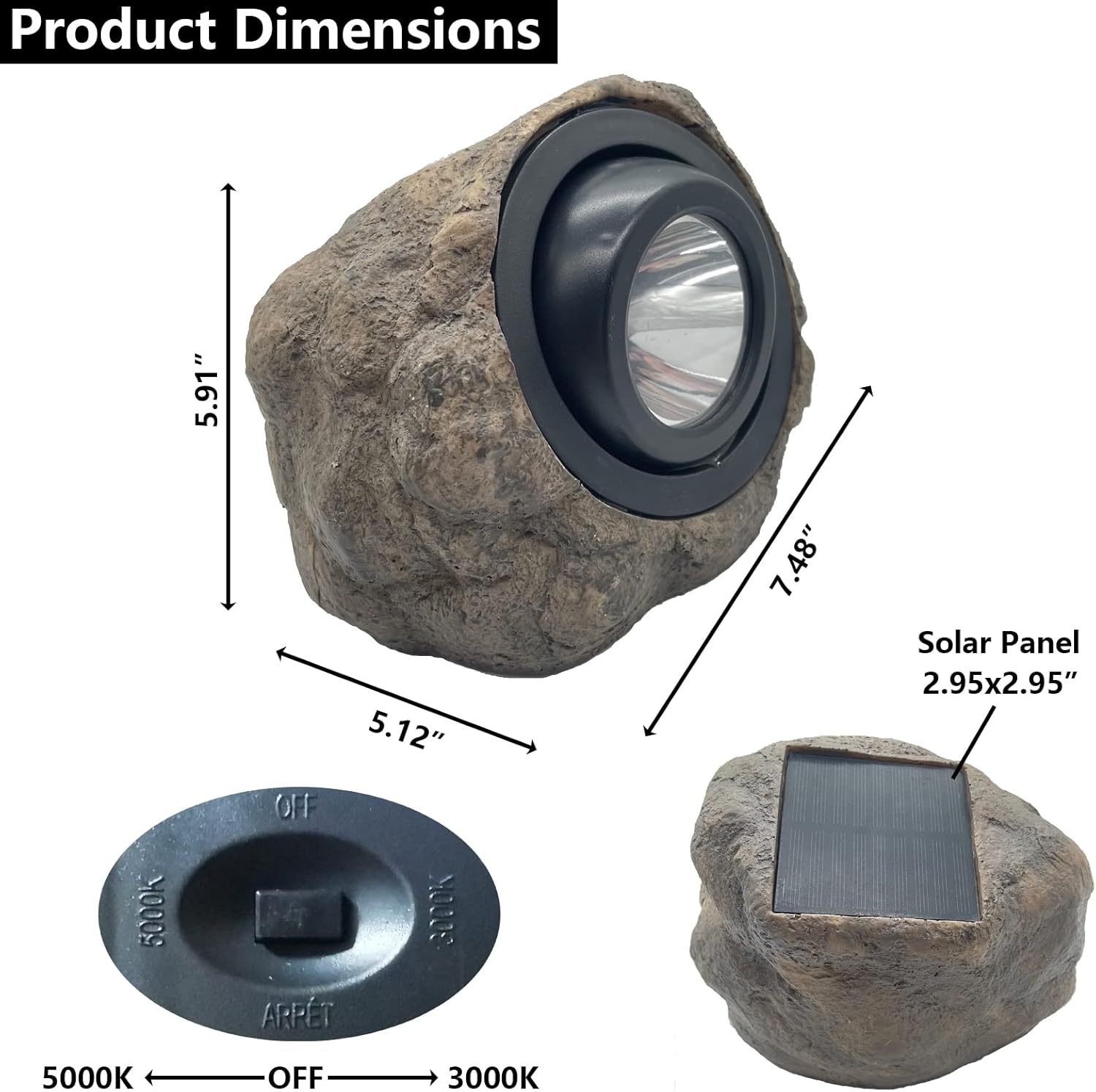
- Large Solar Panel: Equipped with an advanced solar panel measuring 2.95 x 2.95 inches for efficient sunlight absorption.
- High-Capacity Battery: Features a built-in AA1000 mAh battery, providing up to 8 hours of illumination on a full charge.
- Dual Lighting Modes: Offers both warm white light (3000K) and cold light (5000K) to match your desired ambiance.
- Durable Construction: Made from high-strength plastic material, ensuring IP65 waterproof, heat-resistant, and frost-resistant performance.
- Adjustable Light Angle: The light head can be adjusted by 45 degrees for precise illumination.
5. Setup
These solar rock lights require no complex installation or assembly. They are ready to use directly out of the box.
- Activate the Light: Locate the switch on the bottom of the solar light. Turn the switch to the "ON" position.
- Initial Charge: Place the solar light in a location where the solar panel receives direct sunlight for at least 6-8 hours. This ensures the battery is fully charged before first use.
- Positioning: Position the light in your desired outdoor area, such as a garden, pathway, patio, or walkway, ensuring the solar panel is exposed to sunlight.

6. Operation
Once properly set up and charged, your solar lights will operate automatically.
- Automatic Functionality: The lights will automatically charge during the day when exposed to sunlight and illuminate automatically at night.
- Changing Lighting Modes: Use the switch on the bottom of the light to select between 3000K (warm white) and 5000K (cold white) light output.
- Adjusting Light Angle: The internal light fixture can be manually adjusted by up to 45 degrees to direct the light beam as needed.


7. Maintenance
To ensure optimal performance and longevity of your solar lights, follow these maintenance guidelines:
- Clean Solar Panel: Regularly wipe the solar panel with a soft, damp cloth to remove dust, dirt, or debris. A clean panel ensures maximum sunlight absorption and charging efficiency.
- Clear Obstructions: Ensure no trees, bushes, or structures are shading the solar panel, especially during peak sunlight hours.
- Weather Resistance: The IP65 rating provides protection against dust and water jets. While designed for various weather conditions (rain, snow, frost), avoid prolonged submersion.
8. Troubleshooting
If your solar light is not functioning as expected, please refer to the following common issues and solutions:
| Problem | Possible Cause | Solution |
|---|---|---|
| Light does not turn on at night. | Switch is in "OFF" position. | Ensure the switch on the bottom of the light is set to either 3000K or 5000K. |
| Light does not turn on at night. | Insufficient charging during the day. | Relocate the light to an area that receives at least 6-8 hours of direct sunlight daily. Clean the solar panel. |
| Light duration is shorter than expected. | Inadequate sunlight exposure or dirty solar panel. | Ensure the solar panel is clean and receives full, direct sunlight for the entire day. Battery may need replacement after extended use. |
| Light is dim. | Partial charge or aging battery. | Allow for a full day's charge. If the issue persists, the battery may be nearing the end of its lifespan and require replacement. |
Initial Check: When you receive the outdoor solar spot lights, please turn the switch to the ON button. Then, place the light cover upside down on a table to keep them in darkness. This will allow you to check whether the lights will illuminate.
9. Specifications
| Feature | Detail |
|---|---|
| Brand | GOODFOEVER |
| Model Name | ROCK1 |
| Material | Resin, Plastic |
| Product Dimensions (L x W x H) | 7.48" x 5.12" x 5.91" |
| Solar Panel Size | 2.95" x 2.95" |
| Power Source | Solar Powered |
| Battery Type | AA1000 mAh (included) |
| Light Source Type | LED |
| Light Color Options | Warm White (3000K), Cold White (5000K) |
| Water Resistance Level | IP65 |
| Item Weight | 2.09 Kilograms (approx. 4.6 pounds) |
| Number of Items | 2 |
| Control Method | Push Button (for color selection) |
10. Warranty and Support
GOODFOEVER is committed to providing high-quality products and customer satisfaction. If you encounter any issues with your GOODFOEVER lights, please do not hesitate to contact us. We aim to provide a satisfactory solution within 24 hours.
For support, please refer to the contact information provided with your purchase or visit the official GOODFOEVER store page.