
1. Introduction
This manual provides comprehensive instructions for the installation, operation, and maintenance of the INDEM TIRO 60 automation system. This system is designed for automating sectional and spring-loaded up-and-over garage doors with a surface area of up to 10 m².
The INDEM TIRO 60 is a 24V operator engineered for semi-intensive use, featuring a robust 600N traction force. It incorporates advanced safety features such as encoder and amperometric obstacle detection, ensuring the door reverses immediately upon encountering an obstruction during both opening and closing cycles.
Please read this manual thoroughly before installation and operation to ensure proper functionality and safety.
2. Safety Information
Important Safety Instructions:
- Always disconnect power before performing any maintenance or service.
- Ensure all installation steps are followed precisely to prevent injury or damage.
- Keep the area around the garage door clear of obstructions.
- Do not allow children to play with or operate the garage door opener. Keep remote controls out of reach of children.
- The system is equipped with obstacle detection. Test this feature regularly to ensure it functions correctly. If an obstacle is detected, the door should reverse its movement.
- In case of power failure, use the manual release mechanism to operate the door.
- This product is designed for automation of garage doors only. Do not use for other purposes.
3. Package Contents
Verify that all components listed below are present in your package:
- 1x INDEM TIRO 60 24V Motor Unit
- 1x TIRO Control Electronics Unit
- 1x LED Courtesy Light
- 1x Straight Support Bracket (for spring-loaded up-and-over doors)
- 1x Curved Support Bracket (for sectional doors)
- 1x Metal Rail (3100 mm total length, divided into two pieces with central joint, belt drive)
- 2x Hope 4RC Remote Controls
- Mounting Hardware (screws, bolts, etc.)
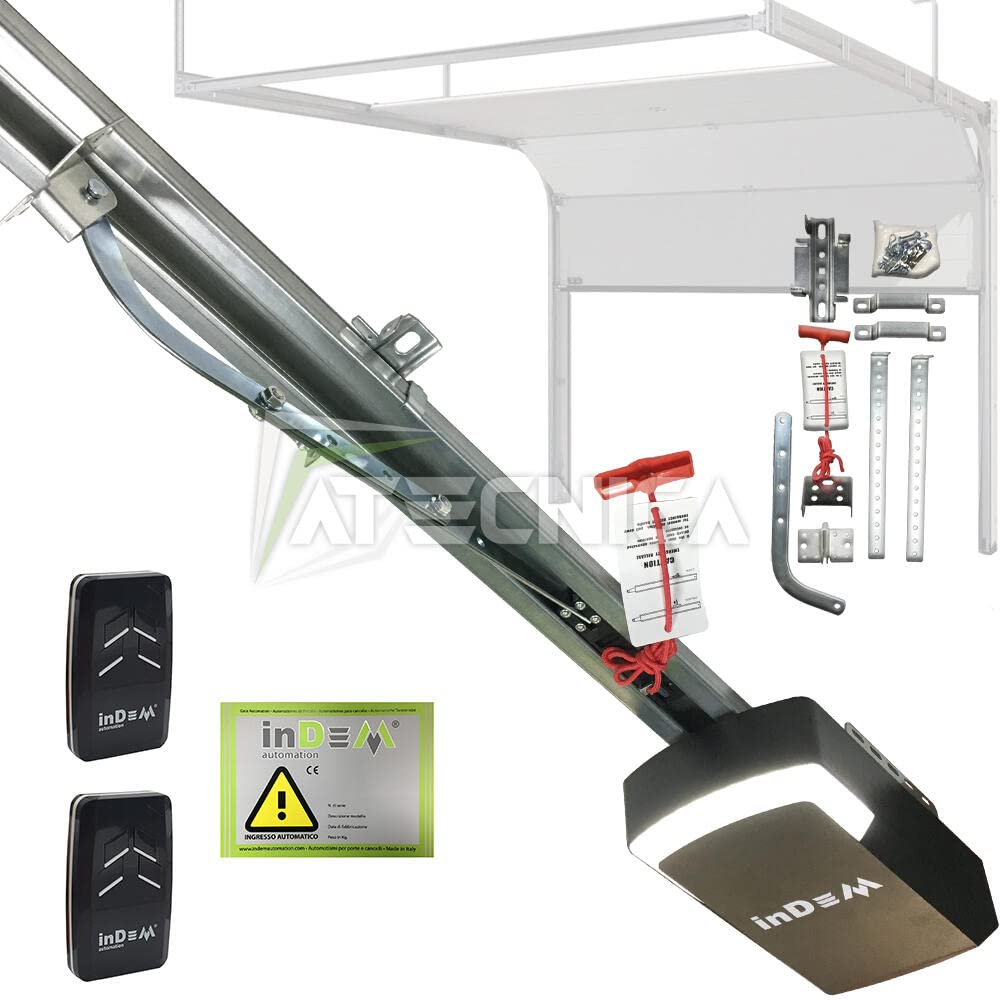
Image 3.1: INDEM TIRO 60 Motor and Rail Assembly. This image shows the complete motor unit attached to the belt-driven rail system.

Image 3.2: INDEM TIRO 60 Mounting Hardware and Accessories. This image displays various brackets, screws, and the emergency release handle included with the system.
4. Setup and Installation
4.1 Pre-Installation Checks:
- Ensure your garage door is in good working condition and balanced.
- Verify that the door type is either sectional or spring-loaded up-and-over. For doors with lateral counterweights, a different model (TIRO 60 2TXBA) may be required.
- Confirm there is a minimum of 5 cm space between the highest point of the door's travel and the ceiling.
- The system is compatible with doors up to 10 m² and a maximum height of 2.5 meters. For taller doors, a longer rail may be necessary (available separately).
4.2 Rail Assembly:
- Assemble the two sections of the metal rail using the central joint. Ensure the belt is correctly routed and tensioned.
- Attach the motor unit to one end of the assembled rail.

Image 4.1: INDEM TIRO 60 Rail and Belt Drive Detail. This close-up shows the metal rail with the internal belt drive mechanism, designed for quiet operation.
4.3 Mounting the System:
- Securely mount the rail assembly to the ceiling, centered above the garage door.
- Attach the appropriate support bracket (straight for up-and-over, curved for sectional) to the garage door and connect it to the trolley on the rail.
4.4 Electrical Connections:
- Connect the motor unit to the TIRO Control Electronics Unit.
- Wire any optional accessories such as photocells, stop buttons, start buttons, or flashing lights to the designated inputs on the control unit.
- Connect the control unit to a suitable power supply. Ensure all wiring complies with local electrical codes.

Image 4.2: INDEM TIRO 60 Motor Unit Close-up. This image highlights the compact design of the 24V motor unit, which houses the control electronics and LED courtesy light.
4.5 Remote Control Pairing:
Refer to the specific instructions provided with the Hope 4RC remote controls for pairing them with the TIRO Control Electronics Unit. Typically, this involves pressing a programming button on the control unit and then a button on the remote.
5. Operating Instructions
5.1 Basic Operation:
- Press a programmed button on your Hope 4RC remote control to open or close the garage door.
- Pressing the button again during operation will stop the door. A subsequent press will reverse its direction.
5.2 Obstacle Detection:
The INDEM TIRO 60 system features encoder and amperometric detection. If the door encounters an obstacle during closing or opening, it will automatically reverse its direction to prevent damage or injury. Regularly test this safety feature by placing a soft, non-damaging object in the door's path.
5.3 Manual Release:
In the event of a power outage or system malfunction, the garage door can be operated manually. Pull the emergency release handle (typically a red cord) to disengage the motor from the door. This allows you to open or close the door by hand. To re-engage the motor, push the handle back into position or operate the door manually until it reconnects.
6. Maintenance
Regular maintenance ensures the longevity and safe operation of your INDEM TIRO 60 system.
- Monthly: Inspect the garage door's balance and condition. Ensure all moving parts are free of obstructions. Test the obstacle detection safety feature.
- Quarterly: Check the belt tension on the rail. The belt should be taut but not overly tight. Adjust if necessary according to the detailed instructions in the full product manual.
- Annually: Have a qualified technician inspect the entire system, including electrical connections, motor, and rail components.
- Keep the motor unit and rail clean and free of dust and debris.
7. Troubleshooting
| Problem | Possible Cause | Solution |
|---|---|---|
| Door does not move. | No power; remote control battery dead; safety sensors obstructed. | Check power supply; replace remote battery; clear sensor path. |
| Door reverses unexpectedly. | Obstacle in path; safety sensors misaligned or dirty. | Remove obstacle; clean and align safety sensors. |
| Remote control not working. | Dead battery; out of range; not paired. | Replace battery; move closer to opener; re-pair remote (refer to pairing instructions). |
| Excessive noise during operation. | Loose components; worn parts; insufficient lubrication. | Inspect and tighten all fasteners; lubricate moving parts (do not lubricate the belt); consult a technician if noise persists. |
For issues not listed here, or if solutions do not resolve the problem, please contact customer support.
8. Specifications
| Feature | Detail |
|---|---|
| Model | TIRO 60 (Reference: M4001060.K2S) |
| Brand | INDEM |
| Motor Voltage | 24V |
| Traction Force | 600 N |
| Door Area Compatibility | Up to 10 m² |
| Max Door Height | 2.5 meters (with standard rail) |
| Rail Type | Metal, Belt Drive |
| Rail Length (Total) | 3100 mm |
| Rail Travel Length | 2510 mm |
| Minimum Headroom | 5 cm (between door and ceiling) |
| Safety Features | Encoder and Amperometric Obstacle Detection |
| Material | Metal |
| Color | Silver |
| Certifications | CE |
| Product Dimensions (L x W x H) | 310 x 250 x 251 cm (Assembled system/packaging) |
9. Warranty and Support
Detailed warranty information and specific terms and conditions are typically included in the physical documentation provided with your product. Please refer to the manuals and certifications found within the product packaging for complete details.
For technical support, spare parts, or warranty claims, please contact your retailer or the manufacturer, INDEM. The seller, Atecnica, can also provide assistance and support for this product.
Contact Information:
- Manufacturer: INDEM
- Seller/Distributor: Atecnica (Atecnica Seller Page)