
1. Introduction
The FIFISH V-EVO is an advanced underwater remotely operated vehicle (ROV) designed for professional-grade underwater exploration and imaging. Featuring a 4K 60FPS high frame-rate camera, 360° omnidirectional movement, and intelligent control systems, the V-EVO offers an immersive and precise piloting experience for various aquatic missions. This manual provides essential information for the safe and effective operation, maintenance, and troubleshooting of your FIFISH V-EVO drone.
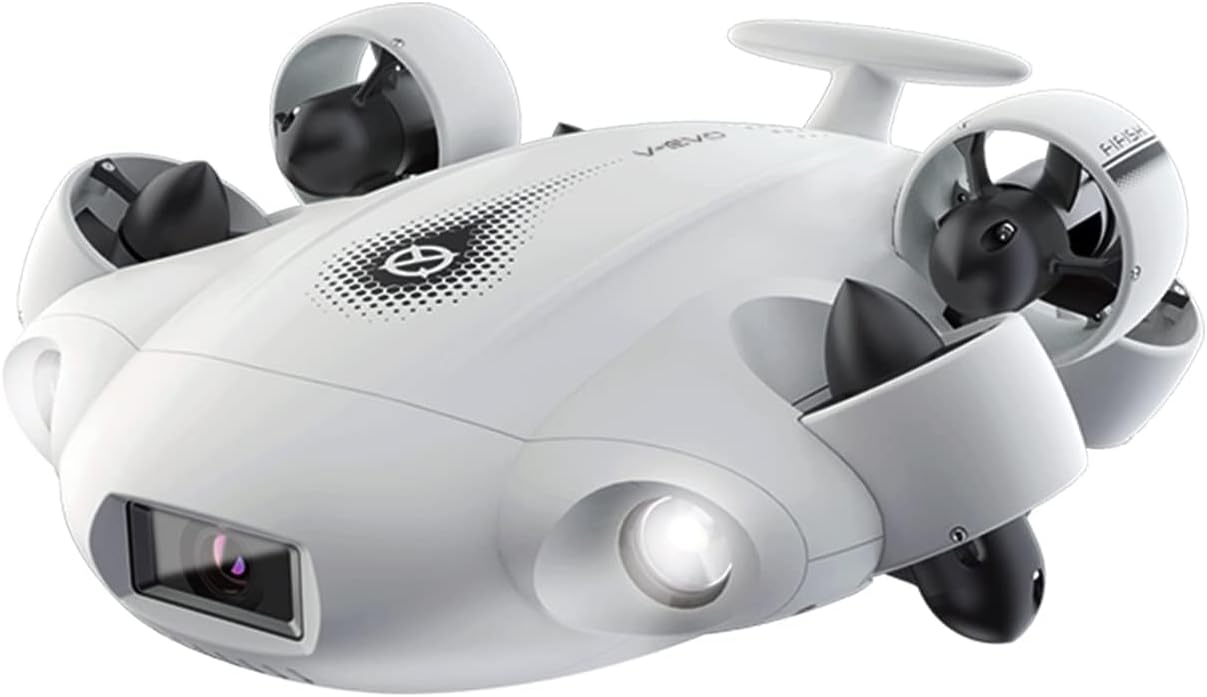
Figure 1: The FIFISH V-EVO Underwater Drone, showcasing its sleek design and integrated camera and lights.
2. Product Components
The FIFISH V-EVO package typically includes the following main components:
- FIFISH V-EVO Underwater Drone
- Remote Controller
- Tether (wired connection between drone and controller)
- Charger for the drone battery
- Battery (integrated)
- VR Goggles (for immersive first-person view)

Figure 2: Overview of the FIFISH V-EVO package contents.
3. Setup Guide
- Charge the Drone: Ensure the drone's internal Lithium Ion battery is fully charged using the provided charger. Fast-charging capabilities allow for 90% capacity within 1 hour.
- Connect the Tether: Securely connect the tether cable to the drone. The fin-inspired handle design aids in stable deployment.
- Prepare the Remote Controller: Attach your smartphone or tablet to the remote controller's holder.
- Connect Controller to Device: Use the provided cable to connect your mobile device to the remote controller.
- Launch the FIFISH App: Download and open the official FIFISH application on your mobile device. Ensure the app is connected to the drone via the controller.
- Deployment: Carefully place the FIFISH V-EVO into the water. The fin-inspired handle design assists in stable and quick underwater deployment.
Video 1: This video demonstrates the setup and initial deployment of the FIFISH V-EVO underwater drone, including connecting the tether and preparing the controller.
4. Operating Instructions
4.1 Movement and Control
- 360° Omnidirectional Mobility: The V-EVO offers complete freedom of movement underwater, allowing for precise navigation in all directions, including hovering and posture holds.
- Depth Hold: Utilize the one-click depth lock feature to maintain a stable depth, allowing for smooth and precise exploration.
- VR Control: Experience immersive piloting with VR head tracking, leveraging unique sensory controls for a first-person view of the ROV's movements.

Figure 3: Illustration of the FIFISH V-EVO's 360° omnidirectional movement capabilities, including barrel rolls, tracking, and camera tilt shots.
4.2 Camera and Lighting
- 4K 60FPS High Frame-rate Camera: Capture professional-class footage with enhanced smoothness and clarity. The camera features a 166° ultra-wide-angle lens.
- AI Vision Lock: This feature allows the drone to adaptively and automatically lock onto subjects, keeping them securely in focus with high precision.
- 5000 Ultra-bright Lumen LEDs: Two combined 5000 lumens, 5500K white LED lights optimize vision in deep, dark, or turbid underwater environments, restoring natural colors.
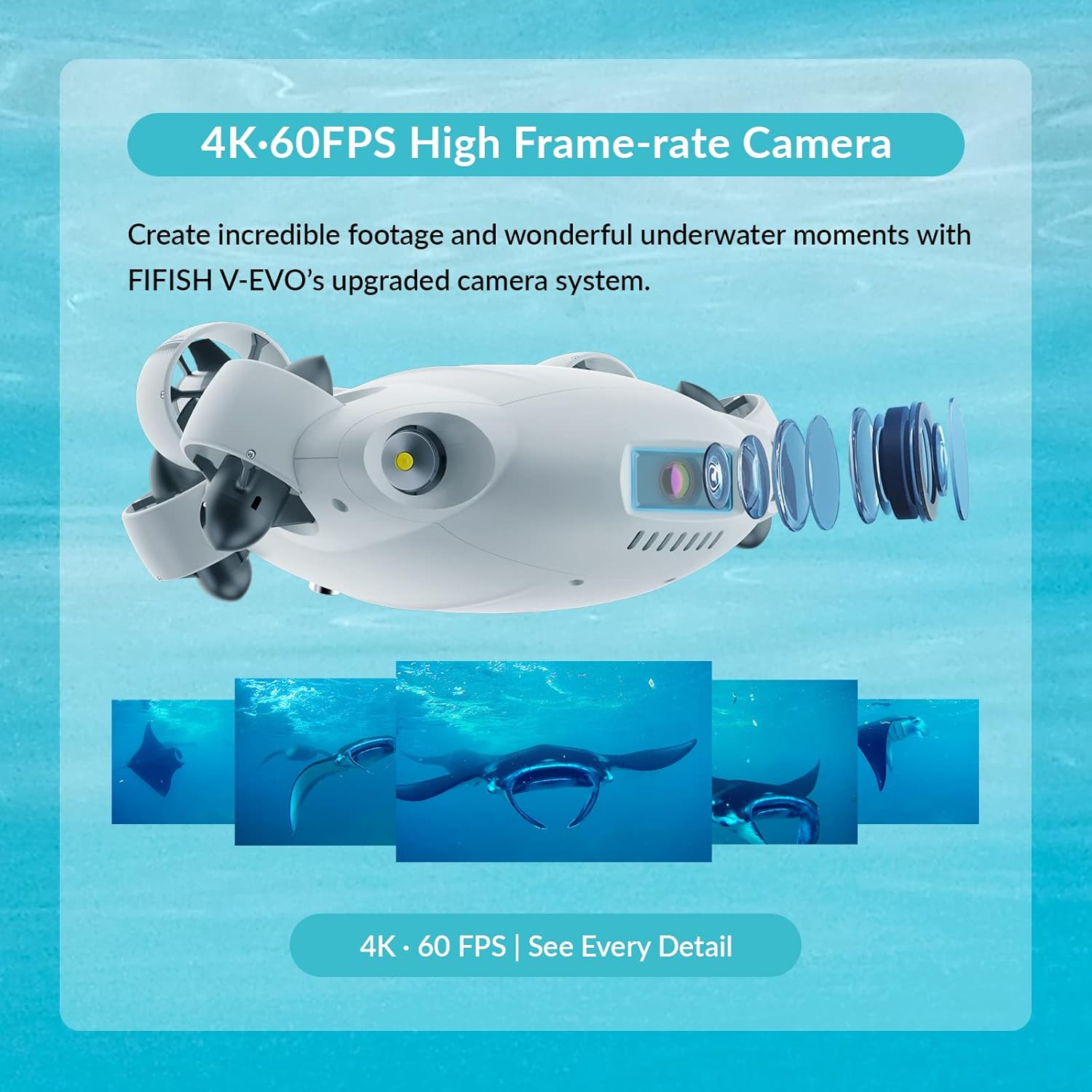
Figure 4: The FIFISH V-EVO's upgraded camera system, capable of capturing 4K 60FPS footage.

Figure 5: The FIFISH V-EVO utilizing its 5000 Lumen LEDs to brighten and restore colors in the deep sea.
Video 2: This video demonstrates the Adaptive AI Sea Plankton Filtering Algorithm, enhancing underwater visibility and image clarity.
4.3 Data Management
- Micro SD Card Slot: The V-EVO comes with a secure Micro SD card slot for fast transfer and storage of files.
4.4 Optional Add-on Tools
The FIFISH V-EVO supports various optional add-on tools to enhance its capabilities for specific tasks:
- Manipulator Tools: Robotic arm, retrieval hook, fish clamp, fishing net, and dozer for salvaging missions and explorations.
- Measuring Tools: Compass ruler, laser scaler, distance and altitude meters, thickness gauge, and hydrophone for detailed environmental understanding.
- Element Sampling Tools: Water samplers, dissolved oxygen sensor, salinity sensor, turbidity sensor, pH sensor, and sludge sampler.
- Navigation Tools: Underwater positioning systems and Doppler Velocity Logs for precise ROV tracking.

Figure 6: Optional accessories for the FIFISH V-EVO, including robotic arms and grippers, to enhance functionality.
Video 3: This video showcases the FIFISH V-EVO's capabilities for infrastructure inspections, demonstrating its maneuverability and the use of various add-on tools.
5. Maintenance
- Cleaning: After each use, rinse the drone and tether with fresh water to remove salt, sand, or debris.
- Battery Care: Always ensure the battery is charged according to the manufacturer's guidelines. Avoid overcharging or completely draining the battery.
- Storage: Store the drone and its components in a cool, dry place away from direct sunlight and extreme temperatures.
- Propeller Inspection: Regularly check propellers for any entanglement or damage. The patented Q-MOTOR system is fully sealed from corrosion and sand damage, but regular inspection is recommended.
6. Troubleshooting
- Internal Memory Full/Recording Issues: If the drone indicates internal memory is full or fails to record, attempt to format the internal storage via the app. If issues persist, consult the manufacturer's support.
- Control Difficulty: Ensure all connections (tether, controller to device) are secure. Calibrate the controller and check app settings for responsiveness.
- Lack of Technical Support: For persistent issues or complex problems, refer to the official FIFISH support channels or community forums for assistance.
7. Specifications
| Feature | Specification |
|---|---|
| Brand | FIFISH |
| Model Name | V-EVO |
| Special Feature | Waterproof |
| Video Capture Resolution | 4K |
| Connectivity Technology | Wireless |
| Included Components | Battery |
| Battery Capacity | 100 Amp Hours |
| Video Capture Format | MP4 |
| Remote Control Technology | Wi-Fi |
| Control Type | Remote Control |
| Maximum Range | 330 Feet |
| Material | Kevlar |
| Battery Cell Composition | Lithium Ion |
| Supported Image Format | JPEG, PNG |
| Item Weight | 21.8 pounds |
| Product Dimensions | 15.07 x 13.03 x 5.62 inches |
| UPC | 768571480637 |
8. Warranty and Support
For warranty information, technical support, or service inquiries, please refer to the official FIFISH website or contact their customer service directly. It is recommended to keep your proof of purchase for any warranty claims.


