
1. Introduction
This manual provides essential information for operating your DOOGEE S98 rugged smartphone. Please read it carefully to ensure proper use and to maximize the device's features and longevity.

Figure 1.1: Front and rear view of the DOOGEE S98 Rugged Smartphone. The front features a display, while the rear showcases the camera module with a circular secondary display and rugged design elements.
2. Device Overview
The DOOGEE S98 is a rugged smartphone designed for durability and performance. Key features include:
- Processor: MediaTek Helio G96 Octa-core chipset.
- Memory & Storage: 8GB RAM + 256GB ROM (expandable up to 512GB).
- Operating System: Android 12.
- Display: 6.3-inch FHD+ with Corning Gorilla Glass.
- Cameras: 64MP main camera, 20MP night vision camera (with 4 infrared lights), 8MP wide-angle camera.
- Battery: 6000mAh with 33W fast charging and 15W wireless charging.
- Durability: IP68/IP69K and MIL-STD-810G certified for water, dust, and shock resistance.
- Connectivity: Dual 4G SIM, NFC, OTG, GPS, Glonass, Beidou, Galileo.
- Unique Feature: Circular rear display for quick access to time, notifications, music control, and alarms.
3. Setup
3.1. Inserting SIM Cards and SD Card
- Locate the SIM card tray on the side of the device.
- Use the provided SIM ejector tool to open the tray.
- Carefully place your Nano-SIM cards and/or microSD card into the designated slots. Ensure the gold contacts face downwards.
- Gently push the tray back into the device until it is flush.
3.2. Initial Power On and Setup Wizard
- Press and hold the Power button (located on the side) until the DOOGEE logo appears.
- Follow the on-screen instructions to complete the initial setup, including language selection, Wi-Fi connection, Google account login, and security settings.
4. Operating Instructions
4.1. Basic Navigation
- Power Button: Press to wake/sleep the screen. Press and hold to power off or restart.
- Volume Buttons: Adjust media volume, call volume, and notification volume.
- Custom Button: A programmable button for quick access to specific functions or apps. Configure this in Settings.
- Fingerprint Sensor: Integrated for secure unlocking. Register your fingerprints in Settings > Security.
4.2. Smart Rear Display
The circular rear display provides quick information and controls without needing to activate the main screen.
- Time: Displays current time.
- Alarm: Snooze or cancel active alarms.
- Music Control: Play, pause, skip tracks.
- Incoming Call: View caller ID and manage calls.
- Notifications: Receive alerts for messages and other app notifications.

Figure 4.1: Illustration of the smart rear display showing its various functions like time, alarm, music control, incoming call, and notifications.
4.3. Camera Operation
The DOOGEE S98 features a versatile camera system:
- 64MP Main Camera: For high-resolution photos in various lighting conditions.
- 20MP Night Vision Camera: Equipped with 4 infrared lights, allowing clear photography up to 20 meters in complete darkness. Activate this mode in the camera app.
- 8MP Wide-Angle Camera: Capture broader scenes.
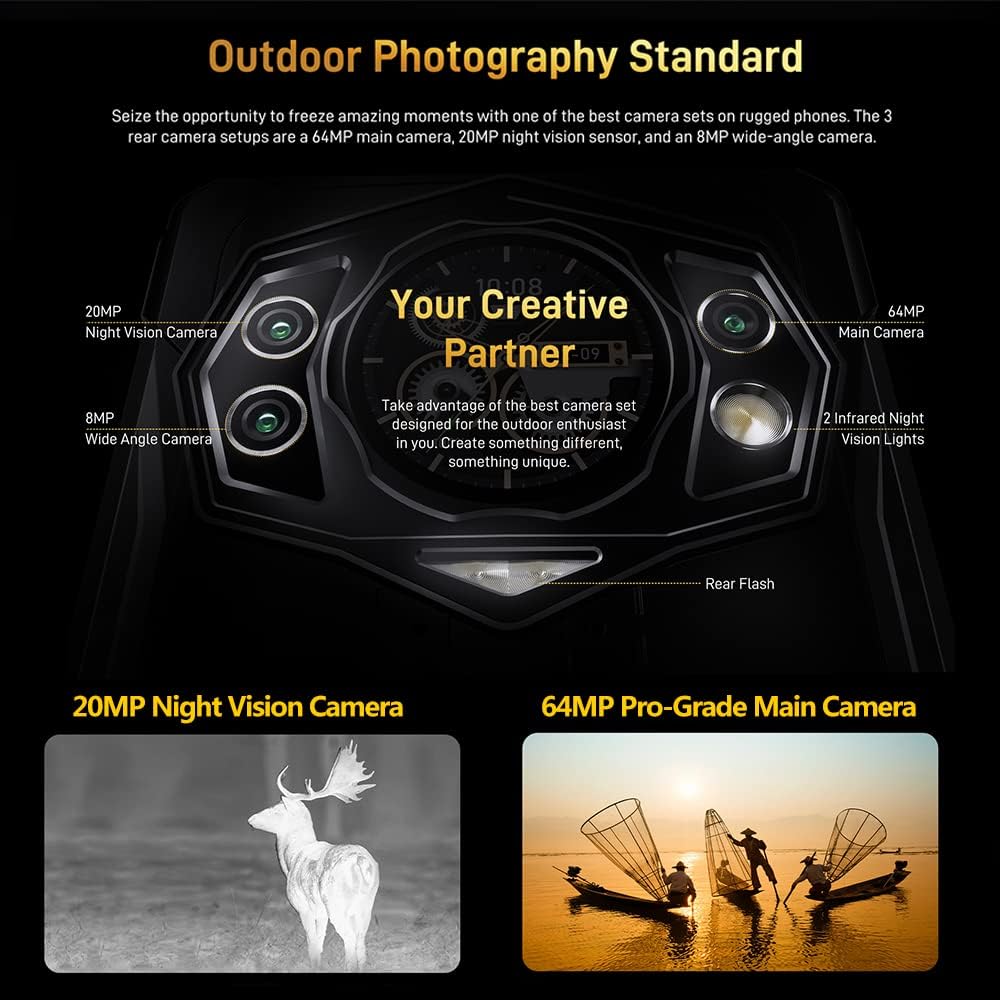
Figure 4.2: Detailed view of the DOOGEE S98 camera module, highlighting the 64MP main camera, 20MP night vision camera, 8MP wide-angle camera, and infrared lights.

Figure 4.3: Examples of photos taken with the DOOGEE S98 camera, demonstrating both standard and night vision capabilities.
4.4. Connectivity
- Dual 4G SIM: Supports two 4G SIM cards simultaneously for flexible network usage.
- NFC: For contactless payments and quick pairing with other NFC-enabled devices.
- OTG: Connect USB peripherals like flash drives or keyboards.
- GPS: Integrated with GPS, Glonass, Beidou, and Galileo for accurate positioning.
5. Battery and Charging
The DOOGEE S98 is equipped with a 6000mAh battery for extended usage.
- Wired Charging: Supports 33W fast charging. A 33W charger can replenish 55% of the battery in approximately 1 hour.
- Wireless Charging: Supports 15W wireless charging. Place the device on a compatible wireless charging pad.

Figure 5.1: Visual representation of the 6000mAh battery capacity and the 33W turbo charging feature of the DOOGEE S98.
6. Durability and Protection
The DOOGEE S98 is built to withstand harsh environments, certified with IP68, IP69K, and MIL-STD-810G standards.
- Waterproof: Can withstand immersion in water up to 1.5 meters for 30 minutes. Features an underwater mode for photography.
- Dustproof: Fully protected against dust ingress.
- Shockproof: Designed to endure drops from a height of 1.5 meters.
- Temperature Resistance: Operates in extreme temperatures between 70°C (158°F) and -55°C (-67°F).

Figure 6.1: Image demonstrating the DOOGEE S98's waterproof, dustproof, and shockproof capabilities, showing the phone submerged in water and covered in sand.
7. Specifications
| Feature | Detail |
|---|---|
| Model Name | DOOGEE S98 |
| Operating System | Android 12.0 |
| Processor | MediaTek Helio G96 Octa-core |
| RAM | 8 GB |
| Internal Storage | 256 GB |
| Expandable Storage | Up to 512GB (microSD) |
| Screen Size | 6.3 Inches |
| Resolution | 1080 x 2340 (FHD+) |
| Main Camera | 64 MP |
| Night Vision Camera | 20 MP (with 4 IR lights) |
| Front Camera | 16 MP (Common for this model, inferred) |
| Battery Capacity | 6000 mAh |
| Wired Charging | 33W Fast Charging |
| Wireless Charging | 15W |
| Durability Ratings | IP68, IP69K, MIL-STD-810G |
| Connectivity | 4G LTE, Wi-Fi, Bluetooth, NFC, USB, OTG |
| Navigation | GPS, Glonass, Beidou, Galileo |
| Dimensions | 8.19 x 7.6 x 1.85 inches (Package) |
| Weight | 11.3 ounces (320 Grams) |
| Audio Jack | 3.5 mm |
8. Maintenance and Care
- Cleaning: Use a soft, damp cloth to clean the device. Avoid harsh chemicals.
- Water Exposure: While waterproof, ensure all ports are securely closed before exposing the device to water. After water exposure, dry the device thoroughly, especially the charging port, before charging.
- Temperature: Avoid prolonged exposure to extreme heat or cold to prevent battery degradation and component damage.
- Software Updates: Regularly check for and install system updates to ensure optimal performance and security.
9. Troubleshooting
| Problem | Possible Solution |
|---|---|
| Device not powering on | Ensure the battery is charged. Connect to a charger for at least 10 minutes, then try powering on. |
| Screen unresponsive | Perform a forced restart by holding the Power button for 10-15 seconds. If the issue persists, contact support. |
| Network connectivity issues | Check SIM card insertion. Toggle Airplane Mode on/off. Restart the device. Verify network settings. |
| Battery drains quickly | Close unused apps. Reduce screen brightness. Disable unnecessary features like GPS or Bluetooth when not in use. Check for background app activity. |
| Night Vision Camera not working | Ensure you are in a sufficiently dark environment. Check camera app settings for night vision mode activation. |
10. Warranty and Support
The DOOGEE S98 comes with a 12-month US warranty. For any questions or issues regarding your device, please contact DOOGEE customer support. Ensure you confirm SIM compatibility with your carrier before purchase, as the device is not compatible with AT&T, Cricket, Verizon, Sprint, Boost Mobile, or other CDMA networks.
For further assistance, please refer to the official DOOGEE website or contact their customer service channels.


