Introduction
This manual provides essential information for the safe and efficient use of your Xiaomi 12 smartphone. Please read this manual carefully before using your device to ensure optimal performance and longevity.
The Xiaomi 12 is designed for elegance and comfort, weighing 180g and measuring just 69.9mm wide, offering a lightweight and pleasurable grip. Its symmetrically curved edges provide a smooth and delicate styling.
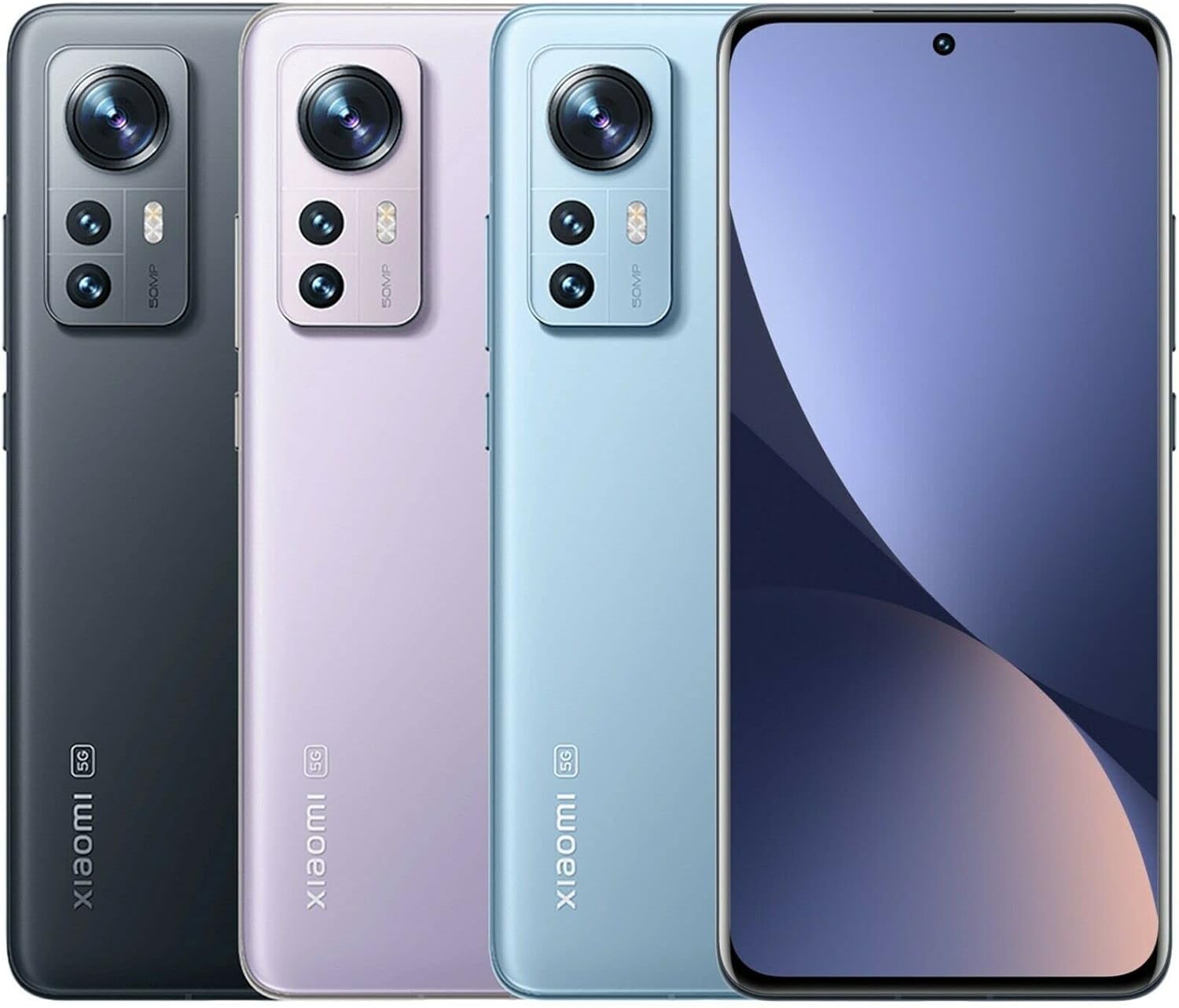
Image: Xiaomi 12 in various colors, highlighting its compact design and camera system.
Setup
1. Unboxing and Initial Inspection
Upon receiving your Xiaomi 12, carefully unbox the device and check for all included accessories. The standard package includes the Xiaomi 12 smartphone and a power adapter.

Image: Xiaomi 12 and its packaging, showing the device's certification screen.
2. SIM Card Installation
- Locate the SIM card tray on the side of your device.
- Insert the SIM ejector tool into the small hole next to the tray and push gently until the tray pops out.
- Place your Nano-SIM card(s) into the tray with the gold contacts facing down. The Xiaomi 12 supports Dual Nano SIM.
- Carefully reinsert the tray into the phone.
3. Initial Power On and Setup Wizard
Press and hold the Power button until the Xiaomi logo appears. Follow the on-screen instructions to complete the initial setup, including language selection, Wi-Fi connection, Google account sign-in, and security settings.
Operating Your Xiaomi 12
Display and Interaction
The Xiaomi 12 features a 6.28" AMOLED DotDisplay with a resolution of 2400 x 1080 pixels and a 120Hz refresh rate, offering vibrant colors and smooth scrolling. It supports up to 480Hz touch sampling rate for responsive interaction. The display is protected by Corning Gorilla Glass Victus.
Camera System
Equipped with a 50MP pro-grade main camera (f/1.88, OIS), a 13MP ultra-wide angle camera (123° FOV, f/2.4), and a 5MP telemacro camera (f/2.4, AF 3cm-7cm). The front camera is 32MP. Key features include:
- Xiaomi ProFocus: Advanced focusing technology with subject learning and tracking.
- Ultra Night Video: AI algorithms enhance video brightness and detail in low-light conditions.
- Multi-scene Night Views: Night mode for wide and ultra-wide angle cameras.
- Portrait Night Mode: Crystal-clear portrait shots even in low light.
- 8K Video Recording: Capture high-resolution video at 24/30fps.
Performance and Cooling
Powered by the Snapdragon® 8 Gen 1 processor, the Xiaomi 12 delivers robust performance. To maintain optimal temperature during intensive use, it incorporates 2600mm² extra-large VC liquid cooling technology, featuring Xiaomi's thinnest 0.3mm VC LiquidCool material for efficient heat dissipation.
Audio Experience
The device features a fully symmetrical physical structure for an immersive stereo sound experience, enhancing enjoyment of movies and music with smooth, high-quality audio.
Maintenance
Battery Care
The Xiaomi 12 is equipped with a 4500 mAh battery. For optimal battery longevity, it is recommended to avoid fully draining the battery to 0% or consistently charging it to 100%. Aim to keep the charge level between 20% and 80% for best results. The device supports 120W fast charging, allowing for rapid replenishment of power.
Software Updates
Regularly check for and install system updates to ensure your device has the latest features, security patches, and performance improvements. You can typically find this option in Settings > About phone > MIUI version.
Cleaning Your Device
Use a soft, lint-free cloth to clean the screen and body of your phone. Avoid using harsh chemicals or abrasive materials that could damage the finish.
Troubleshooting
Common Issues and Solutions
- Device Not Powering On: Ensure the battery is charged. Connect to the charger and wait a few minutes before attempting to power on again.
- Network Connectivity Issues: Check if your SIM card is properly inserted. Verify that mobile data or Wi-Fi is enabled. Restart your device. Note that this model is not compatible with Verizon, Boost, AT&T, Cricket, or Straight Talk CDMA carriers.
- Slow Performance: Close unnecessary background applications. Clear cache regularly. Ensure sufficient storage space is available.
- Overheating: Avoid prolonged use of demanding applications or games, especially while charging. The LiquidCool Technology helps manage temperature, but extreme conditions can still cause heat.
For more complex issues, refer to the official Xiaomi support website or contact customer service.
Specifications
| Feature | Detail |
|---|---|
| Model Number | 2201123G |
| Dimensions | 5.98 x 2.76 x 0.31 inches |
| Weight | 6 ounces (180g) |
| Display | 6.28" AMOLED DotDisplay, 2400 x 1080, 120Hz Refresh Rate, Corning Gorilla Glass Victus |
| Processor | Snapdragon® 8 Gen 1 (4nm) |
| RAM | 8 GB |
| Storage | 256 GB |
| Main Camera | 50MP Wide Angle (OIS) |
| Ultra-Wide Camera | 13MP (123° FOV) |
| Telemacro Camera | 5MP (AF 3cm-7cm) |
| Front Camera | 32MP |
| Battery | 4500 mAh, 120W Fast Charging |
| Operating System | Android 12.0 |
| Connectivity | 5G, 4G VoLTE, Wi-Fi 6, Bluetooth 5.1, GPS (L1+L5) |
| Sensors | Proximity, Ambient Light, Accelerometer, Gyroscope, Electronic Compass, Linear Motor, IR Blaster |

Image: Regulatory information and model number displayed on the Xiaomi 12 screen.
Warranty and Support
For warranty information, technical support, and service inquiries, please visit the official Xiaomi support website or contact their customer service. Keep your proof of purchase for warranty claims.
You can find more information and support resources by visiting the Xiaomi Store on Amazon.


