Water Tank Container User Manual
Compatible with Philips Steam Generator Iron
Product Overview
This document provides instructions for the proper use and maintenance of the replacement water tank container for Philips Steam Generator Irons. This water tank is designed to hold water for steam generation, ensuring continuous operation of your iron.
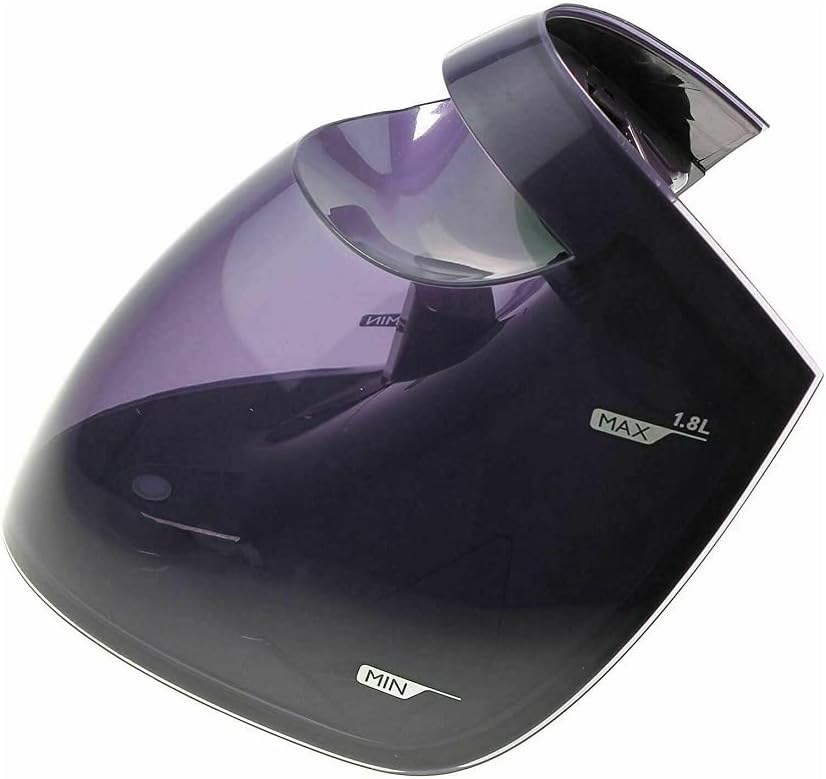
Figure 1: The purple translucent water tank container, showing the 'MAX 1.8L' and 'MIN' fill level indicators. This tank is a replacement part for compatible Philips Steam Generator Irons.
Setup and Installation
Before first use or after replacing an old tank, ensure the steam generator iron is unplugged and cool.
- Remove Old Tank (if applicable): If replacing an existing tank, carefully detach the old water tank from the steam generator iron according to your iron's specific instructions.
- Inspect New Tank: Examine the new water tank for any visible damage or defects.
- Attach New Tank: Align the new water tank container with the designated slot on your Philips Steam Generator Iron. Gently push it into place until it clicks securely, ensuring a tight seal.
- Initial Rinse (Optional): For first-time use, it is recommended to rinse the tank with clean water before filling.
Operating Instructions
Follow these steps to fill and use the water tank with your steam generator iron:
- Remove Tank: Detach the water tank from the steam generator iron.
- Fill with Water: Open the filling cap and fill the tank with clean tap water. For optimal performance and to prevent limescale buildup, distilled or demineralized water is recommended, especially in hard water areas. Do not exceed the 'MAX 1.8L' fill line.
- Close Cap: Securely close the filling cap to prevent leaks.
- Reattach Tank: Reinsert the filled water tank back into the steam generator iron until it is firmly seated.
- Power On Iron: Plug in and power on your Philips Steam Generator Iron. Allow it to heat up according to its own operating instructions.
- Monitor Water Level: During ironing, periodically check the water level. Refill the tank when the water level approaches the 'MIN' indicator.
Maintenance
Regular maintenance ensures the longevity and efficiency of your water tank.
- Daily Cleaning: After each use, empty any remaining water from the tank. Rinse the tank with clean water to prevent stagnant water buildup.
- Weekly Cleaning: For a more thorough clean, use a soft brush or cloth to gently clean the inside of the tank. Avoid abrasive cleaners or harsh chemicals.
- Descaling: While the iron itself handles descaling, ensuring the water tank is clean and free of mineral deposits will support the overall system. If you notice significant mineral buildup in the tank, a mild vinegar solution (diluted with water) can be used for soaking, followed by thorough rinsing. Refer to your iron's manual for specific descaling procedures.
- Storage: Store the water tank in a cool, dry place when not in use, preferably detached from the iron if storing for extended periods.
Troubleshooting
If you encounter issues with your water tank, consider the following:
| Problem | Possible Cause | Solution |
|---|---|---|
| Water Leakage |
|
|
| Iron not producing steam |
|
|
If problems persist, consult the user manual for your specific Philips Steam Generator Iron model or contact Philips customer support.
Specifications
- Capacity: 1.8 Liters
- Color: Purple (translucent)
- Compatible Philips Steam Generator Iron Models: GC9610, GC9611, GC9612, GC9614, GC9615, GC9620, GC9622, GC9625, GC9630, GC9635, GC9636, GC9640, GC9641, GC9642, GC9644, GC9646, GC9647, GC9648, GC9650, GC9655, GC9660, GC9665, GC9666, GC9670, GC9671, GC9675, GC9680, GC9681, GC9682, GC9683, GC9685
- Known Part Numbers: 423902188631, 423902188632, 423902188941, 423902188942, 423902276331, 423902276361, 423902277321, 423902276711, 423902277321, 423903010801, 423903011381, 423903013841
- Material: Durable plastic