
1. Product Overview
The Mohard Bluetooth 5.3 FM Transmitter is a versatile car accessory designed to enhance your in-car audio experience and connectivity. It allows you to stream music, make hands-free calls, and charge your devices simultaneously. This device features advanced Bluetooth 5.3 technology for stable connections and clear audio.
Key Features:
- Dual USB Ports & Secure Charging: Supports charging two devices simultaneously with overload protection. Includes one 5V/1A USB port for music playback (USB disk) and one 5V/2.4A USB port for efficient device charging.
- Three Music Playback Modes: Stream clear stereo music via Bluetooth connection, USB Flash Disk (up to 32GB), or TF Card (up to 32GB). Supports MP3/WMA/FLAC/WAV/APE formats.
- Hands-Free Calling: Built-in microphone with Echo Cancellation and Noise Suppression (CVC) technology for clear calls. Answer, reject, hang up, or redial calls with a single multi-function button. Automatically switches to hands-free mode during incoming calls.
- Blue Ambient Light & LED Display: Features a blue ambient light ring for easy visibility in dark environments and a clear LED screen displaying volume, car voltage, and FM frequency.
- Wide Compatibility: Works with various Bluetooth-enabled devices (e.g., iPhone, iPad, Samsung, HTC, Sony) and is compatible with all cars/trucks (12-24V).

Image 1.1: The Mohard Bluetooth FM Transmitter, showcasing its design and LED display.
2. Setup Guide
Follow these steps to set up your Mohard Bluetooth FM Transmitter for the first time:
- Step 1: Tune Car Radio to a Blank Station. Turn on your car's FM radio and find an empty frequency (one with no static or broadcast).
- Step 2: Insert FM Transmitter and Enter FM Mode. Plug the Mohard FM Transmitter into your car's cigarette lighter socket. Long press the 'CH' button (usually the multi-function knob) for 2 seconds to enter FM pairing mode. The frequency display will start blinking.
- Step 3: Match Frequencies. Rotate the multi-function knob on the transmitter to adjust its frequency to match the blank FM station you found on your car radio. Ensure both frequencies are identical for optimal sound quality.
- Step 4: Pair via Bluetooth. On your smartphone or Bluetooth-enabled device, enable Bluetooth and search for available devices. Select 'T25' from the list to pair. Once connected, the device will confirm the connection, and you can begin streaming audio.

Image 2.1: Visual guide illustrating the four steps for setting up the FM transmitter.
3. Operating Instructions
3.1 Music Playback
The Mohard FM Transmitter offers three ways to play music:
- Bluetooth Connection: After successful Bluetooth pairing, open your music player on your device and play audio. The sound will be transmitted to your car's FM radio.
- USB Flash Disk: Insert a USB flash drive (up to 32GB) containing MP3/WMA/FLAC/WAV/APE audio files into the 5V/1A USB port (marked with a music note icon). The device will automatically detect and play music from the drive.
- TF Card: Insert a TF (microSD) card (up to 32GB) with supported audio files into the designated TF card slot. Music playback will start automatically.

Image 3.1: Illustration of the three available music playback modes.
3.2 Hands-Free Calling
When connected via Bluetooth, you can manage calls directly through the transmitter:
- Answer Call: Press the multi-function knob once.
- Reject Call: Press and hold the multi-function knob for 2 seconds.
- Hang Up Call: Press the multi-function knob once during a call.
- Redial Last Number: Double-press the multi-function knob.
The built-in microphone with CVC (Clear Voice Capture) technology helps reduce background noise for clearer conversations.

Image 3.2: Demonstrating hands-free calling functionality with the device.
3.3 Device Charging
The transmitter features two USB charging ports:
- USB 1 (5V/1A): Primarily for USB disk music playback, but can also charge devices at a standard rate.
- USB 2 (5V/2.4A): Designed for faster charging of smartphones and other compatible devices.
Both ports offer overload protection to ensure safe charging.

Image 3.3: The dual USB ports providing power to two mobile devices.
3.4 Ambient Light and Voltage Display
The device features a blue ambient light ring that illuminates when powered on, making it easy to locate in the dark. The LED screen displays the current FM frequency, volume level, and your car's battery voltage. This allows you to monitor your car's battery health.
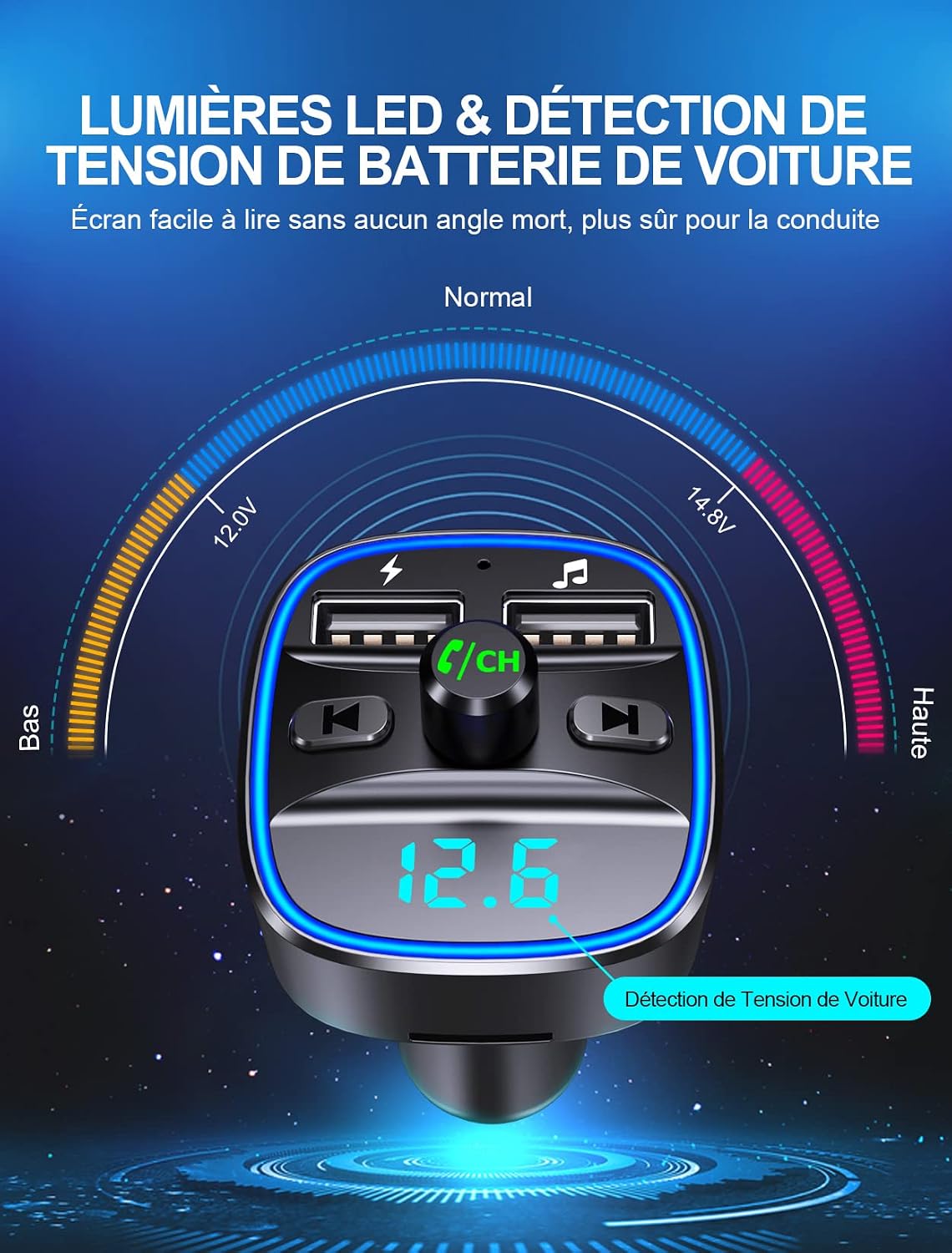
Image 3.4: The LED display showing car battery voltage and ambient light.
3.5 Voice Navigation
When connected to your smartphone via Bluetooth, the transmitter can relay voice navigation prompts from your phone's GPS application directly through your car's speakers, ensuring safer driving without needing to look at your phone.

Image 3.5: Voice navigation feature in use, enhancing driving safety.
4. Maintenance
To ensure the longevity and optimal performance of your Mohard Bluetooth FM Transmitter, follow these maintenance guidelines:
- Cleaning: Use a soft, dry cloth to clean the device. Do not use liquid cleaners or aerosols, as they may damage the electronics.
- Storage: When not in use for extended periods, store the device in a cool, dry place away from direct sunlight and extreme temperatures.
- Avoid Impact: Protect the device from drops or strong impacts, which can damage internal components.
- Power Source: Always ensure the device is plugged into a 12V-24V car cigarette lighter socket. Using an incorrect power source may cause damage.
5. Troubleshooting
If you encounter issues with your Mohard Bluetooth FM Transmitter, refer to the following common problems and solutions:
- No Power:
- Ensure the transmitter is fully inserted into the car's cigarette lighter socket.
- Check if the car's cigarette lighter socket is functioning (e.g., by testing with another device).
- Verify your car's battery voltage is within the 12-24V range.
- Poor Sound Quality / Static:
- Ensure the FM frequency on the transmitter matches the blank frequency on your car radio exactly.
- Try changing to a different, completely clear FM frequency on both the transmitter and car radio. Avoid frequencies used by local radio stations.
- Adjust the volume on both your phone and car radio.
- Move your phone closer to the transmitter to improve Bluetooth signal strength.
- Bluetooth Connection Issues:
- Ensure Bluetooth is enabled on your device and the transmitter is in pairing mode.
- Forget the 'T25' device from your phone's Bluetooth settings and try pairing again.
- Restart both your phone and the FM transmitter (by unplugging and re-plugging it).
- USB/TF Card Not Playing:
- Ensure the USB disk or TF card is inserted correctly and fully.
- Check if the audio files are in a supported format (MP3/WMA/FLAC/WAV/APE).
- Verify the storage capacity of the USB disk or TF card does not exceed 32GB.
- Test the USB disk or TF card on another device to ensure it is not corrupted.
6. Specifications
| Feature | Specification |
|---|---|
| Brand | Mohard |
| Model Number | T25 |
| Color | Black |
| Connectivity Technology | Bluetooth, USB |
| Wireless Communication Standard | Bluetooth 5.3 |
| Power Source | USB (Car Cigarette Lighter) |
| Total USB Ports | 2 (5V/2.4A & 5V/1A) |
| Supported Music Formats | MP3/WMA/FLAC/WAV/APE |
| Max USB Disk/TF Card Capacity | 32GB |
| Material | Acrylonitrile Butadiene Styrene (ABS) |
| Product Dimensions | 8.4L x 4.7W x 4.2H centimeters |
| Item Weight | 36 Grams |
| Rechargeable Battery | No (Powered by car) |
| Compatible Devices | iPhone, iPad, Samsung, HTC, Sony, MP3/MP4 Players, etc. |
| Car Compatibility | All cars/trucks (12-24V) |
7. Warranty and Support
Mohard provides a manufacturer's warranty for this product. For specific details regarding the warranty period and coverage, please refer to the documentation included with your purchase or contact Mohard customer support directly.
Customer Support:
For any technical assistance, troubleshooting, or warranty claims, please contact Mohard customer support through the retailer where you purchased the product or visit the official Mohard website for contact information.
Manufacturer Warranty: One-year after-sales service.


