
Acer GP.KBD11.01N
Acer Predator Aethon 700 Gaming Keyboard User Manual
Model: GP.KBD11.01N
1. Introduction
This manual provides detailed instructions for the Acer Predator Aethon 700 Gaming Keyboard. It covers essential information regarding product setup, operational features, maintenance, and troubleshooting to ensure optimal performance and longevity of your device.

Figure 1.1: Acer Predator Aethon 700 Gaming Keyboard
2. Setup
Follow these steps to set up your Acer Predator Aethon 700 Gaming Keyboard:
- Connect the Keyboard: Plug the braided gold-plated USB cable into an available USB port on your computer. The keyboard is designed for plug-and-play functionality.
- Attach the Wrist Rest: The keyboard includes a detachable magnetic wrist rest. Align the wrist rest with the front edge of the keyboard until the magnets engage, securing it in place.
- Driver Installation: For full functionality, including customization of lighting and macros, download and install the Predator Quartermaster software from the official Acer support website.
3. Operating Instructions
3.1 Dual-Mode Switches
The Predator Aethon 700 features dual-mode switches, allowing you to switch between tactile/clicky and linear/smooth keypresses. This functionality is managed via the keyboard's internal mechanism, providing versatility for different tasks or gaming preferences.

Figure 3.1: Dual-Mode Switch Mechanism
3.2 Volume Control Roller
A dedicated volume control roller is located on the top right of the keyboard. Rotate the roller to adjust the system volume without interrupting your current activity. This feature allows for quick and precise audio adjustments.

Figure 3.2: Volume Control Roller in Use
3.3 Per-Key RGB Backlighting
The keyboard features per-key RGB backlighting with 16.8 million color options. You can customize the backlight of each key individually. The keyboard also includes 7 preset default lighting modes. Customization and mode selection are performed through the Predator Quartermaster software.

Figure 3.3: Per-Key RGB Backlighting
3.4 Programmable Features and Macros
The Predator Aethon 700 is a programmable keyboard. Utilize the Predator Quartermaster software to customize various settings, including:
- Lighting effects and colors.
- Macro creation and assignment to specific keys.
- Key remapping.
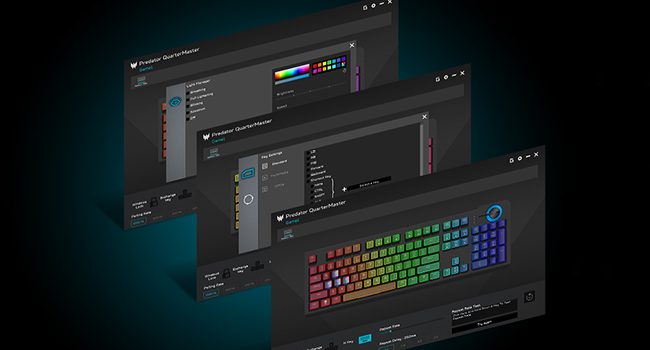
Figure 3.4: Predator Quartermaster Software Interface
3.5 Anti-Ghosting and N-Key Rollover
The keyboard features 100% anti-ghosting with N-Key Rollover (NKRO). This ensures that every keypress is registered accurately, even when multiple keys are pressed simultaneously, which is crucial for fast-paced gaming.

Figure 3.5: Anti-Ghosting Feature
3.6 Dedicated Media Keys and Windows Lock Key
The keyboard includes dedicated multimedia playback keys for convenient control of audio and video. Additionally, a Windows Lock key is present to prevent accidental presses of the Windows key during gameplay.
4. Maintenance
To maintain the performance and appearance of your keyboard:
- Cleaning: Use a soft, dry cloth to wipe the surface of the keyboard. For deeper cleaning, gently remove keycaps and use compressed air to clear debris from underneath. Avoid using harsh chemicals or abrasive materials.
- Storage: When not in use for extended periods, store the keyboard in a clean, dry environment away from direct sunlight and extreme temperatures.
5. Troubleshooting
If you encounter issues with your Acer Predator Aethon 700 Gaming Keyboard, consider the following steps:
- Keyboard Not Responding:
- Ensure the USB cable is securely connected to both the keyboard and the computer.
- Try connecting the keyboard to a different USB port on your computer.
- Test the keyboard on another computer to determine if the issue is with the keyboard or the computer's setup.
- Backlighting Not Working/Incorrect:
- Verify that the Predator Quartermaster software is installed and up to date.
- Check lighting settings within the Quartermaster software.
- Ensure no conflicting software is running that might interfere with RGB control.
- Keys Not Registering:
- Clean around the affected keys to remove any debris that might be obstructing the switch.
- If the issue persists, contact Acer support for further assistance.
6. Specifications
| Feature | Detail |
|---|---|
| Brand | Acer |
| Series | Predator Aethon 700 |
| Model Number | GP.KBD11.01N |
| Hardware Platform | PC |
| Operating System | Windows |
| Item Weight | 4.9 pounds |
| Product Dimensions | 17.72 x 6.36 x 2.1 inches |
| Color | Black |
| Power Source | DC power supply |
| Connectivity Technology | USB |
| Keyboard Description | Gaming |
| Recommended Uses | Gaming |
| Special Feature | Magnetic (Wrist Rest) |
| Keyboard Backlighting | RGB (Per-Key 16.8M Colors) |
| Switch Type | Dual Mode (Linear/Tactile) |
| Anti-Ghosting | 100% Anti-Ghosting (N-Key Rollover) |
| Durability | 60M Keystroke Rated |
| Cable Length | 5.9 feet |
| Material | Aluminum |
7. Warranty and Support
7.1 Warranty Information
For detailed warranty information regarding your Acer Predator Aethon 700 Gaming Keyboard, please refer to the warranty card included with your product or visit the official Acer support website. Warranty terms and conditions may vary by region.
7.2 Technical Support
If you require technical assistance or have questions not covered in this manual, please contact Acer customer support. You can find contact information and additional resources on the official Acer website:
- Acer Support Website: www.acer.com/support
Ask a question about this manual
Ask about setup, troubleshooting, compatibility, parts, safety, or missing instructions. Manuals+ will review the question and use this page’s manual context to help answer it.