
Proster RJ45 Crimper Tool Kit
Proster RJ45 Crimper Tool Kit Instruction Manual
Brand: Proster
Model: RJ45 Crimper Tool Kit (Includes Crimper, Tester, Connectors, Covers, Stripper)
1. Product Overview
The Proster RJ45 Crimper Tool Kit is a comprehensive solution for creating and maintaining network cables. This kit is designed for efficiency and reliability, allowing users to cut, strip, and crimp RJ45 connectors with ease. It supports various connector types including Cat5, Cat5e, Cat6, Cat6a, and non-all-metal Cat7 connectors. The included network cable tester ensures proper connectivity, making it an essential tool for both home and professional networking tasks.
2. What's Included
- 1 x Proster 3-in-1 RJ45 Crimper Tool
- 1 x Network Cable Tester (requires 2x AA batteries, not included)
- 50 x RJ45 Cat6 Pass-Through Connectors
- 50 x Protective Covers (Blue)
- 1 x Mini Wire Stripper
- 2 x Spare Blades for Crimper Tool
- 1 x EVA Storage Bag
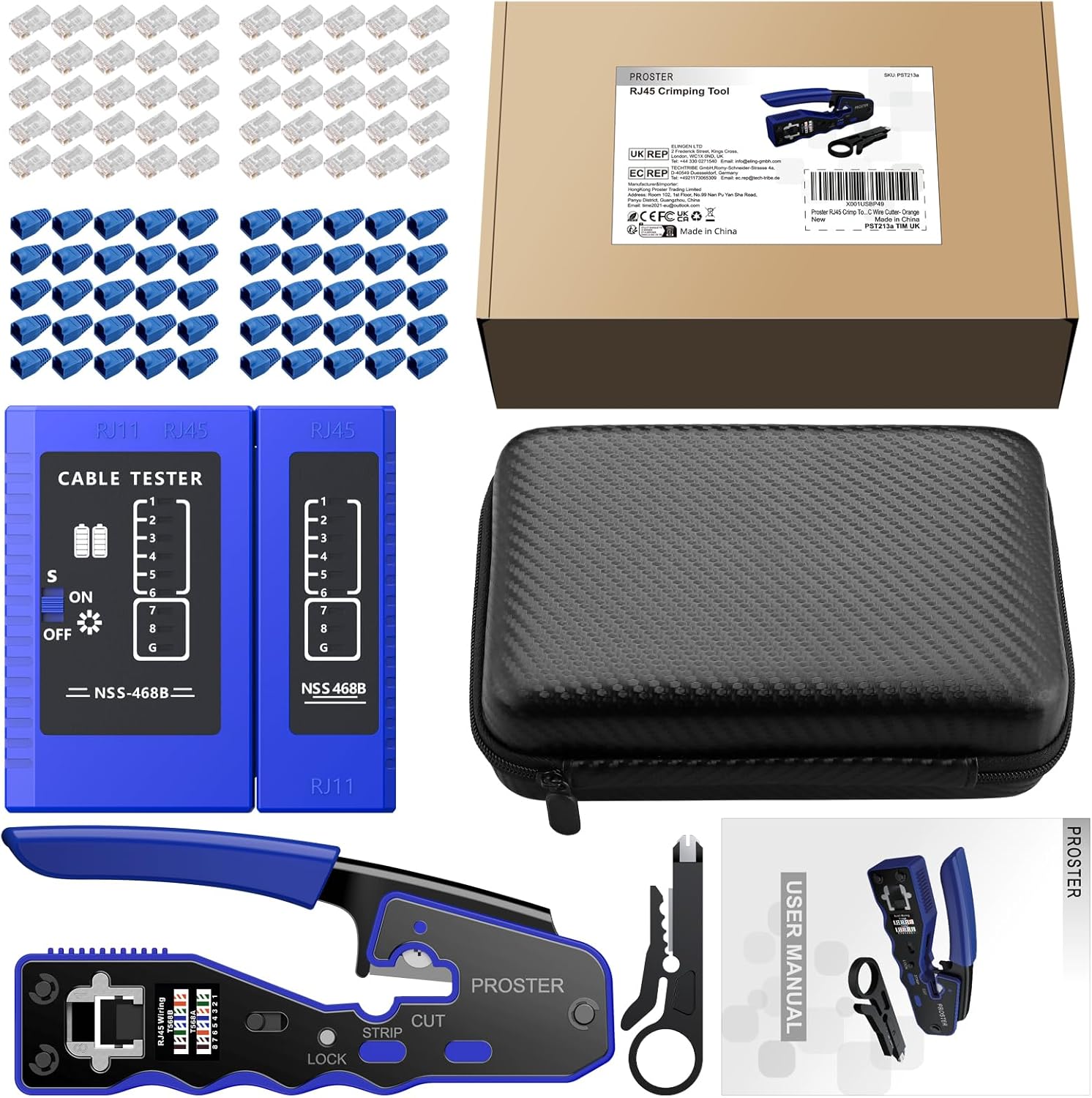
Image: All components included in the Proster RJ45 Crimper Tool Kit, neatly arranged in its packaging.
3. Key Features
- 3-in-1 Functionality: The crimper tool integrates cutting, stripping, and crimping capabilities for efficient cable preparation.
- Pass-Through Design: Facilitates easier wire insertion and allows for simultaneous trimming of excess cable during crimping, ensuring a clean and precise finish.
- Wide Compatibility: Suitable for 8-position RJ45 Cat5, Cat5e, Cat6, Cat6a pass-through/non-pass-through shielded/non-shielded connectors, and non-all-metal Cat7 connectors.
- Integrated Wiring Diagram: The crimper tool features T568A and T568B wiring diagrams directly on the tool for quick reference.
- Network Cable Tester: Verifies correct cable connections and identifies wiring faults, supporting both RJ45 and RJ11.
- Durable Connectors: Gold-plated Cat6 pass-through connectors offer superior conductivity and oxidation resistance.
- Ergonomic Design: The crimper tool features a comfortable, non-slip handle and a locking button for safe storage.

Image: The 3-in-1 design of the Proster RJ45 Crimper Tool, illustrating its cutting, stripping, and crimping functions.

Image: T568A and T568B standard line sequence diagrams for correct wire arrangement in RJ45 connectors.
4. Setup and Preparation
- Unlock the Crimper: If the crimper tool is locked, press the lock button from behind to release the handles.
- Prepare Cable: Ensure you have the desired length of network cable. Slide a protective cover onto the cable before stripping.
- Strip Cable Outer Layer: Use the integrated stripper on the crimper tool or the mini wire stripper to carefully remove approximately 15-20mm of the cable's outer jacket. Be cautious not to damage the inner wires.
- Untwist and Straighten Wires: Gently untwist the 8 individual wires and straighten them out.
- Arrange Wires: Arrange the wires according to the T568A or T568B standard line sequence diagram (refer to the diagram on the crimper tool or in the manual).
- Trim Wires: Use the cutting blade on the crimper tool to trim the arranged wires to an even length, ensuring they are flush before inserting into the connector.

Image: Visual guide demonstrating the steps for preparing and crimping an RJ45 connector onto a network cable.
5. Operating Instructions
5.1. Crimping Process
- Insert Wires into Connector: Carefully insert the arranged and trimmed wires into the RJ45 pass-through connector. Ensure each wire slides into its correct channel and extends slightly beyond the front of the connector.
- Insert Connector into Crimper: Place the RJ45 connector with the wires into the 8P crimping port of the tool. Ensure it is seated correctly.
- Crimp the Connector: Squeeze the handles of the crimper tool firmly and completely. The tool will simultaneously push the pins into the wires and trim any excess wire extending from the front of the pass-through connector.
- Remove and Inspect: Release the handles and remove the crimped connector. Inspect the connection to ensure all pins are properly seated and the wires are securely crimped.
- Slide Protective Cover: Slide the pre-installed protective cover over the crimped connector for added durability and strain relief.
Video: A demonstration of the Proster RJ45 Crimper Tool in action, showing the full crimping process from cable preparation to final connection.
5.2. Network Cable Testing
- Install Batteries: Open the battery compartment of the network cable tester and insert two AA batteries (not included).
- Connect Cable: Plug one end of the newly crimped network cable into the "Cable Tester" unit and the other end into the "Remote" unit.
- Power On: Slide the power switch on the "Cable Tester" unit to the "ON" position.
- Observe Indicators: The indicator lights on both units will light up sequentially (1 through 8, then G for ground/shielding if applicable). If all lights illuminate in sequence on both units, the cable is correctly wired.
- Interpret Results:
- If lights do not turn on or turn on incorrectly, it indicates a wiring fault (e.g., open circuit, short circuit, cross-over).
- Refer to the troubleshooting section for common issues.

Image: The network cable tester verifying the integrity of an RJ45 cable connection.
6. Maintenance
- Cleaning: Regularly clean the crimper tool and cable tester with a dry, soft cloth to remove dust and debris. Avoid using harsh chemicals.
- Blade Replacement: The crimper tool includes spare blades. If the cutting or stripping blades become dull, replace them by unscrewing the retaining screws and carefully installing new blades.
- Storage: Store the kit in the provided EVA storage bag in a dry, cool place to protect it from damage and prolong its lifespan.
- Battery Care (Cable Tester): Remove batteries from the cable tester if it will not be used for an extended period to prevent leakage and damage.
7. Troubleshooting
| Problem | Possible Cause | Solution |
|---|---|---|
| Cable tester lights do not illuminate or sequence incorrectly. |
|
|
| Crimper tool not cutting or stripping effectively. | Dull or damaged blades. | Replace the blades using the provided spare blades. |
| Wires not fully inserting into pass-through connector. | Wires are not straight or trimmed evenly. | Ensure wires are completely straightened and trimmed flush before insertion. |
8. Specifications
| Feature | Detail |
|---|---|
| Brand | Proster |
| Crimper Functionality | 3-in-1 (Cut, Strip, Crimp) |
| Connector Compatibility | RJ45 (8P8C) Cat5/5e/6/6a/7 Pass-Through/Non-Pass-Through |
| Cable Tester Compatibility | RJ45, RJ11 |
| Cable Tester Power | 2 x AA Batteries (not included) |
| Handle Material | Rubber, Stainless Steel |
| Grip Type | Ergonomic |
| Item Weight | 845 Grams (approx. 1.86 pounds) |
| Included Connectors | 50 x Cat6 Gold-plated Pass-Through Connectors |
| Included Accessories | 50 x Protective Covers, 1 x Wire Stripper, 2 x Spare Blades, 1 x EVA Storage Bag |
9. Warranty and Support
Proster products are designed for durability and performance. For any questions regarding product operation, troubleshooting, or warranty claims, please refer to the contact information provided with your purchase or visit the official Proster website. Keep your purchase receipt for warranty validation.
Official Website: https://www.proster.eu
Ask a question about this manual
Ask about setup, troubleshooting, compatibility, parts, safety, or missing instructions. Manuals+ will review the question and use this page’s manual context to help answer it.