
1. Introduction
Thank you for choosing the uehba Universal Replacement Remote Controller (Model RM-D761). This remote is designed to provide seamless control for a range of Pioneer DVD Player models, offering a direct replacement experience without complex setup. This manual will guide you through the simple steps of battery installation, basic operation, and troubleshooting.
2. Product Overview
The uehba Universal Replacement Remote Controller is a pre-programmed device engineered to function immediately with compatible Pioneer DVD players. It replicates the essential functions of your original remote, ensuring a familiar and intuitive user experience.
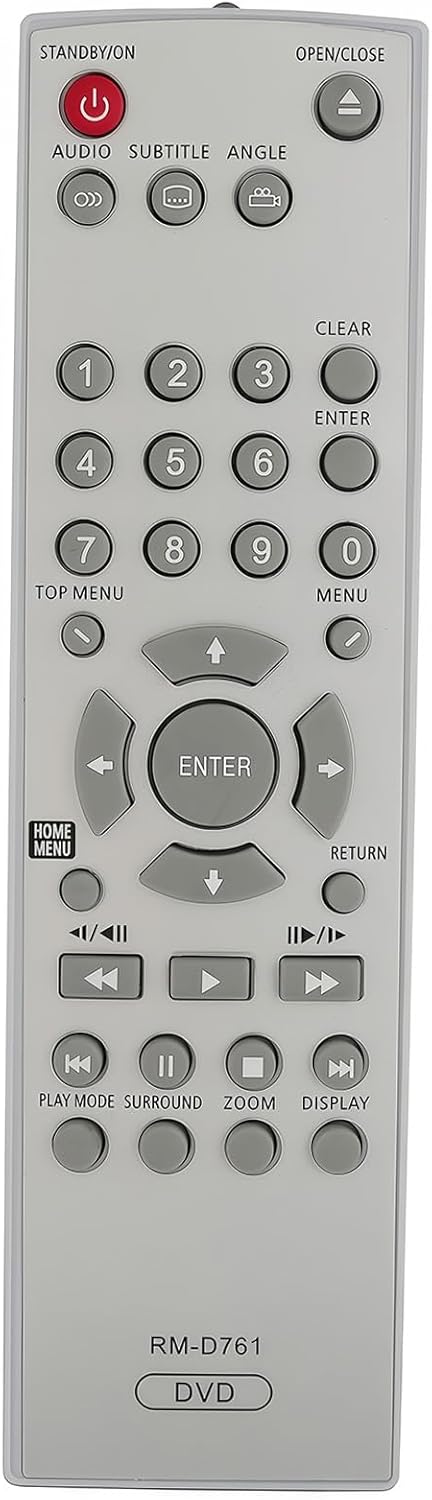
Image 2.1: Front view of the uehba Universal Replacement Remote Controller, showing all buttons and their labels. The remote is silver-gray with dark gray buttons.
3. Setup
This remote controller is pre-programmed and does not require any manual setup or code entry. Simply install the batteries, and it will be ready for use with your compatible Pioneer DVD player.
4. Battery Installation
To power your remote controller, you will need two (2) AAA alkaline batteries (not included). Follow these steps for proper installation:
- Locate the battery compartment on the back of the remote control.
- Press down on the latch and slide the battery cover downwards to open it.
- Insert two AAA batteries, ensuring that the positive (+) and negative (-) terminals align correctly with the markings inside the compartment.
- Slide the battery cover back into place until it clicks securely.

Image 4.1: The back of the remote control with the battery cover removed, showing the empty battery compartment ready for two AAA batteries.
5. Operating Instructions
Once batteries are installed, point the remote directly at your Pioneer DVD player. The remote functions are clearly labeled on each button.

Image 5.1: A hand holding the remote control, demonstrating its ergonomic design and how it would be held during use.
Key Functions:
- STANDBY/ON (Red Button): Powers the DVD player on or off.
- OPEN/CLOSE: Opens or closes the DVD tray.
- Number Buttons (0-9): Used for direct track selection or menu navigation.
- AUDIO: Selects audio tracks or languages.
- SUBTITLE: Toggles or selects subtitle options.
- ANGLE: Changes camera angles on compatible DVDs.
- CLEAR: Clears entries or selections.
- ENTER: Confirms selections in menus.
- TOP MENU / MENU: Accesses the main DVD menu or disc menu.
- Directional Arrows (Up, Down, Left, Right) & ENTER: Navigates through menus and confirms selections.
- RETURN: Goes back to the previous menu or screen.
- Playback Controls (Play, Pause, Stop, Fast Forward, Rewind, Skip): Standard controls for media playback.
- PLAY MODE: Adjusts playback modes (e.g., repeat).
- SURROUND: Activates or adjusts surround sound settings.
- ZOOM: Zooms in on the picture.
- DISPLAY: Shows on-screen information about the current playback.
6. Troubleshooting
If you encounter issues with your remote controller, please refer to the following common solutions:
- Remote not responding:
- Ensure the remote is pointed directly at the DVD player's infrared sensor.
- Check for any obstructions between the remote and the DVD player.
- Verify that the batteries are inserted correctly with the correct polarity (+/-).
- Buttons are unresponsive or intermittent:
- Replace the batteries with fresh AAA alkaline batteries. Low battery power can cause inconsistent performance.
- Clean the remote's surface and buttons with a soft, dry cloth to remove any dirt or residue.
- Remote does not control the DVD player:
- Confirm that your DVD player model is listed as compatible in the introduction of this manual.
- Ensure the DVD player itself is powered on and functioning correctly.
7. Specifications
| Feature | Detail |
|---|---|
| Model Number | RM-D761 |
| Compatibility | Pioneer DVD Player models: DV-300, DV-300-K, DV-310, DV-310-G, DV-310V, DV-310V-G, DV-3310, DV-344, DV-3500, DV-353, DV-353-K |
| Power Source | 2 x AAA Alkaline Batteries (not included) |
| Dimensions (L x W x H) | 6.69 x 1.89 x 0.59 inches (17 x 4.8 x 1.5 cm) |
| Weight | 2.29 ounces (65 grams) |
| Special Feature | No Programming Required |
8. Support
For any questions, concerns, or assistance regarding your uehba Universal Replacement Remote Controller, please contact the seller directly through your purchase platform. They will be able to provide further support and guidance.