
1. Introduction
This manual provides instructions for the setup, operation, maintenance, and troubleshooting of your uehba Universal Replacement Remote Control. This remote is designed to be compatible with various Pioneer DVD Player models, offering a direct replacement functionality without complex programming.
2. Setup
2.1 Battery Installation
The remote control requires two (2) 1.5V AAA alkaline batteries (not included) for operation. Follow these steps to install the batteries:
- Locate the battery compartment on the back of the remote control.
- Press down on the latch and slide the battery cover downwards to open it.
- Insert two AAA batteries, ensuring the positive (+) and negative (-) terminals align correctly with the markings inside the compartment.
- Slide the battery cover back into place until it clicks securely.
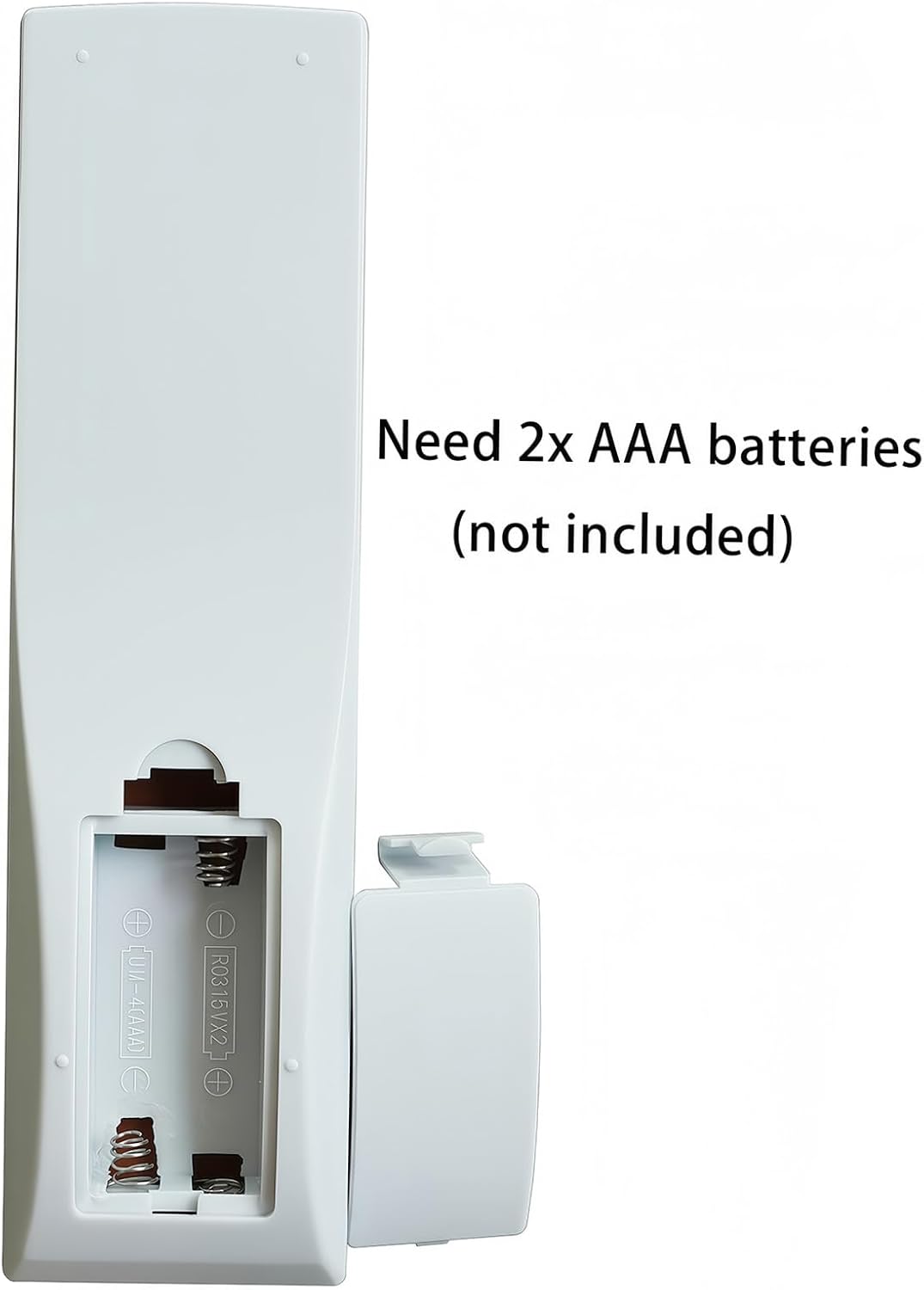
Figure 2.1: Battery compartment with instructions for AAA battery insertion.
2.2 Initial Use
This replacement remote control is pre-programmed and does not require any setup or coding. Once the batteries are correctly installed, it is ready for immediate use with compatible Pioneer DVD Players.
3. Operating Instructions
The remote control provides full functionality for your compatible Pioneer DVD Player. Ensure there is a clear line of sight between the remote control and the DVD player's infrared sensor.
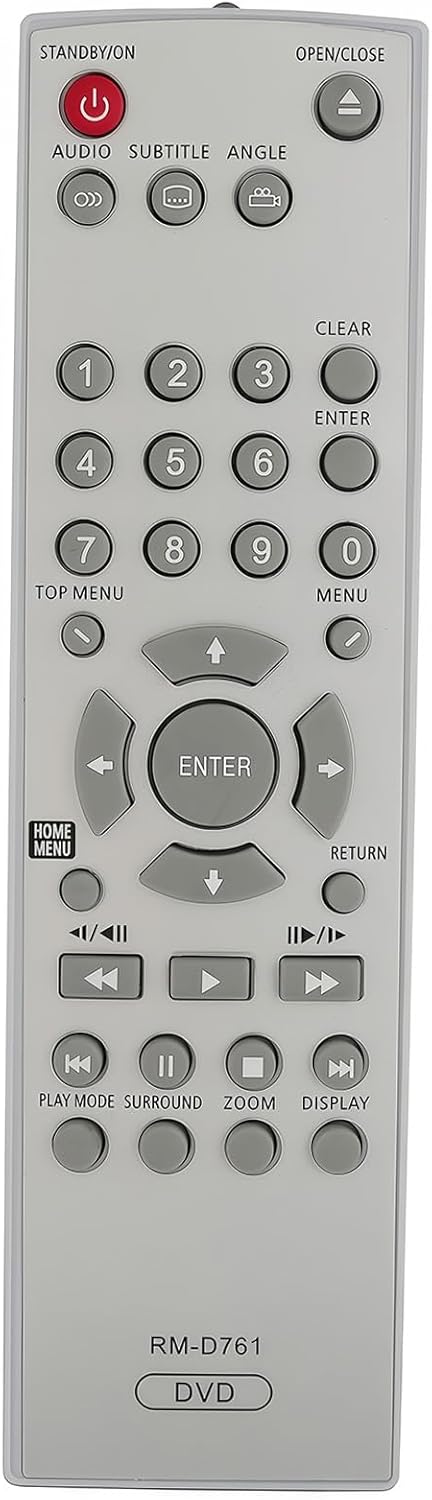
Figure 3.1: Front view of the remote control with button layout.
3.1 Button Functions Overview
- STANDBY/ON (Red Button): Powers the DVD player on or off.
- OPEN/CLOSE: Opens or closes the DVD tray.
- AUDIO: Selects audio tracks or languages.
- SUBTITLE: Toggles or selects subtitle options.
- ANGLE: Changes the camera angle during playback if available on the DVD.
- Number Buttons (0-9): Direct track selection or input for menu options.
- CLEAR: Clears numerical input or cancels a selection.
- ENTER: Confirms a selection or input.
- TOP MENU: Accesses the main menu of the DVD.
- MENU: Accesses the disc menu.
- Navigation Buttons (Up, Down, Left, Right): Navigates through menus and options.
- HOME MENU: Returns to the player's home menu.
- RETURN: Goes back to the previous menu or screen.
- Playback Controls (Play, Pause, Stop, Fast Forward, Rewind, Skip Forward, Skip Back): Standard DVD playback functions.
- PLAY MODE: Selects different playback modes.
- SURROUND: Adjusts audio surround sound settings.
- ZOOM: Zooms in or out on the video image.
- DISPLAY: Shows on-screen information about the current playback.

Figure 3.2: Remote control in use, highlighting the central navigation and ENTER button.
4. Maintenance
4.1 Battery Replacement
Replace the batteries when the remote control's performance diminishes or it stops responding. Always replace both batteries simultaneously with new 1.5V AAA alkaline batteries. Do not mix old and new batteries or different types of batteries.
4.2 Cleaning
To clean the remote control, gently wipe its surface with a soft, dry cloth. Do not use liquid cleaners, abrasive materials, or chemical solvents, as these can damage the remote's finish or internal components.
4.3 Storage
When not in use for extended periods, it is recommended to remove the batteries to prevent leakage and potential damage to the remote control.
5. Troubleshooting
- Remote control is not working:
- Ensure the batteries are installed correctly with the correct polarity.
- Replace old batteries with new 1.5V AAA alkaline batteries.
- Check for any obstructions between the remote control and the DVD player's infrared sensor.
- Ensure you are within the effective operating range of the DVD player.
- Remote control does not respond to specific DVD player models:
- Verify that your Pioneer DVD player model is listed as compatible (DV-400V, DV-400V-G, DV-410, DV-410V, DV-420, DV-420V, DV-463, DV-464, DV-466-K, DV-466-S, DV-490V). While this remote is designed for broad compatibility, some specific player models may have unique IR codes.
- If your model is listed and the remote still does not function, please contact customer support for assistance.
6. Specifications
- Model: RM-D761 (Replacement Remote)
- Compatible Devices: Pioneer DVD Players (Specific models listed above)
- Power Source: 2 x 1.5V AAA Alkaline Batteries (not included)
- Product Dimensions: 6.69 x 1.89 x 0.59 inches
- Item Weight: 2.29 ounces
- Special Feature: No Programming Required

Figure 6.1: Side profile of the remote control.
7. Warranty and Support
7.1 Warranty Information
Specific warranty details for this product are not provided in the available information. Please refer to the product packaging or contact the seller for warranty terms and conditions.
7.2 Customer Support
If you have any questions, encounter issues, or require further assistance with your uehba Universal Replacement Remote Control, please feel free to contact the seller directly. Contact information is typically available on your purchase receipt or the seller's storefront.