
1. Introduction and Overview
This manual provides detailed instructions for the installation, operation, and maintenance of your COCOCAM Wireless Video Doorbell. This device combines the functionality of a doorbell, intercom, and security camera, offering enhanced home security and convenience.

Image 1.1: The COCOCAM Wireless Video Doorbell and its accompanying wireless chime unit.
2. Key Features
- Adjustable Angle & 160° Ultra-Wide Lens: The doorbell comes with two types of angle brackets (25° horizontal, 8° vertical) to adjust the camera's view, ensuring optimal coverage. The 160° ultra-wide-angle lens captures a broad area around your door.
- Anti-Tamper Alarm & Human Detection Recording: Equipped with an anti-tamper alarm that triggers a loud sound if the doorbell is removed from its bracket. PIR human detection minimizes false alarms from non-human movements, saving storage and battery life. Motion-activated recording sends instant notifications to your smartphone.
- Wireless & Rechargeable Design: No wiring required for installation. Features a built-in 5000mAh rechargeable battery, providing up to 3 months of operation on a single charge (based on 10 activations/day). Low battery alerts are sent to your smartphone.
- Expandable Wireless Chime & FHD 1080P Video: Easily pair the doorbell with multiple wireless chimes for coverage throughout large homes or facilities. The chime offers 4 volume levels and 4 melodies. Records in high-resolution FHD 1080P, with automatic infrared night vision for clear images in darkness.
- Smartphone Remote Monitoring & Two-Way Talk: Connects to your smartphone via WiFi for real-time remote monitoring. Features a built-in microphone and speaker for two-way audio communication with visitors. Includes recording playback with audio via the app.
- Durable & Weatherproof: IP66 international waterproof and dustproof rating ensures excellent weather resistance and durability for outdoor installation.
3. Package Contents
Please ensure all items are present in the package before proceeding with installation:
- COCOCAM Wireless Video Doorbell Unit
- Wireless Chime Unit
- USB Charging Cable
- Mounting Brackets (2 types: 8° vertical, 25° horizontal)
- Mounting Screws and Wall Anchors
- Screwdriver
- User Manual (this document)

Image 3.1: All components included in the COCOCAM Wireless Video Doorbell package.
4. Setup Guide
4.1 Charging the Doorbell
Before first use, fully charge the doorbell unit using the provided USB cable. A full charge takes approximately 8 hours.

Image 4.1: The doorbell unit features a 5000mAh built-in battery.
4.2 App Installation and Pairing
- Download the 'CloudEdge' app from your smartphone's app store (iOS/Android).
- Register an account and log in.
- Follow the in-app instructions to add your new doorbell device. Ensure your doorbell is powered on and your smartphone is connected to a 2.4GHz Wi-Fi network.
- Pair the wireless chime unit with the doorbell by following the instructions in the app or the chime's specific pairing button.
4.3 Mounting the Doorbell
Choose a suitable outdoor location for the doorbell, such as near your entrance or on a gatepost. The doorbell is IP66 waterproof and dustproof.
- Select the appropriate angle bracket (8° vertical or 25° horizontal) if needed to optimize the camera's view.
- Mark the drilling points on the wall using the bracket as a template.
- Drill holes and insert wall anchors.
- Secure the bracket to the wall using the provided screws.
- Attach the doorbell unit to the mounted bracket. Ensure it clicks securely into place.

Image 4.2: The doorbell can be angled 8 degrees vertically or 25 degrees horizontally using the included brackets.

Image 4.3: The doorbell is rated IP66 for outdoor use, resistant to rain and dust.
5. Operating Instructions
5.1 Answering Visitors
When a visitor presses the doorbell button, the chime will ring, and you will receive a notification on your smartphone via the CloudEdge app. You can then:
- View live video feed of the visitor.
- Engage in two-way audio communication using the app's microphone and speaker functions.
- Record the interaction or take screenshots.
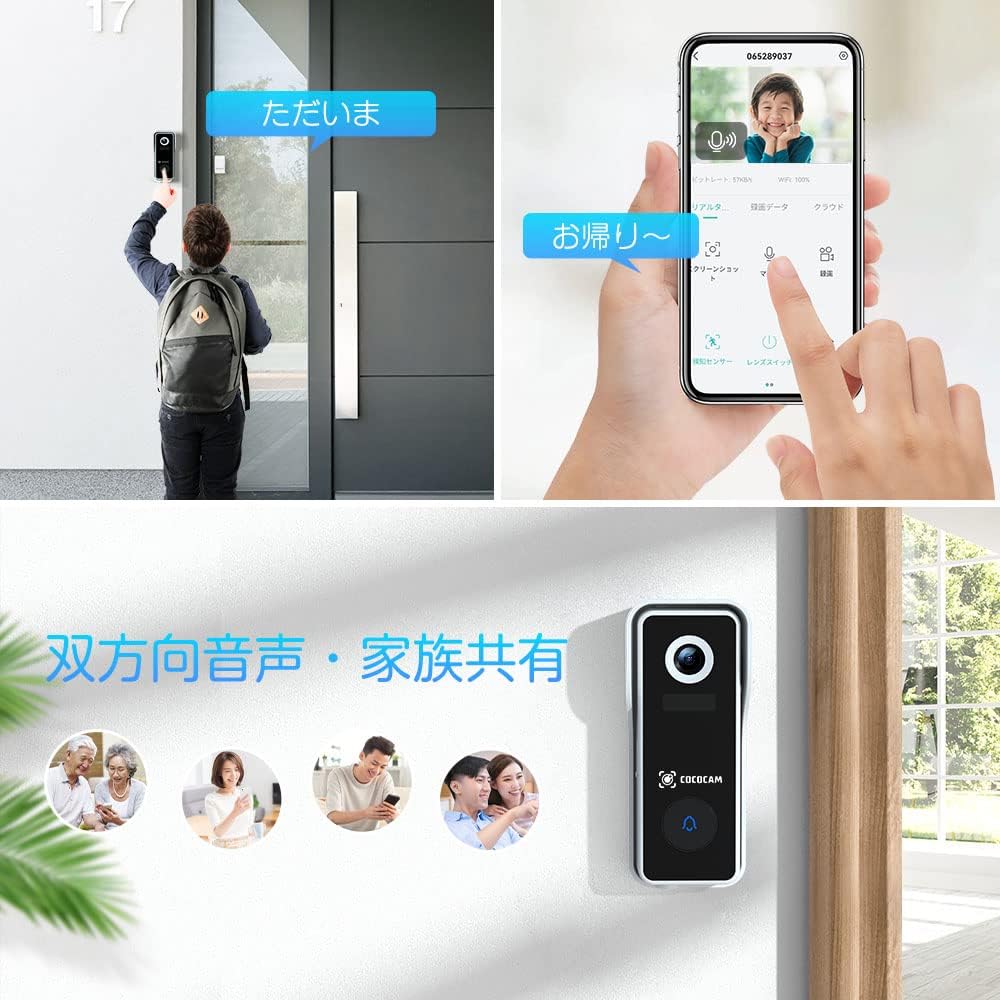
Image 5.1: Two-way audio communication and family sharing features allow multiple users to monitor and interact.
5.2 Motion Detection and Recording
The doorbell's PIR sensor detects human motion and automatically begins recording. You will receive instant push notifications on your smartphone.
- Recordings are saved to a microSD card (up to 128GB, not included) or to the CloudEdge app's cloud storage (first 7 days free).
- You can review recorded footage anytime via the app.
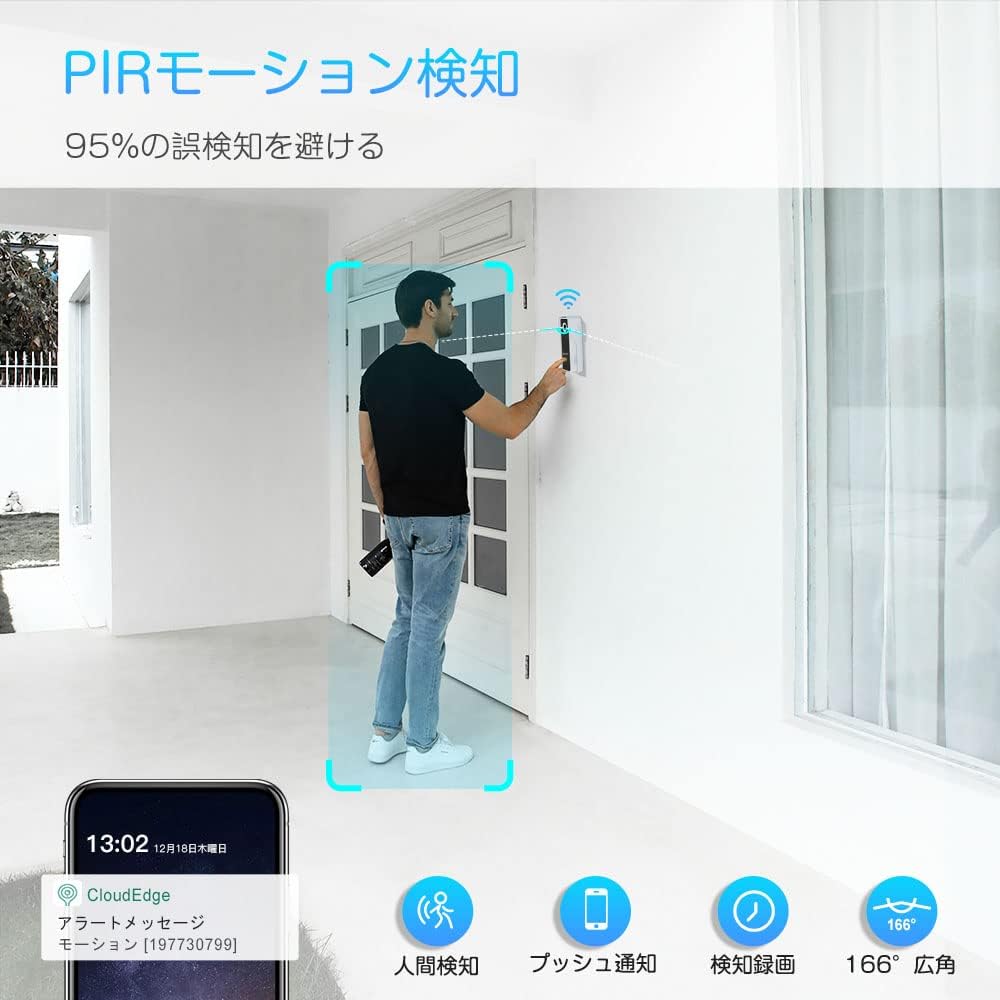
Image 5.2: PIR motion detection accurately identifies human presence, reducing false alarms.
5.3 Night Vision
The doorbell automatically switches to infrared night vision in low-light conditions, providing clear black-and-white video footage.

Image 5.3: The doorbell provides clear FHD 1080P video both during the day and at night using infrared technology.
6. Maintenance
- Cleaning: Wipe the doorbell's lens and body with a soft, damp cloth. Do not use harsh chemicals or abrasive cleaners.
- Battery Life: Monitor the battery level via the CloudEdge app. Recharge the doorbell when the battery level drops to 20% to ensure continuous operation.
- Firmware Updates: Regularly check the CloudEdge app for available firmware updates to ensure optimal performance and security.
- Storage Management: If using a microSD card, periodically review and delete old footage to free up space, or enable the auto-overwrite function.
7. Troubleshooting
| Problem | Possible Cause | Solution |
|---|---|---|
| Doorbell not connecting to Wi-Fi | Incorrect Wi-Fi password; too far from router; 5GHz network. | Ensure correct 2.4GHz Wi-Fi password. Move doorbell closer to router. Ensure router supports 2.4GHz. |
| Chime not ringing | Chime not paired; low battery; out of range. | Re-pair chime with doorbell via app. Charge doorbell battery. Move chime closer to doorbell (max 15m). |
| Frequent false alarms | PIR sensitivity too high; non-human motion. | Adjust PIR sensitivity settings in the CloudEdge app. Ensure the doorbell is angled to minimize detection of irrelevant movement (e.g., passing cars if installed near a street). |
| Poor video quality | Weak Wi-Fi signal; dirty lens. | Improve Wi-Fi signal strength. Clean the camera lens with a soft cloth. |
| Anti-tamper alarm triggers unexpectedly | Doorbell not securely mounted. | Ensure the doorbell is firmly attached to its mounting bracket. Check for any loose screws. |
If you encounter issues not listed here or require further assistance, please contact COCOCAM support.
8. Specifications
| Feature | Specification |
|---|---|
| Video Capture Resolution | 1080p |
| Lens Angle | 160° Wide-Angle |
| Adjustable Angle | Up/Down 8°, Left/Right 25° (with included brackets) |
| Power Source | Battery Powered (5000mAh built-in) |
| Wireless Connectivity | Wi-Fi (2.4GHz) |
| Night Vision Range | Up to 15 meters |
| Storage Options | Max 128GB SD Card (not included), Cloud Storage (CloudEdge app) |
| Waterproof Rating | IP66 |
| Product Dimensions (LxWxH) | 13.5 x 5.5 x 3.5 cm |
| Item Weight | 510 g |
| Compatible Devices | Smartphones (iOS, Android) |
| Mounting Type | Wall Mount |

Image 8.1: Dimensions of the doorbell unit and location of the 128GB SD card slot.
9. Warranty and Support
COCOCAM provides a two-year quality guarantee for this product. If you experience any defects or issues with the security camera during use, a new product exchange or return/refund is possible.
For chime pairing problems, initial product defects, or any other questions or concerns about the product, please contact our support team:
Support Email: support_jp@cococamtech.com
10. Official Product Videos
No relevant official product video URLs from the seller were found in the provided data to embed in this manual.