
1. Introduction
This manual provides detailed instructions for the installation, operation, and maintenance of your Ultralux 2x2 ft Surface Mount Ceiling Light Panel. Please read this manual thoroughly before installation and retain it for future reference. This LED light panel is designed to provide efficient and adjustable lighting for various indoor environments, including kitchens, home offices, and garages.

Image 1.1: Ultralux 2x2 ft Surface Mount Ceiling Light Panel in Brushed Nickel finish.
2. Important Safety Information
WARNING: Risk of electric shock. Disconnect power at the fuse or circuit breaker before installation or servicing.
- Read all instructions before installing.
- This product must be installed in accordance with the applicable installation code by a person familiar with the construction and operation of the product and the hazards involved.
- Ensure the supply voltage is 120V AC.
- Do not attempt to modify the fixture. Any modifications may void the warranty and create safety hazards.
- Suitable for damp locations. Do not use in areas with direct water exposure.
- Always use appropriate safety equipment during installation.
3. Package Contents
Verify that all components are present before beginning installation:
- Ultralux 2x2 ft LED Ceiling Light Panel (1 unit)
- Surface Mount Plate
- Mounting Hardware (screws, wire nuts, safety cable)

Image 3.1: Included components for installation, including the light panel, mounting plate, and hardware.
4. Product Specifications
| Model Number | 736542868470 |
| Dimensions (L x W x H) | 23.7" x 23.7" x 1.06" |
| Weight | 9.7 Pounds |
| Input Voltage | 120 Volts AC |
| Wattage | 40 Watts |
| Brightness | 3000 Lumens |
| Color Temperature (CCT) | 3000K (Soft White), 4000K (Cool White), 5000K (Natural White) - Selectable |
| Dimmability | TRIAC Dimmable |
| Color Rendering Index (CRI) | >80 |
| Beam Angle | 120 degrees |
| Rated Lifetime | L70 > 50,000 hours |
| Material | Aluminum, Nickel |
| Finish | Brushed Nickel |
| Installation Type | Surface Mount |
| Environment | Indoor, Suitable for Damp Locations |

Image 4.1: Summary of key technical specifications for the Ultralux LED light panel.
5. Setup and Installation
Follow these steps for proper installation of your Ultralux LED light panel. It is recommended to have two people for installation due to the size and weight of the fixture.
5.1. Pre-Installation
- Disconnect Power: Turn off power at the circuit breaker or fuse box before starting installation.
- Unpack Contents: Carefully remove the light panel and all components from the packaging. Inspect for any damage.
- Select Color Temperature (CCT): Locate the CCT selection switch on the back of the light panel. Before mounting, slide the switch to your desired color temperature: 3000K (Soft White), 4000K (Cool White), or 5000K (Natural White). This switch is not accessible after installation.
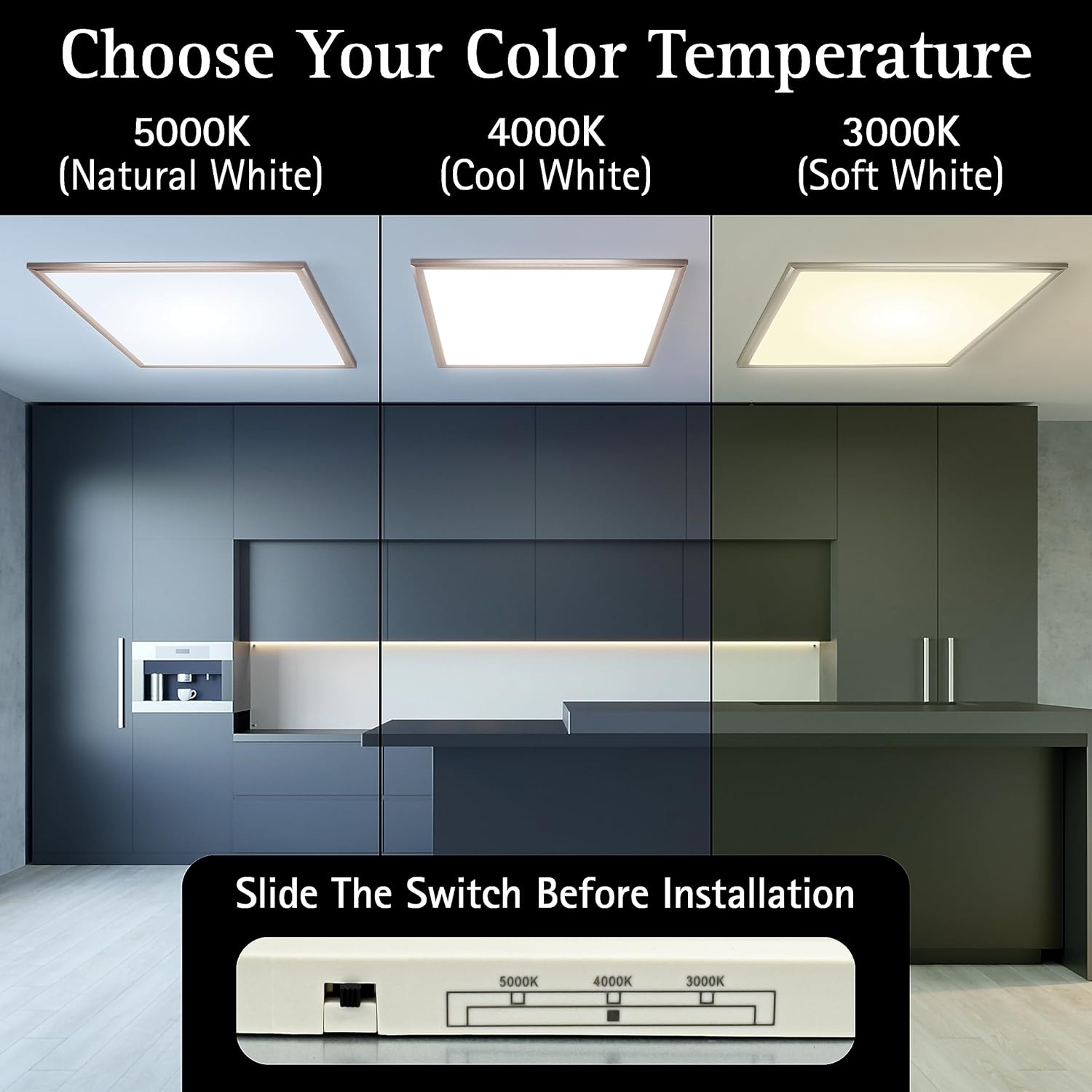
Image 5.1: The CCT switch located on the back of the panel, allowing selection of 3000K, 4000K, or 5000K before installation.
5.2. Mounting Steps
- Install Surface Mount Plate: Secure the surface mount plate directly to the ceiling junction box using the provided screws. Ensure the plate is firmly attached.
- Attach Safety Cable: Connect the safety cable from the light panel to a secure point on the mounting plate or ceiling structure. This will support the panel's weight while making wire connections.
- Wire Connections: Connect the electrical wires from the ceiling to the light panel wires using the provided wire nuts. Connect live to live, neutral to neutral, and ground to ground. Ensure all connections are secure.
- Mount Light Panel: Carefully align the light panel with the installed surface mount plate. Slide the panel into position until it securely locks onto the plate. Ensure all four tabs are engaged.

Image 5.2: The Ultralux 2x2 ft light panel installed flush with the ceiling.
For visual guidance on installation, refer to Image 3.1 which illustrates the mounting process.
6. Operating Instructions
6.1. Power On/Off
Once installed, restore power at the circuit breaker. The light panel can be turned on and off using a standard wall switch connected to the fixture.
6.2. Color Temperature Adjustment (CCT)
The color temperature (3000K, 4000K, or 5000K) is selected via an internal switch on the back of the panel during installation. This setting cannot be changed without removing the fixture from the ceiling.
6.3. Dimming Function
This Ultralux LED light panel is TRIAC dimmable. To utilize the dimming feature, ensure you have a compatible TRIAC dimmer switch installed (not included). Adjust the dimmer switch to achieve your desired brightness level from 10% to 100%.
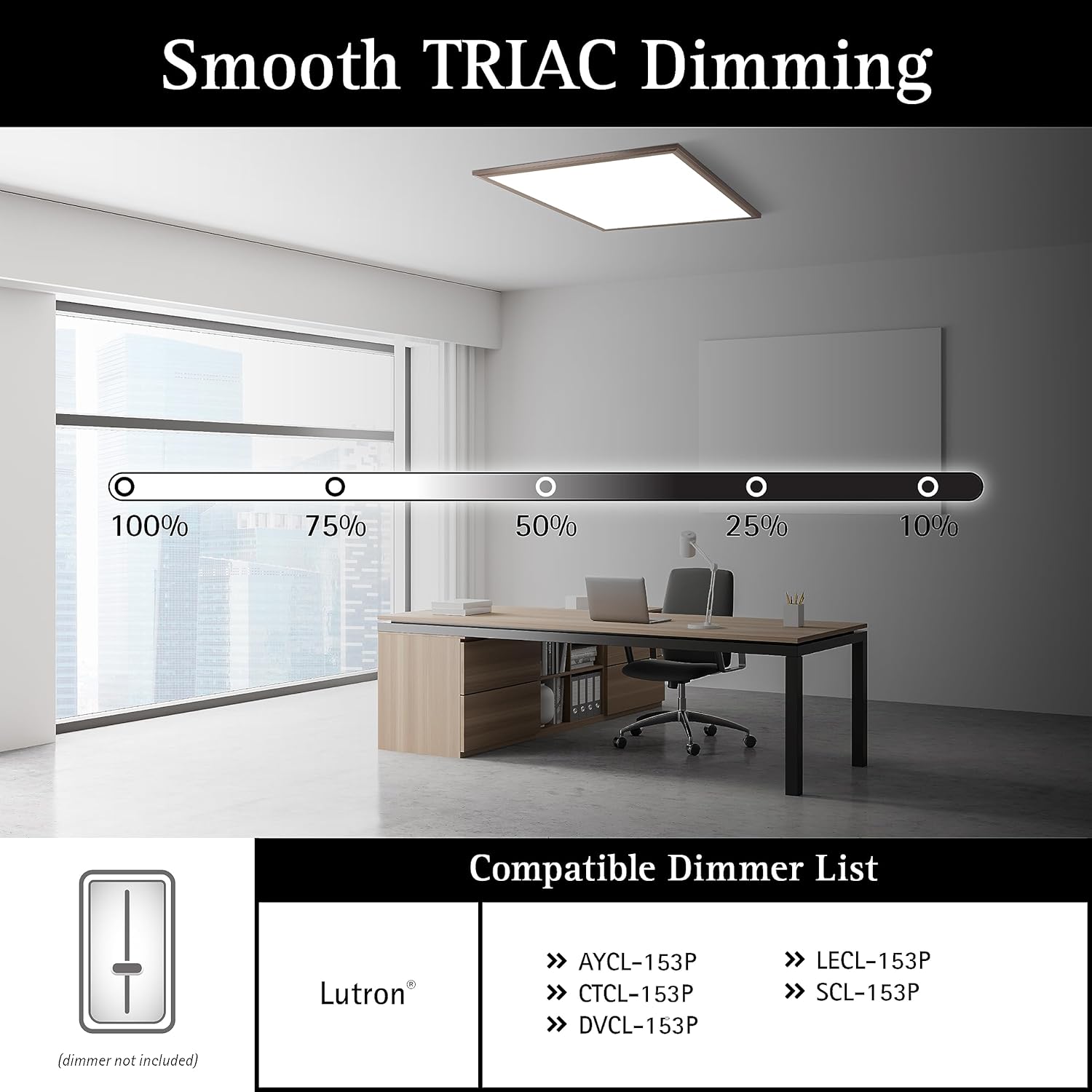
Image 6.1: Illustration of TRIAC dimming capability and examples of compatible dimmer switches.
Compatible Dimmer Models (Lutron examples):
- AYCL-153P
- CTCL-153P
- DVCL-153P
- LECL-153P
- SCL-153P
7. Maintenance
The Ultralux LED light panel requires minimal maintenance.
- Cleaning: Ensure power is disconnected before cleaning. Use a soft, dry, or slightly damp cloth to wipe the surface of the light panel. Do not use abrasive cleaners, solvents, or cleaners containing alcohol, as these can damage the finish.
- LEDs: The integrated LED light source is designed for a long lifespan (over 50,000 hours) and is not user-replaceable.
8. Troubleshooting
If you encounter issues with your Ultralux LED light panel, refer to the following common problems and solutions:
| Problem | Possible Cause | Solution |
|---|---|---|
| Light does not turn on. |
|
|
| Light flickers or dims unexpectedly. |
|
|
| Incorrect color temperature. |
|
|
9. Warranty and Customer Support
This Ultralux LED light panel is backed by a 5-year limited warranty from the date of purchase. This warranty covers defects in materials and workmanship under normal use.
The warranty does not cover:
- Damage caused by improper installation or misuse.
- Damage caused by natural disasters or accidents.
- Unauthorized repairs or modifications.
For warranty claims or technical assistance, please contact Ultralux customer support. Please have your model number (736542868470) and proof of purchase available.
Manufacturer: Ultralux
For more information, visit the Ultralux Store on Amazon.


