
1. Introduction
This manual provides instructions for the uehba Universal Replacement Remote Control, designed for seamless operation with various Denon AV Receiver models. This remote is pre-programmed and requires no additional setup for the listed compatible models.

2. Setup
2.1. Battery Installation
The remote control requires two (2) AAA alkaline batteries (not included). Follow these steps to install the batteries:
- Locate the battery compartment on the back of the remote control.
- Press down on the latch and slide the battery cover downwards to open it.
- Insert two AAA batteries, ensuring the positive (+) and negative (-) terminals align correctly with the markings inside the compartment.
- Slide the battery cover back into place until it clicks securely.

Note: Batteries are not included with the remote control. Please use new alkaline batteries for optimal performance.
3. Operating Instructions
This remote control is pre-programmed for immediate use with compatible Denon AV Receivers. No additional programming is required. Simply point the remote at your receiver and press the desired function button.
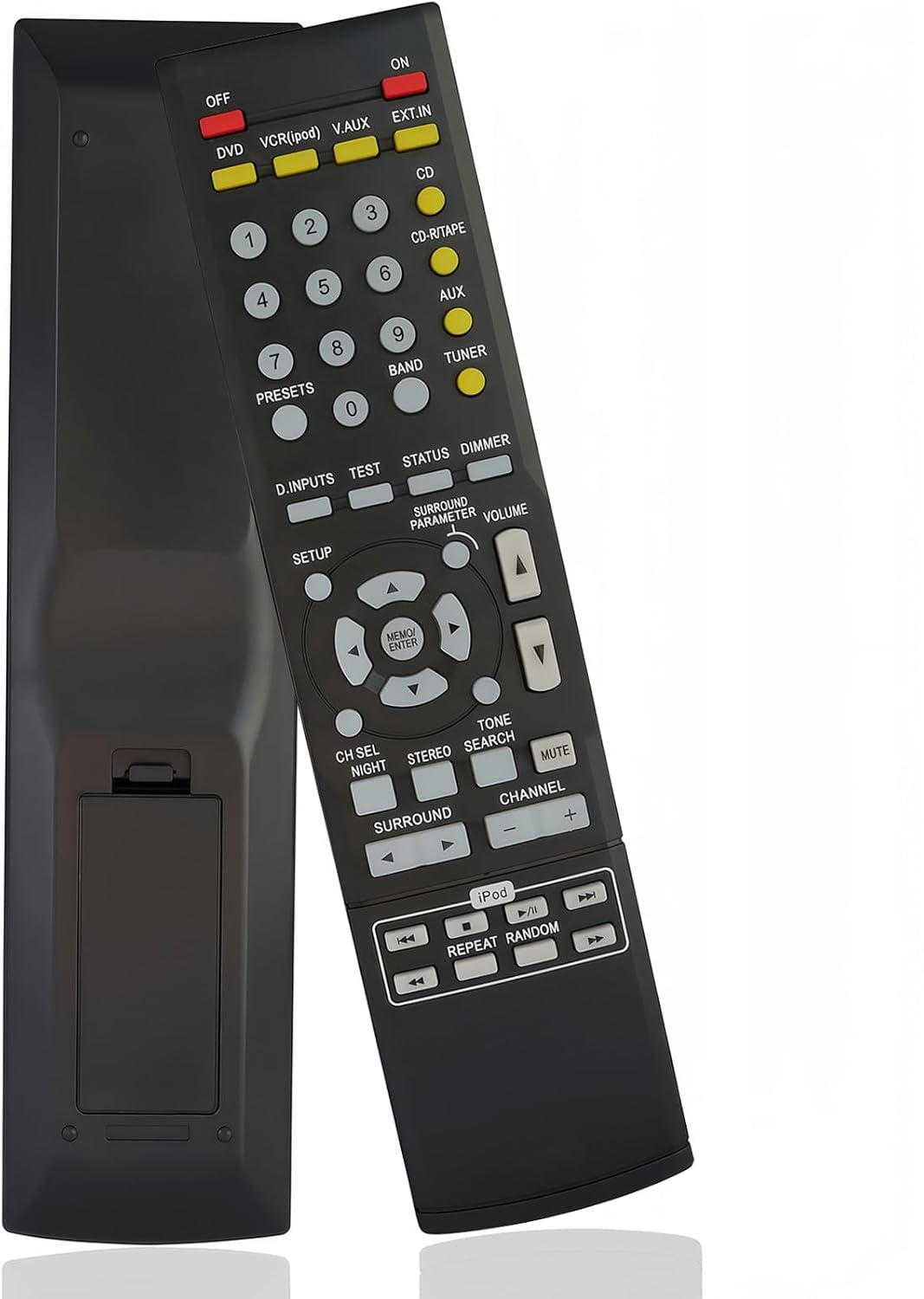
3.1. Basic Functions
- ON/OFF: Powers the AV Receiver on or off.
- Input Selectors (DVD, VCR(iPod), V.AUX, EXT.IN, CD, CD-R/TAPE, AUX, TUNER): Selects the corresponding audio/video input source.
- Volume Up/Down (▲/▼): Adjusts the master volume level.
- MUTE: Silences or restores the audio output.
- Number Buttons (0-9): Used for direct input selection or tuning.
- Channel Up/Down (+/-): Navigates through radio presets or channels.
- Navigation Pad (MENU/ENTER, ▲/▼/◀/►): Used to navigate menus and confirm selections on the receiver's display.
3.2. Advanced Functions
- D.INPUTS: Cycles through digital input options.
- TEST: Initiates speaker test tone.
- STATUS: Displays current status information on the receiver.
- DIMMER: Adjusts the brightness of the receiver's display.
- SETUP: Accesses the receiver's setup menu.
- SURROUND PARAMETER: Adjusts surround sound parameters.
- CH SEL/NIGHT: Selects channels or activates night mode.
- STEREO/TONE: Switches between stereo mode and tone control.
- SEARCH: Initiates search functions.
- SURROUND: Cycles through surround sound modes.
- iPod Controls (PLAY/PAUSE, SKIP, REPEAT, RANDOM): Controls connected iPod devices.

4. Maintenance
4.1. Cleaning
- Wipe the remote control with a soft, dry cloth.
- Do not use abrasive cleaners, solvents, or alcohol, as these can damage the surface.
4.2. Battery Care
- Replace batteries when the remote's response becomes sluggish or inconsistent.
- Remove batteries if the remote control will not be used for an extended period to prevent leakage and damage.
- Dispose of used batteries according to local regulations.
5. Troubleshooting
- Remote not responding:
- Ensure batteries are installed correctly with the correct polarity.
- Replace old batteries with new AAA alkaline batteries.
- Check for any obstructions between the remote control and the AV Receiver's infrared sensor.
- Ensure you are within the effective operating range and pointing the remote directly at the receiver.
- Certain functions not working:
- Verify that your Denon AV Receiver model is listed as compatible.
- Some advanced functions may vary slightly in behavior depending on the specific receiver model.
6. Specifications
| Feature | Detail |
|---|---|
| Model Number | 730637667726 |
| Brand | uehba |
| Compatibility | Denon AV Receiver AVR-3801, AVR-3802, AVR-3803, AVR-3804, AVR-3805, AVR-3806, AVR-3807 |
| Power Source | 2 x AAA Alkaline Batteries (not included) |
| Dimensions (L x W x H) | 8.27 x 1.89 x 0.59 inches (21 x 4.8 x 1.5 cm) |
| Item Weight | 2.57 ounces (72.86 grams) |
| Special Feature | Pre-setting, no programming required |
7. Warranty Information
Specific warranty details for this product are not provided in the available information. Please refer to the retailer or manufacturer's website for any applicable warranty terms and conditions.
8. Customer Support
For any questions or assistance regarding your uehba Universal Replacement Remote Control, please contact the seller or refer to the product listing page where you made your purchase. They can provide further support and guidance.