
Introduction
The EMB MX10BT is a 10-channel audio mixer designed for combining, balancing, and processing various audio signals. This device allows you to mix inputs from microphones, musical instruments, and other audio sources, then route the combined signal to an output system for amplification or recording. It features integrated digital effects, Bluetooth connectivity, and a USB MP3 player, making it suitable for a range of audio applications.
Safety Information
- Power Supply: Use only the provided power adapter. Ensure the voltage matches the specifications (AC 110V-240V / 50Hz-60Hz adapter, DC 5V input for the mixer).
- Moisture: Do not expose the unit to rain or moisture to prevent electric shock.
- Ventilation: Ensure adequate ventilation around the unit. Do not block ventilation openings.
- Heat: Keep the unit away from heat sources such as radiators, heat registers, stoves, or other apparatus that produce heat.
- Servicing: Do not attempt to service this unit yourself. Refer all servicing to qualified service personnel.
- Cables: Protect power cords from being walked on or pinched, particularly at plugs, convenience receptacles, and the point where they exit from the apparatus.
- Cleaning: Clean only with a dry cloth.
Package Contents
Verify that all items are present in the package:
- EMB MX10BT Audio Mixer
- Power Adapter
- USB Cable
- Instruction Manual (this document)

Image: Included power adapter for the EMB MX10BT mixer.

Image: Included USB cable for the EMB MX10BT mixer.
Product Overview
The EMB MX10BT mixer features a comprehensive set of controls and input/output options. Familiarize yourself with the layout before operation.
Top Panel Controls and Connections

Image: Top view of the EMB MX10BT mixer, displaying all input channels, faders, knobs, and the DSP effects section.
- Input Channels (1-10): Each channel features XLR and 1/4" TRS/TS inputs for microphones and line-level devices. Channels 1-6 have individual gain controls, 26dB PAD buttons, 80Hz HPF (High-Pass Filter) buttons, and 48V phantom power switches (for channels 1-4).
- Gain Control: Adjusts the input sensitivity for each channel.
- EQ (High/Low): Two-band equalizer for adjusting the treble and bass frequencies of each channel.
- FX Send: Controls the amount of signal sent to the internal digital effects processor.
- Pan/Balance: Adjusts the stereo position of the channel signal.
- Level Faders: Controls the output volume of each individual channel.
- 99 DSP Effects: A dedicated section with a program selector knob, level control, and a display for selecting and adjusting the 99 built-in digital effects.
- USB MP3 Player: Features an LED screen, navigation buttons (play/pause, skip), and a level control for playing audio from a USB drive.
- Bluetooth Connectivity: Allows wireless audio streaming from compatible devices.
- Main Stereo Output: XLR outputs for connecting to main speakers or an amplifier.
- Headphone Output: 1/4" TRS output with a dedicated level control for monitoring.
Rear Panel Connections
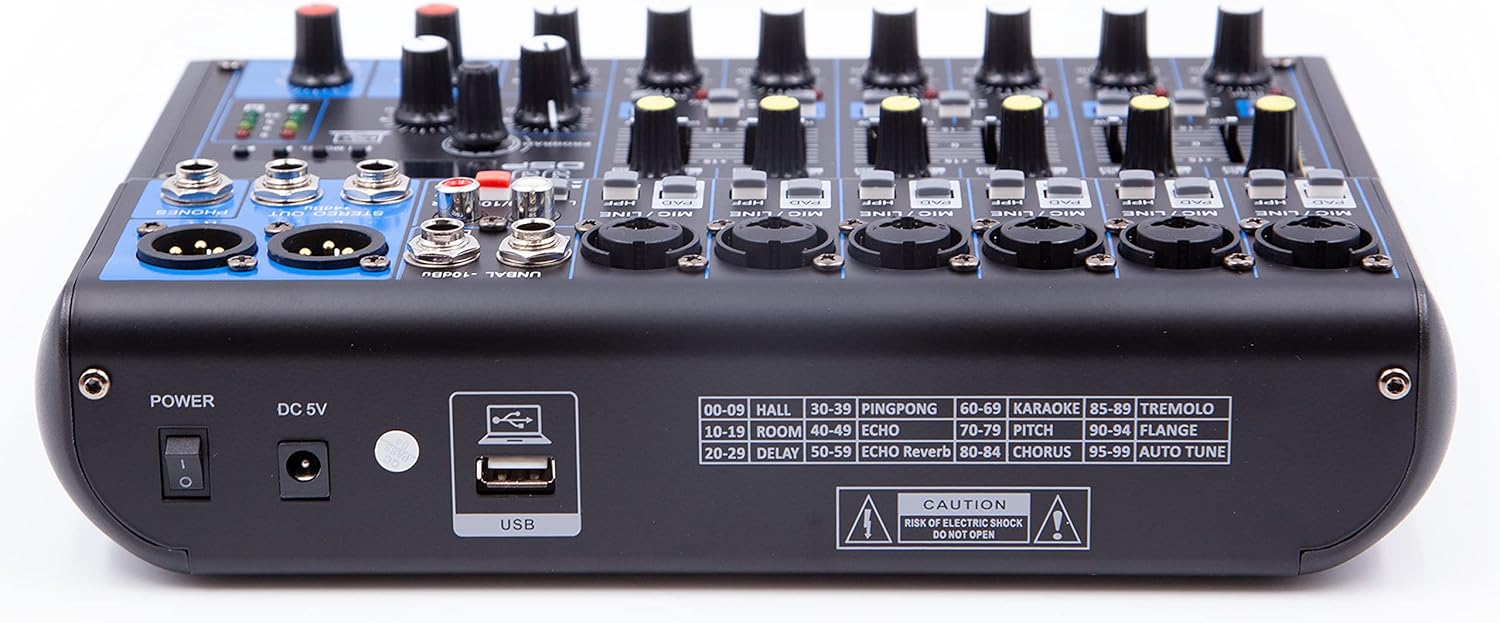
Image: Rear panel of the EMB MX10BT mixer, showing the power switch, DC 5V input, USB port, and a list of the 99 DSP effects.
- Power Switch: Turns the unit on or off.
- DC 5V Input: Connection point for the external power adapter.
- USB Port: For connecting a USB drive for MP3 playback or for connecting to a computer (note: USB functionality for computer connection may be limited to input to the mixer, not output from the mixer to the computer).
- Effect List: A printed list of the 99 DSP effects and their corresponding numbers.
Setup
- Power Connection: Connect the provided power adapter to the DC 5V input on the rear panel of the mixer and then plug it into a suitable AC power outlet. Ensure the mixer's power switch is in the OFF position before connecting.
- Output Connection: Connect the main stereo XLR outputs of the mixer to your amplifier, powered speakers, or recording device.
- Input Connections:
- Microphones: Connect microphones to the XLR inputs of the desired channels. If using condenser microphones requiring phantom power, activate the 48V switch for those specific channels.
- Line-Level Devices: Connect instruments (e.g., keyboards, drum machines) or other line-level audio sources to the 1/4" TRS/TS inputs.
- Musical Instruments: For guitars, basses, or aerophones, use the dedicated instrument input switch if available on your specific channel.
- Headphones: Connect your headphones to the 1/4" TRS headphone output for monitoring.
- Initial Settings: Before powering on, set all channel level faders and the main stereo level fader to their minimum positions. Set all gain controls to minimum.
- Power On: Turn on the mixer's power switch. Then, power on your amplifier or powered speakers.
Operating Instructions
Basic Mixing
- Adjust Gain: For each active input channel, slowly increase the gain control until the PEAK LED flashes only occasionally during the loudest parts of the signal. This ensures optimal signal-to-noise ratio without clipping.
- Set Channel Levels: Gradually raise the channel level fader for each input to achieve a balanced mix.
- Adjust Main Output: Slowly increase the main stereo level fader until the desired overall volume is reached. Monitor the main output level meters to avoid clipping.
- Use EQ: Adjust the HIGH and LOW EQ knobs on each channel to shape the tone of the input signal.
- Pan: Use the PAN knob to position the sound of each channel within the stereo field.
Using Digital Effects (DSP)
- Select Effect: Use the PROGRAM knob in the 99 DSP section to cycle through the available effects. The selected effect number will be displayed. Refer to the effect list on the rear panel for descriptions.
- Apply Effect to Channel: For each channel you wish to apply an effect to, increase its FX SEND knob.
- Adjust Effect Level: Use the dedicated FX LEVEL knob in the 99 DSP section to control the overall wet/dry mix of the effects.
Bluetooth Connectivity
- Activate Bluetooth: Press the MODE button in the USB/Bluetooth section until "BT" or a similar indicator appears on the display. The mixer will enter pairing mode.
- Pair Device: On your Bluetooth-enabled device (smartphone, tablet), search for available Bluetooth devices and select "EMB MX10BT" or a similar name.
- Play Audio: Once paired, you can play audio from your device, and it will be routed through the mixer. Adjust the dedicated Bluetooth level control on the mixer.
USB MP3 Playback
- Insert USB Drive: Insert a USB flash drive containing MP3 audio files into the USB port on the rear panel.
- Select USB Mode: Press the MODE button in the USB/Bluetooth section until "USB" or a similar indicator appears.
- Control Playback: Use the play/pause and skip buttons to control audio playback. Adjust the dedicated USB level control.
Maintenance
- Cleaning: Regularly wipe the mixer's surface with a soft, dry cloth. Avoid using abrasive cleaners or solvents.
- Dust: Keep the unit free from dust. Use compressed air to clean fader slots and knob bases if necessary.
- Storage: When not in use for extended periods, store the mixer in a dry, dust-free environment.
Troubleshooting
| Problem | Possible Cause | Solution |
|---|---|---|
| No power | Power adapter not connected; power switch off; faulty outlet. | Ensure power adapter is securely connected and plugged into a working outlet. Turn the power switch ON. |
| No sound output | Main level fader down; channel fader down; incorrect input/output connections; amplifier/speakers off. | Increase main and channel level faders. Verify all audio cables are correctly connected. Ensure external amplification is powered on. |
| Distorted sound | Input gain too high; output level too high; faulty cable. | Reduce input gain (PEAK LED should not be constantly lit). Lower main output level. Test with different cables. |
| Microphone not working (condenser mic) | 48V phantom power not activated. | Activate the 48V phantom power switch for the connected microphone channel. |
| Bluetooth not pairing | Mixer not in pairing mode; device too far; interference. | Ensure mixer is in Bluetooth pairing mode. Move device closer to the mixer. Reduce other wireless interference. |
| USB MP3 not playing | Incorrect file format; USB drive not properly inserted; USB mode not selected. | Ensure files are MP3 format. Reinsert USB drive. Select USB mode on the mixer. |
Specifications
| Brand | EMB |
| Model | MX10BT |
| Number of Channels | 10 |
| Connectivity Technology | USB, Bluetooth |
| Power Source | Corded Electric (DC 5V Input for mixer, AC 110V-240V / 50Hz-60Hz adapter) |
| Audio Input | XLR, 1/4" TRS/TS |
| Output Connector Type | XLR, 1/4" TRS (Headphone) |
| Digital Effects | 99 Preset DSP Programs |
| Phantom Power | +48V (selectable for channels 1-4) |
| MP3 Player | USB Input with LED Screen Display |
Warranty and Support
Warranty information for the EMB MX10BT mixer is not explicitly provided in the product details. For specific warranty terms and conditions, please refer to the documentation included with your purchase or contact the manufacturer directly.
For technical support or service inquiries, please contact EMB customer service through their official website or the retailer where the product was purchased.