
1. Introduction
This manual provides essential instructions for the safe and effective use of the CAMFM ME202EK Li-Ion Battery. This battery is specifically designed as a replacement power source for Philips ECG EKG Vital Sign Monitors, including models ME202A, ME202B, and ME202. Please read this manual thoroughly before installation and operation to ensure proper functionality and safety.
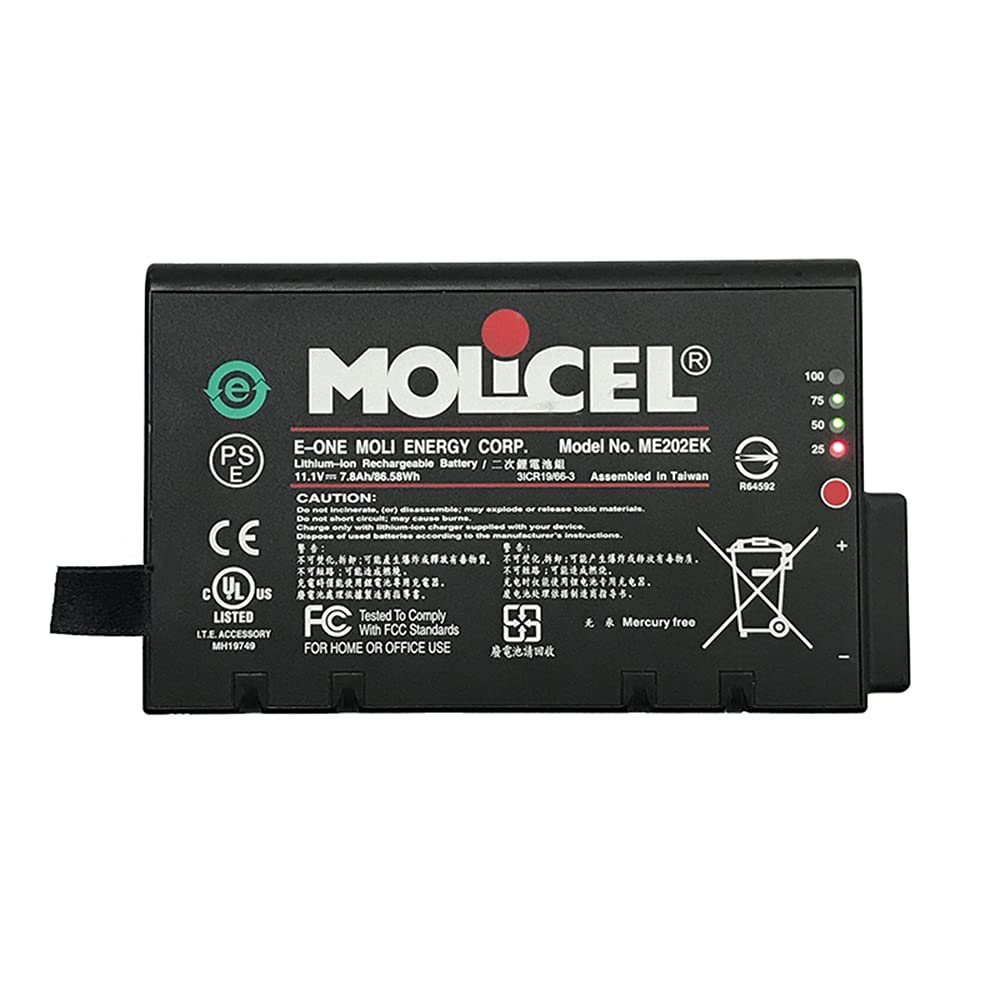
Figure 1: Front view of the CAMFM ME202EK Li-Ion Battery.
2. Safety Information
Your safety is paramount. Please observe the following warnings and precautions when handling, installing, or disposing of the battery:
- CAUTION: Do not disassemble, crush, puncture, short external contacts, or dispose of the battery in fire or water. Such actions can lead to fire, explosion, or severe injury.
- Use only with compatible Philips ECG EKG Vital Sign Monitors as specified.
- Keep the battery away from extreme heat sources, direct sunlight, and high humidity.
- Do not attempt to charge the battery with an incompatible charger.
- If the battery shows signs of damage, leakage, or overheating, discontinue use immediately and dispose of it properly.
- This product is designed for HOME OR OFFICE USE.
- Dispose of used batteries according to local regulations. The battery contains Lithium-Ion and should be recycled responsibly. Do not dispose of with general waste.
- The battery is Mercury Free.

Figure 2: Top view of the battery showing model number, caution statement, and various certifications (CE, UL, FCC, PS, e-waste symbol, Mercury Free).
3. Setup and Installation
Before installing the new battery, ensure the Philips ECG EKG Vital Sign Monitor is powered off and disconnected from any external power source. Refer to your monitor's specific user manual for detailed battery compartment access and replacement procedures.
- Power Off: Completely power down the Philips monitor.
- Disconnect Power: Unplug the monitor from the AC power adapter.
- Locate Battery Compartment: Identify and open the battery compartment on your monitor. This usually involves unscrewing a cover or releasing a latch.
- Remove Old Battery: Carefully remove the old battery. Note its orientation.
- Insert New Battery: Insert the CAMFM ME202EK battery into the compartment, ensuring it is correctly oriented and securely seated. The battery contacts should align with the monitor's terminals.
- Secure Compartment: Close and secure the battery compartment cover.
- Initial Charge: Connect the monitor to its AC power adapter and allow the new battery to fully charge before initial use.

Figure 3: Close-up view of the battery's electrical contacts and identification label (REF 989803194541, PN 4535645093).
4. Operating Instructions
Once installed, the CAMFM ME202EK battery operates seamlessly with your Philips monitor. The monitor's internal charging system will manage the battery's charge and discharge cycles.
- Charging: The battery will charge automatically when the monitor is connected to an external power source. Ensure you use the original or a compatible AC adapter for your Philips monitor.
- Battery Level: The monitor's display will indicate the current battery charge level. The battery itself features visual indicators (100%, 75%, 50%, 25%) to provide a quick reference of its charge status when not installed or when checking directly.
- Discharge: The battery will power the monitor when it is disconnected from external power. The runtime will vary based on monitor usage and settings.
- Recalibration: For optimal battery performance and accurate charge indication, it is recommended to perform a full discharge and recharge cycle periodically (e.g., once every few months).

Figure 4: Battery top view highlighting the charge level indicators (100, 75, 50, 25) and the power button/indicator.
5. Maintenance
Proper maintenance extends the lifespan of your Li-Ion battery:
- Storage: If storing the battery for an extended period, ensure it is charged to approximately 50-70% capacity. Store in a cool, dry place, away from direct sunlight and extreme temperatures.
- Temperature: Avoid operating or storing the battery in temperatures below 0°C (32°F) or above 45°C (113°F).
- Cleaning: Keep the battery contacts clean and free from dust or debris. Use a dry, soft cloth for cleaning.
- Regular Use: For optimal performance, avoid leaving the battery fully discharged for long periods.
6. Troubleshooting
If you encounter issues with your CAMFM ME202EK battery, consider the following:
- Battery Not Charging:
- Ensure the monitor's AC adapter is properly connected and functioning.
- Verify the battery is correctly seated in its compartment.
- Check for any visible damage to the battery or monitor contacts.
- Short Operating Time:
- The battery may not be fully charged. Perform a full charge cycle.
- Battery capacity naturally degrades over time. If the battery is old, replacement may be necessary.
- Monitor settings (e.g., screen brightness, active features) can affect battery life.
- Monitor Not Recognizing Battery:
- Remove and reinsert the battery to ensure proper connection.
- Restart the monitor.
- Ensure the battery model is compatible with your specific Philips monitor model.
If troubleshooting steps do not resolve the issue, contact customer support or a qualified service technician.
7. Specifications
| Feature | Specification |
|---|---|
| Model Numbers | ME202EK, ME202A, ME202B, ME202 |
| Reference Number | 989803194541 |
| Battery Type | Lithium-Ion (Li-Ion) |
| Nominal Voltage | 11.1 Volts |
| Capacity | 12000 mAh (Miliamperios hora) |
| Product Weight | 180 Grams |
| Battery Weight | 250 Grams |
| Manufacturer | CAMFM |
| Compatibility | Philips ECG EKG Vital Sign Monitors (ME202A, ME202B, ME202) |
| UPC / GTIN | 736961929110 |
| Reusability | Rechargeable |
8. Warranty and Support
Warranty: This product comes with a limited warranty. The specific terms and duration of the warranty may vary. Please refer to your purchase documentation or contact the seller for detailed warranty information.
Customer Support: For technical assistance, troubleshooting beyond this manual, or warranty claims, please contact the retailer or CAMFM customer support. When contacting support, please have your product model number (ME202EK) and purchase details readily available.