Introduction
The Fuzion TRI Digital Grams Scale is designed for high-precision weighing of small objects. Its compact size and multiple unit options make it suitable for various applications, including measuring coins, jewelry, coffee, herbs, and powders. This manual provides detailed instructions for proper setup, operation, and maintenance to ensure accurate and reliable performance.
Key Features:
- High Precision: Weighs objects up to 200g with 0.01g readability (accurate to ±0.03g).
- Multiple Units: Supports 6 different weight modes: g, oz, dwt, gn, ct, ozt.
- Practical Design: Features a 1.65in×0.79in orange LCD screen, stainless steel weighing pan, and a protective flip cover with magnetic attraction.
- Tare Function: Allows zeroing of container weight for net measurements.
- Smart Functions: Includes low battery and overload indicators, and adjustable auto-off time for power saving.
Setup
1. Battery Installation
The scale requires 2 AAA batteries (included). To install:
- Locate the battery compartment on the underside of the scale.
- Open the battery cover.
- Insert the 2 AAA batteries, ensuring correct polarity (+/-).
- Close the battery cover securely.
Note: The scale comes with a protective card under the platform. Please remove it before first use.

Figure 1: Fuzion TRI Digital Grams Scale with included accessories.

Figure 2: Detail of battery installation and various weighing units.
2. Initial Placement
Place the scale on a hard, flat, and stable surface to ensure accurate readings. Avoid placing it on soft or uneven surfaces, or near sources of vibration or air currents.
Operation
1. Power On/Off
- To turn on: Press the ON/OFF button. The LCD display will light up and show "0.00" when ready.
- To turn off: Press and hold the ON/OFF button for approximately 3 seconds. The scale will also auto-off after a period of inactivity (adjustable).
2. Unit Conversion
The scale supports multiple weighing units. To change the unit:
- Press the MODE button repeatedly to cycle through the available units: grams (g), ounces (oz), troy ounces (ozt), pennyweights (dwt), grains (gn), and carats (ct).
- The selected unit will be displayed on the LCD screen.
3. Tare Function
The Tare function allows you to subtract the weight of a container, so only the net weight of the item is measured.
- Place an empty container on the weighing pan.
- Press the TARE button. The display will reset to "0.00".
- Add the items to be weighed into the container. The display will show the net weight of the items.

Figure 3: Step-by-step illustration of using the Tare function.
4. Calibration
For optimal accuracy, periodic calibration is recommended. The scale includes a 50g calibration weight.
- Turn the scale on and wait for "0.00" to display.
- Press and hold the MODE button until the display shows "CAL", then release.
- Press the MODE button again. The display will flash the required calibration weight (e.g., "50.00").
- Place the 50g calibration weight gently on the center of the weighing pan.
- The display will show "PASS" and then return to normal weighing mode, indicating successful calibration.

Figure 4: Calibration process with the 50g weight.
5. Product Overview Video
Video 1: An overview of the Fuzion TRI Digital Grams Scale, demonstrating its compact size, battery installation, and basic weighing functions. This video highlights the scale's portability and ease of use for various small items.
6. Digital Pocket Scale Demonstration
Video 2: A demonstration of a digital pocket scale, showcasing its unit conversion capabilities and how it can be used to weigh items like coffee beans, jewelry, coins, and even a feather, emphasizing its precision for very light objects.
Maintenance
1. Cleaning
To clean the scale, wipe it with a slightly damp cloth. Do not immerse the scale in water or use abrasive cleaners, as this may damage the electronic components.
2. Storage
When not in use, keep the protective flip cover closed to shield the weighing pan and display from dust and damage. Store the scale in a dry, stable environment.
Troubleshooting
- "Lo" or Low Battery Indicator: If the display shows "Lo" or the readings become inconsistent, replace the batteries.
- "O-Ld" or Overload Indicator: If the display shows "O-Ld", the scale is overloaded. Remove the item immediately to prevent damage. The maximum capacity is 200g.
- Inaccurate Readings: Ensure the scale is on a flat, stable surface. Recalibrate the scale using the provided 50g weight. Avoid strong electromagnetic interference.
Specifications
| Feature | Detail |
|---|---|
| Product Dimensions | 5.47 x 3.27 x 0.98 inches |
| Item Weight | 8.82 ounces (approx. 250g) |
| Item Model Number | TRI-RD |
| Capacity | 200g |
| Readability | 0.01g |
| Accuracy | ±0.03g |
| Weighing Units | g, oz, dwt, gn, ct, ozt |
| Display Type | LCD (Orange Backlit) |
| Power Source | 2 x AAA batteries (included) |
| Special Feature | Auto Shut Off, Tare Function |
Warranty and Support
This Fuzion TRI Digital Grams Scale comes with a 2-year warranty. For any questions or support needs, please contact Fuzion customer service. We are committed to providing 100% satisfaction and are always ready to assist you.
Additional Product Views
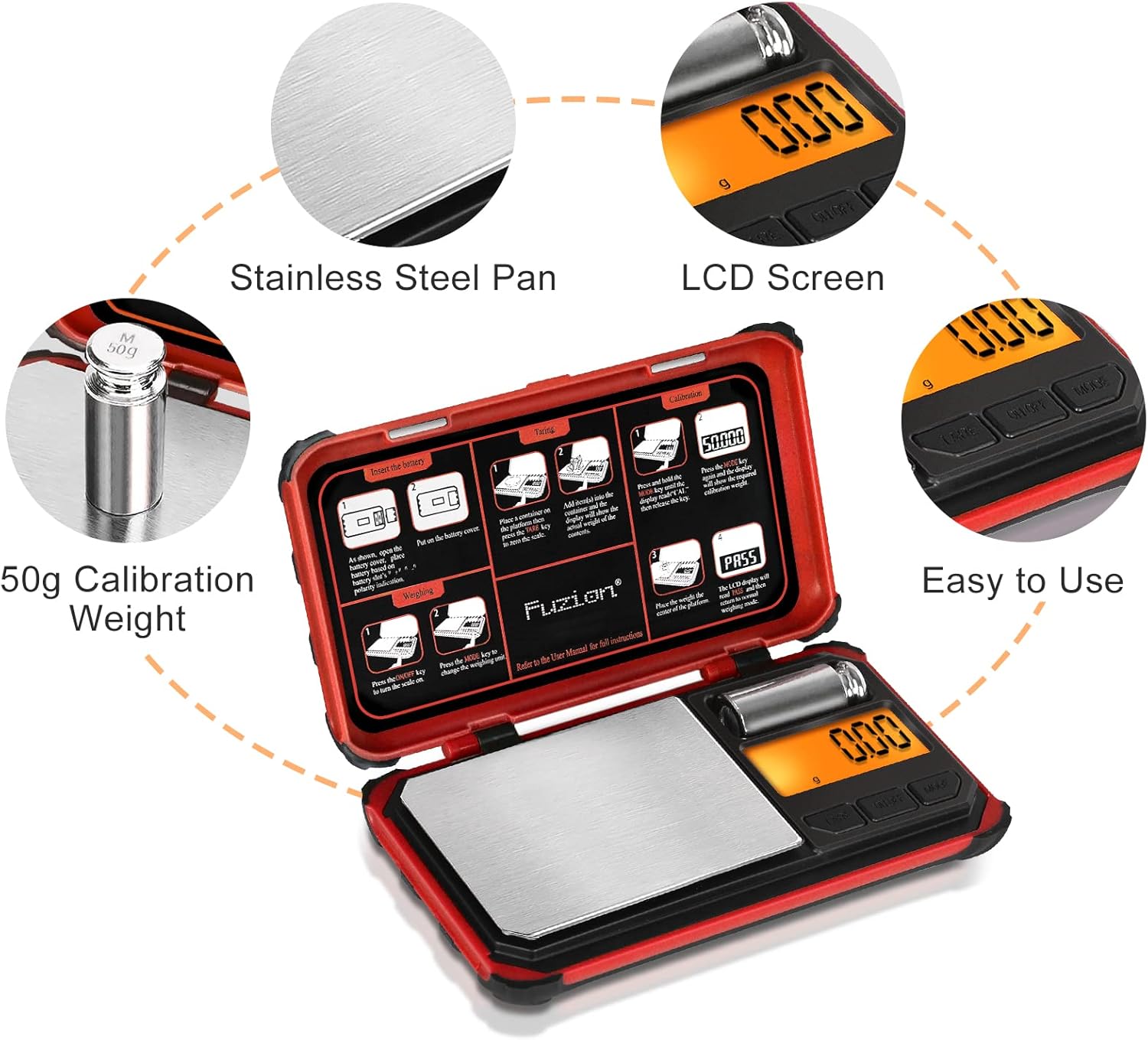
Figure 5: High precision weighing for various small objects.

Figure 6: Compact and portable design for easy carrying.

Figure 7: Durable stainless steel weighing pan and clear LCD screen.


