Product Overview
The ACEBEAM Rider RX is a compact, high-performance Everyday Carry (EDC) flashlight designed for reliability and versatility. It features a durable titanium body, a high Color Rendering Index (CRI) LED, and multiple brightness levels, powered by either a rechargeable 14500 Li-ion battery or a standard AA battery.

Image: The ACEBEAM Rider RX Titanium EDC Flashlight, showcasing its compact design.
Package Contents
Verify that all items are present in your package:
- ACEBEAM Rider RX Flashlight
- Custom USB-C Rechargeable 14500 Li-ion Battery
- USB-C Charging Cable
- Spare O-rings (2 small, 2 large)
- Lanyard
- User Manual (this document)

Image: The complete package contents including the flashlight, battery, cable, O-rings, and lanyard.
Setup
Battery Installation and Charging
- To access the battery compartment, unscrew the head of the flashlight.
- Insert the provided ACEBEAM 14500 Li-ion battery with the positive (+) terminal facing towards the head of the flashlight. Alternatively, a standard 1.5V AA alkaline or 1.2V NiMH AA battery can be used, though output may vary.
- Screw the head back on securely.
- To charge the 14500 Li-ion battery, remove it from the flashlight. Connect the supplied USB-C cable to the battery's USB-C port and to a power source. The battery has a built-in charging indicator.

Image: The 14500 Li-ion battery being charged via its integrated USB-C port.
Operating Instructions
Tail Switch Operation
The Rider RX features a unique tail switch for all operations. The flashlight has 4 brightness levels: Ultra-Low, Low, Mid, and High.
- Turn On/Off: Fully press the tail switch to turn the flashlight on or off.
- Change Brightness: With the light on, lightly press the tail switch (without clicking) to cycle through Ultra-Low, Low, Mid, and High modes. The flashlight will remember the last used brightness level when turned off and on again.
- Momentary On: Lightly press and hold the tail switch for momentary illumination. Release to turn off.
Bolt Action Mechanism
The Rider RX incorporates a bolt action mechanism. This mechanism serves multiple purposes:
- Prevent Accidental Activation: Sliding the bolt action mechanism forward covers the tail switch, preventing accidental activation during transport or storage.
- Tail Stand Capability: When the bolt action mechanism is fully extended forward, it allows the flashlight to stand upright on its tail cap.
- Battery Access: The bolt action mechanism is part of the outer titanium sleeve. To access the battery compartment, the head of the flashlight must be unscrewed, not the bolt action mechanism itself.
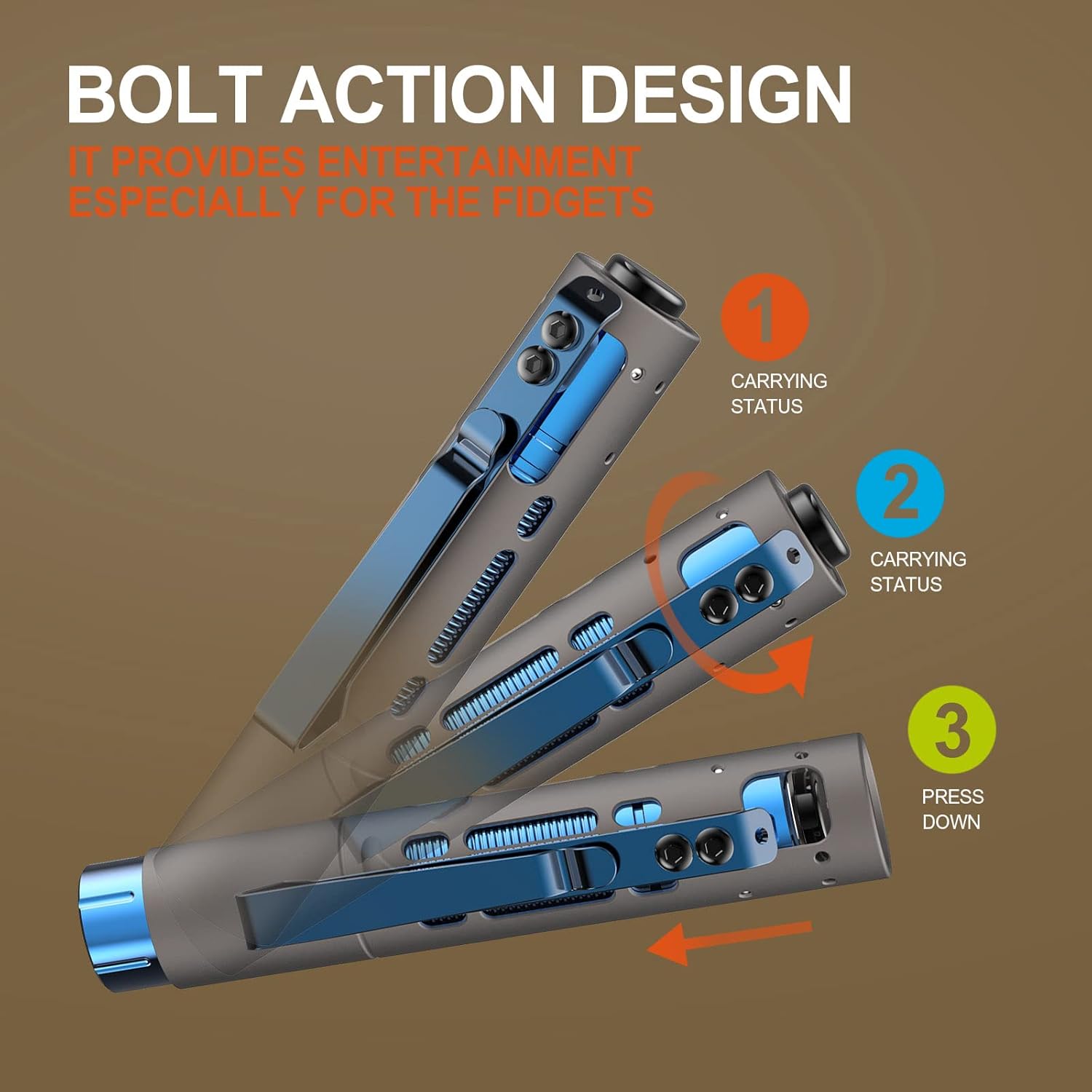
Image: Illustration of the bolt action mechanism in different positions, showing how it covers the tail switch.

Image: Visual representation of the four brightness levels (High, Mid, Low, Ultra-Low) in various application scenarios.
Maintenance
- Cleaning: Clean the flashlight body with a soft, damp cloth. Do not use harsh chemicals or abrasives.
- Lubrication: Periodically apply silicone grease to the O-rings and threads to maintain water resistance and smooth operation.
- O-rings: Inspect O-rings regularly for wear and tear. Replace them with the provided spare O-rings if damaged to ensure the flashlight remains waterproof.
- Battery Care: Store the 14500 Li-ion battery in a cool, dry place. If not using the flashlight for an extended period, remove the battery to prevent potential damage.
Troubleshooting
- Flashlight does not turn on:
- Ensure the battery is correctly inserted with the positive (+) terminal facing forward.
- Check if the battery is charged. Recharge the 14500 battery or replace the AA battery.
- Confirm the head and tail cap are screwed on tightly.
- Verify the bolt action mechanism is not covering the tail switch if you intend to operate it.
- Light is dim or flickers:
- The battery may be low. Recharge or replace the battery.
- Clean the battery contacts and flashlight threads with a clean cloth.
- Water ingress:
- Check O-rings for damage or improper seating. Replace if necessary.
- Ensure all parts are securely tightened.
Specifications
| Feature | Detail |
|---|---|
| Model | Rider RX |
| Light Source | NICHIA 219F LED, CRI 90 |
| Maximum Output | 650 Lumens |
| Power Source | 1x 14500 Li-ion (included) or 1x AA (Alkaline/NiMH) |
| Max Runtime (14500) | Up to 53 hours (Ultra-Low mode) |
| Material | Titanium outer sleeve, Aluminum inner core |
| Dimensions | 1.02" (D) x 0.73" (W) x 3.76" (H) |
| Weight | Approximately 2.45 ounces (69.5g) with 14500 battery |
| Water Resistance | IPX8 (2 meters submersible) |
| Impact Resistance | 1 meter |
| Special Features | Bolt action mechanism, USB-C rechargeable battery, Tail switch, Deep pocket clip |

Image: The Rider RX illuminating red roses, demonstrating its CRI 90 light quality and 650 lumens output.

Image: A comparison showing how the Rider RX's CRI >90 light renders colors more accurately than lights with CRI <80, similar to natural sunlight (CRI 100).
Warranty and Support
ACEBEAM offers a five-year free repair warranty for the Rider RX flashlight, covering manufacturing defects and issues arising from normal use. For warranty claims or technical support, please contact ACEBEAM customer service through their official website or your point of purchase.
For more information, visit the official ACEBEAM website: www.acebeam.com


