
Introduction
The Coast CL20R Clamp Light is a versatile and powerful lighting solution designed for various tasks. It features a wide-angle flood beam, multiple positioning options, and a dual power system for reliable operation. This manual provides essential information for the safe and effective use of your CL20R Clamp Light.

Figure 1: Coast CL20R Clamp Light
Setup
Unpacking and Components
Carefully remove all components from the packaging. Ensure you have the following items:
- Coast CL20R Clamp Light
- Integrated Clamp with Magnetic Base
- 3M Black/Red USB-C Woven Charging Cord
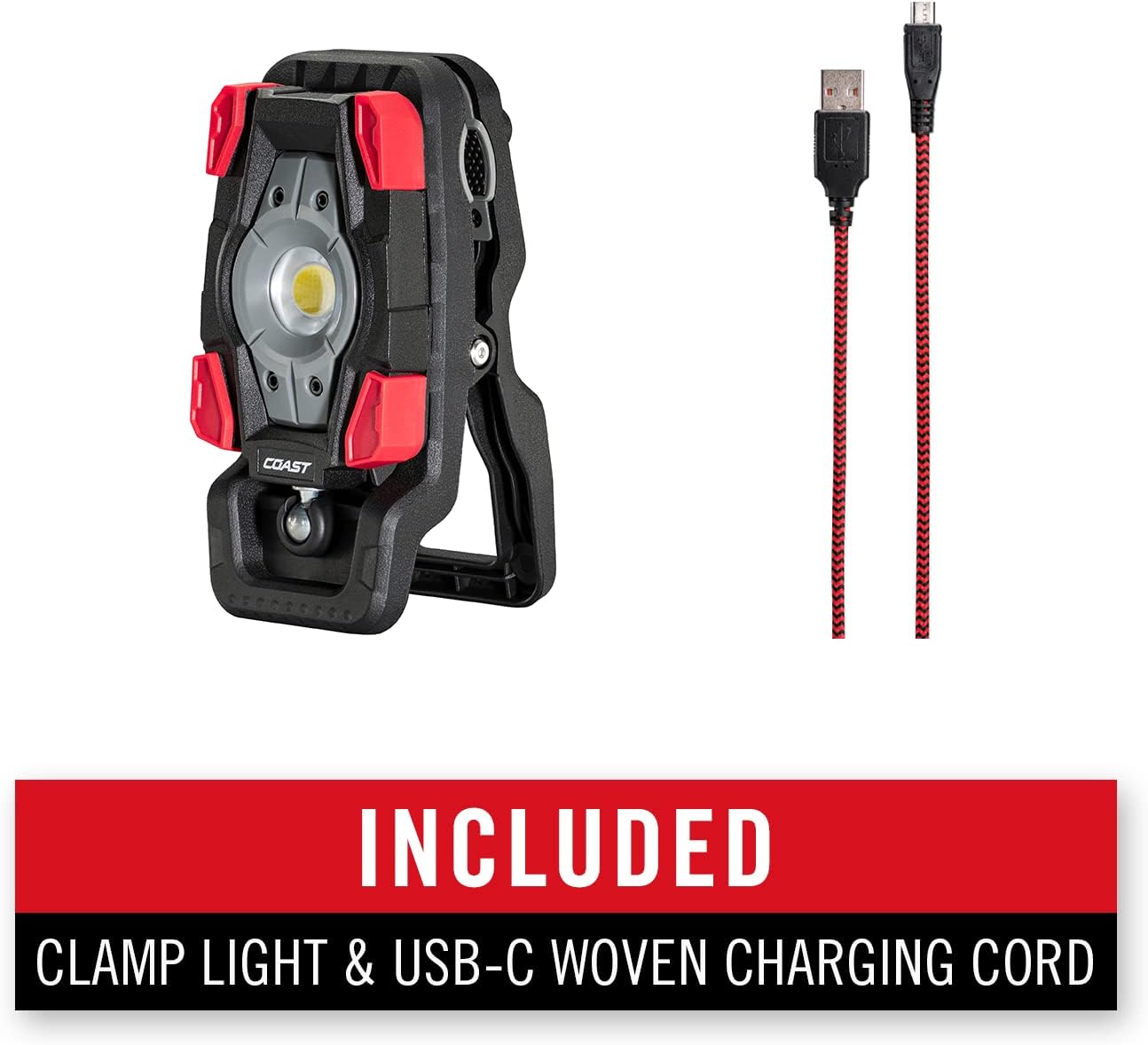
Figure 2: Included Components
Attaching the Clamp
The CL20R features an integrated clamp that can be attached to various surfaces. The light head is connected to the clamp via a ball joint, allowing for flexible positioning.
Charging the Device
The CL20R is equipped with a built-in COAST ZITHION battery. To charge the light, connect the included USB-C charging cord to the light's USB-C port and plug the other end into a compatible power source. The battery life indicator will show the charging status.

Figure 3: USB-C Charging Port
The light can also operate continuously when plugged in via USB-C. While in continuous run mode, the light will operate at a reduced level and will not charge. To fully charge the battery, the light must be turned off.
Operating Instructions
Powering On and Brightness Modes
Press the power button located on the device to turn the light on. The CL20R offers multiple brightness levels. Press the power button repeatedly to cycle through the available brightness modes (e.g., High, Medium, Low) and to turn the light off.

Figure 4: Light Output and Range

Figure 5: Wide Angle Flood Beam
Positioning the Light
The CL20R offers flexible positioning options:
- Clamp Attachment: The high-strength clamp can attach firmly to various supports such as ladders, pipes, or branches.
- Magnetic Base: The integrated magnetic base allows for attachment to metal surfaces.
- Rotation and Tilt: The light head rotates up to 360 degrees and tilts up to 115 degrees, providing precise control over the light direction.

Figure 6: Magnetic Clamp Feature

Figure 7: 360-Degree Light Rotation

Figure 8: 115-Degree Light Tilt
Using as a Power Bank
The CL20R's built-in battery can also function as a power bank to charge external devices. Connect your device to the light's output port (DC 5V/1A) using an appropriate cable.

Figure 9: Portable Charger Function
Battery Life Indicator
The light features a battery life indicator to show the remaining charge. Monitor this indicator to know when recharging is necessary.

Figure 10: Battery Life Indicator
Maintenance
Cleaning
To clean the CL20R, wipe it with a soft, damp cloth. Do not use abrasive cleaners or solvents, as these may damage the finish or internal components.
Water and Dust Resistance
The CL20R is rated IP54 for water and dust resistance, meaning it is protected against dust ingress and splashing water from any direction. While durable, avoid submerging the light in water.

Figure 11: Dust Resistant Feature
Figure 12: Storm Proof Rating
Troubleshooting
- Light not turning on: Ensure the battery is charged. If operating via USB-C, confirm the cable is securely connected and the power source is active.
- Short battery life: Battery life can vary based on brightness mode. High brightness consumes more power. Ensure the light is fully charged before use.
- Light not charging: Check the USB-C cable and power adapter. Ensure the light is turned off for optimal charging.
- Light output reduced when plugged in: This is normal behavior for continuous operation. The light operates at a reduced level to prevent overcharging and allow for continuous use.
Specifications
| Feature | Detail |
|---|---|
| Brand | Coast |
| Model Number | 30684 |
| Light Output Maximum | 1750 Lumens |
| Power Source | Battery Powered |
| Battery Type | Lithium Ion (1 included) |
| Charging Port | USB-C |
| Output (Power Bank) | DC 5V/1A |
| Light Source Type | LED |
| Material | Aluminum, Plastic |
| Product Dimensions | 3"D x 3"W x 13"H |
| Item Weight | 1.3 pounds (0.59 Kilograms) |
| Water Resistance Level | IP54 (Water Resistant) |
| Special Features | Rechargeable, Rotating Head, Magnetic Base, Clamp |

Figure 13: Product Dimensions
Warranty Information
Coast warranties its Coast knives, tools, and Coast LED flashlights/headlamps to be free of defects in materials and workmanship for the life of the original purchaser. This warranty does not cover normal wear and tear, nor damage resulting from misuse or neglect. Warranty does not cover batteries and charging accessories (or damage caused by either). Batteries or damage caused by batteries (i.e., leakage) are not included in the guarantee.
Support
For further assistance or to explore other Coast products, please visit the official Coast Store:


