
Introduction
This manual provides comprehensive instructions for the setup, operation, maintenance, and troubleshooting of your TECHNOVIEW WiFi Glasses Wireless Camera. Please read this guide carefully to ensure proper use and optimal performance of your device.
What's in the Box
- 1 x Glasses Camera
- 1 x Battery Legs (detachable)
- 1 x User Manual
- 1 x USB Charge Cable

An image displaying all items included in the product package: the camera glasses, detachable battery legs, user manual, and USB charging cable.
Product Features and Components
SD Card Slot
The SD card slot is located discreetly on the glasses frame. It supports a TF card up to 32GB (not included) for storing recordings.

Illustration highlighting the discreet SD card slot on the glasses frame and confirming the absence of physical buttons for operation.
Touch Control
The device operates without physical buttons, utilizing touch gestures on the frame for functions such as recording and Wi-Fi activation.

A visual guide indicating the touch-sensitive area on the glasses frame for initiating the Wi-Fi function with a three-second touch.
Indicator Lights
- Blue Light: This is the Wi-Fi indicator. It flashes when Wi-Fi is in a waiting state for 120 seconds. It remains illuminated when successfully connected to the app. If no connection is made within 120 seconds, the blue light turns off, and the device vibrates twice. Video recording is not affected if Wi-Fi closes.
- Green Light: This is the work indicator. A long touch on the left eyeglasses leg for approximately 2 seconds will boot the device. The green light will be bright, and the device will vibrate for 0.5 seconds. Video recording starts automatically after boot, and the green light flashes during recording.

Detailed view of the glasses frame, pointing out the blue light (Wi-Fi indicator) and green light (work indicator) with their respective functions.
Detachable Battery Legs
The glasses feature detachable battery legs, allowing for convenient charging and potential replacement.
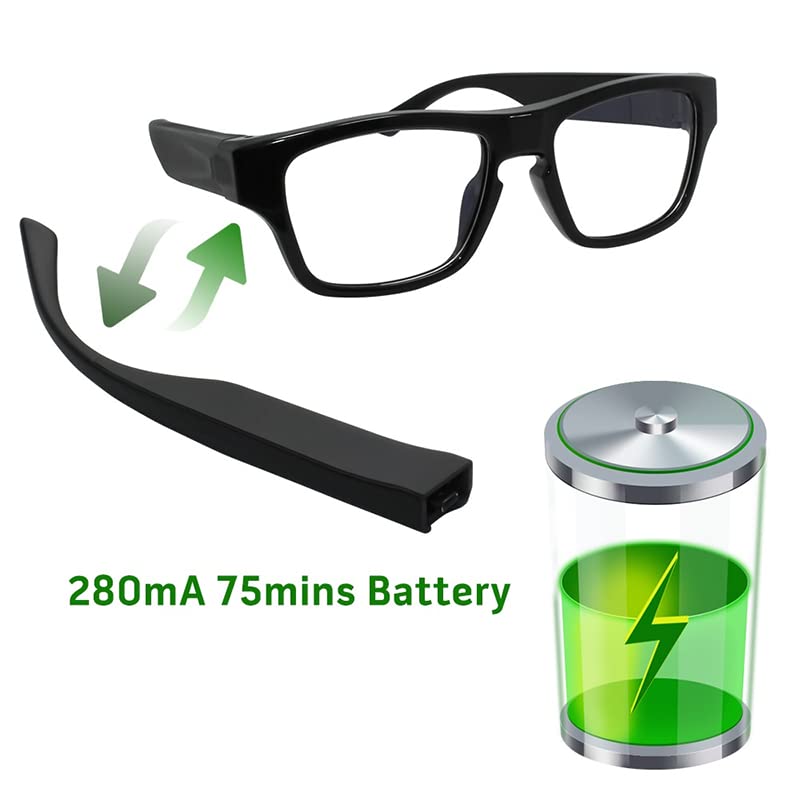
An illustration showing the removable battery leg of the glasses and a graphic representing the battery charge level.
Additional Features
- Ultra HD 1080p Video and Audio Recording: Captures clear video and audio.
- Wide Viewing Angle: 120-degree field of view.
- Gesture Control: Supports gesture-based control for certain functions.
- Circular Recording: Enables continuous loop recording.

A graphic summarizing the main functionalities: instant recording, gesture-based control, extended standby time, continuous loop recording, and memory card management.
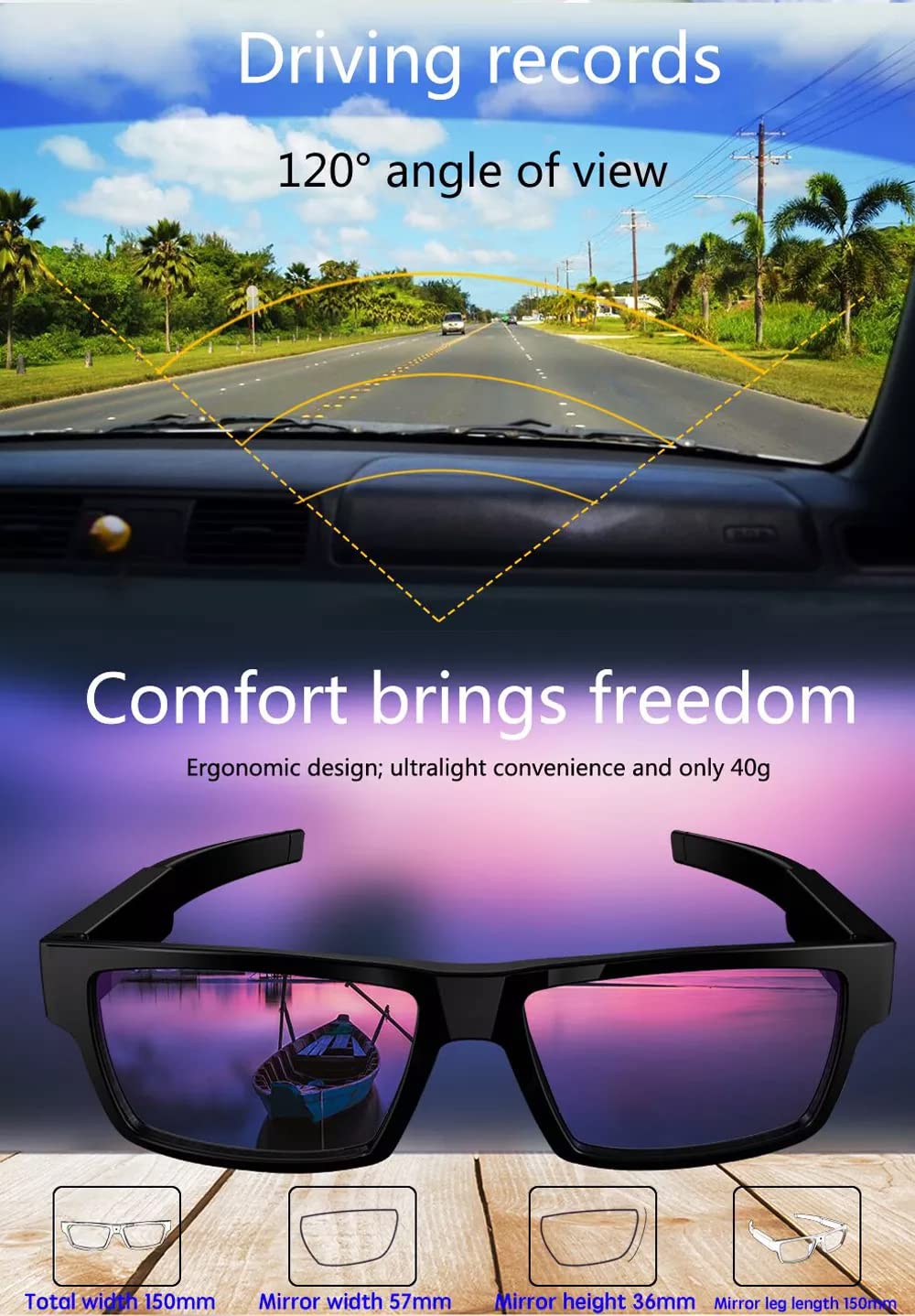
An image illustrating the 120-degree wide-angle recording capability, suitable for activities like driving, along with key dimensions of the glasses.
Setup Guide
1. Charging the Device
Connect the glasses to a USB power source using the provided USB charge cable. A full charge takes approximately 2 hours and provides about 70 minutes of working time.
2. Inserting the Memory Card
Locate the SD card slot on the glasses frame. Gently insert a TF card (up to 32GB, not included) into the slot until it clicks into place. Ensure the card is inserted correctly to avoid damage.
3. App Installation and Wi-Fi Connection
- Download the official application for your smartphone (compatible with Android and iOS). Refer to the user manual included in the box for specific app name and download instructions.
- To activate Wi-Fi on the glasses, touch the designated position on the frame for three seconds. The blue light will flash, indicating the Wi-Fi is in a waiting state.
- On your smartphone, go to Wi-Fi settings and connect to the Wi-Fi network broadcast by the glasses.
- Open the installed app. The app will allow you to view live footage and control the glasses' functions.
Operating Instructions
1. Power On/Off and Recording
- To power on the device and start recording, long touch the left eyeglasses foot boot position for approximately 2 seconds. The green light will illuminate, and the device will vibrate for 0.5 seconds. Video recording commences automatically.
- To stop recording and power off, repeat the touch gesture or use the app controls.
2. Live View and App Control
Once connected via Wi-Fi, use the dedicated smartphone app to watch real-time video, adjust settings, and manage recordings.
Maintenance
1. Cleaning
Use a soft, dry cloth to clean the lenses and frame. Avoid abrasive materials or harsh chemicals.
2. Storage
Store the glasses in a cool, dry place away from direct sunlight and extreme temperatures.
Troubleshooting
- Device not powering on: Ensure the battery is fully charged. Connect to the USB charger and check for indicator lights.
- Wi-Fi not connecting:
- Ensure Wi-Fi is activated on the glasses (blue light flashing).
- Check your phone's Wi-Fi settings and ensure you are connecting to the correct network.
- If Wi-Fi closes automatically after 120 seconds, reactivate it by touching the frame.
- No video recording:
- Verify that a TF card is properly inserted and has sufficient free space.
- Ensure the device is powered on and the green work indicator light is active.
- Short battery life: Ensure the device is fully charged before use. Operating time is approximately 70 minutes on a full charge.
Specifications
| Video Resolution | FHD 1080P (1920*1080) @ 30fps |
| Video File Format | MJPEG |
| WiFi | 802.11n, Range: 15M |
| Audio Video | Support, Built-in microphone |
| Internal Storage | No |
| External Storage | TF card (32 GB maximum) |
| Shutter Control | Electronic |
| EV Compensation | Automatic |
| White Balance | Automatic |
| System Language | English |
| Power Interface | 5V DC input |
| Storage Battery | 300 mA lithium battery |
| Working Time | 75 minutes (approx.) |
| Product Dimensions | 12 x 5 x 7 cm |
| Item Weight | 37 g |
| Viewing Angle | 120 Degrees |
| Operating System | iOS (App compatibility) |
| Material | Plastic |
Warranty Information
The TECHNOVIEW WiFi Glasses Wireless Camera comes with a 6-month warranty from the date of purchase. Please retain your proof of purchase for warranty claims.
Customer Support
For technical assistance or inquiries regarding your TECHNOVIEW WiFi Glasses Wireless Camera, please contact TECHNOVIEW customer support:
- Phone/WhatsApp: 9810601293
- Operating Hours: Monday to Saturday, 11:30 AM to 6:30 PM (Sunday closed)