1. Introduction
The Crunch PZ2-3030.1D POWERZONE Mono Amplifier is designed to deliver powerful audio performance for your car audio system. This mono subwoofer amplifier features SPEED-FET output devices and QTD Technology, providing up to 3000 watts of power in a 1 ohm stable application. This manual provides essential information for the proper installation, operation, and maintenance of your amplifier to ensure optimal performance and longevity.

Figure 1: Top view of the Crunch PZ2-3030.1D POWERZONE Mono Amplifier.
2. Safety Information
Important Safety Warning: This product contains chemicals known to the State of California to cause cancer and birth defects or other reproductive harm. Always handle with care and wash hands after use.
- Always disconnect the vehicle's battery before making any electrical connections.
- Ensure all wiring is properly insulated to prevent short circuits.
- Mount the amplifier securely in a location that allows for adequate ventilation.
- Do not expose the amplifier to moisture or extreme temperatures.
- Consult a professional installer if you are unsure about any installation steps.
3. Product Features
- Mono Amplifier Design: Optimized for driving subwoofers, providing dedicated power for bass frequencies.
- Low Voltage RCA Inputs: Ensures high sound quality by minimizing interference and distortion in the signal path.
- Electronic Crossover: On-board electronic crossover allows tailoring specific frequencies to speakers and subwoofers for precise audio control.
- SPEED-FET MOSFET Components: Exclusive Crunch SPEED-FET MOSFET components maximize power efficiency, improve sound quality, and minimize distortion.
- Variable Electronic Crossovers: Provides complete control over the sound output.
- Bass Remote Included: A wired bass remote allows convenient adjustments to bass frequencies from anywhere in the vehicle.
- 1 Ohm Stable: Capable of operating with a 1-ohm load for maximum power output.
4. Setup and Installation
Proper installation is crucial for the performance and safety of your amplifier. Follow these general guidelines:
4.1 Mounting Location
- Choose a dry, well-ventilated area, away from direct sunlight or heat sources.
- Ensure the mounting surface is sturdy and can support the amplifier's weight.
- Allow sufficient space around the amplifier for air circulation.
4.2 Wiring Connections
Refer to Figure 2 for the power, ground, remote, and speaker connections. Use appropriate gauge wiring for all connections to prevent power loss and ensure safety.

Figure 2: Power, Ground, Remote, and Speaker Terminals.
- Power (POWER +12V): Connect a fused power cable directly from the positive terminal of your vehicle's battery to the +12V terminal on the amplifier. The fuse should be located within 18 inches of the battery.
- Ground (GND): Connect a ground cable of the same gauge as the power cable to a clean, unpainted metal surface on the vehicle's chassis. Ensure a solid, low-resistance connection.
- Remote (REM): Connect a remote turn-on wire from your head unit's remote output to the REM terminal on the amplifier. This wire signals the amplifier to turn on and off with your head unit.
- Speaker (SPEAKER): Connect your subwoofer(s) to the speaker terminals. Ensure correct polarity (+ to + and - to -) and verify the total impedance matches the amplifier's capabilities (1 Ohm stable).
- RCA Input (LINE-INPUT): Connect RCA cables from your head unit's subwoofer output to the LINE-INPUT on the amplifier.
- Hi-Input: If your head unit does not have RCA outputs, use the Hi-Input connection. Consult a professional for proper wiring.
5. Operation and Adjustments
The amplifier features several controls to fine-tune your audio output. Refer to Figure 3 for the location of these controls.
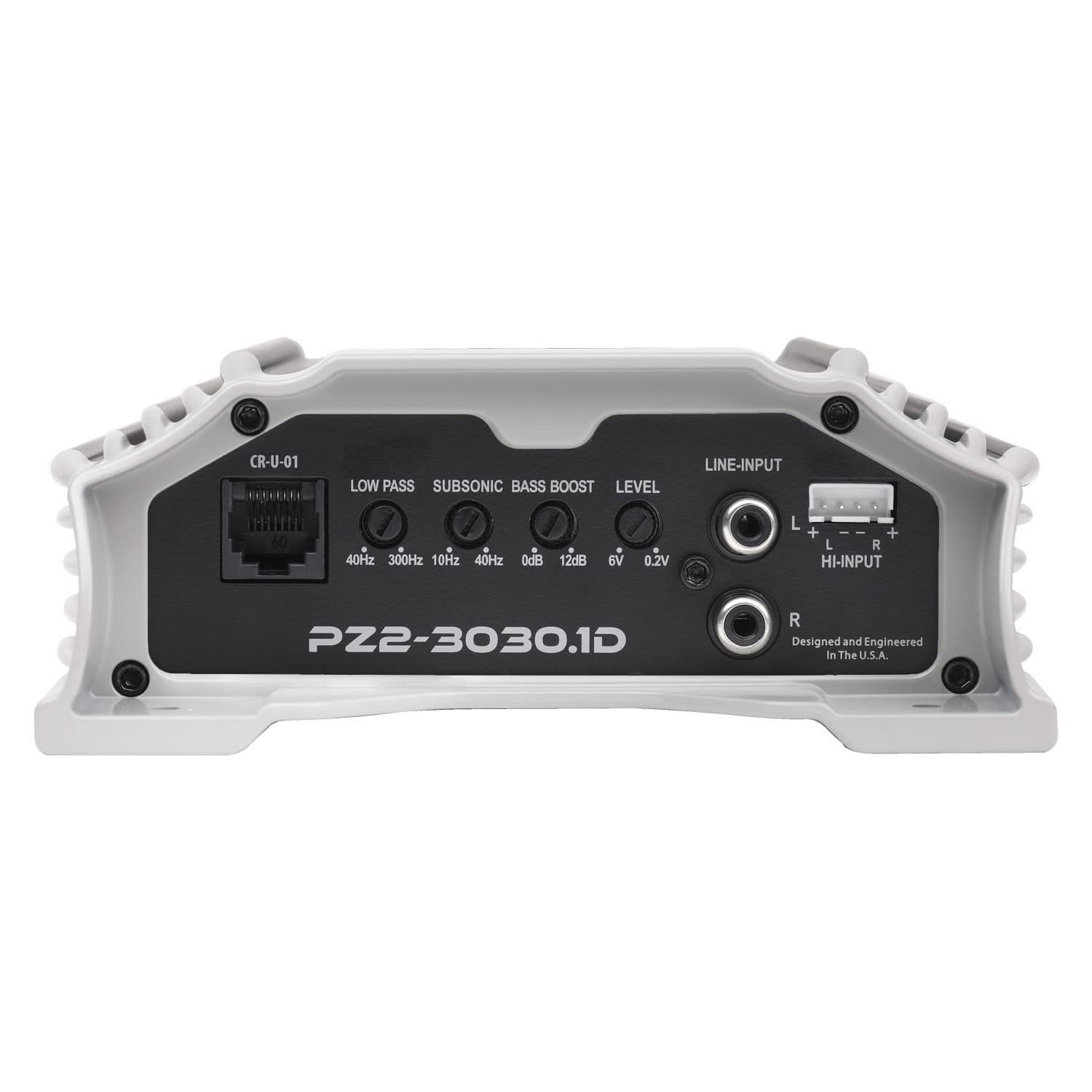
Figure 3: Amplifier Control Panel (Low Pass, Subsonic, Bass Boost, Level, Line-Input, Hi-Input).
- LOW PASS (40Hz - 300Hz): This control sets the upper frequency limit for the subwoofer. Frequencies above this setting will be filtered out. Start at a lower setting (e.g., 80Hz) and adjust to blend with your main speakers.
- SUBSONIC (10Hz - 40Hz): This filter removes extremely low frequencies that are inaudible and can cause damage to subwoofers. Set it slightly below your subwoofer's lowest resonant frequency.
- BASS BOOST (0dB - 12dB): Adjusts the bass level at a specific frequency (typically around 45Hz). Use sparingly to avoid distortion.
- LEVEL (0.2V - 6V): This is the gain control, matching the amplifier's input sensitivity to the output voltage of your head unit. Set it to the lowest possible setting that achieves maximum clean output from your head unit.
- LINE-INPUT (RCA): Connect your head unit's RCA outputs here.
- HI-INPUT: For head units without RCA outputs.
5.1 Bass Remote
The included wired bass remote allows for convenient adjustment of the bass output level from the driver's seat. Connect the remote to the dedicated port on the amplifier (CR-U-01, see Figure 3).

Figure 4: Wired Bass Remote.
6. Maintenance
To ensure the longevity and optimal performance of your Crunch amplifier, follow these simple maintenance tips:
- Cleaning: Periodically wipe the amplifier's exterior with a soft, dry cloth. Do not use harsh chemicals or abrasive cleaners.
- Connections: Regularly check all power, ground, remote, and speaker connections to ensure they are secure and free from corrosion. Loose connections can lead to poor performance or damage.
- Ventilation: Ensure that the amplifier's heatsink fins are free from dust and debris to maintain proper cooling. Do not block any ventilation openings.
- Environment: Avoid exposing the amplifier to extreme temperatures, humidity, or direct sunlight.
7. Troubleshooting
If you experience issues with your amplifier, consult the following troubleshooting guide before seeking professional assistance.
| Problem | Possible Cause | Solution |
|---|---|---|
| No Power (Power LED Off) |
|
|
| No Sound (Power LED On) |
|
|
| Distorted Sound |
|
|
| Amplifier Overheating (Protect LED On) |
|
|
8. Specifications
| Feature | Specification |
|---|---|
| Model Number | PZ2-3030.1D |
| Output Power | 3000 Watts (Peak) |
| Number of Channels | 1 (Mono) |
| Minimum Stable Impedance | 1 Ohm |
| Item Dimensions (L x W x H) | 13.25 x 6 x 2.25 inches |
| Item Weight | 6.7 pounds |
| Maximum Supply Voltage | 6 Volts (DC) - Note: This appears to be an error in source data, typical car audio amplifiers operate at 12-14.4V DC. |
| Mounting Type | Surface Mount |
| Material | Metal |
| Manufacturer | Maxxsonics |
| UPC | 806576233497 |
9. Warranty and Support
For warranty information or technical support, please contact the manufacturer, Crunch, or your authorized dealer. Keep your purchase receipt as proof of purchase.