
Sauter SMF46MX
Contents
SAUTER SMF46MX Multifunctional Mini Oven
User Manual
1. Introduction
Thank you for choosing the SAUTER SMF46MX Multifunctional Mini Oven. This manual provides essential information for the safe and efficient operation, maintenance, and troubleshooting of your new appliance. Please read it thoroughly before first use and keep it for future reference.
Your SAUTER SMF46MX oven is a powerful and versatile device, equipped with 1800W power and capable of reaching 230°C. It offers 5 cooking modes, including convection, rotating heat, grill, defrosting, and spit. Its compact yet spacious 46L design makes it ideal for daily grilling, roasting, and cooking, without occupying excessive countertop space.
2. Safety Instructions
Always follow basic safety precautions when using electrical appliances to reduce the risk of fire, electric shock, and injury.
- Read all instructions carefully before operating the oven.
- Do not touch hot surfaces. Use oven mitts or pot holders.
- To protect against electrical shock, do not immerse cord, plugs, or the appliance in water or other liquid.
- Close supervision is necessary when any appliance is used by or near children.
- Unplug from outlet when not in use and before cleaning. Allow to cool before putting on or taking off parts.
- Do not operate any appliance with a damaged cord or plug, or after the appliance malfunctions or has been damaged in any manner.
- The use of accessory attachments not recommended by the appliance manufacturer may cause injuries.
- Do not use outdoors.
- Do not let cord hang over edge of table or counter, or touch hot surfaces.
- Do not place on or near a hot gas or electric burner, or in a heated oven.
- Extreme caution must be used when moving an appliance containing hot oil or other hot liquids.
- Always attach plug to appliance first, then plug cord into the wall outlet. To disconnect, turn any control to 'off', then remove plug from wall outlet.
- Do not use appliance for other than intended use.
- Ensure adequate ventilation around the oven during operation.
- Do not cover the crumb tray or any part of the oven with metal foil. This will cause the oven to overheat.
3. Product Overview
Familiarize yourself with the components of your SAUTER SMF46MX Mini Oven.
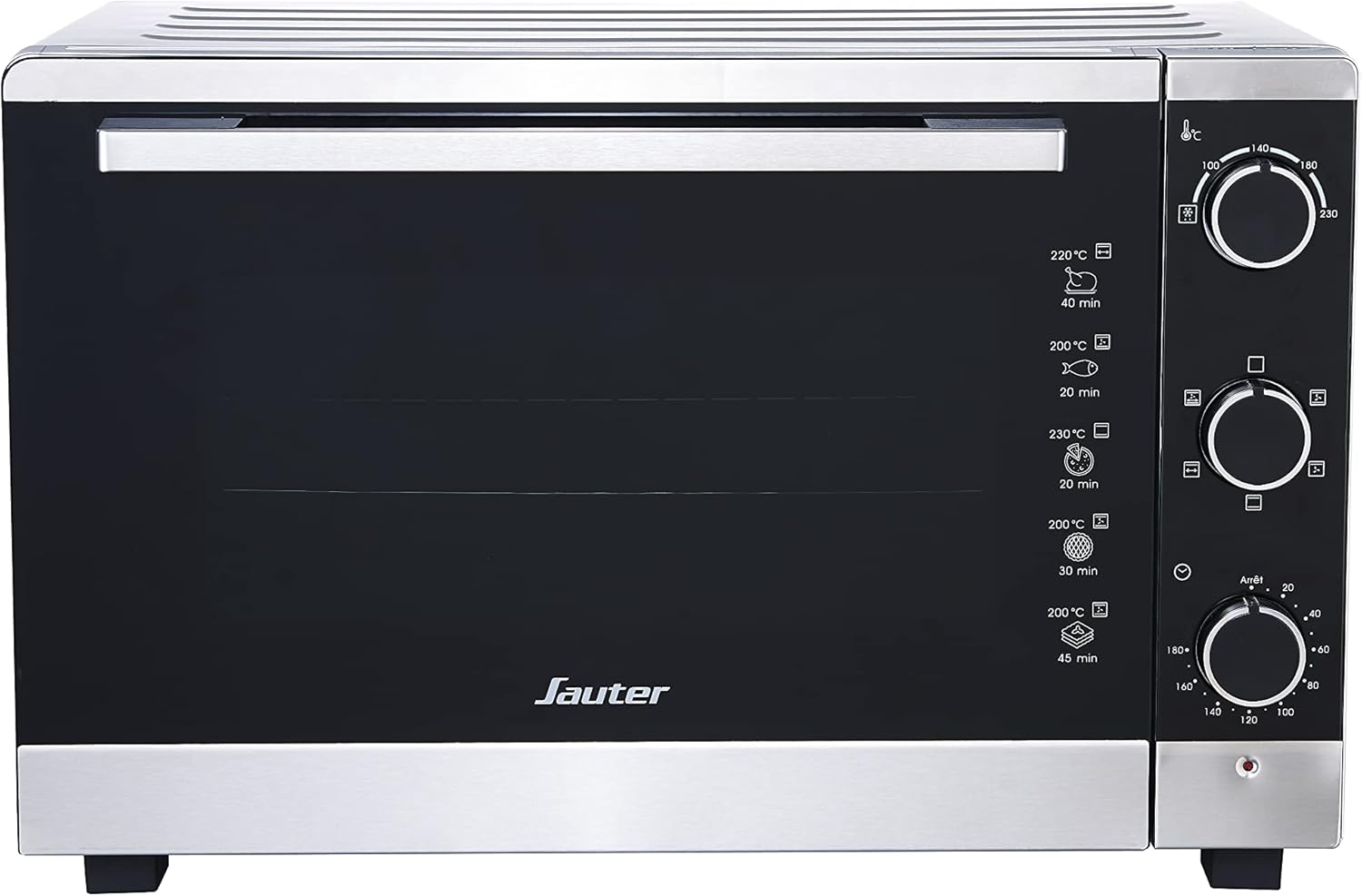
Figure 3.1: Front view of the SAUTER SMF46MX Multifunctional Mini Oven. This image shows the overall design of the SAUTER SMF46MX mini oven, featuring its black door, silver trim, and control panel on the right.

Figure 3.2: Close-up of the control panel. This image highlights the three control knobs for temperature, cooking mode, and timer, along with their respective icons.
Components:
- Temperature Control Knob: Adjusts oven temperature up to 230°C.
- Cooking Mode Selector Knob: Selects desired cooking function (Convection, Rotating Heat, Grill, Defrost, Spit).
- Timer Knob: Sets cooking time up to 60 minutes.
- Oven Door: Double-glazed for energy efficiency.
- Interior Light: For monitoring cooking progress.
- Grids (2): For placing food or baking dishes.
- Tongs (1): For safe handling of hot items.
- Crumb Tray (1): Collects crumbs and drips for easy cleaning.
4. Setup
- Unpacking: Carefully remove the oven and all accessories from the packaging. Remove any protective films or stickers.
- Placement: Place the oven on a stable, heat-resistant, and flat surface. Ensure there is at least 10-15 cm (4-6 inches) of clear space on all sides and above the oven for proper ventilation. Do not place it near flammable materials or heat sources.
- Initial Cleaning: Before first use, wipe the interior and exterior of the oven with a damp cloth. Wash the grids, tongs, and crumb tray in warm, soapy water, rinse thoroughly, and dry.
- First Use (Burn-Off): To eliminate any manufacturing odors, operate the oven empty for approximately 15 minutes at the maximum temperature (230°C) using the convection mode. Ensure the room is well-ventilated during this process. A slight odor or smoke is normal during this initial burn-off.
5. Operating Instructions
General Operation:
- Place the crumb tray at the bottom of the oven.
- Place food on the appropriate grid or in an oven-safe dish on the grid.
- Close the oven door securely.
- Turn the Temperature Control Knob to the desired temperature.
- Turn the Cooking Mode Selector Knob to the desired cooking function.
- Turn the Timer Knob to the desired cooking time. The oven will start operating, and the interior light will turn on.
- When the set time elapses, the oven will automatically turn off and a bell will sound. To stop cooking manually, turn the Timer Knob to the 'Off' position.
- Carefully remove cooked food using oven mitts and the provided tongs.
Cooking Modes:
- Convection / Rotating Heat: Ideal for even cooking and baking. The fan circulates hot air, ensuring consistent results. Suitable for cakes, cookies, roasts, and casseroles.
- Grill: Uses the top heating elements for grilling. Perfect for browning, toasting, or cooking thinner cuts of meat and vegetables.
- Defrost: Uses the fan without heat to gently thaw frozen foods.
- Spit: For rotisserie cooking. Attach food to the spit rod (if included and applicable for your model) and select this mode for even roasting of poultry or larger cuts of meat.
6. Maintenance and Cleaning
Regular cleaning and maintenance will ensure the longevity and optimal performance of your oven.
- Always unplug the oven from the power outlet and allow it to cool completely before cleaning.
- Crumb Tray: Remove and empty the crumb tray frequently. Wash it in warm, soapy water, rinse, and dry thoroughly.
- Grids and Tongs: Wash these accessories in warm, soapy water. For stubborn food residue, soak them before cleaning. Rinse and dry completely.
- Interior: Wipe the interior surfaces with a damp cloth and mild detergent. For baked-on food, a non-abrasive cleaner designed for ovens can be used. Avoid abrasive pads or harsh chemicals that could damage the non-stick coating (if applicable).
- Exterior: Wipe the exterior with a soft, damp cloth. Do not use abrasive cleaners or scouring pads.
- Door: Clean the glass door with a glass cleaner or a damp cloth.
- Do not immerse the oven body in water or any other liquid.
7. Troubleshooting
Before contacting customer service, please refer to the following common issues and their solutions:
| Problem | Possible Cause | Solution |
|---|---|---|
| Oven does not turn on. | Not plugged in; power outage; timer not set. | Ensure plug is securely in outlet; check household circuit breaker; set the timer knob to a cooking duration. |
| Food not cooking evenly. | Incorrect temperature/mode; overcrowding; improper rack position. | Adjust temperature/mode as per recipe; do not overcrowd oven; try different rack positions. Ensure adequate space around food for air circulation. |
| Smoke/odor during first use. | Manufacturing residues burning off. | This is normal for initial use. Ensure good ventilation. It should dissipate after the first few uses. |
| Oven light not working. | Bulb needs replacement. | Consult a qualified technician for bulb replacement. Do not attempt to replace it yourself. |
If the problem persists after trying these solutions, please contact Sauter customer service for assistance.
8. Specifications
| Feature | Specification |
|---|---|
| Brand | Sauter |
| Model Number | SMF46MX |
| Color | Silver |
| Product Dimensions (L x W x H) | 44 x 37 x 44 cm |
| Capacity | 46 Liters |
| Power / Wattage | 1800 watts |
| Material | Aluminum |
| Special Features | Countdown Timer, Interior Lighting |
| Item Weight | 17.6 Kilograms |
| First Available | 14 June 2024 |
9. Warranty and Support
For warranty information, please refer to the documentation provided with your purchase or contact your retailer. Sauter products are designed for reliability and performance.
If you require technical assistance, spare parts, or have any questions not covered in this manual, please contact Sauter customer service. Contact details can typically be found on the official Sauter website or your purchase receipt.
Documents and downloads
Ask a question about this manual
Ask about setup, troubleshooting, compatibility, parts, safety, or missing instructions. Manuals+ will review the question and use this page’s manual context to help answer it.