1. Introduction
The SULMILE WA-60A is a portable water activity meter designed for precise measurement of water activity (aw) in various food products such as jerky, dried fruit, grains, and vegetables. Water activity is a critical parameter that reflects the amount of free water available for microbial growth and chemical reactions, influencing food stability and shelf life.
This manual provides detailed instructions for the proper setup, operation, maintenance, and troubleshooting of your WA-60A meter to ensure accurate and reliable measurements.
Key Features:
- Portability: Lightweight design (approximately 100 grams) for easy, on-the-go measurements.
- High Precision: Offers a precision of 0.02 aw.
- Quick Testing: Provides accurate readings within 5 minutes.
- Easy-to-Read Display: Simultaneously displays water activity and temperature.
- Integrated Sensor: Compact and user-friendly design with an integrated probe.
- USB Data Output: Allows connection to a PC for data transfer.
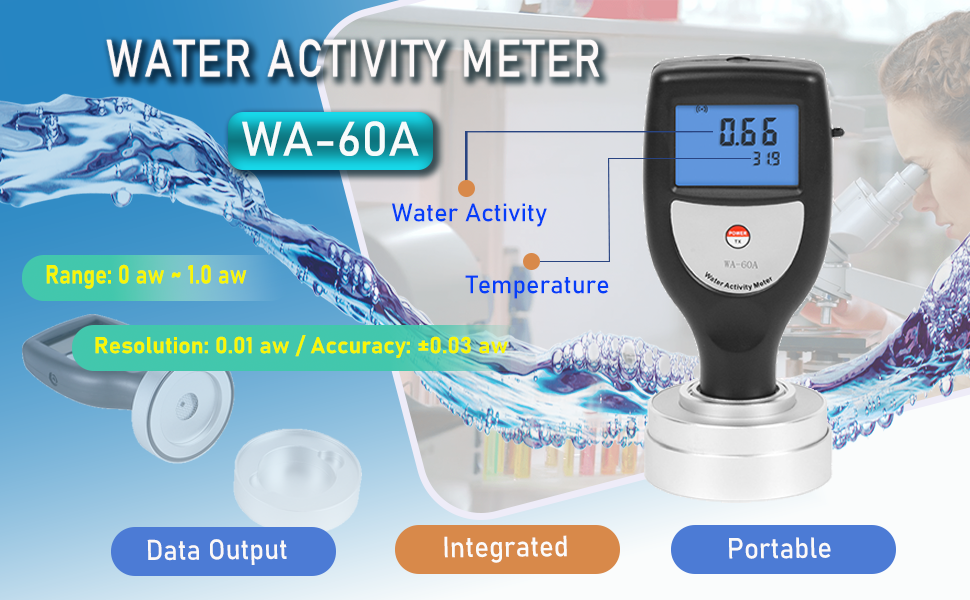
Figure 1: Overview of the SULMILE WA-60A Water Activity Meter highlighting its main characteristics.
2. Setup
2.1 Unpacking and Inspection
Upon receiving your SULMILE WA-60A meter, carefully unpack all components and inspect for any signs of damage. The package should include the WA-60A meter, sample boxes, and AAA batteries.

Figure 2: The WA-60A meter and its accessories within the protective carrying case.
2.2 Battery Installation
The WA-60A meter requires 2 AAA alkaline batteries (included). To install the batteries:
- Locate the battery compartment cover on the back of the device.
- Slide the cover open.
- Insert the 2 AAA batteries, ensuring correct polarity (+/-).
- Close the battery compartment cover securely.
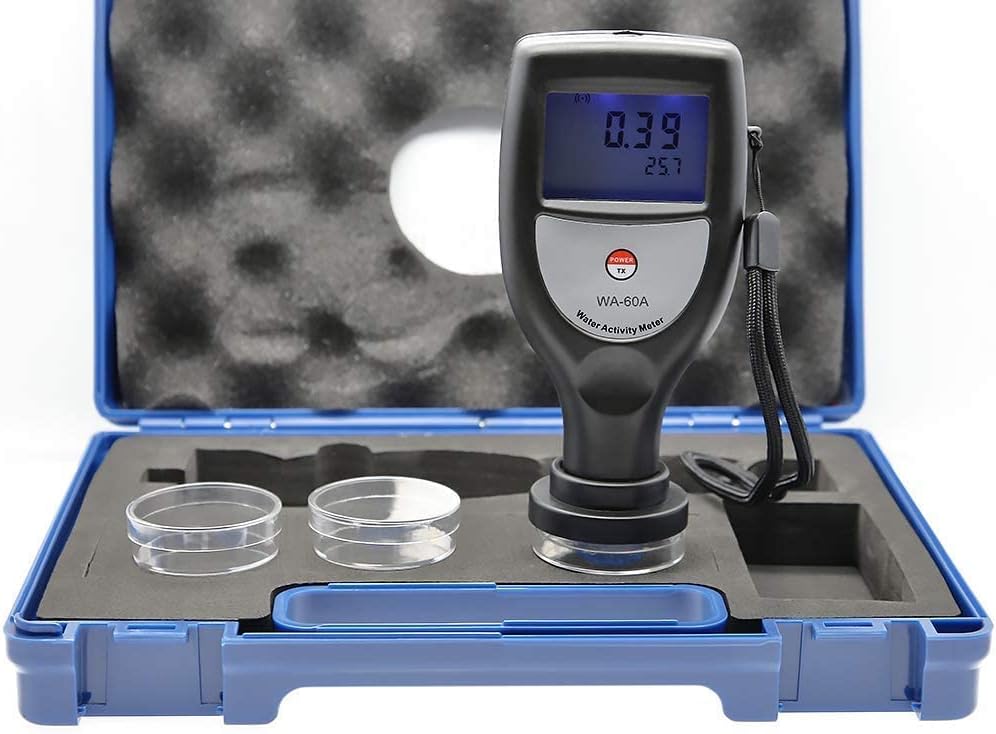
Figure 3: Battery compartment with AAA batteries installed.
3. Operating Instructions
3.1 Preparing a Sample
For accurate measurements, proper sample preparation is essential:
- Ensure the sample is representative of the material to be tested.
- Place a sufficient amount of the sample into one of the provided sample boxes. The sample should cover the bottom of the box evenly.
- Avoid overfilling the sample box, as this may interfere with the sensor.

Figure 4: Sample placed in the sample box, ready for measurement.
3.2 Taking a Measurement
Follow these steps to measure water activity:
- Press the POWER button to turn on the meter. The display will illuminate.
- Place the WA-60A meter directly onto the sample box containing your prepared sample. Ensure the meter is seated firmly and evenly on the sample box.
- The meter will begin measuring automatically. Water activity (aw) and temperature will be displayed on the screen.
- Wait approximately 5 minutes for the reading to stabilize. The measurement is complete when the displayed values no longer fluctuate significantly.
- Record the water activity and temperature readings.
- Press the POWER button again to turn off the meter after use.

Figure 5: The meter displaying water activity and temperature readings.
3.3 USB Data Output
The WA-60A meter supports USB data output for connecting to a PC. This feature allows for convenient data logging and analysis. Refer to the specific software or driver instructions (if provided separately) for detailed steps on connecting and transferring data.
4. Maintenance
4.1 Cleaning
To maintain the accuracy and longevity of your WA-60A meter:
- Wipe the exterior of the meter with a soft, dry cloth.
- If the sample holder or sensor area becomes dirty, gently clean it with a soft, damp cloth. Avoid using abrasive cleaners or submerging the device in liquid.
- Ensure no sample residue remains on the sensor after each use.
4.2 Storage
When not in use, store the WA-60A meter in its protective carrying case in a cool, dry place, away from direct sunlight and extreme temperatures. Remove batteries if the device will not be used for an extended period.
4.3 Calibration and Verification
The SULMILE WA-60A meter is factory-calibrated and generally does not require user calibration. However, you can verify its accuracy using a standard salt solution:
- Prepare the Standard Salt Solution: Dissolve 100g of pure NaCl (sodium chloride) in 200g of hot distilled water. Stir until fully dissolved.
- Allow the solution to cool to room temperature.
- Store the solution in a brown bottle at room temperature for one week to ensure stability.
- Verification Procedure: Ensure the meter, the salt solution, and the room temperature are all at 25°C (77°F).
- Place a small amount of the prepared salt solution into a clean sample box.
- Place the WA-60A meter onto the sample box and take a measurement as described in Section 3.2.
- The measured water activity (aw) value should be between 0.73 and 0.77. If the reading falls outside this range, contact customer support.
5. Troubleshooting
If you encounter issues with your SULMILE WA-60A meter, refer to the following common problems and solutions:
| Problem | Possible Cause | Solution |
|---|---|---|
| Meter does not turn on. | Dead or incorrectly installed batteries. | Check battery polarity. Replace batteries with new AAA alkaline batteries. |
| Inaccurate or fluctuating readings. |
|
|
| Display is blank or unreadable. | Low battery power. | Replace batteries. |
If the problem persists after attempting these solutions, please contact SULMILE customer support for further assistance.
6. Specifications
The following table outlines the technical specifications of the SULMILE WA-60A Water Activity Meter:
| Parameter | Value |
|---|---|
| Model | WA-60A |
| Water Activity Range | 0.00 aw to 1.00 aw |
| Water Activity Precision | 0.02 aw |
| Temperature Range | 0°C to 50°C (32°F to 122°F) |
| Measurement Time | Approximately 5 minutes |
| Power Source | 2 x AAA Alkaline Batteries |
| Item Weight | Approximately 100g (0.22 lbs) (meter only) / 1.76 pounds (package) |
| Package Dimensions | 11.02 x 9.06 x 3.15 inches |
| Manufacturer | M&A INSTRUMENTS INC |
6.1 Water Activity Reference Chart
The following chart provides a general reference for water activity levels and the types of microorganisms that can grow at those levels. This information is crucial for understanding food preservation and safety.

Figure 6: Water Activity (aw) Reference Chart.
7. Warranty and Support
For warranty information, technical support, or service inquiries regarding your SULMILE WA-60A Water Activity Meter, please contact the seller or the manufacturer, M&A INSTRUMENTS INC, directly. Keep your purchase receipt as proof of purchase.
You can often find contact information on the product packaging or through the retailer where the product was purchased.


