
Akuvox X916S
Akuvox X916S SIP Door Phone User Manual
Model: X916S
Introduction
The Akuvox X916S is an advanced SIP Door Phone designed for high-end buildings, offering secure and convenient access control. It features a large 13-inch IPS LCD color touch display, a 2MP Starlight camera, and a durable 316-grade stainless steel front panel. This manual provides comprehensive instructions for the installation, operation, and maintenance of your X916S device.
Key Features
- 13-inch IPS LCD Color Touch Display: Provides an intuitive interface for user interaction.
- 2MP Main Starlight Camera: Features built-in HDR mode for clear imaging in various lighting conditions, with a 115° (H) x 63° (V) display angle and Full HD 1080p video resolution at 30fps.
- Multiple Access Control Methods: Supports facial recognition, NFC, 13.56MHz and 125kHz access cards, Bluetooth, QR code, and numeric PIN.
- Durable Construction: 316-grade stainless steel front panel with IP65 and IK06 protection ratings.
- Advanced Audio: Dual-microphone for noise reduction and dual loudspeakers with IP66 protection.
- SIP Support: Enables reliable two-way voice and one-way video communication.
- Android 9.0 Operating System: Provides a flexible and powerful platform.
Package Contents
Please verify that all components are present before proceeding with installation:
- Akuvox X916S SIP Door Phone Unit
- Mounting Bracket and Screws
- Wiring Connectors
- Quick Start Guide (if applicable)
- Documentation and Warranty Information
Setup and Installation
The X916S is designed for wall mounting. Ensure the installation location provides stable Wi-Fi connectivity and access to either Power over Ethernet (PoE) or a 12V DC power source.
Mounting the Device
The device should be securely mounted to a wall. The dimensions are 340mm (H) x 384mm (W) x 45mm (D). When flush mounted, the depth from the wall is 3mm. Use the provided mounting bracket and hardware to ensure a stable installation.
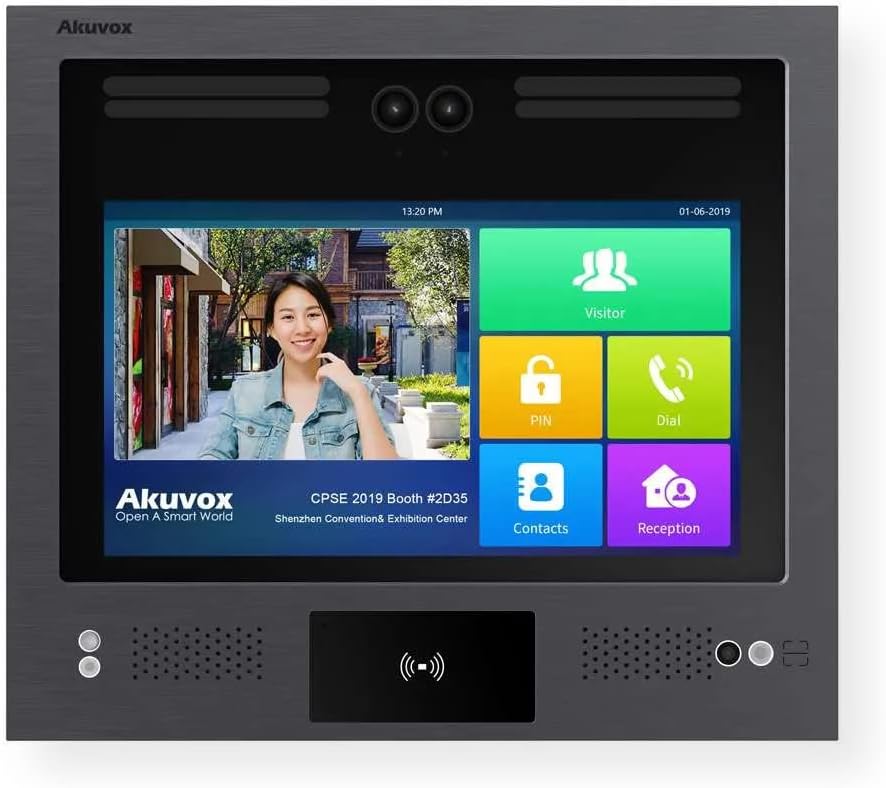
Figure 1: Front view of the Akuvox X916S SIP Door Phone, highlighting the large touch display and integrated camera.
Power and Network Connection
Connect the device to your network via Wi-Fi. For power, use either a PoE-enabled network switch or injector, or a 12V DC power adapter. Ensure the power source meets the device's requirements (2 watts).

Figure 2: Side view illustrating the mounting depth and connection ports (not explicitly visible but implied by context).

Figure 3: Close-up of the lower section, detailing the NFC/card reader and speaker/microphone placement.
Operation
The Akuvox X916S operates on Android 9.0, providing a user-friendly interface via its 13.3-inch capacitive touchscreen.
Access Control Methods
- Facial Recognition: The device supports facial recognition with high accuracy (>99%) and fast comparison speed (<0.6s per person). Ensure proper lighting for optimal performance.
- NFC and Access Cards: Utilize 13.56MHz and 125kHz access cards or NFC-enabled devices for entry.
- Bluetooth: Configure Bluetooth access through the device settings for convenient entry via smartphone.
- QR Code: Generate and use QR codes for temporary or one-time access.
- Numeric Keypad (PIN): Enter a numeric PIN code directly on the touchscreen keypad for access.
Communication
The X916S supports SIP for two-way voice and one-way video communication. Use the integrated dual microphones and loudspeakers for clear audio. The 2MP Starlight camera provides Full HD 1080p video at 30fps, with a wide viewing angle of 115° (H) x 63° (V).
Voice Control
The device supports voice control for certain functions. Refer to the on-screen interface for available voice commands.
Maintenance
To ensure the longevity and optimal performance of your Akuvox X916S, follow these maintenance guidelines:
- Cleaning: Gently wipe the stainless steel front panel and touch display with a soft, damp cloth. Avoid abrasive cleaners or solvents.
- Environmental Conditions: The device has an IP65 rating for dust and water resistance and an IK06 rating for impact protection. It is designed for outdoor use and can operate in temperatures up to 55°C. However, avoid direct exposure to extreme weather conditions if possible.
- Software Updates: Regularly check for and install firmware updates to ensure the device has the latest features and security enhancements.
Troubleshooting
This section addresses common issues you might encounter with your X916S. For more complex problems, please refer to the support section.
- Device Not Powering On:
Ensure the power source (PoE or 12V DC) is correctly connected and supplying adequate power. Check network cables for PoE connections.
- No Video/Poor Video Quality:
Verify network connectivity. Ensure the camera lens is clean and free from obstructions. Check lighting conditions; the Starlight camera with HDR performs best in low light but extreme darkness or backlight can affect quality.
- Access Control Not Working:
For facial recognition, ensure the user is positioned correctly and lighting is adequate. For cards/NFC, ensure the card is correctly presented and registered. Verify user permissions in the system settings.
- No Audio/Poor Audio Quality:
Check microphone and loudspeaker areas for obstructions. Ensure volume settings are appropriate. Verify network stability for SIP communication.
Specifications
| Feature | Detail |
|---|---|
| Model Number | X916S |
| Display | 13.3 inch IPS LCD Color Touch Display |
| Operating System | Android 9.0 |
| Main Camera | 2MP Starlight Camera with HDR |
| Video Resolution | Full HD 1080p |
| Frame Rate | Max 1080p @ 30fps |
| Camera Display Angle | 115° (H) x 63° (V) |
| Microphones | 2x Built-in, IP67 protection |
| Loudspeakers | 2x, IP66 protection |
| Front Panel Material | 316 Grade Stainless Steel |
| Protection Ratings | IP65 / IK06 |
| Access Methods | Facial Recognition, NFC, 13.56MHz/125kHz Cards, Bluetooth, QR Code, Numeric PIN |
| Connectivity Protocol | Wi-Fi, SIP |
| Power Supply | PoE or 12V DC |
| Wattage | 2 watts |
| Dimensions (H x W x D) | 340mm x 384mm x 45mm |
| Depth from Wall (flush mounted) | 3mm |
| Item Weight | 2.5 pounds |
| Operating Temperature | Up to 55°C |
Warranty and Support
For warranty information and technical support, please refer to the documentation provided with your product or visit the official Akuvox website. Ensure you have your product model number (X916S) and purchase details ready when contacting support.
For further assistance, you may contact the manufacturer, Akuvox, directly.
Related documentsX916S


Ask a question about this manual
Ask about setup, troubleshooting, compatibility, parts, safety, or missing instructions. Manuals+ will review the question and use this page’s manual context to help answer it.