
uehba Universal Replacement Remote Control
Universal Replacement Remote Control User Manual
Model: Universal Replacement Remote Control
Brand: uehba
Introduction
This manual provides essential information for the proper use and maintenance of your uehba Universal Replacement Remote Control. This remote is designed to be a direct replacement for various Yamaha AV/A/V Receiver models, including RAV206, RAV210, RAV204, V4731900, V4297600, HTR-5250, RX-V596, RX-V596RDS, V6940901, RX-V420, RX-V520, and RAV205. It is pre-programmed and ready for immediate use upon battery installation.
Safety Information
- Do not expose the remote control to direct sunlight, high temperatures, or humidity.
- Avoid dropping or subjecting the remote to strong impacts.
- Keep batteries out of reach of children. If swallowed, seek immediate medical attention.
- Do not mix old and new batteries, or different types of batteries.
- Dispose of used batteries according to local regulations.
Package Contents
Please check that all items are present:
- 1 x uehba Universal Replacement Remote Control
Note: Batteries and a detailed paper manual are not included in the package.
Setup
Battery Installation
The remote control requires two (2) 1.5V AAA Alkaline batteries for operation.
- Locate the battery compartment on the back of the remote control.
- Slide the battery cover downwards to open the compartment.
- Insert two AAA batteries, ensuring the positive (+) and negative (-) ends align correctly with the markings inside the compartment.
- Slide the battery cover back into place until it clicks securely.

Image: Rear view of the remote control with the battery cover removed, illustrating the correct orientation for inserting two AAA batteries.
Initial Use
This remote control is pre-programmed for compatible Yamaha AV/A/V Receivers. No additional setup or programming is required. Once batteries are installed, the remote is ready to operate your device.
Operating Instructions
The uehba Universal Replacement Remote Control functions identically to the original Yamaha remote for the specified models. Point the remote control directly at your Yamaha AV/A/V Receiver to ensure proper signal transmission.
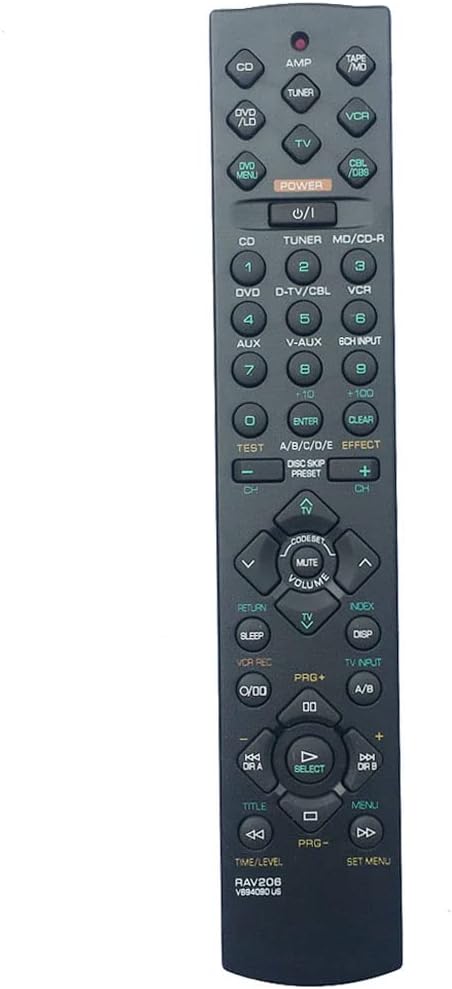
Image: Front view of the remote control, displaying the layout of all buttons for various functions.
Key Functions Overview
- POWER: Turns the receiver on or off.
- INPUT SELECTORS (CD, DVD, TUNER, VCR, etc.): Selects the desired audio/video input source.
- VOLUME +/-: Adjusts the master volume level.
- MUTE: Temporarily silences the audio output.
- NAVIGATION BUTTONS (Up, Down, Left, Right, ENTER/SELECT): Used for menu navigation and selection.
- MENU: Accesses the receiver's on-screen menu.
- RETURN/EXIT: Returns to the previous menu or exits the current menu.
- PLAYBACK CONTROLS (Play, Pause, Stop, Fast Forward, Rewind, Skip): Controls playback for connected audio/video devices.
- NUMBER BUTTONS (0-9): For direct input of channel numbers or other numerical selections.
- TUNER CONTROLS (AM/FM, Preset +/-): Manages radio functions.
For specific functions related to your Yamaha receiver model, please refer to your receiver's original user manual.
Maintenance
Cleaning
To clean the remote control, wipe it gently with a soft, dry cloth. Do not use abrasive cleaners, solvents, or chemical sprays, as these may damage the surface or internal components.
Battery Replacement
Replace batteries when the remote's responsiveness decreases or if the indicator light (if present) dims. Follow the battery installation steps outlined in the "Setup" section. Always replace both batteries simultaneously with new ones of the same type.
Storage
If the remote control will not be used for an extended period, remove the batteries to prevent leakage and potential damage to the remote.
Troubleshooting
| Problem | Possible Cause | Solution |
|---|---|---|
| Remote not responding. | Batteries are dead or incorrectly inserted. | Replace batteries with new 1.5V AAA Alkaline batteries, ensuring correct polarity (+/-). |
| Remote has limited range or intermittent response. | Weak batteries; Obstruction between remote and receiver; Remote not pointed directly at receiver. | Replace batteries. Remove any obstructions. Ensure remote is pointed directly at the receiver's IR sensor. |
| Certain buttons do not work. | Button malfunction; Receiver not compatible with that specific function. | Ensure the remote is compatible with your specific Yamaha model. If the remote is new and buttons are unresponsive, contact customer support. |
Specifications
- Product Dimensions: 8.43 x 1.57 x 0.59 inches
- Item Weight: 2.4 ounces
- Batteries Required: 2 x 1.5V AAA Alkaline Batteries (not included)
- Compatible Devices: Yamaha AV/A/V Receivers (RAV206, RAV210, RAV204, V4731900, V4297600, HTR-5250, RX-V596, RX-V596RDS, V6940901, RX-V420, RX-V520, RAV205)
- Color: Black
- Special Feature: Universal Replacement, Pre-programmed
- Manufacturer: uehba
Warranty and Support
This product is designed to be a reliable replacement. For any questions or issues not covered in this manual, please contact the seller directly through the platform where the purchase was made. Please refer to your purchase receipt for specific warranty details, if applicable.
Contact Information: Please refer to your purchase platform for seller contact details.
Related documentsUniversal Replacement Remote Control


Ask a question about this manual
Ask about setup, troubleshooting, compatibility, parts, safety, or missing instructions. Manuals+ will review the question and use this page’s manual context to help answer it.