
DJI CP.RN.00000178.01
DJI Ronin 4D Video Transmitter Instruction Manual
Model: CP.RN.00000178.01
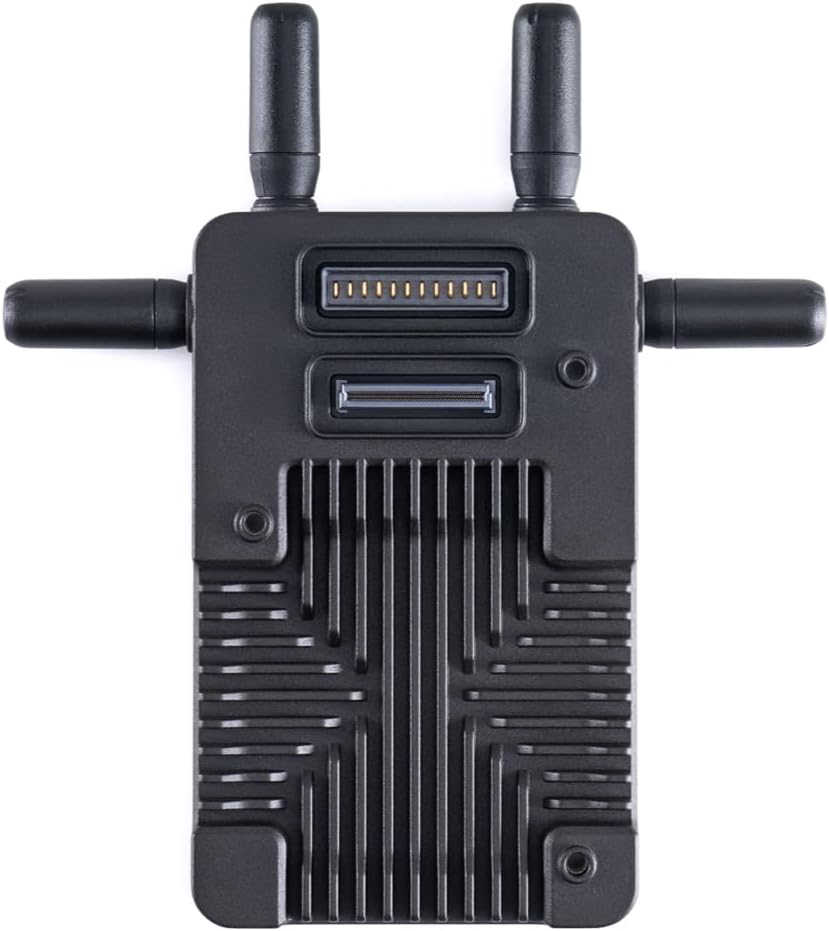
Main unit of the DJI Ronin 4D Video Transmitter, featuring its compact design and connection ports.
Product Overview
The DJI Ronin 4D Video Transmitter utilizes the advanced DJI O3 Pro Video Transmission technology to deliver ultra-low latency video transmission over an effective range of up to 20,000 feet. This system is specifically optimized for seamless integration with the DJI High-Bright Remote Monitor, ensuring a reliable and high-quality wireless video feed for professional filmmaking environments.
Key Features:
- 20,000-foot transmission range
- Ultra-low transmission latency
- Remote control capabilities
- Integrated design for streamlined operation
Package Contents
Verify that all items are present in your package:
- 4D Video Transmitter × 1
- Ronin Video Transmission Antenna × 4
- 3mm Ball-End Hex Key × 1
- M4-20 Hex Cap Screw × 3
Setup Guide
The DJI Ronin 4D Video Transmitter is designed for use with the DJI High-Bright Remote Monitor. Ensure both devices are powered off before beginning setup.
1. Attaching Antennas:
Carefully screw the four Ronin Video Transmission Antennas onto the designated ports on the transmitter unit. Ensure they are securely fastened but do not overtighten.

The transmitter unit with its four antennas extended, ready for operation.
2. Mounting the Transmitter:
Attach the 4D Video Transmitter to your DJI Ronin 4D camera system using the provided M4-20 Hex Cap Screws and 3mm Ball-End Hex Key. Ensure the transmitter is firmly secured to prevent movement during operation.

The DJI Ronin 4D Video Transmitter seamlessly integrated into the DJI Ronin 4D camera setup.
3. Powering On and Pairing:
Power on both the DJI Ronin 4D camera system (with the attached transmitter) and the DJI High-Bright Remote Monitor. Follow the on-screen instructions on the Remote Monitor to pair the devices. The O3 Pro Video Transmission technology will establish a stable connection, offering an effective transmission range of up to 20,000 feet with ultra-low latency.
4. Understanding the SDR Transmission System:
The DJI SDR Transmission system is designed for robust and reliable video transmission. It features seamless auto frequency hopping and improved interference resistance, ensuring a clear signal even in challenging environments. The system supports a transmission bitrate of up to 20 Mbps and a latency as low as 35 ms.
Official DJI video introducing the SDR Transmission system, highlighting its features like extended range, interference resistance, and low latency for professional video production.
Operation
Once set up and paired, the DJI Ronin 4D Video Transmitter operates in conjunction with the DJI High-Bright Remote Monitor to provide real-time video monitoring and remote control functionalities.
1. Real-time Monitoring:
The Remote Monitor displays the live video feed from the Ronin 4D camera. Utilize the monitor's interface to adjust settings, review footage, and ensure optimal shot composition.
2. Remote Control:
The integrated design allows for remote control of various camera functions directly from the DJI High-Bright Remote Monitor. This includes camera settings, focus adjustments, and gimbal movements, providing comprehensive control over your shooting setup.
Maintenance
Proper maintenance ensures the longevity and optimal performance of your DJI Ronin 4D Video Transmitter.
- Cleaning: Regularly clean the transmitter unit and antennas with a soft, dry cloth. Avoid using liquid cleaners or solvents.
- Storage: Store the transmitter in a cool, dry place away from direct sunlight and extreme temperatures. When not in use, detach the antennas and store them safely.
- Firmware Updates: Periodically check the official DJI website for firmware updates. Keeping your device's firmware up-to-date ensures access to the latest features and performance improvements.
Troubleshooting
If you encounter issues with your DJI Ronin 4D Video Transmitter, refer to the following common troubleshooting steps:
- No Video Signal: Ensure all cables are securely connected, both the transmitter and receiver are powered on, and they are properly paired. Check for potential interference sources in the environment.
- Poor Signal Quality: Verify that the antennas are correctly attached and oriented. Reduce the distance between the transmitter and receiver, or move to an area with fewer obstructions.
- Remote Control Issues: Confirm that the Remote Monitor is correctly paired with the transmitter and that its battery is sufficiently charged.
Technical Specifications
| Product Dimensions | 19.69 x 19.69 x 11.02 inches |
| Item Weight | 4.8 ounces |
| ASIN | B09XHMZ3Q4 |
| Item model number | CP.RN.00000178.01 |
| Manufacturer | DJI |
| Language | English |
Warranty and Support
For warranty information, technical support, and additional resources, please visit the official DJI Store or contact DJI customer service.
Ask a question about this manual
Ask about setup, troubleshooting, compatibility, parts, safety, or missing instructions. Manuals+ will review the question and use this page’s manual context to help answer it.