
wolf guard W4Q
Wolf Guard W4Q WiFi 4G Pet Alarm System User Manual
Model: W4Q
1. Introduction
This manual provides detailed instructions for the installation, operation, and maintenance of your Wolf Guard W4Q WiFi 4G Pet Alarm System. Please read this manual thoroughly before using the product to ensure proper functionality and safety. This system is designed to provide comprehensive security for your home or office, featuring advanced connectivity and flexible customization options.
2. Product Overview
The Wolf Guard W4Q is a sophisticated alarm system that integrates WiFi and 4G cellular connectivity for reliable security. It features a central control panel, various sensors, and remote control options, all manageable via a mobile application.
2.1 Key Features
- Operating Principle: When a sensor is triggered, the control center activates a 120 dB alarm and sends immediate notifications (calls, text messages, app push notifications) to your mobile device.
- Flexible Settings: Includes Home Mode (allows arming without triggering motion detectors when home), adjustable alarm delays, and arming delays. Features a 24-hour SOS zone.
- Built-in Battery: All sensors and the main control center are equipped with batteries, ensuring continuous operation even during power outages.
- DIY Naming: Customize names for each device within the Tuya Smart Life application for clear identification of alarm triggers.
- Expandable System: Supports pairing of up to 100 additional sensors directly via the control panel or mobile app. Compatible with external wireless sirens for enhanced deterrence.
2.2 Package Contents
The standard package includes the main control panel, PIR motion sensors, door/window contact sensors, RFID tags, remote controls, and a siren. Specific quantities may vary by kit.

Figure 2.2.1: Overview of the Wolf Guard W4Q Alarm System components, including the main control panel, two PIR motion sensors, three RFID tags, a siren, six door/window contact sensors, and two remote controls.
3. Setup and Installation
3.1 Control Panel Installation
The control panel should be installed in a central location within your premises, preferably near a power outlet and with good WiFi and cellular signal reception. It can be mounted on a wall using screws.
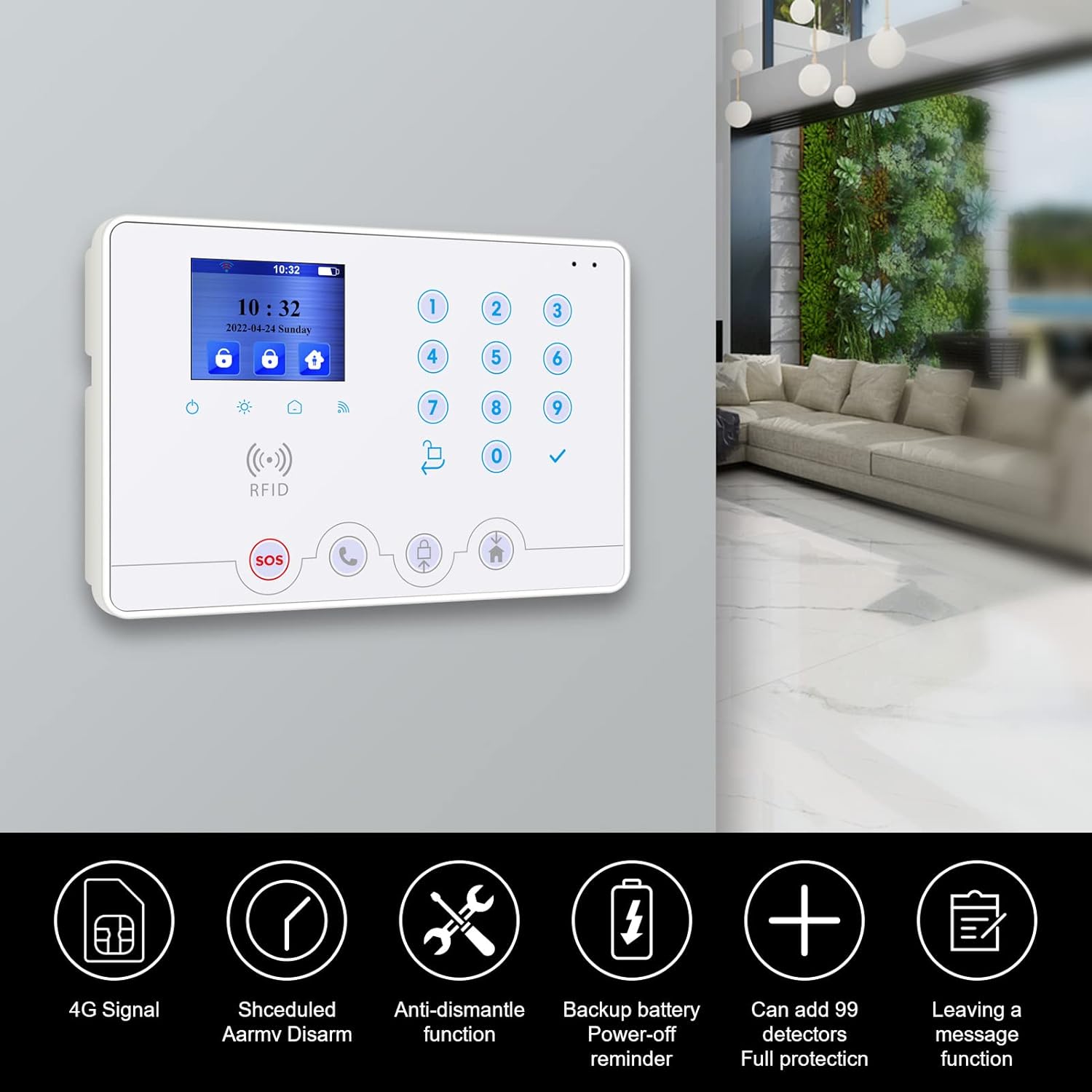
Figure 3.1.1: The Wolf Guard W4Q control panel mounted on a wall, illustrating its sleek design and integration into a home environment. Icons indicate features like 4G signal, scheduled arm/disarm, anti-dismantle, backup battery, ability to add 99 detectors, and a message leaving function.
3.2 Sensor Installation
3.2.1 Door/Window Contact Sensors
Install these sensors on doors and windows. Ensure the two parts of the sensor are aligned and within 10mm of each other when the door/window is closed. They are typically installed using screws or adhesive tape.

Figure 3.2.1: Diagram illustrating the easy installation of a door/window sensor. The sensor triggers an alarm if the distance between its two magnetic components exceeds 10mm, indicating an open door or window.
3.2.2 PIR Motion Sensors
Mount PIR sensors in areas where intruders are likely to pass. Position them to cover the desired detection zone. The W4Q system includes pet-immune motion detectors, designed to ignore pets weighing up to 10kg, reducing false alarms.

Figure 3.2.2: A PIR motion sensor shown detecting movement, with an overlay indicating its pet-immune capability for animals up to 10kg, preventing false alarms caused by household pets.
3.3 Siren Placement
Place the siren in a location where its 120 dB alarm can be heard effectively, both inside and outside the property, to deter intruders and alert neighbors.

Figure 3.3.1: The external siren unit, capable of producing a very loud 120-decibel sound at full volume, designed for maximum deterrence and alert.
3.4 Initial Power-Up and Network Connection
- Connect the control panel to a power source using the provided adapter.
- Insert a 4G/3G/2G SIM card into the designated slot on the control panel for cellular backup.
- Follow the on-screen prompts or app instructions to connect the system to your home WiFi network.
4. Operating the System
4.1 Mobile Application Control
The primary method of control is through the Tuya Smart Life application, available for smartphones. This app allows for remote arming, disarming, monitoring, and system configuration.

Figure 4.1.1: A smartphone displaying the Tuya Smart Life application interface, demonstrating how the system works with a 4G/3G/2G SIM card and provides APP push notifications for system status and alerts.

Figure 4.1.2: Illustration showing the ability to operate the alarm system remotely using the mobile application, compatible with platforms like Google Home, Smart Life, Tuya Smart, and Amazon Alexa.
4.2 Arming and Disarming
The system can be armed or disarmed using the control panel, remote controls, or the mobile application. Different modes are available:
- Full Arm: All sensors are active.
- Home Arm (Stay Arm): Perimeter sensors (e.g., door/window contacts) are active, while internal motion sensors may be bypassed to allow movement within the home.
- Disarm: All sensors are inactive.
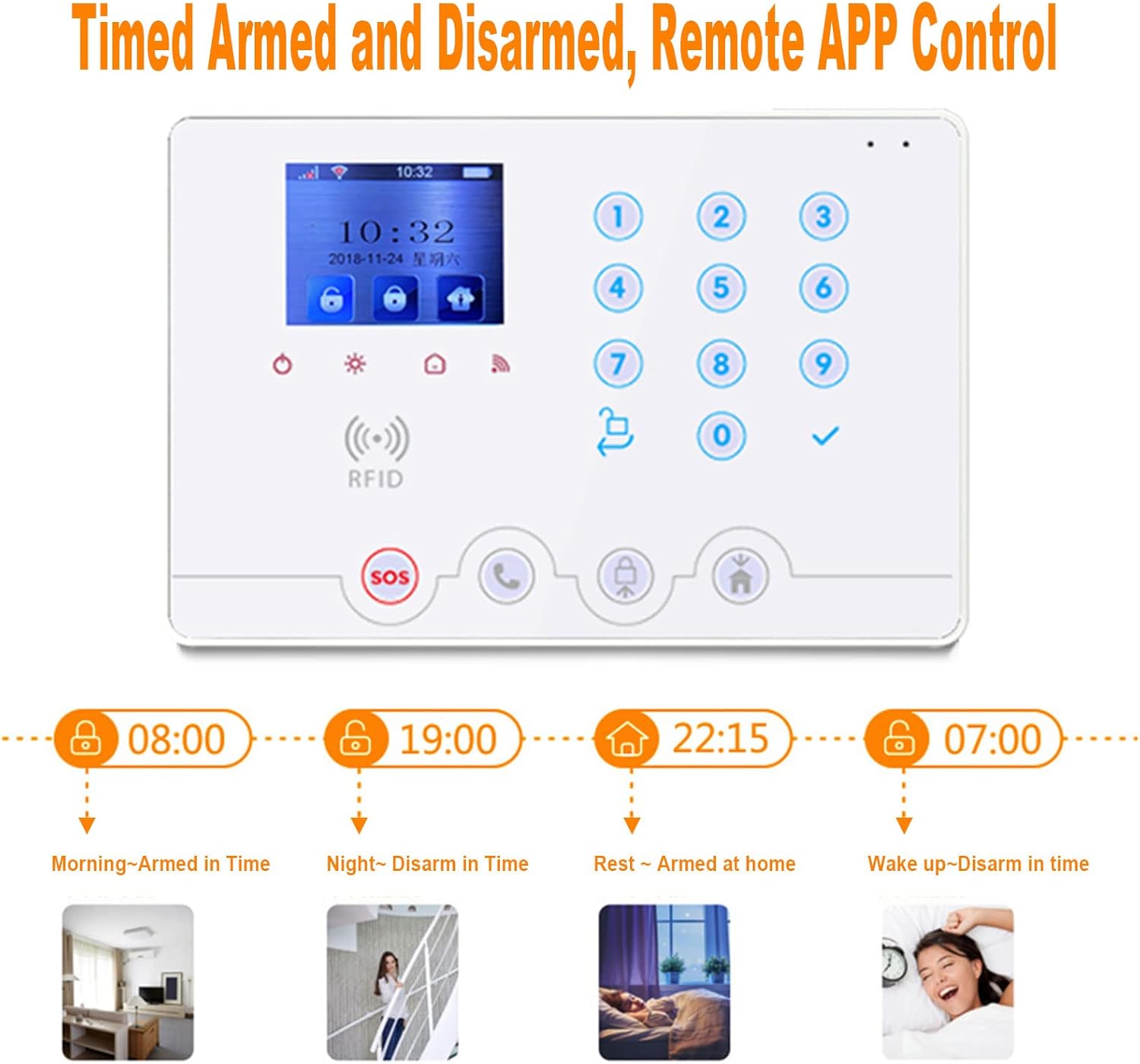
Figure 4.2.1: Visual representation of timed arming and disarming schedules, demonstrating how the system can be configured for automatic operation throughout the day, such as arming in the morning, disarming at night, arming at home for rest, and disarming upon waking up.
4.3 RFID Tag Usage
RFID tags provide a quick and convenient way to arm or disarm the system by simply tapping the tag on the control panel's RFID reader.

Figure 4.3.1: A hand holding an RFID tag near the control panel, illustrating the ease of disarming the system by simply tapping the tag.
4.4 Anti-Dismantling and Door Reminders
The system includes features to enhance security, such as anti-dismantling alarms for the control panel and reminders for unclosed doors or windows before arming.

Figure 4.4.1: This image shows two security features: a smartphone displaying a notification for unclosed doors, and the control panel indicating an active anti-dismantling alarm function, ensuring the system's integrity.
5. Maintenance
5.1 Battery Replacement
Sensors and the control panel are equipped with batteries. The system will notify you via the app when sensor batteries are low. Replace batteries promptly to ensure continuous protection.
5.2 Cleaning
Wipe the control panel and sensors with a soft, dry cloth. Avoid using abrasive cleaners or solvents that could damage the devices.
5.3 Firmware Updates
Periodically check the Tuya Smart Life app for available firmware updates for your control panel. Updates can improve performance, add new features, and enhance security.
6. Troubleshooting
| Problem | Possible Cause | Solution |
|---|---|---|
| System not arming/disarming via app. | No internet connection (WiFi or 4G), app not updated, control panel offline. | Check WiFi and 4G signal. Restart control panel. Update Tuya Smart Life app. |
| Sensor not triggering alarm. | Low sensor battery, sensor out of range, sensor faulty, incorrect zone setting. | Replace sensor battery. Reposition sensor closer to control panel. Check sensor status in app. Verify zone settings. |
| False alarms from motion detector. | Pet movement (if not pet-immune model or pet exceeds weight limit), drafts, direct sunlight, incorrect sensitivity. | Ensure pet-immune feature is active or adjust sensor placement. Avoid direct sunlight/drafts. Adjust sensitivity settings if available. |
| No push notifications/calls. | App notification settings disabled, no SIM card credit, poor cellular signal, incorrect phone numbers configured. | Enable app notifications. Check SIM card balance. Verify cellular signal. Confirm configured phone numbers in app. |
7. Specifications
| Attribute | Detail |
|---|---|
| Brand | wolf guard |
| Model Number | W4Q |
| Manufacturer | CTD |
| Product Dimensions (L x W x H) | 13.6 x 3.1 x 20 cm; 1.25 kilograms |
| Color | White |
| Material | ABS |
| Power Source | Battery powered (with mains adapter) |
| Voltage | 12 Volts |
| Installation Method | Screw-in |
| Sound Level | 120 dB |
| Usage | Indoor |
| Included Components | Adapter, Control Panel, Sensors, Remotes, RFID tags, Siren (kit dependent) |
| Battery Type | Lithium metal (included) |
| Battery Composition | Polymer |
| Compatible Devices | Smartphone (via Tuya Smart Life app) |
| Connectivity Technology | WiFi, 4G |
| Control Method | Application, Control Panel, Remote Control, RFID Tag |
| Alert Type | Sensor-based (Motion, Door/Window), Siren, Call, SMS, App Push Notification |
8. Warranty and Support
For warranty information and technical support, please refer to the documentation provided with your purchase or visit the official Wolf Guard website. Information regarding spare parts availability is currently unavailable.
You can also visit the Wolf Guard Store on Amazon for additional product information and support resources.
Related documentsW4Q


Ask a question about this manual
Ask about setup, troubleshooting, compatibility, parts, safety, or missing instructions. Manuals+ will review the question and use this page’s manual context to help answer it.